
Creality Nebula Camera
4.4Editor score
Real-time Wi-Fi monitoring
Automatic time-lapse capture
Spaghetti failure detection
This expert guide compares the best time lapse camera for 3D printer options, covering compatibility, live monitoring, recording, image quality, setup, alerts
A time lapse camera for a 3D printer turns long print sessions into concise progress videos while also helping you spot failures, check alignment, and document the build from first layer to final finish. The right camera must match the printer, remain stable near moving machinery, and deliver monitoring that is genuinely useful rather than merely decorative.
We compared ten cameras using the supplied specifications, compatibility claims, monitoring functions, resolution, recording modes, installation needs, and customer ratings. The list includes purpose-built Creality and FLASHFORGE printer cameras as well as general-purpose outdoor time lapse cameras that may require a separate mounting and power solution.
The selections show that the best model is usually the one designed for your printer family, with automatic time-lapse generation, app access, and failure alerts taking priority over specifications such as 4K resolution. Product availability, bundles, features, and prices can change, so verify the current listing and compatibility details before ordering.
4.4Editor score

4.6Editor score

4.3Editor score
The table below compares all ten options by their intended use, core recording capability, imaging features, and printer integration. Dedicated printer cameras offer the most direct setup, while outdoor time-lapse models prioritize long battery life, weather resistance, and flexible mounting.

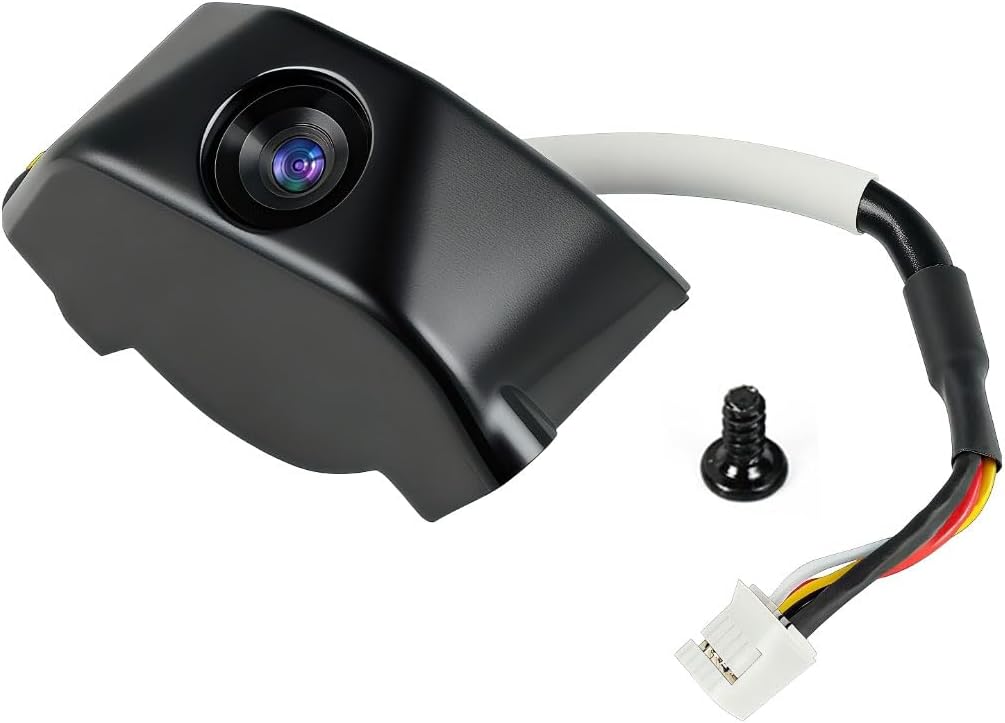


The Creality Nebula Camera earns a 4.4 customer rating and stands out as the most broadly compatible dedicated camera in this guide. Its feature set is tightly focused on 3D printing: live monitoring through Creality Cloud, automatic time-lapse capture, and spaghetti detection that can alert the user to a visible print failure.
We may earn a commission when you buy through this link, at no additional cost to you.
Compatibility is the central strength. The supplied information lists support for the Sonic Pad, Nebula Pad, Ender 3 V3, Ender 3 V3 Plus, Ender 3 KE, CR-10 SE, and HALOT-MAGE and HALOT-MAGE Pro. Some listed systems require the Nebula camera to be paired with a Sonic Pad, while that pad can in turn support many Ender models. That makes this a practical choice for users who want one camera approach across compatible Creality equipment.
The USB connection is presented as simple, and the camera pairs with the Creality Cloud app through Wi-Fi. Manual focus lets an owner refine the image after installation, which is helpful because even a capable sensor cannot compensate for a camera aimed poorly or focused at the wrong distance. The principal limitation is that compatibility depends on the exact printer or pad combination rather than on the broad category of Creality machines.
This is the strongest recommendation for a Creality owner who wants comprehensive monitoring and time-lapse functions without moving to a general-purpose camera. Check the current model list carefully, confirm whether your printer needs a Sonic Pad or Nebula Pad, and use the manual to complete the initial connection. If those requirements align, it delivers a well-rounded monitoring package.
Because the camera is designed around the Creality ecosystem, it may also be more useful than a generic outdoor time-lapse camera for long unattended prints. Its alerts and cloud access add practical value, while its compatibility across several listed printers gives it flexibility for a growing workshop.
Spaghetti detection can identify a recognizable failed layer and send an alert, potentially saving material and time. It is not a substitute for watching every print, but it adds an automated signal that many basic cameras do not provide.
Support for several Ender, CR, HALOT-MAGE, Sonic Pad, and Nebula Pad configurations gives the camera an advantage in mixed Creality workshops. Verify the exact printer, firmware, and required pad before purchase.
We may earn a commission when you buy through this link, at no additional cost to you.
This Nebula Camera listing carries a 4.4 customer rating and offers a balanced combination of live viewing, time-lapse photography, and spaghetti detection. It is designed for users who want to follow a print remotely while also receiving an automated visual record of the build.
We may earn a commission when you buy through this link, at no additional cost to you.
The camera connects by USB to a compatible printer or pad, while the Creality Cloud app provides Wi-Fi access from a phone or computer. Its time-lapse feature records the progression of the print, and the manual focus allows the owner to sharpen the view of the build plate. Spaghetti detection adds another layer of supervision by identifying certain visible failure patterns.
The product is listed for the Sonic Pad, Nebula Pad, Ender 3 V3, Ender 3 V3 Plus, Ender 3 KE, Ender 3 SE, and CR-10 SE. That range makes it relevant for several common Creality setups, although buyers should not interpret Creality branding as universal compatibility. The exact printer, pad, connection method, and current manual need to be checked together.
For a Creality user seeking both monitoring and time-lapse creation, this is a compelling all-in-one choice. It is best suited to owners who are comfortable configuring Wi-Fi and using the Creality app. Compared with a generic construction time-lapse camera, it offers a much more direct relationship to the printer and its failure state.
Its practical appeal comes from reducing the number of separate tools required for a print. The same device can help confirm progress, expose early problems, and create a shareable summary of the finished model.
The camera handles both a live view and a condensed visual record of the print. That combination is more useful for printer owners than a standalone recording device that lacks printer-specific alerts.
Creality Cloud and Wi-Fi connectivity enable remote access, but they also make network setup part of installation. Keep the printer and camera within a reliable signal and consult the supplied manual if a connection does not appear immediately.
We may earn a commission when you buy through this link, at no additional cost to you.
The Creality K1 AI Camera has a 4.6 customer rating, the highest among the ten products listed here, and is the most focused choice for K1-series owners. It combines 1080P high-definition capture, real-time monitoring through Creality Cloud or Creality Print, and automatic time-lapse generation after a print completes.
We may earn a commission when you buy through this link, at no additional cost to you.
Installation is straightforward because the K1, K1 SE, and K1 Max have a reserved camera interface. Rather than requiring a separate enclosure and improvised viewing angle, the camera is designed for those printers. Users can check progress from a phone, examine clear images, and log in to their Creality Cloud account to generate and share a condensed time-lapse video.
Its strong point is coherence within the Creality K1 ecosystem. The resolution is sufficient for inspecting layers and general print progress, while automatic time-lapse creation removes much of the editing and sequencing work. The provided information also mentions 24/7 customer service and technical assistance, although the listing description does not define a separate hardware alert system for this particular model.
This is the best recommendation for someone who owns a compatible K1, K1 SE, or K1 Max and wants a straightforward camera rather than a universal project. It is less suitable for printers outside the listed series, even if a generic camera could physically point toward them. Confirm the model and the reserved interface before ordering.
For a compatible K1 owner, the combination of direct installation, phone monitoring, 1080P imagery, and automatic time-lapse creation delivers a concise and polished monitoring experience. The high customer rating also makes it a reassuring choice within this specialized category.
The stated 1080P resolution provides clear images for checking progress and reviewing the model from a phone or computer. It is more purpose-specific than a 4K general camera that still needs independent mounting and printer software.
The camera creates a condensed recording through Creality Cloud once the print is complete. Owners can share the result without manually assembling numerous still images into a sequence.
We may earn a commission when you buy through this link, at no additional cost to you.
The Creality Official Nebula Camera has a 4.3 customer rating and is the strongest premium recommendation for users who need dependable monitoring around the clock. Its 940nm infrared fill light illuminates the printer during low-light conditions, while the app and local PC browser provide two ways to inspect print progress.
We may earn a commission when you buy through this link, at no additional cost to you.
A particularly useful feature is the ability to stop a print promptly when a problem is visible. The camera also captures an image when each layer finishes and uses an embedded code system to generate a time-lapse video without extensive manual settings. This approach creates a more cohesive record than taking unrelated still photographs at random intervals.
The compatibility list includes the Sonic Pad, Nebula Pad, Ender 3 V3 KE, CR-10 SE, and HALOT-MAGE. The camera has a compact, lightweight form and a straightforward connection process, although Wi-Fi configuration and compatibility verification remain important. Its night-vision support is the feature that most clearly separates it from more basic webcam-style alternatives.
Choose this model when overnight or low-light monitoring is central to your workflow and the listed printer or pad is supported. It is particularly valuable for users who want both remote visibility and a polished automatic time-lapse. Those who only need a simple view of a compatible K1 may find the dedicated K1 camera even easier to install.
The combination of infrared illumination, remote controls, layer-based capture, and automatic video generation makes this a well-equipped option for serious Creality monitoring. It balances everyday convenience with features designed for long, unattended prints.
The built-in 940nm infrared fill light keeps the build visible in darkness without relying on a bright room lamp. That helps owners identify jams, adhesion problems, or alignment issues during long prints.
Capturing the model after each layer gives the generated time-lapse a logical visual progression. The system can then be downloaded and shared without requiring a separate editing workflow.
We may earn a commission when you buy through this link, at no additional cost to you.
The FLASHFORGE AD5X Camera Kit has a 4.1 customer rating and is a purpose-built option for owners of the covered FLASHFORGE systems. It is listed as a retrofittable accessory for AD5M and AD5M Pro 3D printers, with the product title specifically identifying it as an AD5X accessory camera kit.
We may earn a commission when you buy through this link, at no additional cost to you.
Its two principal functions are real-time monitoring and time-lapse video. Those are the essential elements sought by most printer owners: a way to observe the build and a way to preserve a condensed record of the process. Because it is made for a defined printer family, installation should be more integrated than a generic camera placed on a shelf nearby.
The supplied data is more limited than it is for the Creality models, so detailed claims about resolution, viewing app, failure detection, and night operation should be confirmed in the current listing. Likewise, the wording around compatibility includes both AD5X and AD5M or Pro models, making it important to confirm the exact chassis and interface before buying.
This kit is the sensible choice for a compatible FLASHFORGE owner who wants the manufacturer-specific accessory approach. It is not a broad universal solution, and its 4.1 rating does not indicate the same level of customer feedback as the highest-rated K1 camera. Still, for the right machine, a dedicated kit can offer a cleaner result than building a camera system independently.
For those who value a direct retrofit and straightforward monitoring, the kit covers the essential needs. Verify the model designation, included parts, and required software before installation.
A printer-specific kit can simplify the physical installation and create a more reliable viewing angle. That makes it more attractive than mounting an unrelated camera near the build plate.
The kit combines live observation with time-lapse capture, covering the two most common needs of a 3D printing camera. Confirm app support and output details in the current product documentation.
We may earn a commission when you buy through this link, at no additional cost to you.
This Nebula Camera has a 4.4 customer rating and is especially attractive for printers that frequently run overnight. It supports 24-hour monitoring with night vision, automatic switching for low-light conditions, and a stated resolution of 1920 by 1080, while also offering time-lapse photography.
We may earn a commission when you buy through this link, at no additional cost to you.
Automatic day-night switching removes the need to change a setting when workshop lighting changes. The camera can remain in place across daylight and dark periods, making it more appropriate for continuous monitoring than a basic USB camera that depends entirely on visible illumination. Manual focus gives the owner control over the final sharpness once the mounting position is set.
Compatibility is narrower than the broad phrasing might initially suggest. The supplied information says the kit works with the Creality Sonic Pad, Nebula Pad, Ender 3 V3 KE, CR-10 SE, and HALOT-MAGE Pro. A USB-equipped camera is convenient, but the printer, pad, and camera must form a supported combination.
Choose this option if low-light operation is a priority and your machine appears on the compatibility list. It provides a useful balance of monitoring, 1080p imagery, automatic illumination behavior, and time-lapse capture. If your printer is a K1 series model, the dedicated K1 camera remains a potentially simpler alternative because it uses a reserved interface.
For compatible Creality systems, this is a solid choice for a workshop that cannot be watched continuously. The combination of night vision and automatic switching makes it particularly practical for overnight jobs and frequent prototype monitoring.
The night-vision system switches automatically as conditions change. That reduces the risk of losing visibility in a dark room while the print continues.
The adjustable manual-focus lens allows a clearer image than a fixed focus that does not match the printer. Spend a moment setting the focal length after the camera reaches its final angle.
We may earn a commission when you buy through this link, at no additional cost to you.
This Creality K1 AI Camera has a 4.2 customer rating and differentiates itself with automated failure response. It provides 1080P imagery, real-time viewing through Creality Cloud or Creality Print, time-lapse filming, and pop-up alerts when printing problems are detected.
We may earn a commission when you buy through this link, at no additional cost to you.
Its most significant feature is the ability to detect printing failures and automatically suspend the print job. The supplied information also describes AI LiDAR integration for detecting foreign objects on the platform before printing, allowing the system to pause and help prevent a collision with the hotend. These are active interventions rather than passive recording features.
The camera is listed for the K1 Max, K1 SE, and K1C, and the reserved interface simplifies installation. The time-lapse is generated through the Creality Cloud platform, allowing a long print to be condensed and shared. Users should ensure that the printer has the necessary AI hardware and compatible software for the advertised detection functions.
This is the best recommendation for an owner of one of the listed K1 machines who wants more than passive monitoring. The ability to pause a print after a detected failure may prevent additional filament waste and reduce the need for constant manual observation. It is not the right choice for a Creality printer outside the covered range.
Although the 4.2 rating is slightly lower than the other K1 camera's 4.6, the expanded detection and suspension functions may be more valuable to certain users. Choose based on whether automatic intervention matters more than the highest available customer-rating figure.
Detecting a failure and suspending the job is more proactive than merely sending a notification. The feature may help prevent a ruined print from continuing and consuming additional filament.
The described LiDAR-assisted foreign-object detection can identify debris before the hotend moves. It is especially relevant to enclosed printers and workflows where an unnoticed object could damage the build.
We may earn a commission when you buy through this link, at no additional cost to you.
The Dsoon TL3000 has a 4.1 customer rating and is the strongest general-purpose time-lapse option in the list, though it is not a dedicated 3D printer camera. It records in 4K, supports timed photo, photo time-lapse, and video time-lapse modes, and can operate indoors or outdoors within its stated IP66 protection.
We may earn a commission when you buy through this link, at no additional cost to you.
Long battery endurance is its distinguishing feature. The supplied information states that the battery can last up to 180 days when using a five-minute capture interval, making the camera suitable for extended environmental projects. A 32GB TF card is included, while cards up to 512GB in Class 10 or faster can be used. A flipable IPS display helps with framing the shot.
For 3D printing, the TL3000 can create a visual record if it is positioned to see the build, but it does not provide the direct printer connection, real-time print-status integration, or spaghetti detection found in dedicated models. You must also supply a stable mount, maintain the correct viewing distance, and keep the camera pointed accurately as the print develops.
This is the right option when one device must also document construction, renovation, weather, or plant growth, or when a printer workshop setup cannot use a Creality or FLASHFORGE accessory. For a printer-only user who needs alerts and remote print control, a purpose-built camera will usually be more useful despite its narrower purpose.
The included suction bracket, circular tube bracket, nail bracket, waterproof housing, card, cable, and manual make it a flexible kit. Its broader application set is the reason it earns a place, even though it is less integrated with 3D printing than the leading picks.
A battery rated for up to 180 days at a five-minute interval can record without a constant power connection. That is useful for a printer in a workshop where cable management is inconvenient or where no printer-specific camera interface exists.
The weather-resistant housing and multiple mounts expand the camera's value beyond 3D printing. It can document construction progress, remodeling, plant growth, and other long-term changes without changing equipment.
We may earn a commission when you buy through this link, at no additional cost to you.
This 4K outdoor time-lapse camera has a 4.5 customer rating, making it one of the better-rated products in the broader comparison. It records in 4K, offers timed photo, photo time-lapse, and video time-lapse modes, and includes manual macro focusing for close subjects as well as infinity focusing for wider scenes.
We may earn a commission when you buy through this link, at no additional cost to you.
The package is designed for flexible deployment. It includes a suction bracket, circular tube bracket, nail bracket, waterproof housing, an SD card, a USB cable, and a manual. The stated IP66 protection and waterproof housing allow indoor or outdoor use, while the flipable IPS display assists with angle adjustment. The battery can reportedly operate for up to 180 days at a five-minute interval.
As a printer camera, it can capture the progression of a build, but it will not connect to a printer, provide live print status, detect spaghetti, or pause a job. The stated output format is AVI, which is worth considering if you intend to edit the files in a particular program. The included memory card should be formatted before use according to the supplied instructions.
The model makes sense for users who want one time-lapse camera for the printer, construction site, home project, or garden. The three mounting options make it easier to secure a stable viewpoint. It is less convenient than a dedicated printer camera because the operator must set the angle and ensure it remains undisturbed throughout the print.
Its high customer rating and useful accessory package make it an attractive option for general recording. Choose it for versatility and storage capacity, but choose a dedicated model when immediate failure alerts and software integration are more important than multi-purpose outdoor use.
Suction, tube, and nail mounting options make it easier to find a stable position near a printer or on an outdoor project. A consistent viewpoint is essential for a clean time-lapse sequence.
The supplied guidance recommends formatting the memory card before use to avoid missing shots. Checking the card and doing a short test recording is a sensible precaution before relying on it for a long print.
We may earn a commission when you buy through this link, at no additional cost to you.
The Dsoon TL3100 has a 4.3 customer rating and leads the general-purpose cameras with app-based remote control. It captures 4K UHD footage, operates over 2.4GHz Wi-Fi, and lets users start recording, preview live video, adjust settings, and download files through an app without returning physically to the camera.
We may earn a commission when you buy through this link, at no additional cost to you.
Its wide-angle capability and mounting package are useful for monitoring larger scenes. The camera includes clamp, nail, suction-cup, and strap mounts, along with a 2-inch HD display, a 110-degree lens, manual focus, partial zoom, an LED fill light, and infrared sensing. Four recording modes cover time-lapse video, photographs, scheduled photographs, and standard video.
The built-in 3000mAh rechargeable battery supports long standby, and the camera can accept an external 6V, 1A solar panel for remote projects. The solar panel is not included. The IP66 protective housing helps guard against water and dust, while the 32GB card provides immediate storage and the camera writes footage directly to a TF card.
For 3D printing, the TL3100 offers remote previewing and flexible recording without the need for a printer-specific interface. However, it does not offer automatic layer-based time-lapse generation, spaghetti detection, foreign-object analysis, or the ability to suspend a print. The wide lens may also include more of the room than necessary, making careful framing important for a small build plate.
This is the best general camera in the list for a user who values app control, flexible mounting, and solar readiness. It is a practical option for monitoring a printer alongside other projects, but dedicated models remain easier to integrate and better at identifying printer-specific failures.
The 2.4GHz Wi-Fi app allows recording to start, settings to be changed, and footage to be previewed remotely. That convenience is particularly useful when the camera is mounted somewhere inconvenient to reach.
The camera can accept a compatible external solar panel for installations without easy access to mains power. The panel is sold separately, so owners must include it when calculating the complete kit needed.
We may earn a commission when you buy through this link, at no additional cost to you.
The right choice depends first on printer compatibility, then on the monitoring and recording features you actually need. Resolution, lighting, app support, and mounting flexibility are secondary considerations that should support the camera's primary purpose.
Choose a purpose-built camera when your printer has a supported interface. Choose a general camera when there is no direct option, but accept that you will need to mount, aim, power, and manage it independently.
Prioritize live viewing and meaningful alerts for unattended printing. Resolution alone cannot tell you that a print has failed or that a job should be stopped.
Automatic layer-aware generation is the most convenient option. A fixed-interval camera may work well, but it adds more manual work and may not align as neatly with print progress.
Do not choose by resolution alone. Sharp focus, correct distance, and a stable angle are more important for monitoring a small print.
For overnight jobs, automatic night illumination is more valuable than a feature that must be enabled manually. It preserves visibility without requiring you to leave a room light on.
Confirm software availability, account requirements, and network behavior before buying. A simple but reliable workflow is better than an advanced camera with a frustrating setup.
Use a rigid, vibration-resistant mount and keep the camera outside the printer's moving path. Recheck the view after the first short print.
Check storage, output format, and recording interval before a long job. Format a new card and run a test recording to prevent an avoidable loss.
Begin by confirming the printer model, required interface, app, and power arrangement. Dedicated models should be connected according to the current manual, while general cameras need a stable mount and a clear line of sight to the build plate. Run a short test print or preview session, adjust the angle, set the focus, and confirm that the live view and recording are working before starting a long job.
Secure cables and mounts so they cannot interfere with the printer, bed, or toolhead. Keep the lens clean and unobstructed, especially if using a fill light or night-vision function. For app-based cameras, maintain a stable network connection and verify that the schedule, capture interval, storage destination, and alert settings are correct. Test the pause or failure-response feature if the camera provides one.
After the print, save the time-lapse before clearing storage, and retain any diagnostic image that captured a failure. Format memory cards when recommended, keep firmware and applications updated, and handle the camera without placing strain on its connector. If a general camera runs outdoors, inspect the seals, bracket security, and solar connection regularly. Replacement should follow the manufacturer's guidance.
A dedicated camera is usually easier to set up and can provide printer-specific alerts, live status integration, and automatic layer-based time-lapses. A general camera can still record a printer effectively, but it normally requires independent mounting, power, and file management. It will not automatically identify spaghetti failures or suspend a print unless separate software is used.
Yes, as long as it has a clear and stable view of the build plate. Position it so the print fills a meaningful portion of the frame and use a low capture interval if you want smooth motion in the finished video. Remember that a general camera records visually but does not understand printer status or recognize common failures automatically.
A printer camera with automatic night vision is the most convenient option for overnight monitoring. The listed Nebula cameras with 940nm infrared illumination and automatic switching are designed to maintain visibility in low-light conditions. A general camera with fill lighting can also work, but it will need reliable illumination and continuous power.
No. Compatibility depends on the exact printer, interface, and sometimes a required Sonic Pad or Nebula Pad. The guide lists particular supported Ender, CR, HALOT-MAGE, and K1 configurations, but listings can differ. Confirm the model designation, pad requirements, and current manual before ordering.
It can help when it provides timely failure alerts or automatic job suspension. A dedicated camera that detects spaghetti or other print failures may stop a bad job before more material is consumed. A basic recording camera only documents the result and cannot intervene unless it is connected to separate monitoring software.
Place it outside the printer's moving components with a clear view of the entire build plate. A slightly angled view can show the nozzle and side profile, but it should remain fixed for the entire print. Check that cables cannot touch moving parts and that the lens is far enough away to avoid heat, fumes, or accidental contact.
Use a card with sufficient capacity and a speed class recommended by the camera manufacturer. The listed outdoor models support Class 10 cards up to 512GB, and some include a 32GB card. Format the card before use, confirm that it is inserted correctly, and perform a short test recording before beginning a long print.
Several dedicated printer cameras can generate time-lapse videos automatically through their associated platforms. The K1 AI cameras and the premium Nebula listing describe automatic cloud-based or layer-based generation. General cameras also offer time-lapse modes, although their exact output may still require playback or editing for a particular final format.
The Creality Nebula Camera is the best overall choice for a compatible Creality setup because it combines real-time monitoring, automatic time-lapse capture, and spaghetti detection across several listed printer and pad combinations. The Creality K1 AI Camera is the leading dedicated option for compatible K1-series owners, offering 1080P imagery and effortless installation, while the premium Nebula model adds infrared night illumination and remote print controls.
Prioritize compatibility before any other feature. A camera that works directly with your printer and established app will be easier to install and more useful than a higher-resolution generic model. If you need unattended supervision, look for live viewing, failure alerts, and automatic suspension. If you want one device for many projects, a 4K general camera with flexible mounts, app control, and long battery life may be more versatile.
Finally, verify the current listing, included accessories, required software, supported printer variants, and connection method before buying. Product bundles, firmware behavior, availability, and prices can change, and current cost comparisons are best made directly against the live listing.