
Elektron Digitakt II
4.4Editor score
Sixteen-track sample sequencer
Per-track modulation and effects
Song mode for full arrangements
Digital Drum Machine guide compares 10 leading standalone, hybrid, portable, sampler, and pedal models for studio, live, and songwriting workflows today.
A digital drum machine turns stored sounds, synthesized percussion, samples, and programmed rhythms into an instrument you can control with pads, knobs, buttons, or pedals. A strong model balances convincing drum character, flexible sequencing, practical connectivity, and an interface that still feels inspiring when ideas arrive quickly.
This guide compares ten current options spanning traditional standalone machines, hybrid samplers, portable groove boxes, studio workstations, and foot-controlled rhythm systems. The evaluation considers sound variety, sequencing depth, hands-on control, live utility, I/O, and how well each device supports composition without tying every task to a computer.
Each numbered review explains the strongest reasons to choose that model and the compromises worth considering. The top selections highlight premium, editor-favored, and budget-conscious choices, while the comparison and buying guide show how workflows differ. Product configurations and prices can change, so confirm current details before purchasing.
4.4Editor score

4.8Editor score

4.4Editor score
The table below places all ten machines on a common playing field, highlighting their primary sound engines, sequencing formats, and most important connections. Because these products serve different creative roles, the strongest choice depends on whether you value immediacy, deep pattern control, sampling, portability, or hands-free performance.
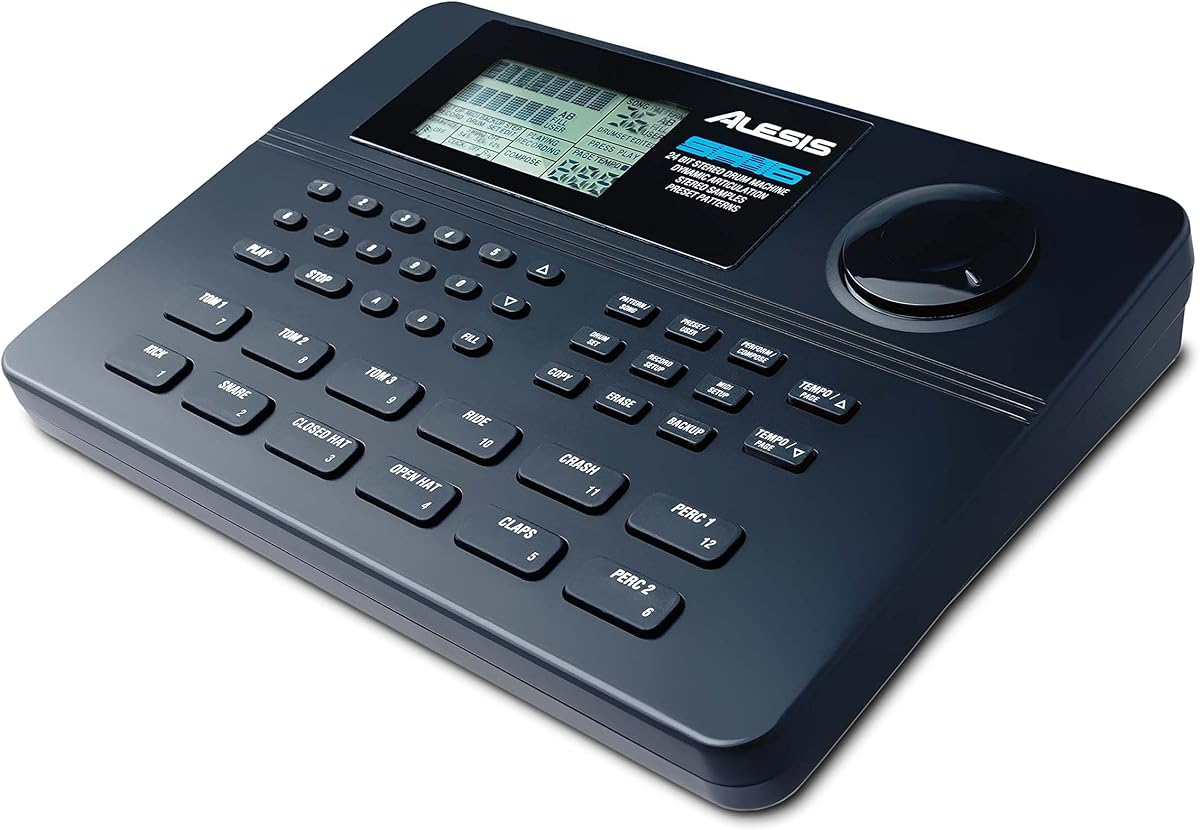


The Alesis SR-16 is a classic standalone drum machine built for songwriters, live performers, and remixers who want substantial control without relying on a computer. Its 4.4 rating reflects a well-regarded combination of 233 professional sounds, velocity-sensitive pads, and a practical production workflow. It remains especially appealing for creating complete grooves quickly and then refining them at the unit.
We may earn a commission when you buy through this link, at no additional cost to you.
Its sound bank spans a broad range of acoustic, electronic, and hybrid percussion, while Dynamic Articulation adds expression beyond a simple on-off pad response. The machine stores 50 preset kits alongside 50 user locations, making it practical to maintain distinct collections for different songs or stages. Four stereo output pairs, two footswitch functions, and complete MIDI support help it fit into larger keyboard, DAW, or electronic drum setups.
The principal tradeoff is age. The SR-16 does not offer the sample importing, deep effect routing, modern navigation, or flexible arrangement tools found in newer hybrid machines. Its editing process can also feel less immediate than a modern color display and encoder-driven interface, particularly for users accustomed to computer-based software. Even so, those limitations are reasonable for a focused standalone instrument.
Choose the SR-16 if you value velocity response, a substantial built-in library, hands-on beat programming, and classic workflow over sample-heavy flexibility. It is a strong match for composers who want one device to cover writing, rehearsing, and performing. For users who prioritize modern editing, deep kit layering, or importing original audio, a hybrid sampler may be a better long-term fit.
The twelve velocity-sensitive pads make it possible to vary emphasis across a pattern rather than treating every hit identically. Dynamic Articulation adds another layer of response, helping programmed parts feel less mechanical during both live triggering and step-sequenced playback.
Complete MIDI support and multiple stereo outputs allow the SR-16 to act as a drum source within a broader production rig. Footswitch control adds practical start-stop and navigation options for rehearsal and performance.
We may earn a commission when you buy through this link, at no additional cost to you.
The Roland TR-8S is the most complete traditional drum machine in this group for producers who value the recognizable character of classic Roland rhythm units. Its 4.8 rating reflects an effective blend of heritage sounds and modern production tools. Authentic circuit models provide a convincing foundation, while sampling, editing, and effects allow the machine to move far beyond a fixed set of vintage kits.
We may earn a commission when you buy through this link, at no additional cost to you.
Sounds from the 808, 606, 909, 707, 727, and modified variants form a celebrated backbone for electronic, hip-hop, house, and hybrid production. Users can import mono or stereo samples through the SD card slot, adjust decay and tuning, and change sample start points, speed, and direction. The ability to combine TR sounds and samples in one kit supports convincing blends that retain the character of both sources.
Its depth comes with a learning curve. The TR-EDITOR expands visual control and organization, but users who want access to every detail will need time to understand parameter relationships, kit structures, and effect assignments. The machine is also a significant financial step above compact groove boxes. For someone whose priority is simply a fun portable rhythm engine, that complexity may be unnecessary.
The TR-8S is the strongest all-around recommendation for producers who want authentic TR tones, detailed sample control, and a workflow that can serve studio production and live triggering. It suits users who understand drum-machine design and want one instrument to bridge vintage rhythm culture and modern sound design. For beginners, its heritage-centered focus provides a clear musical identity, while experienced producers can exploit the deeper editing options.
The TR-8S does not merely imitate a classic TR rhythm box. Its detailed circuit models, sample manipulation, and per-instrument processing let a kit combine punchy machine drums with more nuanced recorded or imported layers.
Instrument and master effects are stored with each kit alongside their settings. That means a carefully shaped sound does not need to be rebuilt every time it appears in a live set or a new production.
We may earn a commission when you buy through this link, at no additional cost to you.
The Korg Volca Drum offers an unusually satisfying combination of portability, synthesis, and pattern control at an accessible tier. Its 4.4 rating reflects a well-regarded groove box that is equally useful for quick composition, sound exploration, and live triggering. A built-in speaker and battery-powered design allow it to function without a desk, amplifier, or computer.
We may earn a commission when you buy through this link, at no additional cost to you.
Its six-part DSP engine produces a broad range of drum sounds, and the Waveguide resonator adds resonant character. The 16-step sequencer is simple to understand, yet Active Step makes it possible to replace individual steps for each part, producing variations without duplicating an entire pattern. Slice functions support drum rolls and intricate subdivisions, while two randomize options can quickly move a session in a new direction.
The primary limitation is sequencing depth. A 16-step format is ideal for punchy loops, breaks, and compact grooves, but it cannot match the length and arrangement depth of a 64- or 128-step system. The unit also focuses on internal synthesis rather than sample importing, so beatmakers seeking chopped personal recordings should look elsewhere. Some users may also want more detailed visual feedback than the compact interface provides.
Choose the Volca Drum when portability, affordable access, and immediate creativity matter most. It is especially good for beginners learning rhythm construction, guitarists adding a compact rhythmic layer, and producers who enjoy controlled randomization as a starting point. It may not satisfy a studio workflow built around long patterns or custom samples, but within its deliberately focused format, it delivers an unusually effective creative tool.
Active Step lets a user alter selected steps within any part of a pattern. This makes it easy to introduce fills, muted variations, or unexpected hits while keeping the underlying groove intact.
The built-in speaker and compact enclosure make the Volca Drum easy to carry between rooms, rehearsals, and performances. Its sequencer and sound-generation features are designed to remain useful without an attached computer.
We may earn a commission when you buy through this link, at no additional cost to you.
The Yamaha DTX Multi Pad stands out for sheer sound variety, providing 1,061 drum, percussion, and effects sounds alongside 216 keyboard sounds. Its 4.3 rating reflects a dependable performance-oriented pad that can function as a drum machine, sound trigger, and multisound instrument. The extensive library makes it useful when one fixed style of drum kit would be too restrictive.
We may earn a commission when you buy through this link, at no additional cost to you.
A sequencer and preset loops provide ready-made rhythmic foundations, while mute and layer functions help performers arrange parts quickly. The included 64MB Flash-ROM offers space for user samples, which broadens the instrument beyond its factory content. The ability to combine percussion and keyboard sounds also opens doors to hybrid setups, sound effects, and unusual melodic triggering.
The main drawback is workflow age. The device's interface and organization are less fluid than contemporary color-screen instruments, and navigating a very large library can feel laborious. Its sound selection is the star, but it does not offer the same level of sample editing, synthesis architecture, or arrangement control as a modern hybrid sampler. Buyers seeking unlimited deep sampling should choose a more specialized system.
The Yamaha is best for performers and educators who want many timbres and percussion options in a single performance unit. It also suits producers who need keyboard sounds alongside drums and want user samples without moving to a computer. Choose it for breadth and practical triggering; choose a more modern groove box if intuitive navigation and contemporary synthesis are the leading priorities.
The 216 keyboard voices give the DTX Multi Pad a role beyond conventional drum triggering. That makes it a practical performance hub for layered arrangements, sound effects, and melodic percussion.
Mute and layer functions help performers control multiple parts without navigating a deeper menu for every adjustment. These features are especially valuable when moving between prepared songs and spontaneous live variations.
We may earn a commission when you buy through this link, at no additional cost to you.
The Akai Professional MPC Sample condenses a remarkably broad beatmaking workflow into a portable standalone system. Its 4.8 rating reflects a product designed for immediate sampling, chopping, sequencing, and playback without requiring a DAW. The familiar MPC concept is presented in a compact modern form for new users, experienced producers, finger drummers, and DAWless creators.
We may earn a commission when you buy through this link, at no additional cost to you.
Sixteen responsive pads provide the main tactile interface, while a 2.4-inch full-color display supports fast navigation. The sampling process is unusually complete: users can record through the internal microphone, import sounds, chop them, resample internally, and alter timing or pitch with real-time time-stretching and repitch tools. More than 100 factory kits provide a solid starting point without concealing the sampler's deeper capabilities.
Four onboard effect processors offer 60 effect types, including FlexBeat, a color compressor, vinyl and tape emulations, and a master compressor with retro character. The unit also supports a rechargeable battery, built-in speaker, internal microphone, and microSD storage. Limitations include the small display, which can make detailed navigation less immediate, and the absence of the included 1/8-inch-to-MIDI adapter for DIN connections.
The MPC Sample is a strong choice for beatmakers who want to create complete grooves away from the computer. It suits guitarists layering loops, live performers carrying a self-contained rhythm setup, and producers who value rapid sample transformation over traditional acoustic drum realism. For conventional electronic-kit programming, its sampling focus may feel less direct, but for chopped, resampled, and finger-played percussion it is highly effective.
A built-in microphone, speaker, rechargeable battery, and microSD storage give the MPC Sample a complete portable workflow. Recording, editing, and playback can happen without a computer or DAW, which is valuable for mobile sessions and spontaneous ideas.
Instant Sample Chop Mode, internal resampling, and real-time time-stretch and repitch tools shorten the path from raw audio to usable beats. These features make the instrument more than a conventional preset drum machine.
We may earn a commission when you buy through this link, at no additional cost to you.
The teenage engineering EP-133 K.O. II is a remarkably capable compact sampler, drum machine, and sequencer built around rapid idea capture. Its 4.7 rating reflects a distinctively capable workflow for users who want to record nearby sounds, resample them, and turn them into music immediately. The updated K.O. II doubles the memory of its predecessor and includes a redesigned carry box.
We may earn a commission when you buy through this link, at no additional cost to you.
A four-track sequencer supports four groups with 99 patterns each, allowing combinations to change on the fly. The Commit function can freeze a musical moment and advance to a new section, while Song Mode expands arrangement into tracks of up to 9,801 bars. Sample recording is available through the built-in microphone or line input, and the unit can resample voices, synthesizers, vinyl, or audio originating on a phone.
Sound control is divided into 12 punch-in effects, six built-in effects, and six master effects, all manageable through the multifunctional fader. The 128MB of memory and 999 sample slots are meaningful within a device this small, but they are still modest compared with a computer or dedicated desktop sampler. The compact format also places the display and controls close together, so navigation can require practice.
The K.O. II is best for experimental producers, field-recording fans, and mobile creators who value direct manipulation over formal acoustic realism. It works well for live improvisation because patterns, effects, pitch, and filtering can be changed in real time. Choose it when portability, sampling immediacy, and dense creative tooling matter most; consider a larger sampler when long audio files and extensive editing are central to the project.
The built-in microphone and line input make environmental sampling immediate. Percussion, voices, short musical phrases, and found sounds can become sequencer parts without first being transferred to another device.
Four groups with 99 patterns each support more variation than a basic step sequencer. Song Mode then provides a way to combine those patterns into much longer arrangements, making the compact unit useful for complete pieces.
We may earn a commission when you buy through this link, at no additional cost to you.
The Korg drumlogue is a hybrid drum machine centered on a threefold engine that combines analog, digital, and multi-engine sound generation. Its 3.6 rating is the lowest here, but the device still offers a distinctive proposition for producers who want hands-on synthesis and extensibility rather than a simple preset instrument. The multi engine supports open-source user oscillators, effects, noise, and VPM.
We may earn a commission when you buy through this link, at no additional cost to you.
Front-panel knobs provide immediate control over tuning and attenuation for common bass drums, snares, toms, and other instruments, with dedicated volume knobs for every part. Its 11-part, 64-step sequencer can combine Loop and Chain functions to create songs and evolving performances. Reverb and delay are available per part and at the master level, and they can operate together for more elaborate spaces.
Connectivity is a major strength. The drumlogue includes stereo and four assignable outputs, USB-C for controllers and loading samples, audio input for processing external instruments, DIN MIDI input and output, and Audio Sync. The drawback is that its open, modular workflow may be less approachable for newcomers, and the 3.6 rating indicates that some users have found the overall experience less polished than that of the leading alternatives.
Choose drumlogue if you want to synthesize drum sounds from multiple engines, shape them directly from the panel, and route multiple parts independently. It is especially compelling for experimental electronic production and users comfortable managing software-driven oscillator and effect ecosystems. For predictable results and a more streamlined setup, the Korg Volca Drum or a conventional sampler may be easier to master.
The analog, digital, and multi engines provide different paths to a final sound. That variety supports both familiar drum-machine tones and less predictable designs assembled through user oscillators, effects, noise, or VPM.
Four assignable outputs in addition to stereo output allow parts to be processed independently. Audio input, USB-C, DIN MIDI, and Audio Sync broaden the device's usefulness in studio, stage, and external-control configurations.
We may earn a commission when you buy through this link, at no additional cost to you.
The Behringer LM DRUM is a feature-dense hybrid sampling drum machine with a 5.0 rating. Its defining strength is modular routing: 16 independent analog outputs allow individual voices to be processed externally or recorded as separate audio tracks. The 16-voice sampling architecture, 64-step sequencer, and dedicated controls position it as a serious studio rhythm system rather than a minimal practice device.
We may earn a commission when you buy through this link, at no additional cost to you.
The interface supports MIDI, USB, Sync, random generation, step repeat, note repeat, and autofill. Poly-meter, track mute, track solo, and real-time triggering expand the range of rhythmic behavior, while the integrated FX bus includes a Wave Designer and dual-mode analog filter that can be assigned per voice. Multiple audio inputs and outputs, MIDI In/Out/Thru, USB 2.0 Type B, and Sync In/Out make integration straightforward.
The trade-off is complexity and size. A hardware surface with numerous outputs, controls, and sequencing modes requires more deliberate setup than a compact groove box. It is better suited to a permanent studio or a rehearsed live rig than to spontaneous portable creation. Buyers who need only a few essential sounds and a simple pattern sequencer may find the feature set excessive.
The LM DRUM is a compelling choice for producers who want per-voice analog routing, external processing, and multitrack capture in one unit. It also suits live engineers who need individual drum sounds available for a mix. The included headphones and auxiliary cable make the package more convenient for immediate setup. For a simpler, highly portable rhythm machine, consider one of the compact Korg or teenage engineering models instead.
Individual outputs are unusual in a standalone drum machine and provide exceptional routing freedom. Each sound can be sent to a separate compressor, amplifier, synth, or recorder, allowing detailed acoustic and electronic treatments.
Poly-meter, step repeat, note repeat, mute, solo, and real-time triggering support active pattern performance. These features make the unit useful for rehearsed live changes rather than only for fixed studio loops.
We may earn a commission when you buy through this link, at no additional cost to you.
The Elektron Digitakt II is a premium drum computer and sampler for producers who want detailed pattern control, per-track processing, and complete arrangement tools in a standalone instrument. Its 4.4 rating reflects a deep, professional workflow rather than a simple novelty drum box. All 16 audio tracks can hold stereo or mono samples, and the 128-step sequencer provides room for detailed, evolving arrangements.
We may earn a commission when you buy through this link, at no additional cost to you.
Each track has three assignable LFOs and its own selection of delay, reverb, chorus, bit reduction, sample reduction, and overdrive. The filter choices add more variation, including a Base-width filter, Multi-mode filtering, Low Pass 4, Comb, EQ, and Legacy LP/HP options. Four trigger modes, a Euclidean sequence generator, and Song Mode extend the system from looping patterns to arranged compositions.
As the premium option in this guide, it requires the largest commitment in both budget and learning effort. Its screen, parameter workflow, track structure, and modulation capabilities are powerful but less direct than those of a compact groove box. Users whose needs stop at a handful of sounds and short patterns may not receive enough benefit to justify the cost. A computer-based setup may also offer broader sample-management options, depending on the producer's habits.
Choose the Digitakt II when precision, depth, and standalone production are priorities. It is ideal for a producer building intricate drum arrangements, layering many treatments, or using Elektron hardware as the central rhythm brain. It also rewards live performers who understand deep modulation and want repeatable control. For a lighter workflow, the TR-8S offers heritage-focused drum design with a less expansive mastering-style approach.
Every audio track can carry its own samples, effects, filter, LFOs, and sequence behavior. This makes it possible to build arrangements in which kick, snare, percussion, textures, and melodic elements evolve independently.
Song Mode supports the creation, editing, and playback of full compositions within the hardware. It closes the gap between a pattern-based drum machine and a dedicated standalone production workstation.
We may earn a commission when you buy through this link, at no additional cost to you.
The Singular Sound BeatBuddy 10th Anniversary Edition takes a fundamentally different approach to rhythm playing by placing drum machine control under the performer's feet. Its 4.5 rating reflects a convincing simulated-drum sound and a format that works especially well for guitarists, solo performers, and live looping musicians. The two-switch pedal can start, stop, and navigate material without leaving the instrument in hand.
We may earn a commission when you buy through this link, at no additional cost to you.
Its content library includes more than 200 songs across 24 genres and 10 ultra-realistic drum kits. Storage for 3.2 million songs and 300 drum sets indicates substantial expandability, and users can download new content or create their own. The LCD visual metronome offers a timing reference that is easier to interpret than a purely audible click, which may help performers learn patterns and manage more complex time signatures.
This is not a conventional pad-based drum machine, and that distinction matters. Musicians who want to trigger individual percussion sounds from a keyboard, finger-drum, or electronic kit will find the pedal format less versatile. The 9V power requirement and fixed pedal orientation also make it less convenient for a seated studio production setup. The product is optimized for standing performance and active stage control.
Choose the BeatBuddy when you want a drummer to support live playing while keeping both hands on your primary instrument. It is especially useful for acoustic guitarists, singer-songwriters, and loopers who need reliable accompaniment with minimal stage footprint. For detailed beat construction, sampling, or fingertip performance, choose a pad-based machine such as the Akai MPC Sample, Korg Volca Drum, or Yamaha DTX Multi Pad instead.
Foot controls allow a performer to manage patterns, starts, and stops while playing guitar, bass, keys, or another instrument. That hands-free approach is the BeatBuddy's central practical advantage.
The visual metronome gives performers a clear visual reference alongside the beat. It can improve timing confidence and make unfamiliar patterns or changing time signatures easier to follow during rehearsal and performance.
We may earn a commission when you buy through this link, at no additional cost to you.
The best digital drum machine for one musician may be a poor fit for another, so begin with the way you intend to make music. Sound source, pattern format, physical controls, connectivity, and storage should support your most common environment rather than features you will rarely use.
Traditional machines use curated drum, percussion, and electronic kits. Hybrid models add samples or multiple synthesis engines, allowing greater control over tone and variation. The Roland TR-8S is ideal for classic TR character plus imported samples, while the Korg Volca Drum focuses on an internal digital synthesis engine. The Akai MPC Sample and teenage engineering EP-133 K.O. II are better choices when chopping or resampling audio is central. A sampler is necessary for reproducing specific recordings; a synthesis engine can be more appropriate for generating sharp, editable percussion from scratch.
Pattern length affects how much rhythmic information you can create without arranging separate clips. The Korg Volca Drum uses a 16-step format suited to compact grooves, whereas the Korg drumlogue provides 11 parts and 64 steps, the Behringer LM DRUM uses a 64-step sequencer, and the Digitakt II extends to 128 steps. Long patterns reduce constant switching, while shorter formats can encourage variation. Check whether the device supports polyrhythms, probability, Euclidean patterns, ratchets, note repeats, and real-time triggers if these functions matter to your style.
A pad-based machine is more tactile and flexible for live triggering, but it should feel responsive and offer enough velocity or alternate-trigger control. The Alesis SR-16 includes 12 velocity-sensitive pads, and the Akai MPC Sample provides 16 responsive MPC pads. The Teenage engineering model is optimized around a compact button-and-fader workflow rather than a full pad deck. If your priority is keeping both hands on a guitar or keyboard, a foot pedal may be more useful than additional pads. Consider the control layout, velocity response, encoder behavior, screen readability, and learning curve together.
MIDI allows synchronization with a DAW, keyboard, or electronic drum kit. Audio inputs make it possible to process external instruments through internal effects, while multiple outputs can separate sounds for external processing or multitrack recording. The Behringer LM DRUM is exceptional for its 16 independent analog outputs, while the Digitakt II focuses on integrated track processing. USB and SD-card access determine how easily samples move between the device and a computer. Users working with DAWs should also verify class compatibility, file formats, MIDI channels, clock behavior, and whether a computer connection provides audio or control only.
Built-in sounds provide instant access, but personal audio requires adequate memory, useful import tools, and a clear file browser. The Akai MPC Sample supports microSD storage and internal resampling, while the teenage engineering K.O. II includes 128MB of memory and 999 sample slots. The TR-8S uses an SD card for importing mono or stereo samples. Consider file size, recording quality, editing tools, and whether the device can slice or pitch-shift audio internally. A large library is not enough if the workflow for finding, renaming, and organizing files is tedious.
Classic rhythm machines excel at punchy, familiar grooves, while samplers can reproduce detailed acoustic kits and custom textures. The Yamaha DTX Multi Pad offers an enormous range of percussion and keyboard sounds. The Korg drumlogue uses multiple synthesis engines for more experimental timbres, and the Behringer LM DRUM includes sampling architecture and a filtered effects bus. Listen to a range of presets, assess how much internal variation is genuinely useful, and decide whether realism, classic punch, synthetic brightness, or sample character best matches your music.
A home studio unit can be large and specialized, while a jam session or street performance demands compactness. The Korg Volca Drum includes a built-in speaker for on-the-go use, and the K.O. II runs on AAA batteries or USB-C. The MPC Sample adds a rechargeable lithium-ion battery, internal speaker, and microphone. Pedal products require their own stage considerations, including power, stability, and available floor space. Before buying, consider the size of your bag or pedalboard, the likelihood of mobile use, and whether a compact device can provide enough control for your intended performances.
Complex systems can reward long-term investment, but only if you enjoy learning them. The Digitakt II provides deep modulation, track processing, and arrangement, while the TR-8S demands attention to samples, effects, and kit design. The Volca Drum offers a shorter path from power-on to a finished groove. A clear immediate workflow may be more valuable than a long specification list for a beginner, while an experienced producer may consider advanced editing indispensable. Estimate how much time you can devote to the manual and choose a control architecture you will continue using after the novelty fades.
Start with a factory kit that already suits your genre, then change one element at a time. Audition the kick, snare, bass, and percussion separately before deciding whether a kit needs replacing. Preserve the original pattern while experimenting with tuning, decay, effects, velocity, and individual steps so that you can recognize which decisions improve the groove. Save meaningful changes into a user kit or project rather than overwriting a dependable starting point.
Build a repeatable routing plan for headphones, speakers, MIDI equipment, computers, and external processors. Confirm tempo, MIDI clock, start-stop behavior, and output levels before a rehearsal or performance. Store user samples in organized folders, keep backup copies on a computer or secondary card, and avoid removing media while a project is active. For connected setups, label cables and document patch settings so troubleshooting does not interrupt a session.
Treat the unit as an electronic instrument that also needs careful storage. Keep it away from excessive heat, moisture, dust, and direct impact, and clean the surface with a soft dry or lightly damp cloth rather than harsh liquids. Check connectors for debris and follow the manufacturer's guidance for firmware, storage media, and battery care. Back up important kits and samples, and rehearse with the same output setup you intend to use live.
A traditional drum machine mainly combines curated or synthesized percussion sounds with a sequencer and pads. A sampler can also trigger those sounds, but its defining strength is loading and manipulating recorded or imported audio. Hybrid drum machines combine both approaches, allowing factory drum kits, samples, and synthesis engines to appear in the same workflow.
Yes, every machine featured here is designed to operate as a standalone instrument. The Korg Volca Drum, Akai MPC Sample, and teenage engineering K.O. II are particularly portable, while the TR-8S, Digitakt II, and LM DRUM provide deeper standalone production tools. A computer can be useful for sample preparation, backups, and DAW integration, but it is not required for basic performance.
Yes, all ten products support some form of MIDI control, allowing a compatible electronic kit to trigger the machine's sounds. The exact MIDI implementation and trigger behavior should be checked for the chosen unit, but standard start, stop, program change, and note data are the main features to verify before performing.
The Korg Volca Drum is among the most approachable because it has a straightforward 16-step sequencer, a built-in speaker, and immediate randomization tools. The Akai MPC Sample and Yamaha DTX Multi Pad are also beginner-friendly, though they offer more depth. A beginner should prioritize clear controls and a workflow that encourages experimentation rather than a large menu.
The best live option depends on the performance style. The BeatBuddy is built for hands-free foot control, the Korg Volca Drum and K.O. II emphasize portability, the SR-16 provides velocity-sensitive pads, and the TR-8S stores detailed kit and effect settings. Reliability, stage power, output routing, and comfortable operation matter more than raw feature count.
It can be highly useful even when you already own acoustic drums or a DAW. A drum machine provides repeatable timing, alternate percussion, quick sketch ideas, and additional processing that is difficult to recreate from a single live take. Many producers use both acoustic drums and a machine, replacing or supplementing selected sounds to suit the arrangement.
Look for a pattern length that suits your music rather than simply choosing the largest number. A 16-step sequencer is convenient for punchy loops, 64 steps support more intricate grooves, and 128 steps allow detailed arrangements without constant pattern switching. Also consider song mode, chain functions, and per-track sequencing, which can make a shorter pattern system more versatile.
Analog-style sounds often provide punch, warmth, and a strong connection to classic rhythm machines, while digital sounds often provide sharper transients, broader editing, and easier variation. Electronic producers may enjoy the TR-8S and drumlogue, while acoustic-minded users may prefer sampled kits on the MPC Sample, Digitakt II, or LM DRUM. The most useful choice is the one whose character motivates you to play.
The Roland TR-8S is the strongest all-around choice for its combination of classic TR character, modern sampling, detailed sound manipulation, and dependable kit storage. The Digitakt II is the premium selection for producers who need deep track processing, modulation, and integrated song arrangement, while the Korg Volca Drum is the budget pick for portable, immediate beat creation. Each serves a distinct creative role rather than competing in exactly the same way.
Before choosing, decide whether your priority is convincing acoustic drums, authentic electronic grooves, custom sampling, deep synthesis, long-form sequencing, or hands-free performance. Ensure the controls and screen meet your comfort level, and verify that the connections match your studio. A simpler machine used every day is often more valuable than a deeper system that remains confusing.
Finally, check the current configuration, availability, warranty terms, and price directly before ordering. Product bundles and package contents can change, and retailer listings may differ from earlier versions. Reviewing the final listing ensures that the chosen digital drum machine includes the accessories, storage, software, and connectivity required for your particular setup.