
ASRock Intel Arc B570 Challenger 10GB OC
4.7Editor score
10GB GDDR6 memory
Dual-fan 0dB cooling
DisplayPort 2.1 connectivity
Our Intel Arc GPU guide compares ten models for gaming, AI, rendering, media work, compact builds, and professional workstations, with clear buying advice.
Intel Arc GPUs cover everything from efficient gaming cards and low-profile professional accelerators to high-capacity AI and rendering systems. A good match depends on more than raw graphics performance: memory capacity, cooling, power requirements, display outputs, physical size, and workload support all influence the right choice.
This guide compares ten Intel Arc models for gaming, content creation, AI inference, professional visualization, and compact workstation use. The analysis considers each card's stated architecture, memory configuration, cooling design, connectivity, power needs, dimensions, and listed capabilities, while separating conventional desktop models from specialized professional products.
The recommendations reveal ten distinct approaches to the platform. Some cards prioritize 1440p gaming, while others emphasize large local AI models, multi-monitor productivity, render farms, or installation inside compact systems. Product listings and prices can change, so confirm current specifications, system compatibility, and availability before purchasing.
4.7Editor score

4.6Editor score

3.9Editor score
The comparison below places all ten cards according to their stated target use, memory capacity, cooling approach, power configuration, display support, and physical design, making it easier to identify the right Intel Arc GPU for a particular system.



The ASRock Intel Arc Pro B60 Creator is a professional workstation card built around 24GB of GDDR6 memory, making it the most conventional single-board option in this guide for memory-intensive applications. Its listed rating is 3.9, the lowest numerical rating among the products that have one, but the specification sheet points toward a specialized rather than a general-purpose role. The card is aimed at AI inference, 3D rendering, generative design, video work, and professional visualization.
We may earn a commission when you buy through this link, at no additional cost to you.
Its defining feature is the combination of 24GB memory and 456 GB/s bandwidth on a 192-bit bus. The Intel Xe2-HPG architecture provides 20 Xe cores and 160 XMX engines, with the listing specifying 197 INT8 TOPS for AI acceleration. Additional professional features include workstation-oriented drivers, ISV certification, dual media transcoders with AV1, H.264, and HEVC support, and four DisplayPort 2.1 outputs for expansive multi-monitor configurations.
The design is not without demands. It is a two-slot card measuring 271 by 112 by 39mm, uses a single eight-pin power connection, and has a 200W TDP. The blower-style cooler uses a nickel-plated copper base and heatpipe, with the fan stopping completely at low loads. Buyers should also note that the 3.9 rating gives less visible customer feedback confidence than the more highly rated gaming models, even though the professional feature set is substantial.
This is the strongest recommendation for a single-card workstation that needs substantially more memory than the 8GB and 10GB gaming options. It is particularly appropriate for users whose applications can exploit 24GB, professional software validation, modern media engines, and multiple high-resolution displays. It is less suitable for a compact system or a build where simple gaming features and a less demanding power envelope matter more.
The 24GB frame buffer is the card's most consequential specification. It gives professional applications more room to hold detailed 3D scenes, AI models, textures, and render data than the smaller gaming cards in this list, which makes the B60 Creator a better fit for workloads where memory capacity can prevent costly data movement or system-memory spillovers.
A single blower fan is suited to workstations that need compact, directed cooling, while the listed 0dB stop behavior prevents unnecessary fan noise at low loads. Four DisplayPort 2.1 outputs also make the card practical for design, engineering, monitoring, and other multi-screen environments.
We may earn a commission when you buy through this link, at no additional cost to you.
The ASRock Intel Arc B570 Challenger is a well-balanced gaming card for buyers seeking 1440p performance without moving into professional memory configurations. It carries a 4.7 rating, 10GB of GDDR6 memory, a 2600MHz GPU clock, and 19 Gbps memory speed. The card combines modern gaming features with a conventional dual-fan cooler and a single eight-pin power connector.
We may earn a commission when you buy through this link, at no additional cost to you.
Intel's Xe2-HPG architecture supplies Xe Matrix Extensions for AI acceleration and upscaling, while the card supports Intel Xe Super Sampling 2. The listing positions those capabilities as useful for image quality and supported gaming workloads. Display connectivity is also modern: three DisplayPort 2.1 outputs and one HDMI 2.1a port support high-resolution, high-refresh-rate displays and modern display technologies.
Thermal management uses two striped axial fans and 0dB silent cooling, allowing the fans to stop when conditions permit. A metal backplate adds rigidity and helps resist GPU sag. Although the 160-bit memory bus is narrower than the A580's 256-bit interface, the higher 10GB capacity gives the B570 a useful advantage for modern textures and content creation. Its single eight-pin connection also simplifies power planning.
For mainstream gamers, the B570 Challenger is one of the clearest choices in the guide because it combines a strong rating with a capable feature set and conventional desktop practicality. It works well for 1440p gaming, general content creation, and mixed productivity. Professional users needing substantially more VRAM should look toward the Arc Pro models, while those requiring a wider bus and more memory may prefer the A580 Challenger.
The combination of 10GB memory, a 2600MHz clock, and 19 Gbps memory speed gives the B570 a useful balance for 1440p gaming and content creation. XeSS 2 support and XMX hardware add useful platform features, although actual gaming results depend on the application and its supported settings.
Two axial fans provide conventional cooling for sustained desktop use, while 0dB behavior keeps them stopped at suitable low-load conditions. The single eight-pin connector and metal backplate make this a straightforward option for builders assembling a gaming desktop.
We may earn a commission when you buy through this link, at no additional cost to you.
The ASRock Intel Arc A580 Challenger combines an 8GB GDDR6 configuration with a broad 256-bit memory interface, giving it a distinct advantage in bandwidth-oriented specifications. It has a 4.6 rating and a factory engine clock of 2000MHz. The card is presented as a flexible option for 1440p gaming, creative workloads, and systems that need support for up to four displays.
We may earn a commission when you buy through this link, at no additional cost to you.
The Intel Xe HPG architecture includes 384 XMX engines for AI acceleration and content creation. Its 16 Gbps memory runs over the wide 256-bit bus, while dual striped axial fans and an ultra-fit heatpipe handle cooling. The fans can stop completely at low temperatures. A metal backplate and ASRock Super Alloy components contribute to structural rigidity and long-term construction.
Connectivity consists of three DisplayPort 2.0 outputs with up to UHDR 10 support and one HDMI 2.0b output. The listing states support for up to four simultaneous displays at resolutions as high as 7680 by 4320. DirectX 12 Ultimate, OpenGL 4.6, and Intel Xe Super Sampling are also listed. These features make the card relevant to more than games alone.
The main caveat is physical and electrical demand. Its 2.4-slot design measures 271 by 132 by 48mm, requires two eight-pin PCIe power connectors, and calls for a recommended 650W power supply. With only 8GB of memory, it is also less suitable for large local models than the Arc Pro alternatives. Even so, it remains a strong all-round recommendation for 1440p gaming and creative productivity when case clearance and power are adequate.
The 256-bit interface is wider than that of the Arc B570 Challenger and gives the A580 a bandwidth-focused specification. Paired with 8GB of GDDR6 at 16 Gbps, it remains well suited to 1440p gaming and creative applications that benefit from responsive memory access.
DirectX 12 Ultimate, OpenGL 4.6, Xe Super Sampling, and hardware XMX engines make this more than a basic gaming card. Its four-output configuration also supports a productive multi-monitor setup for a wide range of desktop workflows.
We may earn a commission when you buy through this link, at no additional cost to you.
The Sparkle Intel Arc B580 Titan OC stands out in this guide by combining 12GB of GDDR6 memory with a 2760MHz boost clock. Its 4.5 rating gives it a favorable customer history, while the unusual 12GB configuration offers more memory than the standard 10GB B570. The card is positioned as an enthusiast-oriented desktop upgrade with a distinctive cooler and lighting.
We may earn a commission when you buy through this link, at no additional cost to you.
TORN Cooling 2.0 is the card's main physical identifier, paired with a single axial fan. A metal backplate supports the board, and the included graphics-card sag bracket helps maintain alignment in compatible systems. A blue breathing light provides a subtle visual accent for cases with side panels or other visible components.
The supplied information is concise, so buyers should confirm details such as exact dimensions, connector requirements, display outputs, and power consumption before ordering. The absence of those specifications in the listing is an important limitation. A single axial-fan cooler also deserves close attention in a particular chassis, although the provided data does not quantify cooling capacity or noise levels.
The B580 Titan is most compelling for a builder who values the combination of extra memory and a high stated clock in a visually distinctive package. Its 12GB capacity may appeal to gamers and creators who want more room than a conventional 8GB card. For buyers needing documented power, connector, and display specifications, the ASRock B570 Challenger provides a much more clearly specified alternative.
At 12GB, the Titan exceeds the memory capacity of the standard B570 and A580 models covered here. That distinction can be useful in texture-heavy games and mixed creative workloads, although memory alone does not determine the card's suitability for every application.
TORN Cooling 2.0, an axial fan, blue breathing light, metal backplate, and included sag bracket create a package aimed at builders who care about appearance and physical support. These features should be checked against case dimensions and mounting positions before installation.
We may earn a commission when you buy through this link, at no additional cost to you.
The WEELIAO MAXSUN Intel Arc Pro B60 48G Turbo is a dual-GPU workstation product designed to place 48GB of GDDR6 behind a single card. Its listing states that the dual Arc Pro B60 design is intended for large AI models, including quantized 70B-class and QwQ-32B workloads, without requiring a separate multi-card arrangement. No customer rating is supplied, so the product should be evaluated primarily from its detailed specifications.
We may earn a commission when you buy through this link, at no additional cost to you.
Each GPU operates at 2400MHz with 20 Xe cores and 197 INT8 TOPS, producing a combined stated compute figure of 394 TOPS. The system recognizes both chips separately, allowing flexible task assignment. Compatibility information covers PyTorch, IPEX-LLM, vLLM, standard professional applications, Qwen3-32B, Qwen3-VL, and DeepSeek models.
The interface is unusual but important: the card uses PCIe 5.0 x8 plus PCIe 5.0 x8. On a motherboard supporting x16 lane bifurcation, both links can operate with full platform bandwidth. A triple thermal design combines a blower fan, large vapor chamber, and metal backplate for sustained inference work, while SR-IOV supports virtualization and resource allocation.
This is a specialized recommendation for users who need a large, self-contained local AI platform and can configure the motherboard and operating system correctly. It is not a conventional gaming upgrade, and the absence of a customer rating makes early-adopter caution sensible. Buyers should verify application support, bifurcation behavior, cooling clearance, and the exact dual-GPU topology with their software and hardware vendors.
The principal advantage is the amount of dedicated memory presented by the dual-GPU design. Rather than requiring several separately installed cards, the product combines two Arc Pro B60 processors and their memory into a workstation-oriented package for large inference and visualization tasks.
Support for PyTorch, IPEX-LLM, vLLM, named model families, and SR-IOV broadens the intended workload range. However, the PCIe x8 interface arrangement means motherboard bifurcation support is a central compatibility requirement rather than a minor detail.
We may earn a commission when you buy through this link, at no additional cost to you.
The MAXSUN Intel Arc Pro B60 Dual 48G Turbo combines two Arc Pro B60 GPUs in a product described as a compact dual-slot card. It provides 48GB of dedicated graphics memory and is aimed at AI, machine learning, rendering, and complex visual computing. Like the other specialized dual-GPU product in the guide, it does not have a listed customer rating.
We may earn a commission when you buy through this link, at no additional cost to you.
Its two-slot format is notable because it aims to deliver dual-GPU capability without occupying the entire expansion area of a motherboard. The card uses a single large-diameter turbo fan to exhaust heat from the chassis, a design commonly suited to workstations where consistent airflow matters.
The listing supplies less detail than the WEELIAO MAXSUN dual-B60 product. It does not state the individual GPU clocks, compute throughput, bus details, interface lane arrangement, exact dimensions, connector requirements, or supported frameworks. Those omissions make careful manufacturer and seller verification essential, particularly for users planning AI software or a multi-GPU rendering pipeline.
The card is best considered for professional users attracted to a high combined memory capacity and dual-GPU arrangement in a relatively space-conscious package. It may be less attractive for gaming, where the supplied information does not describe a conventional display-oriented feature set. Confirm that the host software recognizes the combined solution, that the chassis can support its cooling arrangement, and that its power requirements fit the intended workstation.
The stated dual-slot design separates this card from larger multi-GPU implementations that may consume three or more expansion positions. That can preserve motherboard expansion options while still providing 48GB of combined memory for demanding visual and AI workloads.
A single large-diameter turbo fan moves heat toward the chassis exhaust, which can be a useful approach in dense workstation cases. Adequate case airflow and confirmation of the card's exact dimensions are still essential before installation.
We may earn a commission when you buy through this link, at no additional cost to you.
The ASRock Intel Arc B570 Bundle combines the 10GB Arc B570 Challenger with a PRO-650G 650W power supply, making it a convenient option for a new gaming build. It has the highest listed rating in the guide at 5.0. The bundle is designed around smooth 1440p gaming, with Intel Xe2-HPG architecture, XeSS 2, and XMX acceleration.
We may earn a commission when you buy through this link, at no additional cost to you.
The graphics card itself uses a 2600MHz clock and 10GB of high-speed GDDR6. Dual striped axial fans provide cooling, and 0dB Silent Cooling keeps the fans stopped during light activity. The supplied power supply is 80 PLUS Gold certified and ATX3.1 ready, giving buyers a coordinated power solution rather than requiring them to assemble one independently.
Bundles can simplify a first build, but they are not automatically the right choice for every upgrader. A buyer who already owns a suitable power supply may gain more flexibility by selecting the graphics card alone. Compatibility, connector layout, case clearance, and whether the included PSU meets the needs of all other components should be checked before purchase.
For someone building a complete 1440p gaming system and starting without a PSU, this is a streamlined recommendation. Its 5.0 rating is encouraging, and the combination addresses two major components of a modern gaming desktop. If the system already has a capable unit, the standalone B570 Challenger offers a broader buying path and allows the builder to retain existing hardware.
Pairing the B570's 2600MHz clock and 10GB memory with a 650W Gold-rated power supply creates a focused package for 1440p gaming. XeSS 2 and XMX support add useful modern graphics and compute features for supported titles and applications.
The main convenience comes from receiving both the graphics card and power supply together. It can reduce the number of components a new builder must select, although the included PSU should still be checked against the processor, motherboard, and any other power-hungry equipment.
We may earn a commission when you buy through this link, at no additional cost to you.
The GUNNIR Intel Arc Pro B50 LP is built for compact professional systems where full-size graphics cards are impractical. It measures 167 by 69 by 18.4mm, uses a single-slot low-profile design, and draws 70W without an external PCIe power connector. It provides 16GB of GDDR6 memory, making it unusually compact for a professional card with that capacity.
We may earn a commission when you buy through this link, at no additional cost to you.
Its 128-bit memory bus delivers 224 GB/s of bandwidth. Intel Xe2 architecture supplies 16 Xe cores and 128 XMX engines, with a stated maximum of 170 INT8 TOPS. The card is intended to accelerate AI inference, deep learning, larger model loading, complex 3D scenes, and work with substantial datasets.
The metal shroud and turbo fan suit a workstation chassis, and the lack of an external power connector greatly simplifies installation. That also means the product can be limited by available slot power in some systems, so the host platform's power delivery should be confirmed. The listing repeats the compute-capability description several times and offers no customer rating, reducing the amount of user-feedback evidence available.
The B50 LP is a compelling choice for small-form-factor PCs, mini towers, and edge workstations that require meaningful memory and compute capability in a narrow enclosure. It is not the first choice for a gaming system or an expandable full-size workstation. Confirm case thickness support, bracket configuration, physical clearance, and the intended software's compatibility before finalizing the installation.
The 16GB allocation gives the card a strong foundation for larger AI models, detailed 3D work, and substantial datasets despite its compact dimensions. The 224 GB/s bandwidth figure helps define its data-transfer capability, while the 128-bit interface remains narrower than several full-size alternatives.
A 70W design without an external PCIe power connector removes a cable and potentially a power-supply upgrade from the installation equation. That makes the card especially attractive for compact professional systems, provided the chassis and motherboard support its single-slot low-profile form.
We may earn a commission when you buy through this link, at no additional cost to you.
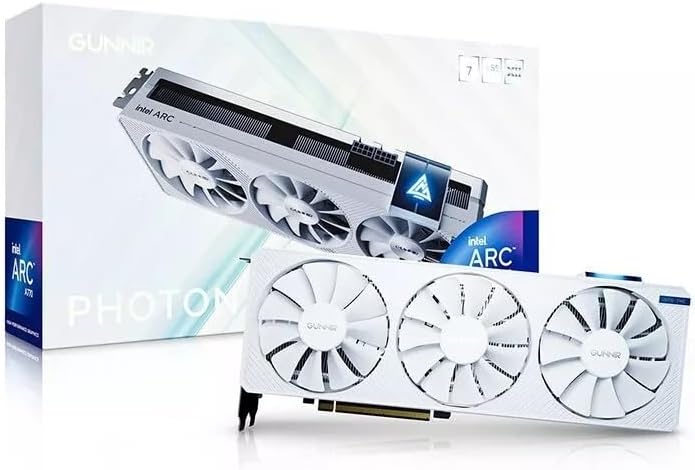
The GUNNIR Intel Arc A770 Photon is a white-themed 8GB graphics card built around a 256-bit memory interface and a stated 2400MHz clock. Its 4.5 rating places it among the better-reviewed products in the guide. The card is presented for gaming and content creation, with a triple-fan cooler and support for modern display connections.
We may earn a commission when you buy through this link, at no additional cost to you.
Its white finish makes it visually suitable for matching themed builds, while three fans provide a substantial cooling layout. The listing mentions HDMI, DisplayPort, and 4K monitor support, but it does not provide exact port counts, connector versions, resolution combinations, power requirements, or dimensions. These omissions should be resolved through the seller's current product documentation.
The A770 Photon's 256-bit bus is a major strength relative to memory capacity. It provides a different balance from the 10GB and 12GB B580 options: more interface width but less total memory. Its stated 8GB of GDDR6 is suitable for many mainstream games and creative tasks, but modern texture-heavy applications and professional workloads may benefit from additional capacity.
This card is a practical choice for gamers who value a recognizable Intel Arc model, a wide memory bus, triple-fan cooling, and a white design. It is also a sensible option for a content-creation build with 4K displays. Before buying, verify the exact power connector, physical dimensions, supported display standards, and compatibility with the intended motherboard and system.
The card's 256-bit interface is a major strength relative to its 8GB allocation. It gives the A770 Photon a bandwidth-oriented specification that can benefit responsive gaming and content-creation workloads, even though more memory would suit some modern applications better.
A triple-fan configuration gives the card a visually bold design and a conventional high-airflow layout for desktop use. Its white finish is especially suitable for coordinated builds, although the missing dimensions and power information make case-fit verification important.
We may earn a commission when you buy through this link, at no additional cost to you.
The Sparkle Intel Arc A310 Omni View is built around a simple but specialized idea: provide four HDMI outputs from a compact, low-power card. It includes 4GB of GDDR6, four HDMI connections, a 50W TBP, and a single-slot, single-fan design. Its 4.6 rating indicates positive customer feedback despite the card's modest memory capacity.
We may earn a commission when you buy through this link, at no additional cost to you.
Four display outputs make the A310 Omni View relevant to digital signage, information displays, multi-screen business desktops, and compact systems that lack enough integrated display connectors. The single-slot format and 50W power target also suit space- and power-conscious installations, including office-oriented systems where gaming performance is not the priority.
The trade-off is 4GB of memory and the absence of stated gaming-focused acceleration features. Modern games and demanding 3D applications can outgrow a small memory allocation, and the listing does not specify the processor's compute resources, exact dimensions, refresh-rate limits, or supported display combinations. Multi-monitor buyers should confirm those details for their exact screens.
The A310 Omni View is best for users who value four HDMI connections, low power, and a narrow chassis footprint over heavy graphics workloads. It can be a strong productivity or display card for a compact office system, but it should not be confused with a high-end gaming or AI accelerator. It is also a less natural choice for users who need a single high-refresh display and might benefit more from a stronger conventional graphics card.
The four-HDMI configuration is the defining feature. It simplifies the connection of several business, control, monitoring, or signage screens without requiring multiple adapters, provided the system and selected displays support the intended resolutions and refresh rates.
A 50W TBP and single-fan, single-slot design keep the card unobtrusive and energy-conscious. These characteristics can simplify integration into compact or multi-display systems where a larger, power-hungry gaming card would be unnecessary.
We may earn a commission when you buy through this link, at no additional cost to you.
Choosing an Intel Arc GPU starts with the application, but physical design and system support can be equally decisive. Memory, architecture, cooling, display requirements, power, and intended workload should be evaluated together before selecting a model.
In short, choose the product whose primary feature set matches the work you expect to perform.
In short, choose more memory for large assets and models, and pay close attention to bus width for bandwidth-heavy tasks.
In short, verify that the motherboard's lanes, slots, and bifurcation support align with the card's design.
In short, match the card's power and thermal design to your chassis, and never overlook connector and clearance requirements.
In short, prioritize native connectors that match your monitors rather than adding unnecessary adapters.
In short, check length, height, slot width, bracket style, and nearby component clearance before ordering.
In short, verify software and driver support directly because feature labels do not guarantee compatibility with every application.
In short, use ratings as supporting evidence and favor listings that provide the physical and technical details you need.
Before installation, confirm that the graphics card will physically fit and that the power supply, motherboard slot, and case airflow can support it. Check the card's dimensions, slot width, bracket type, and power-connector requirements. For a dual-GPU workstation, also verify motherboard lane bifurcation, operating-system support, and the application's ability to recognize both processors.
Install the card with the system powered off, connect the required PCIe power cables, secure the bracket and any sag support, and connect the intended displays. Install the current Intel graphics driver and update relevant professional or AI frameworks afterward. Use the card's supported output configuration, and avoid changing physical connections while the system is running.
For care, keep intake and exhaust paths clear of dust and make sure the case has enough airflow for sustained workloads. Give blower and turbo designs room to exhaust properly, and do not block their fans. Monitor temperatures and system stability during long rendering or inference sessions, and use the manufacturer's utilities and driver releases to manage updates, performance profiles, and known compatibility issues.
The ASRock Arc B570 Challenger is a strong general recommendation because it combines 10GB of memory, a 2600MHz clock, 19 Gbps memory speed, modern display outputs, and a 4.7 customer rating. The ASRock A580 Challenger is also compelling, especially for its 256-bit memory bus and broader creative feature set. Actual game performance depends on the title, settings, CPU, and graphics memory requirements.
No. More VRAM is most valuable when a workload needs to retain large textures, datasets, 3D scenes, or AI models that exceed smaller memory allocations. A wider memory bus can still be beneficial for bandwidth-sensitive tasks, so buyers should compare both capacity and bus width. A 12GB card is not automatically superior to an 8GB card in every application.
The GUNNIR Arc Pro B50 LP is purpose-built for compact installations, measuring 167 by 69 by 18.4mm and using a single-slot low-profile design. Its 70W power draw requires no external PCIe power connector, while 16GB of memory supports more demanding professional tasks than a basic display card. Always check bracket and chassis clearance.
Yes, if you want the full platform bandwidth described in the product listing. The dual-GPU card uses PCIe 5.0 x8 plus PCIe 5.0 x8 and states that x16 lane bifurcation allows full bandwidth on a suitable consumer platform. A motherboard that does not support that arrangement may not expose all lanes as intended.
The dual-GPU 48GB models provide the largest combined local memory in this guide and are designed for large inference workloads. The WEELIAO MAXSUN product specifically lists quantized 70B-class model support, PyTorch, IPEX-LLM, and vLLM compatibility. The single ASRock Arc Pro B60 Creator offers 24GB, which is a more conventional workstation configuration.
The supplied information focuses on professional workloads for the Arc Pro B60 and Arc Pro B50 products, so gaming is not their primary stated purpose. Gaming capability can vary by title, driver, and application support. Buyers whose main use is gaming should consider the B570, A580, B580 Titan, or A770 models instead.
Check the number and type of outputs, supported resolution and refresh rates, and whether the operating system recognizes all displays simultaneously. The A310 Omni View offers four HDMI outputs, while the ASRock A580 and B570 models use a combination of DisplayPort and HDMI. Adapter requirements and display scaling settings can also affect the final setup.
It is essential because the card, processor, motherboard, memory, and other components all share the system's power budget. Requirements vary widely: the A310 Omni View is listed at 50W, the B50 LP at 70W, and the ASRock Pro B60 Creator at 200W. Follow the card's connector and recommended PSU guidance rather than estimating from the GPU name alone.
The strongest general-purpose choice in this guide is the ASRock Arc B570 Challenger, whose 10GB memory, modern outputs, 2600MHz clock, dual-fan cooling, and 4.7 rating create a balanced package for 1440p gaming. The A580 Challenger stands out with its 256-bit memory bus, while the Sparkle B580 Titan offers 12GB and a higher stated boost clock. For professional work, the ASRock Arc Pro B60 Creator provides 24GB, modern media engines, ISV-oriented drivers, and four DisplayPort outputs.
Prioritize the workload before the model number. Large local AI models favor the dual 48GB cards, compact systems favor the B50 LP, four-HDMI display setups favor the A310 Omni View, and gaming or mixed desktop use generally points toward the B570 and A580 Challenger models. In every case, verify physical fit, power connectors, motherboard interfaces, cooling, display specifications, and software support before purchasing.
Listings, ratings, and prices can change, so review the current product page and manufacturer documentation at the time of purchase. The information in this guide provides a strong framework for narrowing the field, but current compatibility details and current pricing should determine the final choice. Use the links in this article to check each model's latest availability and specifications.