
OREI HDMI Audio Extractor ARC 4K@60Hz
4.4Editor score
18 Gbps HDMI bandwidth
Simultaneous audio outputs
Dolby Vision and HDR support
Automatic surround downmixing
This HDMI Audio Extractor guide compares 10 models for 4K and 8K video, ARC and eARC support, audio formats, outputs, and setup ease.
An HDMI audio extractor separates sound from an HDMI source so it can be sent to a soundbar, receiver, amplifier, speakers, or headphones. The right model depends on video resolution, ARC or eARC behavior, supported audio formats, available ports, and whether you need one source or source switching. A capable extractor can improve a home entertainment setup without replacing the television.
This guide compares ten extractors using the supplied specifications, compatibility claims, output configurations, and customer ratings. It covers conventional HDMI-to-audio devices, ARC and eARC converters for television return audio, 4K and 8K models, dual-input switchers, and budget-friendly analog adapters. Special attention is given to output types, surround-sound limitations, remote-control behavior, and required cables or power.
Each review explains who the product is best suited to and where it may disappoint. The list includes simple options for older systems and advanced units for modern home theaters. Ratings and product availability can change, while retailer offers and prices fluctuate, so readers should confirm the current listing, port layout, and television settings before purchasing.
4.4Editor score

4.2Editor score

4.2Editor score
The comparison below highlights each extractor's strongest video capabilities, audio outputs, source type, and practical limitations. Comparing these details is the fastest way to separate full HDMI extractors, television-only ARC converters, and two-source switchers.






The VPFET HDMI Audio Extractor is a conventional HDMI-to-audio converter with a 4.1 rating. It is designed for source devices that send picture and sound through HDMI but do not provide a convenient analog or optical audio connection. Its combination of optical, 3.5mm, and HDMI connections makes it useful for soundbars, powered speakers, amplifiers, and conventional televisions.
We may earn a commission when you buy through this link, at no additional cost to you.
The extractor offers 2.0-channel, 5.1-channel, and pass-through modes. The 3.5mm output is intended for stereo operation, while the optical connection is used with the 5.1 setting. Video can pass through at up to 4K 30Hz using RGB or YUV 4:4:4, and the supplied information identifies support for HDCP 1.4, DTS 5.1, and PCM. USB power from a television or another connected device is required.
The compromises are important. This is an HDMI 1.4-based unit rather than a modern HDMI 2.0 or HDMI 2.1 model, and its maximum video specification is 4K at 30Hz. It does not support ARC or eARC, cannot accept a television as an HDMI input source, and does not support 7.1-channel audio. Fire TV, Apple TV, and PlayStation sources are stated to be limited to 1080p rather than 4K.
It remains a sensible choice for a basic source device, especially when both optical and analog destinations matter. It is less suitable for a modern 4K 60Hz gaming system or a television that needs return audio. Buyers should choose it for straightforward source extraction rather than next-generation bandwidth, advanced control features, or television integration.
Optical output supports compatible digital surround equipment, while the 3.5mm connection provides a simple route to stereo speakers or headphones. Switching the device into the appropriate mode is essential, and the analog path should not be expected to decode a Dolby or DTS stream.
The plug-and-play design and USB power arrangement suit Blu-ray players, streaming devices, game consoles, and set-top boxes. It is most effective when the source and television operate at 1080p or 4K 30Hz and the external system is limited to stereo or 5.1-channel digital audio.
We may earn a commission when you buy through this link, at no additional cost to you.
The OREI HDMI Audio Extractor ARC 4K@60Hz is the most balanced option in this guide and carries a 4.4 rating. It supports video up to 4K at 50Hz or 60Hz with YUV 4:4:4, while adding optical and left/right analog outputs, ARC compatibility, CEC pass-through, and automatic downmixing to stereo.
We may earn a commission when you buy through this link, at no additional cost to you.
Its 18 Gbps bandwidth and HDMI 2.0b support make it appropriate for many contemporary source components. The listed HDR support includes HDR, HDR10, HDR10+, Dolby Vision, and HLG, along with 10-bit color and both RGB and YCbCr color spaces. Audio can be extracted to optical and analog outputs at the same time, while HDMI and optical paths can preserve multichannel formats. Dolby Digital and DTS 5.1 can be downmixed to two-channel PCM.
CEC allows the television and source to retain some control functions, but the television remote does not adjust volume on the optical or analog outputs. That limitation is common on extractors because the analog and optical paths may operate independently from the television's own speaker system. The package includes the extractor, a power adapter, and a user manual, but no cable inventory is specified in the supplied data.
This is a strong general recommendation for someone who wants 4K 60Hz, ARC flexibility, and both digital and analog audio without moving to an 8K extractor. It is particularly suitable for modern televisions and source devices that do not provide the desired legacy output. Consumers prioritizing the newest 8K and 4K 120Hz standards should instead examine the higher-bandwidth OREI model.
The extractor can feed a digital receiver and an analog system simultaneously, offering more installation flexibility than a single-output adapter. When a Dolby Digital or DTS stream must reach stereo equipment, the downmix function converts it to two-channel PCM instead of sending an incompatible digital signal to analog inputs.
HDMI 2.0b bandwidth, HDCP 2.2, 18 Gbps signaling, and broad HDR support cover a wide range of current source devices. Cable quality and display capability still determine whether the highest 4K 60Hz mode is available, so all components should be checked before installation.
We may earn a commission when you buy through this link, at no additional cost to you.
The OREI 4K@60Hz HDMI Audio Converter Extractor has a 4.2 rating and is a well-rounded source extractor for 4K content. It supports HDMI 2.0b, HDCP 2.2, 18 Gbps bandwidth, and video pass-through up to 4K at 50Hz or 60Hz with YUV 4:4:4. Optical and 3.5mm outputs provide both digital and analog connection choices.
We may earn a commission when you buy through this link, at no additional cost to you.
Its format list is particularly comprehensive. The supplied data includes LPCM 2-, 5.1-, and 7.1-channel audio, Dolby Digital, DTS 5.1, Dolby Digital Plus, Dolby TrueHD, DTS-HD Master Audio, Dolby Atmos, and DTS:X. HDMI high-bit-rate audio pass-through and CEC bypass are also listed, making it suitable for a receiver that handles decoding when the source supplies an appropriate stream.
The specification includes several explicit exclusions. It does not support 1440p at 120Hz, 4K at 30Hz, 1080p at 120Hz, or 1080p 3D at 60Hz, and it has no ARC support. Dolby and DTS streams pass through the digital path rather than being decoded for the analog output, so the source may need to be configured for PCM when using the 3.5mm connection.
It is a good match for a 4K 60Hz home theater whose receiver or soundbar accepts optical audio and whose streaming or disc sources support advanced formats. It is less useful when television return audio, 3D television modes, or high-refresh-rate PC gaming is central to the setup.
The broad format list allows a source to send advanced digital streams through compatible equipment. Optical output is the natural path for Dolby and DTS content, while PCM is the safer choice for a stereo analog connection.
The metal enclosure and international power supply make the unit suitable for home or commercial installations. It works with Blu-ray players, game consoles, PCs, and major streaming platforms, provided the selected source and television are operating within its supported modes.
We may earn a commission when you buy through this link, at no additional cost to you.
The eSynic Professional eARC and ARC Audio Extractor has a 4.5 rating, the highest in the list, and is built for one very specific purpose: converting television return audio into analog stereo. It connects to a television's eARC or ARC interface rather than accepting video from a game console, streaming box, or disc player.
We may earn a commission when you buy through this link, at no additional cost to you.
Its main attraction is support for sampling rates up to 24-bit and 192kHz. The available audio formats are PCM and PCM 2.0, which makes it a practical bridge to powered speakers, an amplifier, or headphones through 3.5mm and left/right connections. Signal indicators show whether the converter is active, and the device operates as a plug-and-play USB-powered accessory without drivers or software.
Its limits are equally clear. There is no optical output, no Dolby-only decoding, and no support for ordinary HDMI source components. The television must support eARC or ARC, the correct port must be used, the adapter must be powered, and the television's audio format should be set to PCM. Volume control may also depend on the television's ARC behavior.
Choose this model when a newer television has excellent speakers but an older stereo sound system, and the goal is to route television apps or broadcasts to analog equipment. Do not choose it for a conventional source-to-soundbar setup or for surround audio. Its focused design earns a strong rating because it addresses that narrow use case clearly.
The stated 24-bit and 192kHz capability indicates support for high-resolution PCM input, although the real result also depends on the television's output settings and the connected amplifier. A compatible digital-to-analog chain is necessary to benefit from those sample rates.
The extractor is limited to a television's ARC or eARC return channel. Connecting a console or streaming device to its input will not reproduce the behavior of a conventional HDMI de-embedder, so users should confirm their exact requirement before buying.
We may earn a commission when you buy through this link, at no additional cost to you.
The J-Tech Digital JTD18G-H5CH is a 4.1-rated extractor designed around HDMI 2.0, HDCP 2.2, and 4K 60Hz video. It includes SPDIF and 3.5mm outputs, Dolby Digital and DTS pass-through, CEC, and HDR10 support, making it suitable for common 4K source devices connected to a sound system without a convenient analog feed.
We may earn a commission when you buy through this link, at no additional cost to you.
The product title also identifies support for 1080p at 120Hz and 144Hz, features that can benefit compatible computer displays and gaming environments. Its optical connection is appropriate for a receiver or soundbar that accepts surround formats, while the analog output serves stereo equipment. The extractor preserves the video path while separating audio for the external system.
Users must configure the source correctly. The supplied note says that Dolby Digital and DTS formats are passed through rather than decoded for analog output. If the 3.5mm connection is used, the source should output PCM. Compatibility is also limited: the unit is not compatible with the third-generation Apple TV model A2843, certain Comcast Xfinity boxes, HDMI 1.2 sources, or monitors made before 2005.
It is most useful for a mixed entertainment system that needs 4K 60Hz, optical surround audio, and an occasional analog connection. Check the exact streaming device and source format before installation. The explicit exclusions do not make it a poor extractor, but they mean it is less universally compatible than models that omit legacy or platform-specific restrictions.
The SPDIF route is the preferred path for Dolby Digital or DTS, while the 3.5mm output works with PCM stereo. Having both creates installation options, although the source format should be changed when moving between paths.
Beyond 4K 60Hz, the listed high-refresh 1080p modes can be useful with compatible PCs and displays. The extractor preserves HDR10 and passes CEC, although exact behavior still depends on the source, display, television, and cables used.
We may earn a commission when you buy through this link, at no additional cost to you.
The VPFET HDMI eARC Audio Extractor is a television-focused digital converter with a 4.1 rating. It takes return audio from a television's ARC or eARC port and provides simultaneous optical and coaxial outputs, allowing older amplifiers, DACs, speakers, and headphone amplifiers to receive a digital signal.
We may earn a commission when you buy through this link, at no additional cost to you.
The extractor supports sampling rates up to 24-bit and 192kHz. Its eARC connection offers greater bandwidth than standard ARC, while backward compatibility allows it to operate with televisions that only provide ARC. Separate status indication helps users confirm whether the ARC or eARC path is active, and the included package comprises the converter, a Type-C power cable, a 19+1 HDMI ARC cable, an optical cable, and a manual.
This unit does not accept ordinary HDMI sources, and it does not support CEC. It also may not provide television remote volume control because the volume is ultimately managed by the connected digital audio device. Users must enable ARC or eARC in television settings, turn off the television's own speakers when appropriate, and use a suitable 19+1-pin HDMI cable.
It is an appealing choice when a television exposes only eARC or ARC and the target audio equipment lacks compatible digital inputs. The dual digital outputs are useful for testing or connecting multiple components. It is not the right choice for extracting audio from a game console or for controlling a home theater through CEC.
Optical and coaxial connections cover many soundbars, amplifiers, and DACs. Because both outputs are available simultaneously, the extractor can also serve as a convenient distribution point before selecting the final audio device.
ARC functionality must be activated on the television, and its built-in speakers may need to be disabled. The connected receiver controls the final volume, so users should adjust levels there rather than assuming the television remote will always work.
We may earn a commission when you buy through this link, at no additional cost to you.
The OREI 8K@60Hz 48 Gbps HDMI Audio Extractor is the most future-oriented conventional source extractor in the list, earning a 4.2 rating. It supports up to 8K at 50Hz or 60Hz, 4K at 120Hz with YUV 4:4:4, and several other high-resolution modes. The 48 Gbps FRL bandwidth and HDMI 2.1 protocol support distinguish it from most 4K extractors.
We may earn a commission when you buy through this link, at no additional cost to you.
Audio is de-embedded to optical SPDIF or stereo through the 3.5mm output, while HDMI can carry multichannel formats. The listed formats include LPCM 2-, 5.1-, and 7.1-channel audio, Dolby Digital, DTS 5.1, Dolby Digital Plus, Dolby TrueHD, DTS-HD Master Audio, Dolby Atmos, and DTS:X. Features such as ALLM, QMS, QFT, SBTM, HLG, HDR, HDR+, and Dolby Vision pass-through are included.
The extractor supports ARC and CEC bypass but not eARC. Television remote volume control does not operate on the extracted outputs, which is an important distinction for anyone accustomed to adjusting television volume. A HDMI 2.1 cable is required for the intended high-bandwidth modes, and the source, display, and extractor must all support the target format. The package includes an auto-switching international power supply, the extractor, manual, technical support, and a 12-month manufacturer warranty.
This is the strongest all-around recommendation for a new home theater built around current and next-generation video. It balances advanced resolution, broad audio support, ARC, and a durable enclosure. It is less suitable for a setup that specifically requires eARC, but for direct HDMI source extraction it offers the strongest combination of bandwidth and audio flexibility here.
Eight 60Hz, 4K 120Hz, and 48 Gbps FRL support make the unit relevant to modern gaming and high-end television setups. A qualified HDMI 2.1 cable is essential, and no extractor can create a resolution that the source, display, or cable does not support.
Optical output is suited to a receiver or soundbar capable of handling the relevant surround formats, while the analog output is best paired with PCM stereo. HDMI pass-through preserves advanced audio when the downstream display chain can accept it.
We may earn a commission when you buy through this link, at no additional cost to you.
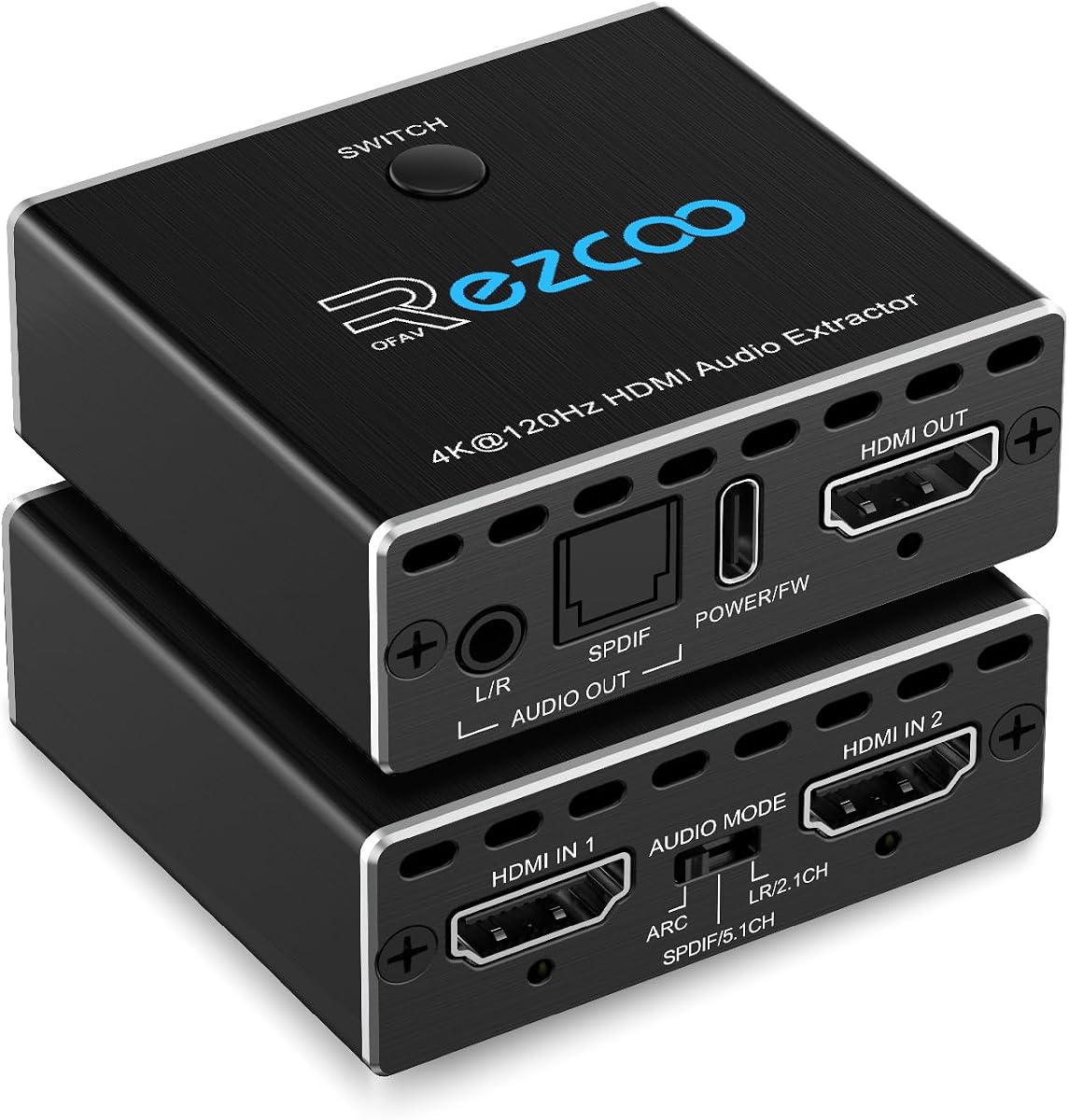
The 4K 120Hz HDMI 2.1 Audio Extractor Switch is a distinctive two-input, one-output device with a 5.0 rating. It lets a user connect sources such as a game console and streaming box, send one to a display, and extract audio through HDMI, optical SPDIF, or a 3.5mm stereo connection.
We may earn a commission when you buy through this link, at no additional cost to you.
Its video specification reaches 8K at 60Hz and 4K at 120Hz, with support for 1080p at 240Hz, 5120 by 1440 at 120Hz, 4K at 60Hz, 1440p at 60Hz, 3D, HDR, HDCP 2.2, and HDCP 2.3 bypass. Audio can be extracted as 5.1-channel optical or 2-channel analog audio, while the HDMI output supports digital 7.1-channel, DTS:X, TrueHD, and DTS-HD Master Audio.
The automatic source switch is convenient, but it also defines the product's scope. This is not a one-to-two output splitter, and it cannot operate bidirectionally. The guidance recommends a qualified HDMI 2.1 cable shorter than 10 feet, or approximately 3 meters, and warns that unsuitable cables can cause unstable video or no image. It also mentions ARC mode as part of setup.
It is a strong fit for a two-device entertainment system, especially a gaming setup with an Xbox and PlayStation sharing one television. Users who need more inputs, a single-source installation, or broader distribution should choose a conventional extractor or a dedicated switch instead. Its perfect customer rating should still be considered alongside the limited topology.
The switch simplifies setups that would otherwise require manually changing cables. Automatic selection is convenient, though the included data does not describe how the switching priority is determined.
A soundbar or receiver can use optical 5.1-channel output, stereo equipment can use the 3.5mm connection, and an advanced display chain can retain digital 7.1-channel audio through HDMI. The correct path depends on the capabilities of the downstream system.
We may earn a commission when you buy through this link, at no additional cost to you.
The 8K eARC HDMI Audio Extractor is a versatile 4.2-rated model that combines HDMI source extraction with television ARC and eARC operation. It offers optical, left/right RCA, and 3.5mm analog outputs, while its video path supports 8K at 60Hz and 4K at 120Hz. That range of connections makes it useful in mixed home theater environments.
We may earn a commission when you buy through this link, at no additional cost to you.
Three operating modes clarify its behavior. Pass mode mirrors the source's native audio and allows the optical output to carry multichannel formats. L/R mode downmixes PCM, Dolby Digital, Dolby TrueHD, and DTS-HD into stereo PCM across the analog and optical outputs. SPDIF mode preserves premium digital formats through the optical connection. The analog ports in pass and SPDIF modes should be fed PCM to avoid buzz or static.
In eARC mode, the television connects to the extractor's HDMI output and returns audio to an external sound system. The user must enable CEC, select TV mode on the DIP switch, and use an ARC or eARC-capable cable. In the other direction, the extractor can receive a source through HDMI, although the supplied note explicitly says not to connect a television directly to the HDMI input.
This is the most flexible option for users who may switch between source extraction and television return audio. Its main cautions are the need for a Type-C 5V power connection and the strict PCM requirement for analog output in digital modes. Users should choose it when both eARC and direct-source use are valuable rather than paying for capabilities the setup will never need.
Pass mode favors native digital streams, L/R mode prioritizes universal stereo compatibility, and SPDIF mode concentrates on multichannel sound. These modes make it easier to align the extractor with a soundbar, receiver, or analog amplifier.
The device can serve two roles, but they use different connections. A conventional source enters the HDMI input, while a television returns sound through the ARC or eARC connection and the extractor sends that sound to the external audio system.
We may earn a commission when you buy through this link, at no additional cost to you.
The HDMI to 3.5mm Audio Adapter is a budget-oriented extractor with a 4.2 rating. It separates audio from an HDMI source and provides analog left/right output while continuing the video signal through its HDMI connection. Its practical appeal lies in a small, straightforward design intended for speakers, amplifiers, and other stereo systems.
We may earn a commission when you buy through this link, at no additional cost to you.
Video support extends to 4K by 2K at 30Hz and includes 3D and 1080p compatibility. The source list covers Roku and Chromecast devices, Blu-ray and DVD players, cable or satellite boxes, several PlayStation models, Xbox, Fire TV, HD cameras, and DVRs. The supplied data notes that 3D requires compatible input and output equipment, so the label alone does not guarantee a working 3D installation.
The unit is normally powered directly through the HDMI connection and does not usually require a separate power adapter. Some Sony devices with low-power HDMI ports may need the included USB cable or another USB power source. The package includes the extractor, a USB power cable, an audio cable, a 4K HDMI cable, and a manual, making it relatively complete for a first setup.
ARC and eARC are not supported, and the supplied information says a television should not be used as the input source. The device is therefore best for a console, disc player, or streaming box feeding a television and a separate stereo sound system. It is an inexpensive way to add analog audio, but buyers should not expect 4K 60Hz, surround decoding, or television return audio.
The 3.5mm connection makes it easy to add powered speakers or an analog amplifier to a source that only offers HDMI. It is a simple routing tool rather than a surround processor, so the external system should be designed for stereo.
The bundled HDMI cable, audio lead, and USB power cable cover the basic installation. Extra power may be necessary for low-output Sony game consoles, and compatible 3D equipment is required for the advertised 3D mode.
We may earn a commission when you buy through this link, at no additional cost to you.
The right HDMI audio extractor depends on the signal entering the device, the equipment receiving the sound, and the video standard used by the display. Port compatibility, supported formats, and control behavior usually matter more than headline bandwidth alone.
A conventional HDMI audio extractor receives video and audio from a game console, streaming device, disc player, set-top box, or computer. It separates the audio and may pass the video onward to a display. An ARC or eARC converter behaves differently: it receives return audio from a television, normally through the port marked eARC or ARC, and sends that sound to another system. The eSynic and television-focused VPFET products are ARC-specific, while the standard extractors are intended for direct source connections. The 8K eARC model can serve both roles but uses different ports and modes for each.
Choose a standard extractor for consoles, streaming boxes, and disc players. Choose an ARC converter when the missing audio connection is on a television. If both use cases matter, look for a model that explicitly documents HDMI input, television return audio, and mode controls.
Video capability should match the source, extractor, display, and cable. Several budget models stop at 4K 30Hz, which is adequate for many conventional viewing situations but not for 4K 60Hz gaming or high-refresh displays. The OREI ARC model reaches 4K 60Hz, while the OREI 8K model supports 8K 60Hz and 4K 120Hz. The two-input switcher also reaches 8K 60Hz and adds several high-refresh 1080p modes. Resolution claims are conditional because every component and connection must support the selected mode.
For a modern television and game console, prioritize a model that explicitly supports 4K 60Hz. For current-generation high-end hardware, consider 8K 60Hz or 4K 120Hz. Also check the excluded refresh rates, because some nominally 4K products omit 4K 30Hz or specific 3D modes.
Optical SPDIF and coaxial connections carry digital audio and are appropriate for many soundbars and home theater receivers. Left/right RCA and 3.5mm outputs carry analog stereo and work with simpler amplifiers, powered speakers, and some headphone systems. An extractor with both types gives more installation flexibility, but the source's output format may need to change when using analog. Several products explicitly pass Dolby Digital and DTS through the digital path without decoding them for analog output. In those cases, the source should be set to PCM when the analog output is active.
Choose optical or coaxial for a digital receiver and RCA or 3.5mm for analog equipment. If both may be used, verify that the extractor can downmix or that your source can output PCM. Do not assume a digital surround signal will become usable stereo simply because an analog port is present.
The presence of an optical output does not guarantee support for every surround format. The OREI 4K converter lists Dolby Digital, DTS 5.1, Dolby Digital Plus, Dolby TrueHD, DTS-HD Master Audio, Dolby Atmos, and DTS:X, with additional LPCM configurations. The 8K OREI lists the same broad family. By contrast, the eSynic television converter is limited to PCM and PCM 2.0, and several budget extractors focus on stereo output.
Match the extractor to the format your receiver can decode. For advanced cinema audio, seek explicit support for the formats provided by the source. For a basic television or desktop setup, PCM stereo may be enough. A 5.1 output should not be mistaken for 7.1 support either.
ARC allows a television to send some audio back through HDMI, while eARC provides greater bandwidth and more advanced audio capabilities. Not every extractor supports television return audio, and the products labeled ARC or eARC are often designed only for a television's designated return port. Control is another separate issue. CEC pass-through can let a television remote control a connected source, but it does not guarantee that the television remote will adjust volume on optical or analog outputs. Several models explicitly state that volume must be controlled by the connected audio device.
Check three separate functions: whether the unit accepts television return audio, whether it passes CEC, and whether the television remote controls the final output volume. For reliable operation, plan to use the soundbar's or receiver's own remote for volume.
Some extractors draw power from the HDMI source, while others require USB or a dedicated power adapter. Low-power HDMI ports on certain game consoles may not supply enough current, making the included USB cable necessary. Cable requirements also become stricter at high bandwidth: a qualified HDMI 2.1 cable is needed for 8K 60Hz and 4K 120Hz, and the supplied guidance for one switcher recommends keeping such a cable under 10 feet. Television ARC adapters may also require a 19+1-pin cable and the correct eARC or ARC port.
Plan the full signal path before buying. Confirm whether the box includes a power supply, HDMI cable, optical cable, or audio lead, and verify that your existing cables meet the required specification. Keeping connections short and correctly rated reduces the chance of unstable video or no synchronization.
A basic extractor may have one HDMI input, one HDMI output, and one or two audio outputs. A switcher adds multiple source inputs but usually still has only one display output. The two-input HDMI 2.1 model in this guide cannot act as a one-to-two splitter or as a bidirectional device. Some extractors can run without a display connected when audio-only use is desired, but not every model permits that arrangement. ARC-only converters have even fewer options because their input is specifically the television's return channel.
Match the topology to the installation rather than merely counting ports. A two-source switcher is useful for a console-and-streaming-box setup, while a simple one-input extractor is easier to integrate into a permanent system. Verify whether HDMI pass-through is mandatory and whether the display must remain connected.
Universal HDMI support is an ideal, but real compatibility depends on source devices, television models, HDCP, ARC implementations, and the format selected in each device's settings. Some products exclude specific streaming hardware, older HDMI sources, or legacy displays. Physical construction also varies: the OREI 4K and 8K models use metal housings, while the smaller budget adapters prioritize a lightweight, compact form. A metal enclosure may be preferable in a rack or frequently handled installation, whereas a compact plastic unit is easier to conceal near a television.
Review the explicit exclusions and manufacturer notes before ordering. Check the exact model of any streaming device, game console, television, or receiver involved. If the setup is business-critical, favor a product with broad documented format support, included power hardware, and a clear warranty or support policy.
Begin by identifying the role the extractor will play. For a standard source, connect the game console, streaming device, disc player, or set-top box to HDMI input. For a television-only converter, connect the television's port marked eARC or ARC to the designated television input. Using the wrong port can result in no video, no return audio, or an inactive status indicator.
Next, connect the video path. Run HDMI from the extractor's output to the television or projector when the selected model requires pass-through. Connect optical, coaxial, RCA, or 3.5mm audio to the soundbar, receiver, amplifier, DAC, speakers, or headphones. Power the extractor as directed, then select the correct mode and set the source to PCM when an analog output is in use.
For care and troubleshooting, inspect cables for bends or damaged connectors, keep the extractor near its source, and avoid unnecessary power cycling. If audio is missing, verify the selected mode, television ARC or eARC setting, source audio format, and power connection. For video dropouts at 8K or high refresh rates, exchange the cable for a qualified shorter HDMI 2.1 cable and confirm that every source and display supports the active mode.
An HDMI audio extractor separates the audio signal from an HDMI connection and sends it to a soundbar, receiver, amplifier, speakers, or headphones. It is useful when the source device has HDMI only or when a television's built-in speakers do not provide the desired listening experience. The extractor may also continue the video signal to the display through an HDMI pass-through connection.
It depends on the model. A conventional source extractor usually should not use the television as its HDMI input, while an ARC or eARC converter is designed to receive television return audio from the specially marked port. The 8K eARC model in this guide supports both source extraction and television return audio in different modes, so its exact connection instructions should be followed.
Only if the source, television, and intended use require it. A 4K 60Hz extractor is more relevant for a typical 4K television and many gaming systems, while 8K and 4K 120Hz support becomes important for high-end displays and compatible source hardware. Every cable and device in the chain must also support the selected resolution and refresh rate.
The most likely cause is a non-PCM source format being sent to an analog output that cannot decode it. Change the source to PCM stereo or use the digital output with a compatible receiver. Also confirm that the extractor is in a mode that supports the analog path and that the correct left/right connection is in use.
Not always. ARC, eARC, and CEC control different functions, and several extractors explicitly state that the television remote will not adjust volume on optical or analog outputs. A soundbar connected through HDMI ARC may support television remote control, but an extractor that separates audio into another path generally requires the soundbar's own remote or control.
A normal HDMI cable is often sufficient for 1080p and 4K 30Hz, while 4K 60Hz, 4K 120Hz, and 8K 60Hz may require a qualified HDMI 2.1 cable. ARC and eARC connections can have their own cable requirements, including the 19+1 standard cited for one television-focused product. Shorter, properly rated cables are generally more dependable for the highest bandwidth modes.
That depends on the product. Some extractors pass Dolby Digital and DTS through the optical connection for a receiver to decode, while others downmix supported formats to two-channel PCM. Other models are limited to PCM or stereo. Check both the extractor's format list and the capabilities of the sound system that will perform any decoding.
First confirm that power is present and that the source, input, and output cables are fully seated. Then verify that the selected mode matches the signal path and that the television is on the correct HDMI input. At 4K 60Hz, 4K 120Hz, or 8K, replace the cable with a qualified HDMI 2.1 cable and confirm that every connected device supports the active mode.
The OREI 8K@60Hz 48 Gbps model is the strongest overall choice for a new high-performance installation, combining 8K and 4K 120Hz video with optical, analog, ARC, and broad surround-format support. The OREI ARC 4K@60Hz extractor is a more measured recommendation for mainstream 4K systems, while the compact HDMI-to-3.5mm adapter offers the simplest route to stereo speakers on a budget.
Prioritize the actual connection path rather than the largest specification. Determine whether you are extracting from a console or streaming box, receiving return audio from a television, or combining both. Then match the output to the sound system, confirm PCM or surround-format behavior, and ensure the extractor, cables, source, and display all support the desired video mode.
Finally, confirm the current product listing and retailer offer before ordering, because prices, bundles, ratings, and availability can change. The supplied specifications are the basis for this guide, but exact compatibility can vary by device model and firmware. Checking the latest listing, port diagram, package contents, and return terms helps prevent an otherwise suitable extractor from creating installation friction.