
Meross Smart Home Energy Monitor
4.3Editor score
Local Home Assistant control
Five-year data storage
Up to eighteen monitored circuits
Custom energy-use alerts
Our expert guide compares the best Energy Consumption Monitors for PC, covering accuracy, app features, circuit coverage, safety, and ideal setups.
Energy Consumption Monitors for PC range from simple outlet meters to smart plugs and whole-circuit home energy systems. A useful monitor shows where electricity is going, reveals idle consumption, and helps users compare components such as a desktop, monitor, graphics card, network equipment, and powered peripherals.
We compared the ten monitors in this guide on measurement functions, accuracy, display readability, data retention, smart features, installation requirements, and suitability for a personal computer setup. The list includes plug-in meters for targeted testing, app-connected smart plugs for remote control, and panel-mounted systems for detailed circuit-level analysis.
Each review explains what the monitor is best suited to measure, along with its strongest features and practical limitations. Ratings and product information reflect the supplied listings, while availability, compatibility, and pricing can change. Always verify electrical ratings and system requirements before purchasing or installing a device.
4.3Editor score

4.6Editor score

4.6Editor score
The comparison below separates single-outlet meters, smart plugs, and panel-mounted energy monitors so PC users can identify the right level of detail for their setup.


The Emporia Vue 3 is the most complete option in this guide for users who want to understand not merely how much a PC consumes, but where energy is used throughout the home. It carries a 4.6 rating and combines real-time monitoring, app-based reporting, automation, solar visibility, and sixteen branch sensors. For a desktop setup with multiple peripherals, that level of visibility is substantially more useful than a basic outlet meter.
We may earn a commission when you buy through this link, at no additional cost to you.
Its main advantage is granular circuit monitoring. The included 50A sensors can be assigned to loads such as an air conditioner, water heater, washer, dryer, or range, while an additional 200A sensor is available separately for supported 3-phase, 4-wire Wye systems with earthed neutral. The listed accuracy is plus or minus 2 percent, and one-second readings are available in the app when it is open, with three hours of one-second data retained. Minute data is retained for seven days, while hour data is retained indefinitely.
The trade-offs are installation complexity and network requirements. This is not a simple plug-in meter, and users who lack panel experience should use qualified electrical help. The system also requires 2.4GHz Wi-Fi and an internet connection for app monitoring. Additional electrical-system configurations may require extra hardware, but the breadth of features makes that complexity reasonable for a whole-home or serious workstation energy audit.
Choose the Emporia Vue 3 when your goal extends beyond checking one outlet. It is especially valuable if you operate a powerful gaming PC, multiple displays, network storage, and other high-load household equipment. For a simple desktop wattage check, a less elaborate plug meter is easier, but for long-term energy awareness and automation, this is the strongest all-around recommendation.
Instead of estimating consumption from a PC power supply, the Vue 3 can reveal real power for monitored circuits. That makes it possible to compare a gaming system with displays, printers, and other household loads, then use live reporting to identify the largest contributors.
The app supports time-of-use, peak-demand, excess-solar, and rewards-program settings. These capabilities can be useful when a PC's workload can be shifted, although the system does not automatically control the computer itself.
We may earn a commission when you buy through this link, at no additional cost to you.
The Upgraded Watt Power Meter Plug provides a thorough, self-contained way to inspect the electrical behavior of a PC or peripheral. Its 4.6 rating reflects a capable seven-mode display that covers watts, kilowatt-hours, voltage, current, frequency, power factor, cost, minimum and maximum power, and cumulative operating time. It is especially practical for testing a desktop, gaming console, monitor, or other device one at a time.
We may earn a commission when you buy through this link, at no additional cost to you.
The 2.36-by-1.85-inch backlit display is large enough to make direct observation convenient, while a 180-degree viewing angle helps when the plug is mounted low or behind furniture. Five backlight settings range from ten minutes to always on. The overload warning is also configurable from zero to 3680 watts, although the instructions recommend setting it to 1800 watts for typical use.
The main limitation is scope. It measures only the load connected to the outlet and does not provide remote access, historical graphing, or automatic scheduling. Its cost estimate depends on settings entered by the user, and physical access is required to read the display. The retained data feature is useful, though it preserves the last reading rather than providing a full historical database.
This meter is ideal for users who want a broad set of measurements without setting up an account or connecting to a network. Plug it in, choose the relevant display mode, and compare the PC under idle, typical, and stressed workloads. It is less appropriate for continuous whole-room analysis, but for direct component testing it offers an unusually broad feature set.
Because the monitor shows active power, energy, and peak readings, it can help quantify how much a gaming PC or workstation changes its demand. Testing the system directly also avoids estimates based only on component manufacturer figures.
The wide viewing angle and selectable backlight are valuable when the outlet sits behind a desk. The overload indicator provides a visible warning if the connected equipment reaches the configured limit.
We may earn a commission when you buy through this link, at no additional cost to you.
The SURAIELEC Outlet Watt Meter is a strong choice for direct PC power testing, particularly when a user wants broad electrical specifications and longer data retention. It has a 4.5 rating and measures power, voltage, current, frequency, power factor, maximum and minimum watts, cumulative time, and energy in kilowatt-hours. A configurable electricity rate allows it to calculate operating costs.
We may earn a commission when you buy through this link, at no additional cost to you.
Its stated measurement range is 90-250 volts AC, zero to 16 amps, and zero to 3680 watts. Resolution is listed at 0.1 watt, 0.1 volt, 0.001 amp, and 0.001 kilowatt-hour, with a Class 1.0 accuracy standard. The wide-angle backlit LCD makes values visible in low-light workspaces, and the compact body is designed to leave the lower wall outlet accessible.
The standout practical feature is the rechargeable battery backup, which can hold data for up to 90 days during outages or while unplugged. That makes the meter useful for long observations, although it remains a local display rather than a connected logging platform. It also lacks scheduling, remote control, and multi-circuit analysis.
Select this meter when you need a dependable plug-in instrument for a PC, monitor, or peripheral and want precise-looking readings plus extended local storage. Users searching for live app dashboards or whole-home visibility should choose a smart plug or panel system instead. For portable, outlet-level analysis, the SURAIELEC offers a capable and well-rounded feature set.
The battery-backed ninety-day hold distinguishes this meter from many basic watt meters. It is useful for recording behavior across several sessions without losing accumulated information when the plug is removed.
Its space-saving design helps maintain access to nearby outlets, while the backlit screen supports quick readings in either bright rooms or dim equipment areas.
We may earn a commission when you buy through this link, at no additional cost to you.
The Meross Smart Home Energy Monitor stands apart through its emphasis on local data, open control, and long-term analytics. It carries a 4.3 rating and tracks power, voltage, current, and power factor with a stated accuracy of plus or minus 1 percent. For PC owners who already use Home Assistant or want more control over their energy data, that combination makes it a particularly attractive premium option.
We may earn a commission when you buy through this link, at no additional cost to you.
It supports two main 200A circuits and sixteen 60A branch circuits, allowing users to distinguish major household loads and specific equipment areas. Minute, hourly, daily, monthly, and yearly charts make it possible to spot patterns, while stored data can remain for up to five years and hourly reports can be exported for deeper analysis. Custom alerts flag unusual consumption spikes and threshold violations.
The major advantage over cloud-dependent options is local operation. Home Assistant integration, an Open API, and Web Control allow energy data to remain on the local network, and the product description specifies no subscriptions, cloud lock-in, or hidden fees. The trade-off is that the advanced features require a compatible electrical panel, correct sensor placement, and some configuration. It is not a simple outlet plug.
Buy the Meross system when privacy, local automation, and historical analysis matter more than immediate plug-and-play convenience. It is particularly appropriate for a smart home with solar generation, where detecting surplus and directing it toward an EV charger or water heater can be valuable. For a single PC under a desk, a plug meter remains easier, but this monitor offers the richest data ownership story in the guide.
Local Home Assistant operation is the defining benefit for privacy-conscious users. Open API and Web Control support also make the measurements more accessible to a broader home-energy ecosystem.
Threshold alerts can notify users when a PC or other monitored load behaves unexpectedly. This is more proactive than relying on a static meter display, particularly during long-term system monitoring.
We may earn a commission when you buy through this link, at no additional cost to you.
The SEM-Meter Energy Monitor combines whole-home visibility with features tailored to shared homes and detailed bill allocation. Its 4.4 rating, sixteen 50A branch sensors, and support for several electrical arrangements make it useful for identifying which room or circuit contains a major power user. In a shared apartment, that can help distinguish a gaming PC setup from lighting, kitchen equipment, or other common areas.
We may earn a commission when you buy through this link, at no additional cost to you.
The system supports single-phase systems up to 240 volts line-neutral, split-phase 120/240-volt systems, and three-phase 415Y/240-volt installations without Delta. It uses 2.4GHz Wi-Fi for app monitoring, provides current, daily, weekly, monthly, and yearly statistics, and allows exports subject to the listed retention periods. Its stated accuracy range is one percent.
Privacy and flexible cost analysis are its most distinctive qualities. A super privacy mode can run without the vendor cloud or app using a private MQTT server on a local network, and customizable templates support peak, off-peak, and holiday rates. The trade-off is that these capabilities demand more configuration than a plug meter, while panels with access only to busbars require a different flexible sensor option.
Choose SEM-Meter when you need to divide energy costs among rooms or circuits or want private, app-based monitoring across several phases. It is less convenient for testing one desktop, but it provides a much clearer picture of how a high-powered PC contributes to a shared property. Users comfortable with MQTT and local automation will get the most from its flexibility.
Rate templates allow landlords, roommates, or property managers to calculate estimated costs by room or circuit. This supports fairer allocation when bedrooms, common spaces, and an EV charger have very different demand profiles.
The privacy mode can function over a local network without cloud access. That gives technically capable users an alternative to relying entirely on a hosted service.
We may earn a commission when you buy through this link, at no additional cost to you.
The HBN Watt Meter Plug is the most approachable option for a PC owner who wants direct consumption data without installing panel sensors or configuring a smart-home platform. It has a 4.6 rating and offers nine display modes: watts, apparent power, kilowatt-hours, usage time, frequency, power factor, voltage, current, and electricity cost. That range is ample for evaluating how a gaming PC or workstation behaves under different workloads.
We may earn a commission when you buy through this link, at no additional cost to you.
Its backlit LCD uses a 160-degree viewing angle, making it easy to read when the outlet is behind a desk or positioned below eye level. The backlight turns off after 15 seconds to conserve energy. The meter can calculate consumption and cost over time, and it stores non-real-time data so cumulative information is not lost during a sudden power outage.
This is a simple local device rather than a connected meter, so remote access, automation, and long-term graphed history are not part of its design. Its stated electrical limit is 125 volts AC, 60Hz, and 15 amps, with a maximum of 1875 watts for resistive and tungsten loads. Users should keep those limits in mind when evaluating high-end desktops.
The HBN plug is best for quick, hands-on measurement and short experiments with individual components. Its straightforward controls, clear display, and nine measurement modes offer more functionality than a bare minimum indicator without the complexity of whole-home hardware. It is the top budget choice for measuring a PC's real draw and identifying whether a particular component is responsible for significant consumption.
Place the meter between the PC and the wall, then cycle through the relevant modes. This is an efficient way to compare idle, typical, and peak power without installing anything at the electrical panel.
Power factor, apparent power, current, and energy readings provide useful context beyond a single watt value. The backlit screen remains legible when the outlet is tucked behind furniture.
We may earn a commission when you buy through this link, at no additional cost to you.
The KETOTEK Watt Meter Plug has the highest listed rating in the guide at 4.7 and is particularly well suited to careful PC power analysis. It displays kilowatt-hours and electricity cost, watts and apparent power, true RMS voltage and current, frequency and power factor, maximum and minimum power, and accumulated operating time. This depth helps distinguish different characteristics of a variable-load computer.
We may earn a commission when you buy through this link, at no additional cost to you.
Five-button control provides direct access to the measurements, while the wide-angle LCD improves readability from different positions. Its alarm system is one of the strongest features in this category: separate warnings can appear for overload, a user-set kilowatt-hour threshold, and a cost threshold, accompanied by a flashing indicator. The default overload threshold is 3680 watts and can be adjusted from zero to that limit.
The meter stores data if power is removed and can reset readings while preserving configuration for another appliance. The trade-off is that it remains a manual instrument with no graphed history, remote notifications, or automated control. Cost calculations depend on the rate entered by the user, and the recommended general setting of 1800 watts should be reviewed according to the connected equipment.
Choose KETOTEK when you want more analytical detail than a basic watt display and appreciate maximum, minimum, and true RMS values. It is a good fit for testing a gaming PC during load changes, monitoring a desktop and its display separately, or checking whether a device spikes beyond expected levels. For effortless remote tracking, choose a smart plug instead.
Maximum and minimum power readings help reveal how a system changes between idle and intensive workloads. That information is particularly valuable when evaluating variable power draw from modern computer components.
Separate kilowatt-hour and cost alarms extend beyond a simple overload warning. Users can define boundaries that match a planned test or an energy-management goal.
We may earn a commission when you buy through this link, at no additional cost to you.
The Two-Pack Watt Meter Plugs offer a convenient way to monitor two PC-related loads at the same time. The set has a 4.6 rating and each meter can display watts, kilowatt-hours, voltage, frequency, current, power factor, unit rate, and total cost across eight modes. A two-meter setup is especially useful for comparing a computer with its monitor, testing a desktop against a gaming console, or observing a system and a separate network device.
We may earn a commission when you buy through this link, at no additional cost to you.
The LCD includes a white backlight with black characters, and the display stays illuminated while connected to AC power. After ten minutes without a button press, it turns off automatically, and users can also control it manually. Each plug uses ABS material and a standard US socket and plug configuration. The overload display flashes when the load exceeds the default 1800-watt threshold.
The meters preserve cumulative electricity, cost, unit-rate, and configuration data after removal or a sudden power failure. Resetting is straightforward, although the process restores the device to its factory settings. As with other outlet meters, there is no cloud connection, app dashboard, or remote scheduling, and simultaneous operation requires access to separate suitable outlets.
This two-pack is best for comparative testing rather than whole-circuit analysis. Its key advantage is the ability to observe two components concurrently without moving a meter back and forth between outlets. For a single PC, either meter can be used on its own, but the pair is particularly effective for testing a complete desktop setup, comparing two systems, or separating the display's contribution from the tower's.
Keeping one meter on the computer and another on a display or peripheral creates a straightforward side-by-side test. It can make configuration differences easier to understand than alternating measurements manually.
There is no account or app to set up. The backlit display, automatic preservation, and simple reset controls make the meters useful for quick tests as well as longer comparisons.
We may earn a commission when you buy through this link, at no additional cost to you.
The P4400 Kill A Watt is a straightforward appliance-level energy monitor designed to assess efficiency and estimate operating expenses. Its large LCD counts consumption in kilowatt-hours, and four settings allow users to view usage by day, week, month, or year. For someone who wants to understand a PC's contribution to household electricity without navigating a sophisticated app, the focused design is easy to appreciate.
We may earn a commission when you buy through this link, at no additional cost to you.
The monitor connects between an appliance and an outlet, then calculates estimated electricity expenses for the selected period. It is designed for 115-volt AC appliances and is also described as compatible with inverters. This makes it a reasonable companion for a standard North American desktop, monitor, or peripheral that fits within the meter's operating limits.
The limitations are substantial compared with the connected and panel-mounted options. It does not offer real-time app charts, remote control, alerts, scheduling, or automatic recommendations, and the supplied listing does not include a numerical customer rating. Users who need power factor, apparent power, detailed maximums, or modern home-energy integration may prefer another meter.
Choose the P4400 when simplicity and familiar cost-estimation features are the priorities. It is useful for a beginner investigating which connected device consumes the most energy over time. Advanced PC builders should verify wattage limits before use, while users seeking real-time control, detailed logs, or whole-house analysis will find the more specialized monitors in this guide more capable.
Daily, weekly, monthly, and yearly views translate energy measurements into practical estimates. This makes it approachable for users who primarily want to understand operating expense rather than monitor individual electrical phases.
The plug-in format requires no account, app, or panel work. Connect a supported 115-volt appliance, select a period, and read the result from the large display.
We may earn a commission when you buy through this link, at no additional cost to you.
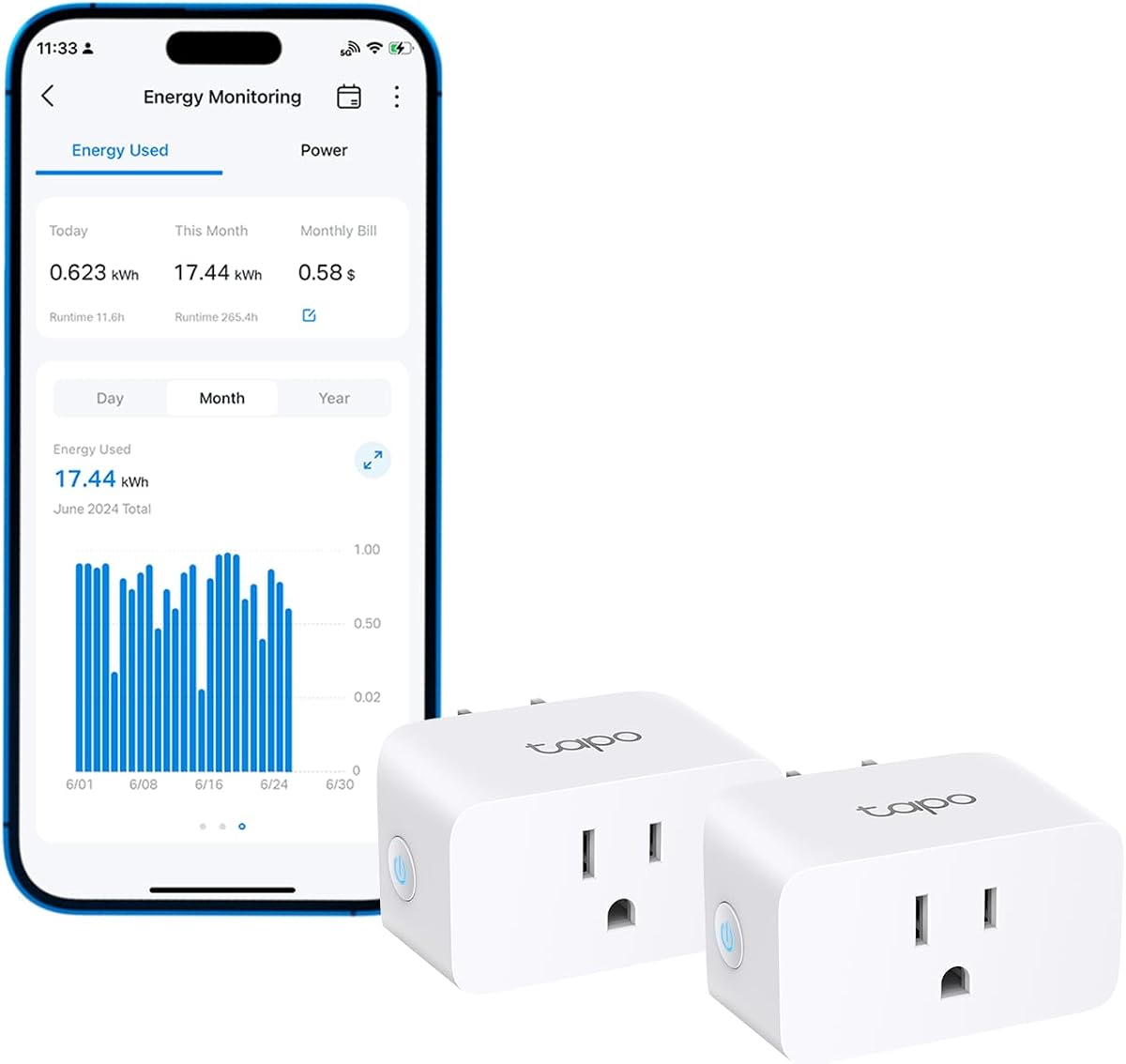
The Tapo P115 Two-Pack combines energy monitoring with the convenience of a connected smart plug. It has a 4.5 rating and can be controlled through the Tapo app, while its clear statistics and charts turn raw consumption into an easier-to-understand view. For PC users who want remote visibility, scheduling, and voice control, this is the most approachable connected option in the guide.
We may earn a commission when you buy through this link, at no additional cost to you.
Each plug supports programmable scheduling, allowing connected equipment to operate during preferred electricity periods. It also includes smart charging that cuts power at a user-set low-battery level and an auto-shutoff function intended to prevent electrical overload. These controls are especially relevant to workstations, charging equipment, and other devices that do not need to remain powered continuously.
The product supports built-in Alexa and Google Assistant functionality, and devices can be switched or adjusted from the Tapo app. The trade-offs include dependence on a compatible network setup, reliance on app-based operation, and the loss of both wall-outlet positions where the plugs are installed. It also does not offer the branch-level granularity of panel sensors.
Choose the Tapo P115 pair when you want to monitor and control two PC-related loads remotely. A common arrangement is one plug for a monitor or peripheral and another for a charging station or secondary system. If you need historical data exported for detailed analysis, a dedicated energy monitor may be a better fit, but for scheduling and everyday visibility, these smart plugs are highly practical.
Programmable operation lets users move suitable loads to off-peak periods. The scheduling feature cannot change a PC's internal workload, but it can control when monitors, chargers, or other peripherals operate.
App access and support for Alexa and Google Assistant make it easy to check or change a plug's state without approaching the desk. This is useful for components that can safely remain off while the computer is not in use.
We may earn a commission when you buy through this link, at no additional cost to you.
The right monitor depends on whether you want a quick measurement of one component, remote control of two outlets, or a detailed view of an entire electrical system. Consider measurement scope, electrical limits, data needs, and installation tolerance before choosing.
An outlet meter is the simplest way to test a desktop, monitor, or peripheral. It sits between the wall and the device, making it useful for short experiments and direct wattage comparisons without touching the electrical panel. A panel-mounted system provides much more detail by measuring main and branch circuits, but it requires compatible sensors, more installation work, and a clear understanding of the home's electrical arrangement.
Choose an outlet meter for targeted PC testing. Choose a panel system when the goal is whole-home consumption, solar tracking, or a long-term energy audit.
Accuracy matters most when comparing low differences in consumption or estimating costs over time. The listed smart panel systems provide accuracy specifications ranging from plus or minus 1 percent to plus or minus 2 percent, while the plug meters use stated accuracy standards and resolution levels. Check not only the nominal accuracy but also whether the device measures true RMS values, minimums, maximums, and energy over time.
Prioritize a monitor with documented accuracy and enough resolution for the load being tested. Avoid judging a meter solely by a large wattage range when the PC operates near its lower measurement threshold.
Electrical compatibility is a safety issue, not merely a convenience. Plug meters have explicit voltage, amperage, and wattage limits, while panel monitors specify support for single-phase, split-phase, and three-phase Wye configurations. Some systems explicitly do not support Delta arrangements, and certain panels may require alternate flexible sensors or additional main sensors.
Confirm the monitor's voltage, current, power, phase, neutral, and wattage limits before use. If the installation is unfamiliar, consult a qualified electrician rather than forcing compatibility.
Immediate wattage readings answer a narrow question, while historical graphs reveal patterns such as idle draw, daytime use, and seasonal changes. Some devices retain minute or hour data in the cloud, while privacy-focused products support local storage and export. Plug meters usually preserve only a limited local record, which is sufficient for a short test but not a detailed long-term audit.
Choose cloud charts for convenience and local or exportable data for control and privacy. Match retention length to how long you expect to study the PC's behavior.
Connected monitors can add remote switching, usage alerts, schedules, cost estimates, and integrations with broader home-energy systems. These features are useful for peripherals that can safely be switched off or shifted to another time. A smart plug is usually enough for a small PC setup, while a full energy monitor offers automation for larger circuits and household loads.
Prioritize automation only when it solves a real problem. A remote display is convenient, but reliable alerts, local control, and flexible scheduling can provide greater energy-management value.
For a plug meter, a large backlit LCD, wide viewing angle, and easily recognized display modes make measurements quicker to obtain. This is important when the outlet is behind a desk or the plug sits below eye level. Adjustable backlight timing is also useful because a permanently illuminated screen is unnecessary when the user is not reading measurements.
Look for a readable screen and straightforward button navigation. If you plan to monitor remotely, a less elaborate display may be acceptable; if readings require physical access, readability should be a top priority.
Overload warnings help users recognize when a load exceeds the meter's configured limit, while the product's certification and stated safety standards provide additional assurance. Some outlet meters can also set energy and cost alarms. These safeguards should complement, not replace, careful attention to the connected equipment's requirements.
Check certification, maximum ratings, and whether the overload threshold is adjustable. Set the limit according to the manual and disconnect the load if an overload warning appears.
Many monitors can estimate operating cost, but accuracy depends on entering the correct electricity rate. Some systems also support peak, off-peak, and holiday templates, while simpler meters use one general unit rate. If you operate a high-powered gaming PC or workstation, small rate errors can become more significant over longer periods.
Use your actual billing rate when available and update it when tariffs change. Treat cost readings as estimates rather than a replacement for utility billing.
Begin by defining the question you want the monitor to answer. For example, measure the complete desktop at the wall to establish total system draw, then test the monitor or peripherals separately to identify their individual contributions. Record the workload, display mode, and operating duration so each measurement can be reproduced under similar conditions.
For a plug-in meter, connect the meter to a grounded outlet and then connect the PC or component to the meter. Allow the reading to settle, select the required mode, and avoid changing the overload threshold without reviewing the instructions. For panel systems, use compatible sensors, follow phase and neutral requirements, and obtain qualified installation help whenever the wiring or panel layout is uncertain.
To keep readings meaningful, test the system in several states, including shutdown, idle, typical desktop use, and sustained maximum load. Save or export data where possible, note any changes in drivers or power settings, and review accumulated cost values against your utility rate. Clean outlet-mounted devices only when unplugged, and never open a panel-mounted system for routine cleaning.
For a complete system reading, connect the PC directly to a suitable plug-in meter and read its live wattage under idle, menu, and intensive gaming workloads. For a more detailed household analysis, use panel sensors to distinguish the PC circuit from displays and other loads. Record each workload for a consistent duration because short spikes can make a sample misleading.
A monitor does not reduce consumption by itself, but it can reveal waste and help users make better decisions. A smart plug can switch peripherals on schedules, while a panel system can identify high-consuming circuits. Common savings come from disabling unnecessary displays, reducing idle activity, using suitable power settings, and shifting flexible operation to preferred tariff periods.
Choose a plug meter for testing one PC, display, or peripheral and for simple wattage comparisons. Choose a whole-home monitor when you want branch-level data, long-term history, solar awareness, custom alerts, or bill allocation. A panel system requires more installation and planning but provides much broader visibility.
A smart plug can be used with a desktop only if its electrical rating covers the system's startup and sustained power needs. The Tapo P115 is rated for 15 amps, but the PC's PSU label, wall circuit, and local electrical requirements should still be checked. It is generally more convenient for a monitor, charging station, or peripheral than for powering a high-end tower directly.
A basic monitor may show instantaneous watts and cumulative kilowatt-hours, while advanced models also report voltage, current, frequency, power factor, apparent power, minimums, maximums, operating time, and cost. The most useful approach is to compare these values across different workloads rather than relying on one instantaneous reading.
It depends on the model. Local plug meters work without internet, while cloud-connected panel systems use 2.4GHz Wi-Fi and an internet connection for app monitoring. Some advanced systems also support local operation, MQTT servers, an Open API, or Web Control, allowing users to keep energy data on their own network.
Usually not. Plug meters and smart systems estimate cost using the electricity rate entered by the user, so accuracy depends on correct setup and may not reflect every utility charge. Panel systems with peak, off-peak, and holiday rate templates can be more precise, but their results should still be treated as estimates.
First measure the complete desktop at the wall, then subtract the results of individual tests where practical. Test the monitor, docking station, external storage, lighting, and other peripherals separately. Keep the operating workload consistent, because graphics load, storage activity, and CPU demand can cause the tower's consumption to change substantially.
The Emporia Vue 3 is the best overall choice for users who want comprehensive circuit visibility, real-time app reporting, automation, and solar monitoring. The Meross Smart Home Energy Monitor is the premium pick for local data ownership, Home Assistant integration, detailed reporting, and long-term storage. The HBN Watt Meter Plug is the best budget option for straightforward, hands-on measurement of an individual PC or peripheral.
Prioritize the level of visibility your setup actually needs. A simple outlet meter is often enough to compare a desktop, monitor, and gaming console, while a multi-circuit system is appropriate for a smart home, shared property, solar installation, or detailed energy audit. Check voltage, current, wattage, phase, and installation requirements before buying.
Product ratings, availability, and pricing can change over time, so review the current listing and compatibility details before purchasing. For safe results, use the monitor within its stated limits, follow its instructions, and seek qualified electrical help when working inside a circuit panel.
