
BOSGAME E5 Mini PC
4.6Editor score
Dual 2.5GbE networking
Expandable DDR4 memory
Triple 4K display support
This guide compares the best Mini Pcs for Homelab, covering processors, networking, memory, storage, displays, and upgradeability.
A homelab is more than a collection of services running on ordinary desktop computers. Mini PCs can provide a compact, efficient foundation for routers, home servers, virtual machines, media libraries, monitoring systems, and other always-available workloads. The best unit balances processor capability, memory flexibility, fast networking, practical expansion, and a chassis quiet enough to live beside your desk.
This guide compares ten Mini Pcs for Homelab using the supplied specifications, with particular attention to dual-network configurations, storage options, supported operating systems, cooling, display connectivity, and upgrade paths. It includes affordable Celeron and Pentium systems, Ryzen-based appliances, and a more powerful Ryzen 7 model, while separating general-purpose mini PCs from machines better suited to lightweight server roles.
Each review explains where a product is strongest, what limitations should influence your decision, and the type of homelab project it suits best. The leading recommendations cover the budget, balanced, and premium ends of the range, but the right system depends on your workloads, storage plans, and networking needs. Product prices and configurations can change, so confirm current details before buying.
4.6Editor score

4.5Editor score

4.3Editor score
The comparison below highlights each Mini PC's processor, memory, storage, networking, and display capabilities to help you identify the right foundation for a router, virtualization host, media server, or lightweight always-on service.


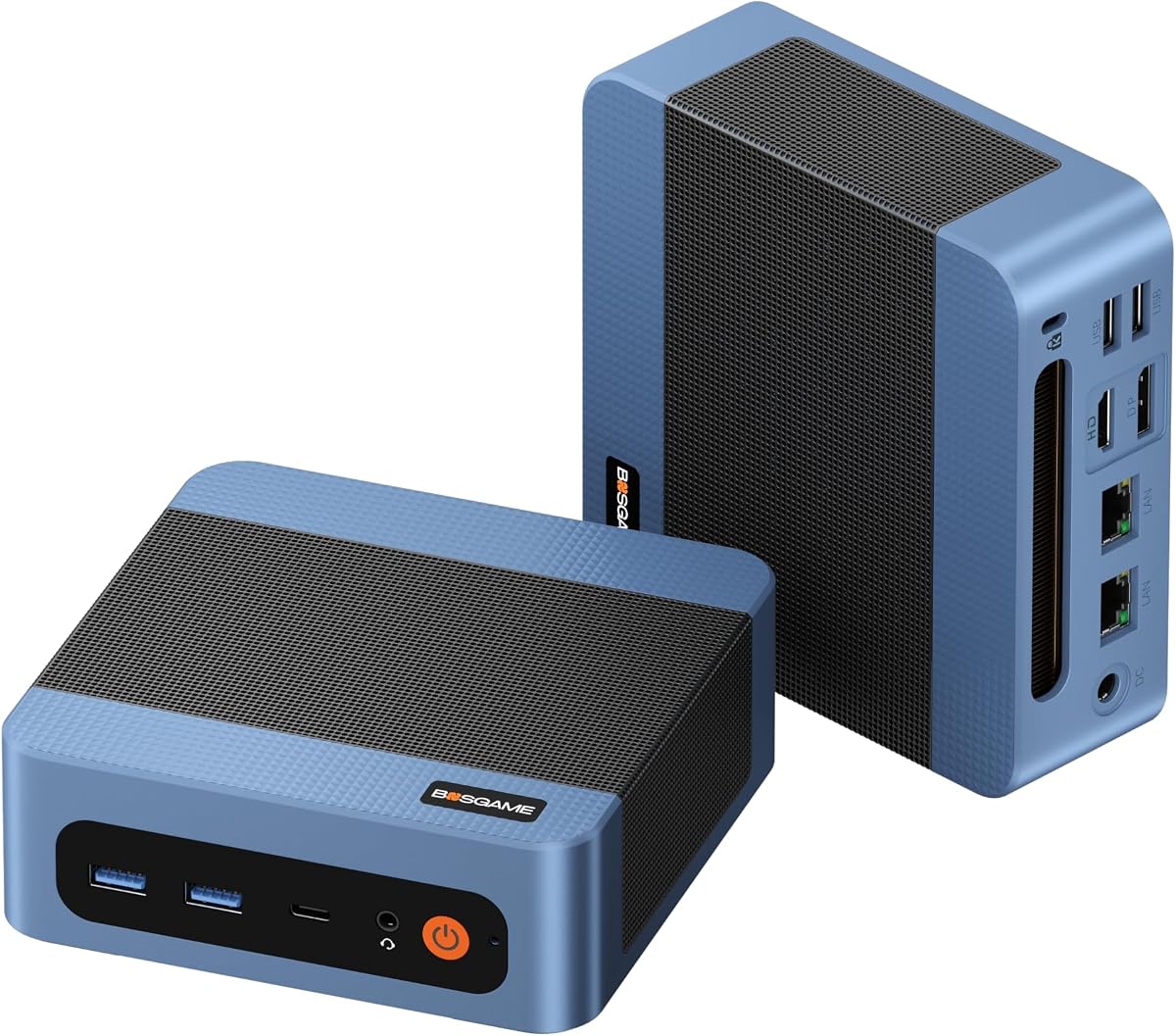


The BOSGAME E5 earns a 4.6 rating and stands out as the most compelling budget-oriented homelab option in this collection. Its Ryzen 3 5300U processor provides four cores and eight threads, while dual 2.5GbE Ethernet ports create an unusually useful foundation for firewalls, routers, virtual machines, and local services. The compact enclosure also makes it practical to deploy beside a router or in a small equipment cabinet.
We may earn a commission when you buy through this link, at no additional cost to you.
Its networking is the central attraction. Two Realtek RTL8125-based 2.5GbE ports make it possible to connect a modem, switch, and storage appliance without relying on USB Ethernet adapters. The system also includes Wi-Fi 5, two SODIMM slots supporting memory expansion up to 64GB, and an additional M.2 2280 NVMe PCIe 3.0 position. That second drive can be added without disturbing the installed operating system.
There are sensible compromises. The starting memory of 8GB is modest for several virtual machines, and the included 256GB drive uses M.2 SATA rather than the faster NVMe configuration. The product is also not intended for demanding professional 3D rendering or intensive 3A gaming. Even so, those limitations matter little for lightweight Docker containers, network appliances, monitoring tools, and general server administration.
This is the recommendation for most buyers creating a first homelab. Install more memory, add an NVMe drive if the workload requires it, and use the dual 2.5GbE interfaces for flexible network segmentation. It offers more meaningful server features than many inexpensive office mini PCs without moving into the higher-tier Ryzen 5 and Ryzen 7 systems.
Dual 2.5GbE ports are the feature that gives this budget model genuine homelab value. They are well suited to a segmented network, a firewall with separate WAN and LAN connections, or a server that needs both a management link and a storage link.
The two SODIMM slots and secondary NVMe position keep the initial configuration from becoming a dead end. A larger RAM kit and additional high-speed drive can turn the E5 into a more capable virtualization or storage host later.
We may earn a commission when you buy through this link, at no additional cost to you.
The BOSGAME E5 Plus carries a 4.3 rating and is a balanced choice for homelab users who want capable networking without moving to a premium processor. Its Ryzen 3 5400U offers four cores, eight threads, a 2.6GHz base clock, and boosts up to 4.0GHz, giving it a useful blend of responsiveness and efficiency for office software, browsing, conferencing, and light background services.
We may earn a commission when you buy through this link, at no additional cost to you.
Dual 2.5GbE ports remain the most important homelab feature. Wi-Fi 5 and Bluetooth 5.0 are also included, while two SODIMM slots permit expansion to 64GB. A second M.2 2280 NVMe PCIe 3.0 x4 slot offers faster storage than the included SATA SSD, making it possible to create a dedicated data or virtual-machine volume without replacing the system drive.
The E5 Plus does not overpower the standard E5 despite its different processor and marketing tier. Both use four-core, eight-thread Ryzen 3 chips, and the supplied memory and storage capacities are similar. Its preinstalled Windows 11 Pro system, certification, and stated parts warranty are positives, but buyers focused only on specifications may see relatively little separation from the first-ranked model.
Choose the E5 Plus when you want Windows 11 Pro out of the box, triple-display flexibility, and a clear path to faster NVMe storage. It is well suited to network monitoring, file services, development work, and private cloud experiments, provided you upgrade the initial memory when the workload requires it.
The two 2.5GbE interfaces make the E5 Plus a natural fit for firewall appliances, dual-network experiments, and direct server links. Their speed is especially useful when moving files between fast NAS and workstation systems.
Although the initial SSD is SATA, the available PCIe 3.0 x4 position supports a much faster drive. Adding one is a straightforward way to separate storage-intensive workloads from the operating system.
We may earn a commission when you buy through this link, at no additional cost to you.
The Getorli Ryzen 5 7430U earns a 4.5 rating and offers the strongest balance of processor performance, memory, networking, and expansion in the guide. Six cores and twelve threads provide more headroom than the four-core Ryzen 3 alternatives, while the included 16GB of DDR4 memory is a much more comfortable starting point for Linux services, containers, and several lightweight virtual machines.
We may earn a commission when you buy through this link, at no additional cost to you.
Its networking and wireless features are particularly well matched to a modern homelab. Two 2.5GbE RJ45 ports support high-speed wired transfers and flexible firewall or server arrangements. Wi-Fi 6 and Bluetooth 5.3 provide contemporary wireless connectivity, and the Ryzen 5 7430U reaches up to 4.3GHz for responsive interactive work. Triple 4K output through HDMI, DisplayPort 1.2, and Type-C also allows the machine to double as a monitoring or administration station.
The 512GB drive is only a starting point. Memory can be expanded to 64GB, and solid-state storage to 4TB, although the supplied information does not detail the interface mix for every additional position. A home server still requires sensible memory sizing, storage planning, backups, and service isolation. These are normal homelab responsibilities rather than shortcomings specific to the system.
This is the pick for someone who wants one capable computer to run containers, a lightweight virtualization lab, media services, and network experiments without immediately choosing a premium Ryzen 7 platform. The 16GB memory, six-core processor, dual fast Ethernet, and modern wireless support create the most versatile package in the roundup.
Six cores and twelve threads give the Getorli more breathing room than the four-core E5 models. That advantage is noticeable when compiling software, managing several containers, or running multiple lightweight virtual machines concurrently.
Dual 2.5GbE, Wi-Fi 6, and Bluetooth 5.3 reduce the need for adapters when moving between wired network appliances and wireless peripherals. It also gives administrators more ways to experiment with network paths.
We may earn a commission when you buy through this link, at no additional cost to you.
The Pentium N3700 Mini PC has a 3.7 rating and prioritizes a remarkably small, low-power enclosure over raw performance. Its four-core, four-thread processor operates at up to 2.4GHz within a 6W thermal design. The result is a 0.47-liter chassis weighing just 0.28kg, making it easy to mount behind a display or deploy in a tightly packed homelab.
We may earn a commission when you buy through this link, at no additional cost to you.
Despite the modest rating, the specification list covers a useful range of light workloads. The product data specifically mentions virtual machines, NAS functions, Docker, and multiple background services, but the 8GB memory and 128GB drive make those uses more realistic for one or two lightweight services than a crowded multi-tenant environment. Dual HDMI outputs support 4K dual-display arrangements, and the port selection includes two Type-C ports, two USB 3.1 ports, two USB 2.0 ports, Gigabit Ethernet, and an audio jack.
The main drawback is the 3.7 rating, which is the lowest among these ten products. The older Pentium platform also delivers less processing headroom than the Ryzen selections. Storage can expand to 2TB, yet buyers should verify the exact drive interface and connector requirements before assuming compatibility with a particular upgrade.
Its target buyer is someone building a highly compact, low-power endpoint for lightweight containers, a small NAS experiment, digital signage, or a dedicated test machine. For a primary virtualization server, a Ryzen 5 or Ryzen 7 system would be a more responsible choice.
At 0.47 liters and 0.28 kilograms, the enclosure is dramatically smaller than a traditional tower. The included VESA mount makes it particularly useful behind a monitor or television.
Low power draw and efficient cooling make this attractive for a small always-on helper. Keep expectations realistic by assigning limited containers or monitoring functions rather than intensive virtual machines.
We may earn a commission when you buy through this link, at no additional cost to you.
The KAMRUI Ryzen 5 3501U combines a 4.6 rating with a homelab-friendly pair of Gigabit Ethernet ports. Its Ryzen 5 3501U processor, Radeon Vega 8 graphics, and 28W cooling design make it suitable for general desktop work, media playback, network utilities, and a home-server foundation. The system also supports triple 4K output through HDMI 2.0, DisplayPort 1.4, and full-featured USB-C.
We may earn a commission when you buy through this link, at no additional cost to you.
Two SO-DIMM DDR4 slots allow memory expansion to 32GB, and dual M.2 2280 positions support storage expansion up to 4TB. That upgradeability is important because the included 8GB and 256GB configuration is modest for modern container workloads. The full-function USB-C port supports 65W Power Delivery, which can simplify a desk setup when paired with a compatible display.
Its networking is excellent for basic segmentation but trails the 2.5GbE models in raw transfer speed. That distinction matters when serving a fast NAS or moving large files locally, although dual Gigabit connectivity remains more flexible than the single-port alternatives. The system's 24/7-oriented quiet cooling and compact metal enclosure are positives for an unattended installation.
This KAMRUI is a good middle option for OpenWrt, pfSense, lightweight NAS use, media services, and a dual-home-network experiment. Choose it when dual wired ports and good graphics matter more than 2.5GbE throughput, and plan to add memory once the core homelab project is established.
One port can connect to the upstream network while the other links to an internal switch or server. That arrangement simplifies firewall, router, and isolated-lab experiments.
Dual M.2 positions and replaceable SODIMM memory prevent the initial configuration from becoming a permanent restriction. A NAS or virtual-machine project can gain capacity without replacing the entire computer.
We may earn a commission when you buy through this link, at no additional cost to you.
The BOSGAME E5 11 Pro holds a 4.4 rating and differentiates itself through a clean, activated Windows 11 Pro installation, an NVMe system drive, and strong networking. The Ryzen 3 5300U provides four cores and eight threads with boosts up to 3.8GHz, enough capability for business applications, extensive browser use, conferencing, and a range of network services.
We may earn a commission when you buy through this link, at no additional cost to you.
Dual Realtek RTL8125-based 2.5GbE ports are the key homelab asset. They are suitable for pfSense or OPNsense, software routers, NAS functions, and local virtual machines. The system also offers a second internal M.2 2280 NVMe PCIe 3.0 position for an additional high-speed drive, along with memory expansion to 64GB. Triple 4K at 60Hz output is available across HDMI 2.0, DisplayPort, and full-function USB-C.
The included 8GB remains the limiting factor for larger virtual machines, and Windows 11 Pro may be unnecessary for a pure Linux appliance. Some homelab operators prefer to install their preferred Linux distribution and avoid a preconfigured Windows environment. Nevertheless, the supplied system is described as clean, and Windows can still be useful for administrative dashboards or Windows-compatible services.
This is the recommendation for buyers who want an immediately usable Pro desktop that can also enter a home-server role. It combines fast Ethernet, NVMe storage, and multi-display flexibility in a compact package, provided the eventual workload does not require more than the installed memory.
The combination of dual 2.5GbE and NVMe storage supports quicker local data movement than systems limited to Gigabit Ethernet and SATA. It is a better fit for demanding file services and network experiments.
Windows 11 Pro provides a ready-made environment for business software and administrative tools, while USB-C display output, data transfer, and power delivery can simplify a multi-monitor desk.
We may earn a commission when you buy through this link, at no additional cost to you.
The 16GB version of the BOSGAME E5 earns a 4.6 rating and is the most immediately balanced configuration in the E5 family. It retains the Ryzen 3 5300U's four cores and eight threads while shipping with 16GB of DDR4 memory and a 512GB NVMe PCIe 3.0 SSD. That is a considerably more useful starting point for containers, file services, and several small virtual machines.
We may earn a commission when you buy through this link, at no additional cost to you.
The rest of the feature set is equally homelab-friendly. Dual 2.5GbE RJ45 ports support fast wired networking and firewall deployments, while a second M.2 2280 NVMe slot allows a separate high-speed data drive. Wi-Fi 5 is included for wireless access. The system can also drive three independent 4K displays, making it useful for a network dashboard, monitoring station, or secondary administration screen.
The processor remains the same four-core design found in the lower-memory E5, so heavily parallel workloads will not scale as well as on the six-core Getorli or eight-core P6 Neo. The product is also explicitly positioned for daily productivity and network server applications rather than intensive 3D rendering or demanding 3A games. Those limits are entirely reasonable for a homelab node.
Choose this version when you want to minimize immediate upgrades and still retain excellent networking. It is a strong fit for a home NAS, a small virtual-machine host, a dedicated network monitor, or a general-purpose always-on server. Buyers can add RAM and another NVMe drive as their services grow.
Sixteen gigabytes gives you room for a Linux desktop, several containers, or a small collection of lightweight virtual machines. This makes the system easier to deploy than an 8GB entry configuration.
The included 512GB NVMe drive provides a stronger foundation for virtual disks, application data, and active storage workloads. The reserved second NVMe slot keeps future expansion straightforward.
We may earn a commission when you buy through this link, at no additional cost to you.
The C3 Core i3-5005U has a 4.2 rating and appeals to homelab builders focused on storage and steady background operation rather than demanding compute. The older Intel Core i3-5005U is a dual-core, four-thread platform, but its 15W design and optimized cooling are positioned for continuous use in digital signage, thin-client, media-server, and monitoring roles.
We may earn a commission when you buy through this link, at no additional cost to you.
Storage flexibility is its most notable strength. The system includes 8GB of RAM and a 512GB M.2 2280 SSD, with memory expandable to 32GB. It supports M.2 SATA or NVMe expansion up to 2TB and an additional 2.5-inch SATA SSD or HDD position, allowing up to 4TB of combined storage. That mix is useful when combining fast SSD performance with inexpensive bulk capacity for media or backups.
Its networking is less flexible than most alternatives. A single Gigabit Ethernet port limits direct dual-network configurations and may require an additional switch or adapter for certain router and firewall arrangements. The integrated Intel HD Graphics 5500 supports two displays up to 2560×1600 at 60Hz, but its age also places it behind newer Ryzen systems in general responsiveness.
This C3 makes the most sense for storage, signage, or lightweight monitoring where steady operation and drive expansion matter more than processor speed. The supplied system supports only 10 and Linux, which may be an advantage for a dedicated open-source appliance. For heavy virtualization, choose a newer six-core or eight-core model.
The C3 accepts both M.2 SATA and NVMe media while also offering a 2.5-inch drive position. Combining NVMe and SATA storage can provide fast system performance alongside inexpensive archival capacity.
The low-power processor and cooling design suit digital signage, thin-client functions, and long-running media services. Reliability features and support are helpful, but critical data should still have independent backups.
We may earn a commission when you buy through this link, at no additional cost to you.
The BOSGAME P6 Neo holds a 4.3 rating and is the premium selection for homelabs that need more compute headroom than conventional office mini PCs offer. Its Ryzen 7 6800H delivers eight cores, sixteen threads, a 3.3GHz base clock, and boosts up to 4.7GHz, with Radeon 680M integrated graphics capable of driving three 4K displays.
We may earn a commission when you buy through this link, at no additional cost to you.
The supplied 24GB of LPDDR5X 4800MT/s memory and 1TB PCIe 4.0 x4 SSD create a strong configuration for development, content workflows, multiple virtual machines, and containerized services. A second M.2 2280 slot allows another NVMe drive. Dual Gigabit Ethernet supports flexible wired networking, while Wi-Fi 6E and Bluetooth 5.3 cover modern wireless needs. Three 10Gbps USB Type-A ports and a full-function USB-C port add useful peripheral bandwidth.
The key trade-off is that LPDDR5X is onboard, so the included 24GB cannot be expanded in the same way as SODIMM-based systems. Its Ethernet ports are also limited to 1Gbps each, despite the processor's strong capabilities. The dual-fan design, Windows 11 Pro installation, VESA bracket, and stated certification make it convenient as both a homelab host and an everyday workstation.
Choose the P6 Neo for a high-performance lab, a development server with several virtual machines, or a single machine that must handle both computing and extensive display output. It is overkill for a basic DNS server or lightweight NAS, but it provides the most substantial processing reserve in this roundup.
Eight cores, sixteen threads, and 24GB of fast memory make this the strongest candidate for multiple virtual machines or CPU-heavy containers. It also provides a comfortable desktop experience while those services operate.
The 1TB PCIe 4.0 drive accelerates operating-system response and active workloads, while Radeon 680M graphics provide useful display capability. Triple 4K output can turn the system into a compact multi-screen monitoring hub.
We may earn a commission when you buy through this link, at no additional cost to you.
The Bmax B1 Plus has a 4.2 rating and serves as the most accessible entry point into this roundup. Its Intel Celeron J3355 reaches up to 2.5GHz and is designed for browsing, document editing, and routine office tasks. Windows 11 Home is preinstalled, while Linux and Ubuntu are supported, giving homelab users a choice of operating environment for a lightweight node.
We may earn a commission when you buy through this link, at no additional cost to you.
The machine measures only 4.2 by 4.1 by 1.4 inches and weighs 0.49 pounds. That makes it easy to conceal behind a monitor using the included VESA bracket. Two HDMI outputs support 4K at 60Hz on two displays, while dual-band Wi-Fi, Bluetooth 5.0, and Gigabit Ethernet cover everyday connectivity. An F9 one-click restore function is a convenient option for quickly recovering the operating system.
The largest limitation is fixed 6GB LPDDR3 memory, which cannot be upgraded and offers little room for memory-heavy containers or virtual machines. The 128GB eMMC is suitable for a lightweight operating system, and the dual M.2 positions—one SATA and one NVMe—provide storage expansion up to 2TB. There is only one Ethernet port, so multi-homed firewall configurations will require additional hardware.
This Bmax is best for a simple Linux helper, a lightweight monitoring terminal, a personal cloud control machine, or a compact office computer with occasional homelab use. It is less suitable for a primary NAS or busy virtual-machine host, where more memory, faster storage, and multiple network interfaces are important.
The tiny chassis can sit behind a display or in a crowded cabinet without taking up meaningful space. Its low power needs and quiet cooling suit a small utility role.
The F9 one-click restore tool can help a beginner recover a compact system after configuration changes. It does not replace backups, but it simplifies the process of returning to a clean state.
We may earn a commission when you buy through this link, at no additional cost to you.
Choose a Mini PC for a homelab by matching processor capacity, memory, storage, network interfaces, and cooling to the services you intend to run. A compact size is useful, but expandability and sustained performance matter more once the system becomes infrastructure.
The processor determines how comfortably the system can run Docker containers, virtual machines, compilation tasks, media transcoding, and multiple background services. The four-core Ryzen 3 5300U and 5400U models are practical for lightweight services, while the six-core Ryzen 5 7430U offers a better balance for several concurrent workloads. The eight-core, sixteen-thread Ryzen 7 6800H provides the strongest performance reserve in this roundup. Older Intel Pentium, Core i3-5005U, and Celeron J3355 systems are best reserved for lightweight administrative or media tasks rather than heavily parallel virtualization.
Memory determines how many services, applications, and virtual machines can remain active without excessive swapping. Eight gigabytes is a reasonable starting point for a single lightweight server role, while 16GB provides a much more comfortable foundation for a combined desktop and homelab system. SODIMM slots are valuable because they let you increase capacity as projects expand. Fixed 6GB LPDDR3 and 24GB LPDDR5X configurations cannot be upgraded, so choose the onboard capacity with future growth in mind.
Fast NVMe storage improves boot times, application loading, database responsiveness, and virtual-machine performance, while SATA drives are more appropriate for inexpensive bulk storage. Look for M.2 2280 positions and confirm whether the included drive is SATA or NVMe. The C3 supports a useful combination of M.2 and 2.5-inch SATA storage, but other systems rely entirely on compact M.2 drives. For a NAS or media library, plan capacity for the operating system, application data, backups, and growth rather than selecting only enough space for the initial installation.
Ethernet is usually more important than wireless connectivity in a homelab. Dual 2.5GbE ports provide the greatest flexibility for firewall appliances, VLAN experiments, direct NAS links, and high-speed local file transfers. Dual Gigabit Ethernet is still excellent for many routed networks, while single-port systems require a switch or additional adapter for multihomed setups. Wi-Fi 6 or 6E can be valuable for management and mobile devices, but it should not be assumed to replace a stable wired connection for critical services.
Lightweight containers and virtual machines place different demands on a homelab computer. Containers can be efficient, but each application still consumes memory, storage I/O, and processor time. Virtual machines need more memory and a faster drive because each guest operates as a complete isolated system. The Getorli's 16GB configuration and six-core processor provide a strong general-purpose foundation, while the 24GB P6 Neo handles heavier virtual-machine labs. The Intel N3700 can run limited workloads, but its 8GB memory should be treated as a firm ceiling for demanding projects.
Windows can be convenient for business applications and mixed desktop use, while Linux and Ubuntu are widely used for containers, routers, NAS functions, and automation. Several products in this guide explicitly support Linux, but compatibility can depend on wireless drivers, storage devices, and the specific software version. The C3 is limited to 10 and Linux according to its supplied information. Confirm boot support, networking, and hardware compatibility for your intended operating system before committing to a model.
A homelab machine may operate continuously, so thermal design and noise matter even when peak performance is modest. Copper heat pipes, efficient fans, and low-power processors are common features in this collection. The Pentium N3700 emphasizes a near-silent 6W design, the KAMRUI uses a quiet 28W cooling layout, and the P6 Neo relies on dual fans for its more powerful processor. Position the system where airflow is not restricted, leave space around vents, and use a surge-protected source for unattended equipment.
Multi-display support can make a homelab node much more useful by providing separate screens for administration, dashboards, logs, and media. Triple 4K configurations are available on the Ryzen 3 5300U systems, the Getorli, the KAMRUI, and the P6 Neo. The Pentium and Bmax support dual displays, while the C3 uses two HDMI outputs at up to 2560×1600. USB-C display support can also simplify a one-cable desk arrangement, but the connected monitor must offer compatible video and power-delivery functions.
Begin by deciding which role the computer will play and keeping that role separate from unrelated desktop tasks. Install the operating system you intend to use, update it, create a dedicated administrative account, and configure secure remote access. For a router or firewall, connect the appropriate Ethernet cables before exposing services, and document each interface's network assignment. For a server, use stable naming, consistent storage paths, and a backup destination that is not merely another folder on the same drive.
Give the system adequate ventilation and place it on a hard, stable surface. Avoid enclosed cabinets unless airflow is demonstrably adequate, and do not block vents. Use the included VESA mount when appropriate, but leave clearance around the chassis and cable bends. Connect a UPS if the computer hosts critical services, and configure automatic startup for essential applications. Monitor temperatures, storage health, and service logs rather than assuming that a compact enclosure is immune to thermal or reliability issues.
Maintain the Mini PC by applying operating-system and firmware updates on a schedule, checking logs for failed services, and verifying that backups can actually be restored. Keep memory and storage additions compatible with the documented limits, and do not remove the only working copy of important data. A clean system image and documented configuration make upgrades and replacements much easier. If the unit is moved between networks, update firewall rules, certificates, and remote-access credentials to prevent old assumptions from creating security gaps.
The Getorli Ryzen 5 7430U is the strongest all-around recommendation because it combines six processor cores, 16GB of memory, dual 2.5GbE networking, and substantial expansion options. The BOSGAME E5 16GB is a more affordable alternative when its Ryzen 3 processor and 512GB NVMe drive are sufficient. Choose a lighter system only for narrowly defined services such as a simple dashboard, DNS helper, or media endpoint.
Two ports are highly useful for firewall, router, and isolated-network experiments because they can connect separate physical networks without an extra adapter. A single Gigabit Ethernet port is adequate for a straightforward server connected to one managed switch. Multiple 2.5GbE ports also help when transferring large files between local servers or high-speed NAS equipment.
Eight gigabytes can run a few lightweight containers or one modest virtual machine, but it leaves little room for growth. Sixteen gigabytes is a better minimum for a mixed homelab, while 24GB is preferable for heavier virtual-machine labs. Fixed-memory systems should be chosen with their maximum capacity in mind because their installed memory cannot be replaced.
Several models explicitly support Ubuntu or Linux, including the BOSGAME E5 Plus, the E5 11 Pro, the P6 Neo, and the Bmax B1 Plus. The C3 supports 10 and Linux. Before installation, verify the necessary boot mode, storage driver, wireless driver, and server software, since not every accessory or peripheral behaves identically across operating systems.
A Mini PC can be better when you value compact size, lower power consumption, modern networking, and quiet operation. An old desktop may offer more upgradeable components or stronger performance for less money, but it can also be larger, louder, and less efficient. Compare the complete system rather than judging either form factor solely by its processor.
The correct amount depends on whether the machine runs operating-system services, virtual machines, databases, media, or backups. A 256GB drive is enough for lightweight applications, while 512GB or 1TB is more comfortable for active virtual disks and system data. Keep large media or archival data on separate drives and maintain independent backups rather than relying on internal capacity alone.
Several choices explicitly position their dual-network hardware for pfSense, OPNsense, or similar firewall use. A four-core Ryzen model with dual 2.5GbE is a strong starting point, while lighter Intel systems may work for simpler configurations. Confirm the specific network software's hardware requirements, supported boot method, and port behavior before installation.
Many systems in this guide are designed or marketed for continuous operation, and their low-power processors can suit always-on services well. Proper ventilation, reliable storage, backups, surge protection, and monitoring remain necessary. A UPS and an automatic restart after power loss are especially useful for network-critical machines.
The BOSGAME E5 is the best budget starting point because dual 2.5GbE ports, expandable memory, and a secondary NVMe position provide unusually serious homelab features. The Getorli Ryzen 5 7430U is the best overall option because its six-core processor and 16GB memory handle a broader range of containers and virtual machines. For the highest performance, the BOSGAME P6 Neo combines eight cores, 24GB of fast memory, and a 1TB PCIe 4.0 drive.
Prioritize the parts that affect your actual project. Use dual 2.5GbE when you need firewall flexibility or fast local transfers, choose 16GB or more for mixed workloads, and install NVMe storage for active data. Small systems remain useful for lightweight services, but they should not be expected to replace a modern server when memory use and concurrency are high.
Finally, check the current product details, configuration, compatibility information, and price before purchasing. Hardware specifications and bundled software can change, and the same Mini PC family may appear in different memory and storage configurations. Confirm that the selected model matches the ports, operating system, and expansion requirements of your planned homelab.
