
Lenovo Idea Tab – College Tablet
4.3Editor score
11-inch 2.5K touchscreen
Included pen and case
All-day study battery
Looking for a Tablet for Back to School Students? Compare ten options by performance, display, battery, storage, accessories, portability, and study features.
A tablet for back to school students must balance portability, screen quality, battery life, and dependable performance across lectures, note-taking, research, communication, and entertainment. The best choice depends on how a student learns, what software they use, and whether they prefer a stylus or a keyboard-first setup.
We compared ten tablets using their listed specifications, included accessories, ratings, displays, memory, storage, battery claims, connectivity, and learning-oriented features. The guide covers models for note-taking, research, media use, gaming, younger learners, and students who want a more laptop-like experience.
Each pick highlights a distinct balance, from a well-equipped college tablet to premium performance and child-focused controls. Product details and availability can change, so readers should verify the current listing, included accessories, regional compatibility, and software support before buying.
4.3Editor score

4.6Editor score

4.6Editor score
The table below compares all ten tablets by display, performance, memory, and standout study features, making it easier to identify the option that matches a student's workflow, budget, and preferred level of portability.



The Lenovo Idea Tab – College Tablet is a balanced, campus-oriented tablet with a listed rating of 4.3. Its 11-inch 2.5K IPS touchscreen runs at 90Hz, giving students a sharp and fluid surface for reading documents, following online lessons, writing notes, or streaming after class. The included Tab Pen and folio case make it more immediately useful than a bare tablet.
We may earn a commission when you buy through this link, at no additional cost to you.
Learning support is one of its strongest elements. Lenovo AI Note, Squid, Nebo, and MyScript Calculator cover several common study tasks, while Circle to Search provides a direct way to search information visible on the screen. The MediaTek Dimensity 6300 processor supports everyday multitasking, and Smart Connect is intended to move tasks between compatible devices without relying on cables or email attachments.
Media performance is also well balanced. The 72% NTSC display is paired with quad Dolby Atmos-tuned speakers, making the tablet suitable for lectures, videos, and casual entertainment. Battery life is listed at up to 12 hours of YouTube use, and the included 20W charger helps reduce downtime. The principal limitation is 4GB of memory, which may feel constrained when many demanding applications remain open.
This is the strongest general recommendation for a student who wants a capable writing and media tablet without paying for a premium performance model. It suits note-taking, research, streaming, and everyday communication particularly well. Those who routinely multitask with demanding apps should consider a tablet with more memory, while students who value a stylus, sharp display, and protective accessories will find this package especially coherent.
The Tab Pen supports writing, drawing, highlighting, and Circle to Search, while the folio case provides a basic way to protect the tablet during commutes. Together, they remove the need to purchase those accessories separately.
The 2.5K IPS panel offers more resolution than a standard HD display, while the 90Hz refresh rate improves scrolling and menu transitions. Quad Dolby Atmos-tuned speakers add useful clarity for instructional videos.
We may earn a commission when you buy through this link, at no additional cost to you.
The Samsung Galaxy Tab S10 Lite combines a 4.6 rating with a particularly useful balance of study, entertainment, and ecosystem features. Its 10.9-inch LCD provides an ample canvas for handwritten notes, reading assignments, video calls, and streaming, while the Exynos 1380 processor is designed to handle routine multitasking with less friction than a basic entry-level tablet.
We may earn a commission when you buy through this link, at no additional cost to you.
One of its defining advantages is the S Pen. Samsung positions the responsive pen for writing, drawing, mathematical work, and intelligent note features, allowing students to annotate course material instead of simply watching a lecture. Other tools include Circle to Search, note cleanup, equation assistance, and an AI Hot Key accessible through a compatible keyboard. These features are most valuable when the student already uses Samsung devices.
Storage and battery life are strong points. The listing specifies 6GB of memory and 128GB of internal storage, with support for microSD expansion up to 2TB. Samsung advertises up to 16 hours of battery life and a full charge in roughly two hours using Super Fast Charging. Vision Booster adjusts the display to ambient lighting, which is useful during both daytime classes and bedtime reading.
The S10 Lite is ideal for students who want a mature tablet ecosystem, a capable pen, and generous expandable storage. Its LCD screen is less visually ambitious than an OLED or high-resolution premium panel, and some productivity functions are optimized for Galaxy hardware and optional accessories. Even so, the combination of hardware, software integration, and a 4.6 rating makes it one of the most complete choices in this guide.
The S Pen turns the tablet into a practical digital notebook for lecture notes, diagrams, handwritten assignments, and math practice. Intelligent features can help organize or clean up notes, reducing the friction of turning raw writing into useful study material.
With 128GB of built-in storage and microSD support up to 2TB, students can keep textbooks, lecture recordings, videos, and projects together. Expansion is especially helpful for users who do not want to transfer large files to a computer regularly.
We may earn a commission when you buy through this link, at no additional cost to you.
The Samsung Galaxy Tab A11+ is a strong all-purpose option for students who spend equal time on coursework and entertainment. It carries a 4.6 rating, pairs 6GB of memory with 128GB of storage, and features an 11-inch display with a refresh rate up to 90Hz. The larger canvas is useful for digital textbooks, research, video calls, and streaming.
We may earn a commission when you buy through this link, at no additional cost to you.
Its upgraded chipset is intended to keep daily activities responsive, while fast charging supports continued use between classes. The product information also points to versions with up to 8GB of memory and 256GB of storage, allowing buyers to pay attention to configuration differences. Storage expansion further improves its suitability for downloaded lessons, photos, and media files.
The A11+ stands out for entertainment hardware. Quad speakers with Dolby Atmos create a more immersive experience than a typical single-speaker tablet, and the fluid 90Hz display handles motion in games and video well. Google Gemini and Circle to Search add practical assistance for writing, on-screen searches, and everyday organization.
This is a compelling choice for a student who values the display and audio used during long study or streaming sessions. It lacks an included stylus in the listed package, so students wanting handwritten notes should budget for an appropriate pen. Nevertheless, the combination of a 4.6 rating, large screen, strong speakers, and everyday intelligence features makes the A11+ a versatile choice.
The 11-inch display offers enough room for split-screen research, readable documents, and full-width video. Its refresh rate of up to 90Hz also makes scrolling and motion appear smoother than on many basic tablets.
Quad Dolby Atmos speakers improve clarity and immersion for lectures, music, films, and games. That makes the A11+ particularly attractive when the tablet is also the student's main entertainment screen.
We may earn a commission when you buy through this link, at no additional cost to you.
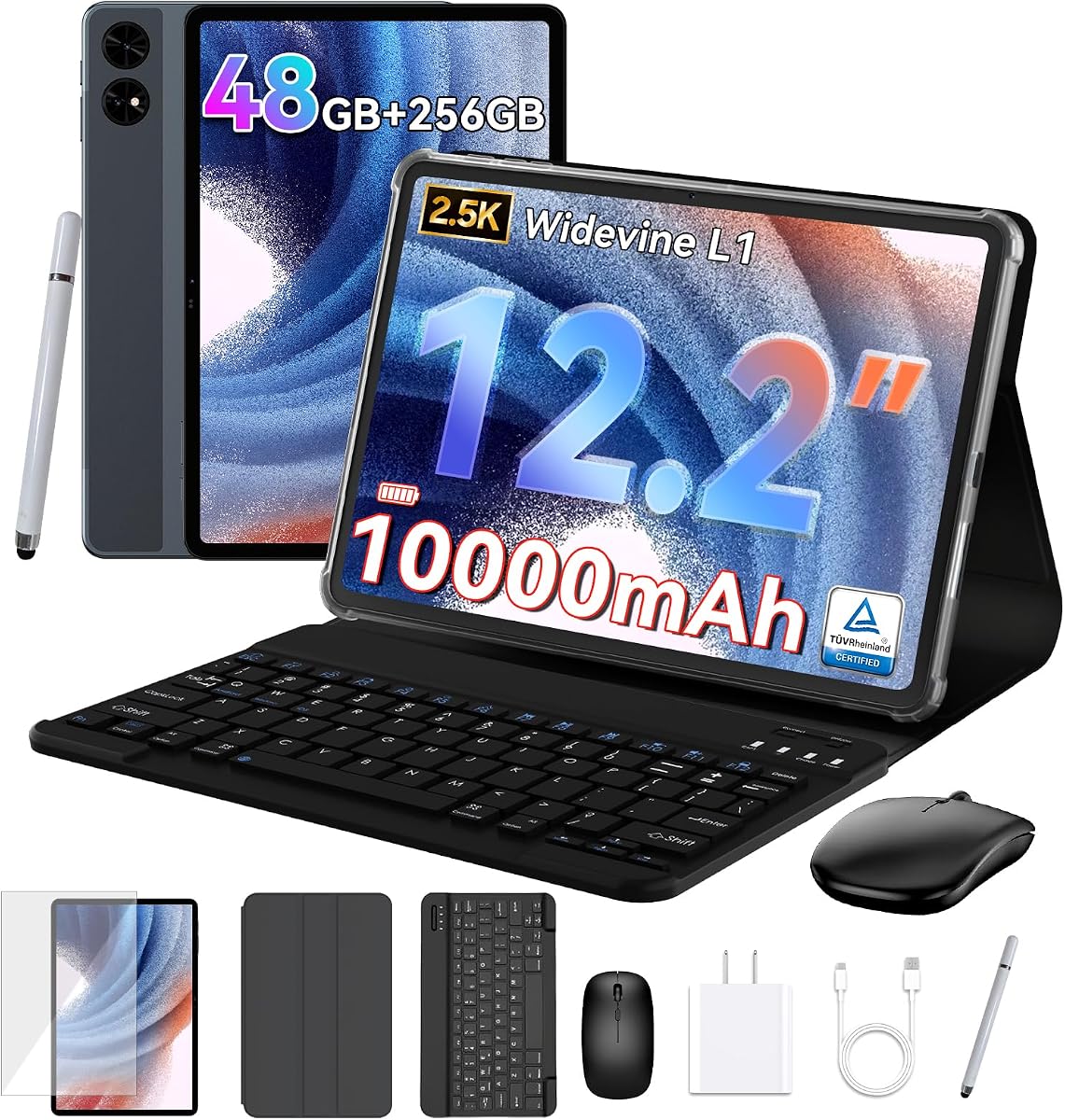
The TABWEE T60 is designed to resemble a complete mobile workstation rather than a simple tablet. It has a 4.4 rating, a large 12.2-inch 2.5K display, and a bundle containing a magnetic keyboard, mouse, stylus, and protective case. That combination gives students more flexibility for typed essays, handwritten notes, video calls, and media work.
We may earn a commission when you buy through this link, at no additional cost to you.
Its specifications are ambitious on paper. The listing describes 48GB of memory, divided into 12GB physical and 36GB virtual, alongside 256GB of UFS storage expandable by up to 1TB. Android 16 desktop windowing, Gemini assistance, split-screen multitasking, and a stated ability to keep many apps active could appeal to students who want a flexible desktop-style workflow.
Visual quality is another major attraction. The 2.5K CSOT LCD covers a stated 99% of the sRGB gamut and includes anti-glare and eye-comfort features. A 10,000mAh battery, GPS, Widevine L1 certification, and GMS support broaden its appeal for travel, streaming, navigation, and everyday connected use.
The T60 is worth considering for budget-conscious students who want a laptop-like bundle without assembling accessories separately. However, the large screen and substantial claimed memory specifications should not be confused with equivalent physical memory in every workload, and the less established brand may require closer attention to warranty registration and support terms. It is best suited to students who prioritize bundle value and flexibility.
The magnetic keyboard, mouse, and desktop windowing mode create a more conventional workstation arrangement. This is useful for lengthy documents, research, remote classes, and students who alternate between typing and stylus input.
The 12.2-inch 2.5K panel is unusually large for a general-purpose tablet. Anti-glare treatment and a stated 99% sRGB coverage also make it suitable for detailed reading and creative work.
We may earn a commission when you buy through this link, at no additional cost to you.
The Evermyth Android 16 Tablet is a straightforward, affordable option for students who need a conventional Android device for browsing, reading, classes, messaging, and casual gaming. Its 4.0 rating is the lowest among the picks in this guide, but the core feature set covers many fundamentals without requiring a premium design.
We may earn a commission when you buy through this link, at no additional cost to you.
The tablet runs Android 16 and is GMS-certified, allowing direct access to Google Play apps. Its stated 24GB of memory consists of 3GB physical memory and 21GB virtual memory, so it is best understood as a mixed specification. The 64GB internal storage can be supplemented with a TF card up to 1TB, which is useful for students maintaining a large local library of course materials.
Connectivity is a meaningful strength. Wi-Fi 6, dual-band networking, and Bluetooth 5.4 provide a modern foundation for school Wi-Fi and compatible accessories. The 10-inch 1280×800 IPS display includes low-blue-light technology, while 5MP front and 8MP rear cameras cover video calls and basic photography.
With a 6000mAh battery, the Evermyth is aimed at regular reading, streaming, browsing, and light productivity. Its HD resolution is less detailed than the alternatives, and virtual memory cannot fully replace physical RAM for every workload. It is most appropriate for a student whose priorities are app access, modern connectivity, expandable storage, and uncomplicated everyday use.
Wi-Fi 6 and Bluetooth 5.4 make the tablet a practical companion for crowded school networks and newer peripherals. Dual-band support can help maintain a stable connection when students move between different access points.
TF card expansion up to 1TB lets users keep more downloaded lessons, documents, and media without constantly replacing files. The microSD card itself is not included, so buyers should confirm compatibility before purchase.
We may earn a commission when you buy through this link, at no additional cost to you.
The Jeazans Android 16 Tablet is built around convenience. Its 4.0 rating reflects a more general product, but the package includes a Bluetooth keyboard, silent wireless mouse, stylus, folding leather case, and fast charger. For a first tablet or a student moving between home and campus, that ready-made setup is compelling.
We may earn a commission when you buy through this link, at no additional cost to you.
Android 16 brings privacy controls and multitasking features, while the listing describes 24GB of memory with 3GB physical and 21GB virtual, plus 64GB of storage. The case supports multiple viewing angles and can be folded for 360-degree use. Together with the keyboard, it can function as a compact workstation for documents, browsing, and virtual classrooms.
The stylus is designed for annotations and sketching, while the dual HD cameras support online meetings and everyday photography. The product also includes a one-year brand warranty, technical support, and a stated return policy, giving buyers some added confidence in a less familiar tablet brand.
This is a strong option for students who want the most complete accessory bundle at the lower end of the guide. It may appeal to travelers and younger learners who need a protective case and simple keyboard. More advanced students should examine actual screen resolution, update support, and sustained app performance, since the product data emphasizes accessories more heavily than a high-resolution display.
The keyboard, mouse, stylus, case, and charger eliminate the need to source separate accessories immediately. This makes setup easier for students who are new to tablets or building a compact study station.
The folding leather case supports several positions, useful for typing, media viewing, handwritten notes, and video calls. A stable viewing angle can also reduce neck strain during longer online classes.
We may earn a commission when you buy through this link, at no additional cost to you.
The UKIDOZ Android 16 Kids Tablet is tailored to children ages three to 12, making it a distinctive choice for elementary and early middle-school students. Its 4.6 rating is among the strongest in the guide, and the package combines a 10-inch HD IPS display with a stylus, adjustable protective case, and kid-focused software controls.
We may earn a commission when you buy through this link, at no additional cost to you.
UKIDOZ Kids Space provides educational content, learning games, and picture books selected for the stated age range. The built-in parental controls allow guardians to set screen-time limits, manage app permissions, and filter content. These tools are more important for a younger student than raw processor specifications because they help create a structured, age-appropriate environment.
Hardware specifications include 24GB of memory, 64GB of internal storage, and TF card expansion up to 1TB. The included case has a 180-degree adjustable stand and anti-slip, drop-resistant, and anti-scratch features. Widevine L1 certification supports HD streaming on compatible services, while 6000mAh battery capacity is intended to support several hours of learning and entertainment.
This is the most appropriate pick for families buying a child's first tablet or seeking stronger controls than a standard Android device provides. It is less suitable for high-school students who need advanced productivity software or a more sophisticated stylus experience. Within its intended audience, however, the learning library, parental tools, case, and pen create a notably complete package.
UKIDOZ Kids Space puts educational games, books, and age-appropriate material at the center of the experience. Paired with parental limits and permissions, it gives guardians more control over how a child uses the device.
The lightweight body, protective adjustable case, and included stylus are practical for drawing, writing, and entertainment. The 180-degree stand also makes the tablet convenient for watching lessons or joining calls.
We may earn a commission when you buy through this link, at no additional cost to you.
The compact Samsung Galaxy Tab A11 is built for students who prefer a smaller, easier-to-carry device. Its 8.7-inch 90Hz display offers a 1340×800 resolution, and the overall size makes it convenient for carrying in a smaller backpack or using one-handed for reading. The listed rating is 4.3.
We may earn a commission when you buy through this link, at no additional cost to you.
Performance is led by the 6nm MediaTek Helio G99 octa-core processor and Mali-G57 MC2 graphics. With 4GB of RAM and 64GB of internal storage, the tablet is suitably equipped for browsing, note-taking, media, and regular productivity. A microSD slot supports expansion up to 2TB, an unusually generous ceiling for a compact device.
Connectivity includes dual-band Wi-Fi, Bluetooth 5.3, GPS, a 3.5mm headphone jack, and USB Type-C 2.0. Cameras comprise an 8MP autofocus rear camera and a 5MP front camera, while the 5100mAh battery provides the power source. These details make it a self-contained option for travel and campus use.
The important caveat is that this is an international Latin American model with no warranty, and a charger is not included. Buyers must also follow the stated setup instruction regarding country selection. Subject to those considerations, the Galaxy Tab A11 is a polished, compact choice for reading and studying where portability matters more than a large display.
The 8.7-inch size reduces the amount of bag space required for a study device. It is well suited to reading, web research, note review, and lighter media use while remaining comfortable for prolonged handheld sessions.
This international Wi-Fi-only version has no stated warranty and does not include a charger. Regional support, accessory compatibility, and service options should be confirmed before ordering.
We may earn a commission when you buy through this link, at no additional cost to you.
The Lenovo Idea Tab Pro is the premium performance and display option in this guide. Its 4.6 rating reflects a strong overall package built around a 12.7-inch 3K LCD, 8GB of memory, 128GB of storage, and the MediaTek Dimensity 8300 processor. It is aimed at students who want a visually impressive device for demanding coursework and entertainment.
We may earn a commission when you buy through this link, at no additional cost to you.
The large 3K display is paired with quad JBL Dolby Atmos speakers, creating an excellent combination for lectures, films, reference material, and creative work. Low Blue Light certification and selectable monochrome or chromatic reading modes help support longer study sessions. Wi-Fi 6E connectivity is another modern feature that can improve performance on compatible networks.
Gaming-oriented specifications include a stated 360Hz touch sampling rate and support for up to 90fps, along with PUBG certification. For school use, Google Gemini can assist with writing and research, while Circle to Search provides quick access to information selected on the display. The included Tab Pen Plus supports handwriting, drawing, and search interactions.
Battery life is listed at up to 11 hours of unplugged video streaming, with 45W quick charging for faster top-ups. This is the strongest choice for a student willing to carry a larger device and accept a premium-tier outlay for a superior screen, stronger chip, richer audio, and 8GB of physical memory. It can also function as an attractive entertainment tablet between classes.
The 12.7-inch 3K panel provides abundant space and high detail for lecture recordings, diagrams, textbooks, and design references. Reading modes and Low Blue Light certification make it easier to adapt the display to long sessions.
The Dimensity 8300 and 8GB of memory provide ample headroom for multitasking. Quad JBL Dolby Atmos speakers make the tablet equally capable as a media device, while 45W charging reduces time spent waiting.
We may earn a commission when you buy through this link, at no additional cost to you.
The WXUNJA C5 Android 16 delivers a large screen, substantial battery, and generous storage at an entry-oriented level. Its listed rating is 4.1, and the combination of an 11-inch display, 128GB of internal storage, and 8,000mAh battery makes it a practical general-purpose tablet for browsing, lessons, media, and light productivity.
We may earn a commission when you buy through this link, at no additional cost to you.
Its Unisoc T606 octa-core processor is designed for everyday apps and many games. The stated 28GB of memory combines 4GB physical memory with a 24GB expansion, so physical RAM remains the more important measure for sustained multitasking. Android 16 provides the platform, while split-screen, wireless casting, auto wake-up, face recognition, and Google Kids add useful functions.
The 1280×800 HD screen is Widevine L1 certified for compatible HD streaming. An 8,000mAh battery is claimed to deliver roughly eight to 10 hours of playback, and PD charging up to 18W helps with recharging. Wi-Fi, Bluetooth 5.0, a 3.5mm headphone jack, and 5MP plus 8MP cameras cover the standard connectivity and media needs.
The C5 is best for students seeking a large display and long battery life without paying for a premium chipset. Students running demanding applications or keeping many work-heavy apps open should not assume the expanded memory performs like additional physical RAM. For reading, streaming, ordinary coursework, and casual gaming, however, it covers the essentials with room to spare.
The 8,000mAh battery is one of the most generous capacities in this guide. Combined with the efficiency of the listed processor, it suits full days of reading, browsing, and streaming between classes.
Widevine L1 certification supports high-definition playback on compatible services. Split-screen, wireless casting, and the included headphone jack also make the tablet flexible for both solo work and shared media.
We may earn a commission when you buy through this link, at no additional cost to you.
The right student tablet is the one that supports the learner's daily tasks without becoming frustrating to carry, charge, or operate. Screen quality, software, memory, stylus support, and included accessories should be weighed together rather than judged by a single specification.
Screen size determines how comfortably a student can read, write, multitask, and watch video. Compact 8.7-inch models are easy to carry and handle like a reader, while 10- to 11-inch screens provide a better balance for handwritten notes, split-screen research, and online classes. Larger 12.2- and 12.7-inch screens are more immersive for media and detailed documents but are heavier to carry.
Choose the smallest display that still allows comfortable work. A smaller tablet may be ideal for reading and highlighting, while a larger one is preferable for drawing, spreadsheets, presentations, and courses that require extensive reference material.
Resolution determines how much fine detail the screen can show, which matters for small text, diagrams, and handwritten notes. A 90Hz refresh rate makes scrolling and interactions feel smoother than a standard 60Hz panel. Features such as Vision Booster, anti-glare coatings, low-blue-light modes, and reading filters can also improve comfort in changing environments.
Prioritize a sharp display with smooth motion rather than paying for resolution alone. Check whether the viewing environment includes bright classrooms or dim bedrooms, as brightness adjustment and eye-comfort features become more valuable in those conditions.
Several tablets advertise large combined memory totals by adding virtual memory to physical RAM. Physical memory has a more direct effect on smooth multitasking, while virtual memory can assist with swapping and some background tasks. Students running web browsers with many tabs, video-conferencing tools, and productivity applications should favor at least 6GB of physical memory.
Treat 4GB as adequate for lighter study use but less generous for demanding multitasking. A higher physical-memory figure offers more confidence than a large headline number made mostly from virtual expansion.
Writing-heavy courses benefit from an included pen, low-latency handwriting, and useful note applications. Design and media students may prioritize a larger, higher-resolution display and accurate color. Programmers and advanced students should investigate processor performance, memory, keyboard support, and the availability of desktop-style windowing. Younger learners benefit most from parental controls and curated educational content.
Write down the apps and tasks you expect to use before choosing. A tablet that excels at reading and note-taking may be ideal for humanities students, while one with a larger screen, stronger processor, and keyboard bundle may be better for technical courses and media projects.
A full school day includes classes, commuting, study sessions, and video calls, so battery life should be considered beyond a single entertainment benchmark. Listings in this guide cite battery claims ranging from several hours of mixed use to as much as 16 hours of video. Actual runtime varies with screen brightness, network conditions, video quality, and app demands.
Fast charging can make a moderate-capacity battery much easier to manage between classes. Check the included charger and compatible wattage, especially for models sold internationally or without a listed charging accessory.
Cloud storage helps with synchronization, but students still need enough local capacity for offline notes, textbooks, recordings, applications, and media. The picks range from 64GB to 128GB of internal storage, while several support microSD or TF expansion. Expansion is particularly useful when a course requires large video files or a student prefers keeping materials offline.
Choose at least 128GB when possible if you expect to install many apps or retain course archives. If the tablet supports memory cards, verify the maximum supported capacity and whether the card is included before purchasing.
A stylus, keyboard, mouse, and protective case can materially improve the value of a tablet, especially for students. A pen enables annotation and handwritten work, while a keyboard transforms the device into a more practical writing and research machine. A folding case provides protection and supports comfortable viewing angles for classes and video calls.
Do not assume that a bundle includes every accessory students need. Check whether the pen supports palm rejection and pressure sensitivity, whether the keyboard has a trackpad, and whether the case is included. Individual accessories may also need separate purchase if they are not listed.
A modern operating system, Google Play access, and useful intelligence features can make a tablet easier to use, but compatibility still matters. International models may not include a warranty, may require specific setup steps, or may lack a charger. Students also need to check whether the required learning platform, browser, typing software, and accessibility tools are available.
Read the final specifications and regional notes before ordering. Confirm language support, update expectations, included accessories, charger details, warranty coverage, and the availability of repair or replacement service.
Begin by updating the operating system and all installed apps, then sign in to the student's academic account and synchronize essential materials. Configure a screen lock, set automatic backups, and organize home-screen folders for classes, communication, reading, and creative work. Students using a stylus should complete a short handwriting calibration exercise and test the palm-rejection behavior before taking notes.
Create a charging routine that suits the school day rather than waiting until the battery is nearly empty. Keep a compatible charger in the student's bag and use low-power modes during reading or note-taking. For younger learners, establish screen-time limits, review app permissions, configure the kid-focused content space, and agree on which applications and online activities are appropriate.
Protect the device with the included case and a screen guard if the manufacturer recommends one. Avoid leaving the tablet in extreme heat, direct winter cold, or a full backpack under heavy pressure. Clean the screen and case with a soft microfiber cloth, use a dry method for the charging port, and back up important notes before updating software or replacing an SD card.
A 10- or 11-inch tablet is usually the most balanced choice for college students because it offers enough room for notes, documents, and split-screen research without becoming difficult to carry. An 8.7-inch model is easier to transport and works well for reading, while a 12-inch tablet is preferable for detailed creative work or frequent media use. The best size ultimately depends on the student's subjects and preferred accessories.
A tablet can be better for handwriting, reading, media consumption, and focused online classes, while a laptop is generally stronger for extensive typing, complex software, coding, and file management. Many students use a tablet with a keyboard as a middle ground. Students should identify the software required by their courses before deciding whether a tablet alone can handle their workload.
A stylus is highly useful for students who take handwritten notes, annotate readings, solve math problems, or draw. It can also make research faster through features such as Circle to Search. Students who primarily type and do not need annotation may not need to prioritize a bundled pen, but they should check whether a compatible stylus is available separately.
At least 64GB is workable for lighter use, while 128GB provides more room for applications, downloaded lessons, photos, recordings, and offline documents. Students with large media files or extensive archives should look for microSD or TF expansion. Cloud synchronization can add flexibility, but having adequate local storage remains useful when a reliable network is unavailable.
No. Virtual memory extends available storage for some workloads, but it cannot completely replicate the benefits of additional physical RAM. Students doing heavy multitasking should prioritize the physical-memory figure, processor capability, and software optimization. For basic reading, browsing, and note-taking, a smaller amount of physical memory may still be sufficient.
A Wi-Fi-only tablet works well for students who primarily study at home, school, a library, or another location with reliable wireless access. A cellular model offers more flexibility for commuting and field use but adds cost and complexity. Students should also check whether their campus requires device authentication or has a dedicated wireless network.
The most useful accessories depend on the student's workflow, but a protective case, charger, and stylus or keyboard are common priorities. A case protects the device and may provide a better viewing angle, while a stylus supports handwritten work. A keyboard and mouse can help students who draft long documents or use desktop-style applications.
A child-focused model can be worthwhile for elementary-age students because it offers age-appropriate content, parental controls, screen-time limits, app-permission management, and a more protective package. Older students may prefer a general tablet as their independence and software requirements grow. Parents should consider the child's age, supervision needs, and the educational content available.
The Lenovo Idea Tab – College Tablet is the best overall value for students who want a sharp screen, pen, folio case, and useful learning applications in one package. The Samsung Galaxy Tab S10 Lite is the most balanced premium ecosystem choice, while the Lenovo Idea Tab Pro stands out for its 3K display, stronger processor, 8GB of memory, and rich JBL audio.
Prioritize the features used every day rather than the largest headline number. Pen support matters for handwritten notes, physical memory matters for multitasking, screen size matters for reading and media, and battery life matters between classes. Younger students should emphasize parental controls and protective accessories, while advanced students should investigate processor performance and course-specific software.
Before ordering, confirm the current listing, configuration, included accessories, regional compatibility, warranty coverage, and available storage options. Product specifications and marketplace details can change, so checking the live listing ensures the selected tablet matches the student's courses, budget, and preferred way of studying.