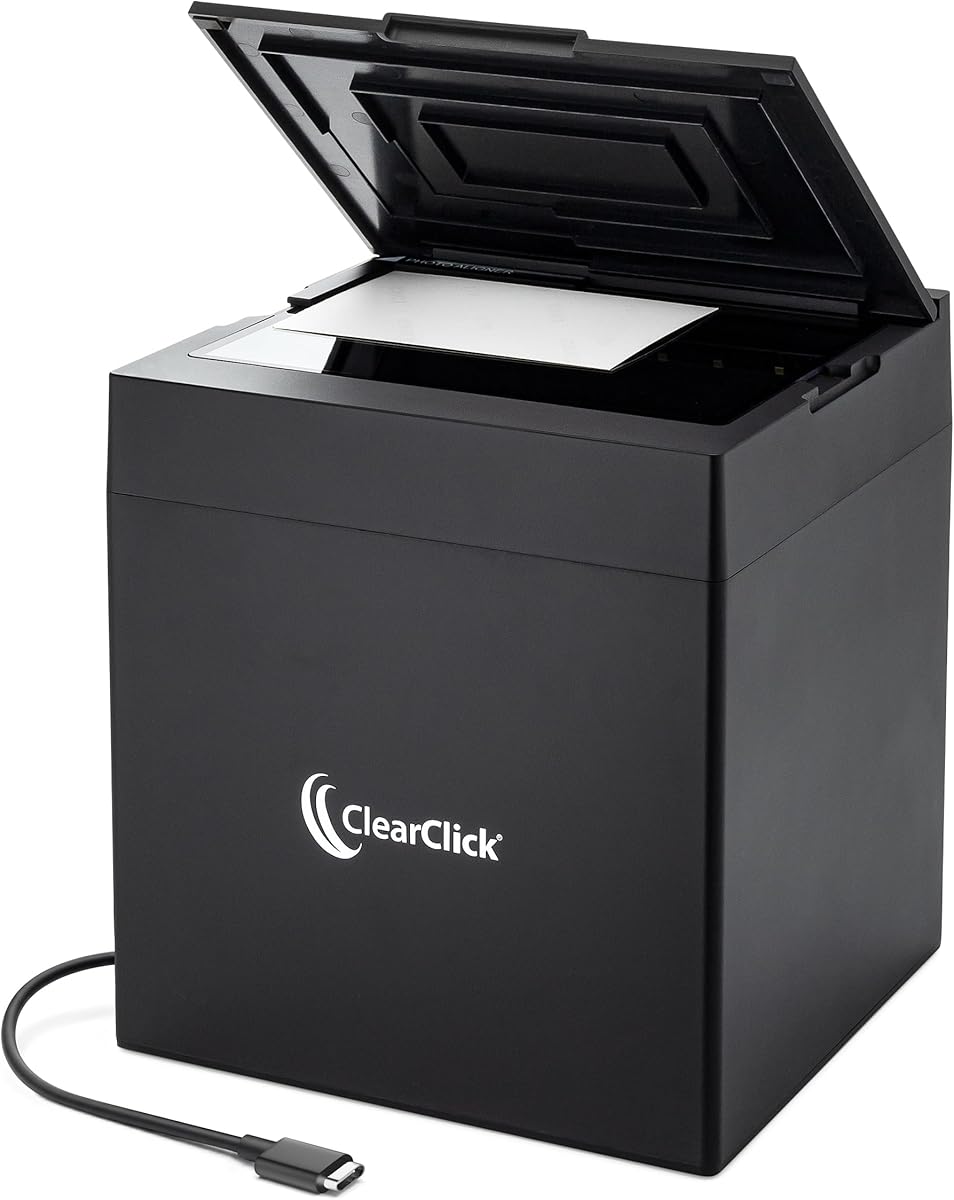
ClearClick InstaScan
3.6Editor score
Designed for standard prints
Automatic camera-based capture
No driver installation required
A scanner for 4×6 photos should make digitization straightforward while preserving the color, detail, and character of each print. The right model depends on how many photographs you own, whether they are fragile, and how you plan to organize or share the finished digital files.
This guide compares ten scanners using the supplied specifications, including supported photo sizes, scanning resolution, connection methods, automation, included software, and document features. It covers dedicated photo scanners, flatbed models, sheetfed scanners, and wireless options for different budgets and workflows.
Each review explains the strongest reasons to consider the model, along with its limitations and ideal user. Ratings and product details reflect the supplied information, while prices and availability can change, so confirm the current listing before making a final purchase.
3.6Editor score

4.5Editor score

4.5Editor score
As an Amazon Associate we earn from qualifying purchases.
The table below compares all ten models by scanner design, photo capacity, resolution, connectivity, and the features that most directly affect a 4×6-photo workflow.





The Epson FastFoto FF-680W is a high-speed photo and document scanner built around the needs of families with a substantial collection of printed pictures. It earns a 4.5 rating and stands out for its ability to scan as quickly as one photo per second at 300 dpi, while also offering 600 dpi TIFF and 1200 dpi options for more demanding projects.
We may earn a commission when you buy through this link, at no additional cost to you.
Its most valuable feature for 4×6-photo owners is batch scanning. The automatic document feeder can hold as many as 36 photographs at once, a substantial advantage when digitizing albums, envelopes, or a shoebox full of loose prints. Software-assisted features include auto enhancement, color restoration, red-eye reduction, deskewing, cropping, and rotation, reducing the manual work needed to prepare scans for viewing.
The single-step duplex operation is another notable strength. It can capture the image on one side and any handwritten notes on the reverse in one scan, which is useful for preserving context that would otherwise disappear once the physical print is filed away. USB and wireless connectivity also provide flexibility, and the FastFoto app supports cloud backup through Dropbox and Google Drive.
The principal trade-off is that this is a dedicated sheetfed scanner rather than a flatbed model. It handles photographs up to 8 by 10 inches and common standard sizes, but it is not intended to capture oversized artwork or the full range of originals that a flatbed can accommodate. Buyers should also consider the need for the supplied carrier sheet when handling especially delicate prints. Even so, it is the most compelling all-around choice here for large batches of standard photographs.
This is the scanner to choose if you want fast throughput, automatic enhancement, wireless convenience, and the ability to preserve notes written on the backs of prints. For someone scanning hundreds or thousands of 4×6 photos, the batch capacity and fast processing can provide a much more practical workflow than a basic single-photo flatbed.
A feeder that holds up to 36 photos dramatically reduces the time spent loading, starting, and saving individual scans. That makes the FF-680W especially suitable for album projects, family archives, and collections accumulated over many years.
Duplex capture records a photograph together with any handwritten message on its reverse. For memory keepers, that context can be as valuable as the image itself.
We may earn a commission when you buy through this link, at no additional cost to you.
The AMBIR Photo Scanner with Photo Cleaning Kit Bundle combines a flatbed photo scanner with supplies intended for preparing prints before capture. It carries a 4.3 rating and is especially appealing to owners of older or fragile photographs because the bundle includes a bellow-based blower, microfiber cloth, anti-static soft brush, and protective carrier sheet.
We may earn a commission when you buy through this link, at no additional cost to you.
The scanner accommodates 3×5-inch, 4×6-inch, 5×7-inch, 8×10-inch, 1×1-inch, and panoramic prints up to 12 inches. Users can choose 300 dpi for everyday sharing or 600 dpi for more demanding preservation work. Automatic cropping and deskewing help simplify setup, while the editing software adds brightness, contrast, exposure, sharpness, and gamma controls.
Organization is another strength. Existing digital images can be imported from Apple Photos, Google Photos, digital cameras, and memory drives into Picture Studio by AMBIR. Custom albums, tags, favorites, and notes make the software useful beyond the initial act of scanning. One-touch tools can enhance images, restore faded photographs, apply filters, and add borders.
Its limitations are straightforward. It relies on a single USB cable for power and data, with no wireless connectivity listed. A flatbed workflow also requires placing each photo individually rather than feeding a large stack automatically. The cleaning kit and protective accessories help compensate for that hands-on approach, but they do not turn it into a high-volume feeder.
Choose this bundle when you value careful photo preparation, broad size compatibility, and a software suite for both restoration and long-term organization. It is a well-rounded option for a moderate collection of 4×6 photos, especially when cleaning fragile prints and importing existing digital memories are important parts of the project.
The included blower, brush, microfiber cloth, and carrier sheet support a gentler process for handling photographs. Cleaning dust before scanning reduces the chance that surface debris will be preserved in the digital copy.
Importing existing images, tagging favorites, adding notes, and adjusting tonal properties turn the scanner into a central photo-organization hub rather than a basic capture device.
We may earn a commission when you buy through this link, at no additional cost to you.
The Flip-Pal mobile scanner takes a different approach from conventional desktop models by operating independently and saving files to an included 4GB SD card. Its 4.3 rating reflects a distinctive package aimed at photos, large documents, memorabilia, and collectors who may not always want to work at a desk.
We may earn a commission when you buy through this link, at no additional cost to you.
A 4×6 photograph can be scanned in about seven seconds at 300 dpi according to the supplied information. Users simply turn on the scanner and press the green scan button. Because it does not require a connected computer, the device is useful for collecting memories at a family event, organizing an old collection in another room, or working where a desktop setup is inconvenient.
The flip-and-scan design is particularly important for fragile material. The original lies on the flat scanning surface instead of being pulled through a feeder, reducing the risk of damage to photographs, documents, or keepsakes. The EasyStitch software can reassemble multiple captures into a larger image, while StoryScans can combine a recorded narration and the scan into a single file.
There are some compromises. Scanning directly to an SD card offers less flexibility than sending files over a network, and the larger archive may eventually require the included 4GB card to be moved or replaced. StoryScans also notes that download and activation may be required. For a dedicated 4×6-photo workflow, the Flip-Pal is convenient but not as accommodating for extensive cloud organization as newer connected scanners.
This model makes the most sense for portable use and delicate originals. If your collection includes unusual sizes, fragile keepsakes, or materials you want to scan without a computer nearby, its safe flatbed method and automatic stitching offer meaningful advantages.
The scanner stores images on an SD card, removing the need for a computer during capture. That makes it practical for traveling, family gatherings, or organizing a collection away from a home office.
EasyStitch automatically combines overlapping captures into one image, allowing portraits, artwork, documents, and quilts to be digitized without manually stitching the files.
We may earn a commission when you buy through this link, at no additional cost to you.
The Canon CanoScan LiDE 400 is a slim flatbed scanner aimed at users who want one device for photographs, documents, and general image capture. It has a 4.1 rating and measures only 0.4 inches thick, making it easier to store in a drawer or place upright than many conventional flatbeds.
We may earn a commission when you buy through this link, at no additional cost to you.
Its stated 4800 x 4800 dpi resolution provides a high specification for photographs and detailed images. Canon includes enhancements such as color restoration and dust removal, both relevant when older prints have lost some vibrancy or carry small particles on their surfaces. The physical scan area supports standard letter and A4 paper sizes, which comfortably accommodates 4×6-inch photographs.
The EZ Buttons and automatic scan mode simplify operation. The scanner can detect the material being scanned, and dedicated PDF controls allow users to create editable, searchable multi-page documents. A single included USB Type-C cable handles both data and power, reducing the number of cables required at the workstation.
The main limitation is that it is a flatbed without an automatic document feeder for photographs. Each 4×6 print must be placed, scanned, and removed individually. That makes the model better suited to a small collection or mixed home-office workload than a large archive that needs fast batch processing.
Choose the LiDE 400 when a compact, high-resolution flatbed and straightforward document scanning matter more than automated photo throughput. It is a practical all-purpose option for preserving a moderate number of standard photographs while also handling paperwork and creative projects.
At just 0.4 inches thick, the scanner can fit into areas where a deeper traditional flatbed would be inconvenient. Its dimensions also make it easier to move between a home office and another workspace.
Automatic detection and searchable PDF creation make the LiDE 400 useful beyond photographs. It can also handle illustrated pages and standard office documents without changing devices.
We may earn a commission when you buy through this link, at no additional cost to you.
The ClearClick InstaScan is a compact photo scanner designed around the most common print sizes rather than general-purpose documents. It has a 3.6 rating and directly targets 4×6 and 5×7 photographs, as well as smaller prints and small documents, making its purpose immediately understandable.
We may earn a commission when you buy through this link, at no additional cost to you.
The scanner uses a built-in 4K internal camera and internal lighting to capture photographs at 300 dpi. After cropping, the resulting photo resolution is approximately 2500 by 1800 pixels, which is suitable for ordinary screen viewing and common sharing needs. The software provides cropping and image adjustment, so users can refine the scan after capture.
Setup is one of its strongest advantages. It installs automatically on compatible Windows and Mac systems without requiring drivers, and a USB-A adapter is included for the USB-C connection. The operating requirements are clearly listed: Windows 10, 11, or 12, or Mac OS X 11.0 and later. It does not support smartphones, tablets, or Chromebooks.
Its limitations are just as clear. There is no automatic feeder, it cannot scan 8×10 photographs, and it is not intended for 8.5×11 documents. The 300 dpi setting also offers less flexibility than scanners that provide 600 or 1200 dpi options. As a result, this is a focused solution for a small collection of standard prints rather than a comprehensive archival system.
Choose the InstaScan if you want a simple, dedicated way to scan 4×6 photos without installing complex drivers. It is particularly suitable for beginners and small collections, provided its size limits and single-photo workflow match your needs.
Automatic installation, included photo-adjustment software, and a focused capture process reduce the number of steps between placing a print and saving a cropped image.
The device concentrates on 4×6, 5×7, and smaller photographs. Buyers with larger prints should select a model that supports 8×10 media.
We may earn a commission when you buy through this link, at no additional cost to you.
The AMBIR Photo Scanner with PICTURESTUDIO is a flatbed scanner with an emphasis on editing and restoration after capture. It carries a 3.4 rating, the lowest in this group, but its supplied specifications include a quick three-second scan of a 4×6 color photograph at 300 dpi and a substantial collection of photo-management tools.
We may earn a commission when you buy through this link, at no additional cost to you.
The scanner accepts sizes ranging from 1×1 inches to 8×10 inches, plus panoramic photographs up to 12 inches. Users can select 300 or 600 dpi, giving them a choice between faster everyday captures and higher-resolution results. A carrier sheet and microfiber cloth are included for delicate photos, while the flatbed design avoids pulling prints through a feeder.
Its photo software provides one-touch auto-enhancement, color restoration for faded images, filters, borders, and AI-assisted colorization of black-and-white photographs. More detailed controls adjust brightness, contrast, exposure, sharpness, and gamma. These features may be particularly useful for old prints whose colors have shifted or faded over time.
Organization features help compensate for the modest rating. Users can import images from Apple Photos, Google Photos, cameras, and memory drives, then search their collection using tags and notes. The trade-off is that this remains a USB-powered desktop workflow without wireless transfer or an automatic feeder, and the model is likely to appeal most to users who actively edit and organize after scanning.
Choose this AMBIR when restoration, colorization, and album organization are central to your project. It is less compelling for high-volume capture, but it offers useful tools for turning a box of prints into a structured digital collection.
Color restoration and one-touch enhancement can make faded photographs more appealing without requiring the user to perform every adjustment manually.
AI-based colorization is designed to analyze tones in grayscale images and add color. It provides a creative option for old family pictures alongside conventional scanning.
We may earn a commission when you buy through this link, at no additional cost to you.
The Epson Perfection V19 II is a compact, USB-powered flatbed scanner with a 3.9 rating. While it is not as specialized as some dedicated photo models, its 4800 dpi optical resolution, removable high-rise lid, and photo-restoration features make it a credible choice for scanning 4×6 prints alongside books, artwork, and documents.
We may earn a commission when you buy through this link, at no additional cost to you.
Easy Photo Fix provides one-click restoration for faded photographs, a useful feature for older prints. Epson ScanSmart supports photo scanning, OCR, searchable PDF creation, and editable Microsoft Office documents. One-touch buttons reduce the number of steps involved, while the removable lid can be raised to accommodate thicker items such as books and photo albums.
Its footprint is another meaningful advantage. The scanner weighs 3.1 pounds, operates over USB, and includes a built-in kickstand for vertical placement and storage. This makes it easy to keep available without dedicating a large amount of desk space, particularly useful for a home office or occasional photo project.
The trade-off is that every photograph must be placed individually on the glass. There is no batch photo feeder, and the 4800 dpi figure represents the scanner's optical resolution rather than a dedicated 300 or 600 dpi photo-scanning workflow. It also does not offer the wireless organization tools found in the Epson FastFoto model.
Choose the V19 II for a compact, multipurpose flatbed that can handle both photographs and office documents. It is a good fit when 4×6 digitization is part of a broader home scanning routine rather than a high-volume archive project.
OCR, searchable PDFs, and editable Office documents give the scanner value for paperwork, books, and illustrated materials. That versatility helps justify it when it is shared across multiple tasks.
The built-in kickstand lets the scanner rest vertically when not in use, while USB power eliminates the need for a separate power adapter at the desk.
We may earn a commission when you buy through this link, at no additional cost to you.
The HP Small USB Scanner, model HPPS100, is a portable single-sided sheetfed scanner with a 4.2 rating. It is designed primarily for lightweight document workflows, but its photograph support and 1200 dpi resolution make it relevant to owners who want to digitize 4×6 prints while also handling invoices, receipts, business cards, and brochures.
We may earn a commission when you buy through this link, at no additional cost to you.
Its sheetfed format processes one side at a time and supports paper sizes from 2 by 2.9 inches up to 8.5 by 14 inches. The stated operating speed is up to 15 pages per minute, or roughly four seconds per page. Because photos feed through the mechanism, however, this device requires more care than a flatbed when handling fragile prints.
HP WorkScan software adds auto-scan and size detection, preview and zoom controls, cropping, image-quality optimization, background cleanup, edge and hole removal, and flexible destination settings. Output formats include PDF, JPG, and other options. Windows and Mac support makes the scanner suitable for home, office, and travel-oriented workspaces.
Its major limitation is that it is not a dedicated photo scanner. The lack of duplex scanning means reverse sides must be handled separately, and no specialized photo carrier or automatic enhancement workflow is listed. Fragile prints may also be better served by a flatbed model designed to keep them stationary on the glass.
Choose the HPPS100 when portability, document throughput, and flexible file output matter most. It can handle standard 4×6 photographs, but it is best viewed as a compact general-purpose scanner rather than a photo-preservation specialist.
Its slim housing and single-cable USB 2.0 operation make it easy to carry between home, office, and business trips without relying on a large desktop setup.
Auto-scan, size detection, cropping, and background cleanup reduce manual setup. Users can preview and refine images before choosing where the files are saved.
We may earn a commission when you buy through this link, at no additional cost to you.
The ScanSnap iX2500 Photo Edition is a high-end automatic scanner with a 4.5 rating and the strongest batch-processing specifications in this guide. It can scan as many as 100 photos per minute, while its automatic document feeder holds up to 100 documents or 36 photos, making it a natural fit for extensive 4×6-photo collections.
We may earn a commission when you buy through this link, at no additional cost to you.
A large touchscreen is central to the experience. Users can select personalized scanning profiles, create photo-specific settings, send files to a PC, Mac, mobile device, or cloud service, and use the QUICK MENU to move scans into preferred computer applications. Built-in Wi-Fi 6 allows a computer-free workflow, while USB-C provides a wired alternative.
Automatic optimization, naming, and sorting are designed to minimize post-processing. The included three photo carrier sheets support delicate prints and allow photo scanning profiles to be created. For a large archive, the combination of high throughput, touchscreen configuration, and automated file management can be more valuable than maximizing optical resolution alone.
The tradeoff is cost and physical size. This is a premium desktop appliance with a much larger footprint than a compact flatbed or camera-based scanner, and the supplied specifications do not identify a specific dpi figure for the photo captures. It is therefore best evaluated by its speed, workflow automation, connectivity, and feeder capacity rather than by a conventional resolution comparison.
Choose the iX2500 Photo Edition if you have many photographs, want the scan to go directly into a connected workflow, and value a touchscreen-driven process. For a small collection, one of the simpler flatbeds may be sufficient, but for professional or extensive family archiving this model offers the most sophisticated route.
A 36-photo feeder and a stated speed of up to 100 photos per minute dramatically reduce the labor involved in converting large albums into digital files.
Wi-Fi 6, cloud destinations, mobile-device support, automatic naming, and customizable profiles create a direct path from physical print to organized digital file.
We may earn a commission when you buy through this link, at no additional cost to you.
The Epson Perfection V39 II is a general-purpose flatbed scanner with a 3.7 rating. It offers 4800 dpi optical resolution, photo restoration, oversized-image stitching, and cloud delivery support, giving it a broader feature set than many basic flatbeds while retaining a compact, USB-powered design.
We may earn a commission when you buy through this link, at no additional cost to you.
Easy Photo Fix is designed to restore color to faded photographs with one click. The removable high-rise lid accommodates books and photo albums, and one-touch buttons simplify common tasks. Epson ScanSmart can stitch oversized images together and send completed scans to supported cloud storage services, which is useful when a project extends beyond the scanner bed.
For 4×6 photographs, the stated 4800 dpi resolution offers ample detail for enlargement and general creative use. The scanner can also handle artwork, illustrations, books, and standard documents. That versatility makes it suitable for a home office where photographs are only one part of the workload.
As a flatbed, it requires each print to be positioned and scanned manually. There is no automatic feeder for a stack of 4×6 photos, which makes it less efficient than the Epson FastFoto FF-680W or ScanSnap iX2500 for large collections. The cloud support also depends on compatible services and the available software workflow.
Choose the V39 II if you want a feature-rich flatbed for photographs, creative work, and documents. It is a sensible general-purpose option for a modest number of 4×6 prints, especially when occasional oversized projects justify the additional stitching and cloud features.
Easy Photo Fix offers an accessible way to improve faded color, reducing the learning curve for users who want enhancement without adjusting every parameter manually.
Oversized-image stitching expands the usable project size, while cloud storage support provides a path for transferring completed files without relying solely on a locally connected drive.
We may earn a commission when you buy through this link, at no additional cost to you.
The best scanner for 4×6 photos depends on collection size, print condition, desired resolution, and how much automation you need. These factors help separate dedicated photo tools from multipurpose flatbeds and portable document scanners.
A small collection may be handled efficiently with a flatbed or compact camera-based scanner, while dozens or hundreds of prints favor a sheetfed model. The Epson FastFoto FF-680W holds up to 36 photos, and the ScanSnap iX2500 also holds up to 36 photos while offering a stated speed of as many as 100 photos per minute. A flatbed requires more attention because each photograph must be placed and removed individually.
Resolution determines how much detail a scan can retain. The Epson FastFoto offers 300, 600, and 1200 dpi options, while the AMBIR models provide 300 and 600 dpi choices. The Canon and Epson Perfection flatbeds advertise 4800 dpi optical resolution, and the HP sheetfed scanner offers 1200 dpi. More resolution can help when enlarging or capturing fine detail, but it also creates larger files and may not be necessary for ordinary online viewing.
Old photographs can have brittle surfaces, loose emulsion, cracks, or embedded dust. A flatbed keeps the print stationary, while the AMBIR bundle includes a protective carrier sheet and cleaning tools. The Flip-Pal also treats originals on a flat surface, and the ScanSnap includes three photo carrier sheets. Sheetfed scanners require correct alignment and careful feeding, making them better suited to prints in good condition unless the manufacturer specifically provides protective photo media.
Automatic cropping, deskewing, enhancement, color restoration, red-eye reduction, and rotation can reduce the time required to prepare many files. The Epson FastFoto includes this broad set of corrections, while the AMBIR Picture Studio tools add filters, borders, advanced tonal controls, and AI colorization. HP WorkScan offers background, edge, and hole cleanup. Dedicated automation is particularly helpful when every photograph should follow the same output standard.
Some scanners save directly to a computer, some write to an SD card, and others can send files over a wireless network. The Epson FastFoto and ScanSnap iX2500 support wireless workflows, while the FastFoto also integrates with Dropbox and Google Drive. The Flip-Pal stores files on the included SD card and does not require a computer during scanning. Choose the destination method that matches your organization habits and desired level of convenience.
A dedicated photo scanner may excel at standard prints while providing little value for paperwork. The Canon LiDE 400, Epson Perfection flatbeds, and HP Small USB Scanner can also handle documents, searchable PDFs, OCR, or other office formats. Choose a multipurpose model if you expect to scan albums, receipts, contracts, or artwork as well as 4×6 photographs. Choose a dedicated photo scanner if image quality and photo-specific automation are the primary goals.
A compact flatbed can be stored in a drawer, while the Canon LiDE 400 uses a particularly slim profile and the Epson V19 II includes a kickstand for vertical storage. The HPPS100 and Flip-Pal are designed for portable use, although the Flip-Pal's stitching workflow targets larger objects as well as photographs. Conversely, the ScanSnap iX2500 needs room for its feeder, touchscreen, and automatic document handling.
Check the maximum print size before buying. The ClearClick InstaScan supports 4×6, 5×7, and smaller photos but not 8×10 prints. Most other choices accommodate larger formats, with the AMBIR scanners also supporting panoramas. Software matters as well: editing tools can help with faded prints, while albums, tags, notes, and searches can make a large archive easier to navigate. Consider the entire workflow rather than focusing only on capture speed.
Begin by sorting photographs without forcing them to separate if they are stuck. Use a clean microfiber cloth and suitable soft brush to remove loose dust, and avoid rubbing fragile emulsion. Review the scanner's size limits, place each print in the recommended orientation, and use a carrier sheet when the instructions call for one.
Install the supplied or manufacturer-supported software and select the appropriate photo profile before starting. Clean the glass or feeder path according to the manual, choose 300 dpi for normal sharing or a higher option for enlargement, and confirm that cropping and color correction are enabled. Scan one representative photograph first to check framing, brightness, color, and resolution before processing the rest.
Name and back up each scan as soon as it is created, adding dates or source information that will help you identify prints later. Store originals in a clean, acid-conscious environment away from prolonged heat, moisture, and direct sunlight. Periodically verify that backup files open correctly and keep more than one copy of irreplaceable photographs in separate locations.
For everyday screen viewing and online sharing, 300 dpi is usually a practical starting point. A 600 dpi setting provides more detail for larger displays, cropping, or modest enlargement, while higher settings can help with demanding print work but create larger files. The appropriate choice also depends on the scanner's optical or capture specifications. Always inspect a test scan before processing a full album.
A flatbed is generally safer for fragile, valuable, or unusual prints because the image stays stationary on the glass. A sheetfed scanner is faster for clean standard prints in a large collection because multiple images can be loaded together. Dedicated photo feeders and carrier sheets can improve sheetfed handling, but users should still check whether a photograph is dry, flat, and free from loose debris.
Many models can, but dedicated photo scanners may focus mainly on images and automatic photo profiles. The Canon CanoScan LiDE 400, Epson Perfection V19 II, Epson Perfection V39 II, and HP Small USB Scanner also advertise document functions such as OCR, searchable PDF creation, or general sheetfed capture. Check the exact paper-size limits and software compatibility if documents are a regular part of your workflow.
Handle prints gently and avoid pulling stuck photographs apart. Remove loose dust with a soft brush or microfiber cloth, and do not use household cleaners or moisture on the image surface. Scan one print at the manufacturer-recommended resolution and inspect it before proceeding. For especially delicate material, use a flatbed or the supplied protective carrier and avoid forcing any print through a feeder.
Wireless scanning is convenient when you want to send files directly to a computer, mobile device, or cloud service. The Epson FastFoto FF-680W and ScanSnap iX2500 offer wireless options, while the ScanSnap also supports Wi-Fi 6. If you prefer local control, USB-connected models may be simpler. The Flip-Pal stores scans on an SD card and can operate without a computer.
Automatic crop and deskew are useful for maintaining consistent framing across a collection. Color restoration and enhancement can improve faded prints, while brightness, contrast, exposure, sharpness, and gamma controls offer more precise adjustments. Album, tag, favorite, and note features help organize large libraries. The AMBIR models provide the broadest supplied photo-editing and organization set in this guide.
Not always. Higher resolution can capture more detail, but it also produces larger files and may slow storage, editing, and backup. Choose 300 dpi for routine sharing and 600 dpi or higher when you need more detail for enlargement or restoration. Check the original print quality as well, because a very high setting cannot recover detail that was never captured on the physical photograph.
Save scans to a reliable drive or approved cloud destination as soon as they are complete, then maintain at least one additional backup in a separate location. Use descriptive filenames and preserve the original folder structure when possible. Periodically open sample files to verify they remain intact. For irreplaceable prints, keep the physical photographs organized even after their digital copies have been checked.
The Epson FastFoto FF-680W is the strongest all-around recommendation because it combines fast batch scanning, automatic enhancement, duplex capture, multiple resolutions, and wireless flexibility. The ClearClick InstaScan is the focused budget option for standard 4×6 prints, while the ScanSnap iX2500 Photo Edition offers the most advanced workflow for large or professionally organized archives.
Your priorities should determine the rest of the shortlist. Choose a flatbed such as the AMBIR models, Canon LiDE 400, or Epson Perfection scanners for delicate prints and manual control. Choose a sheetfed model for throughput, and use the included carrier sheets and cleaning supplies whenever they are provided. Consider software organization, destination options, and physical storage before making the final choice.
Ratings and specifications provide a useful starting point, but current prices, bundle contents, software updates, and compatibility can change over time. Review the latest listing and manufacturer requirements before purchasing, then test the scanner with one photograph to confirm that its capture quality and workflow suit your collection.