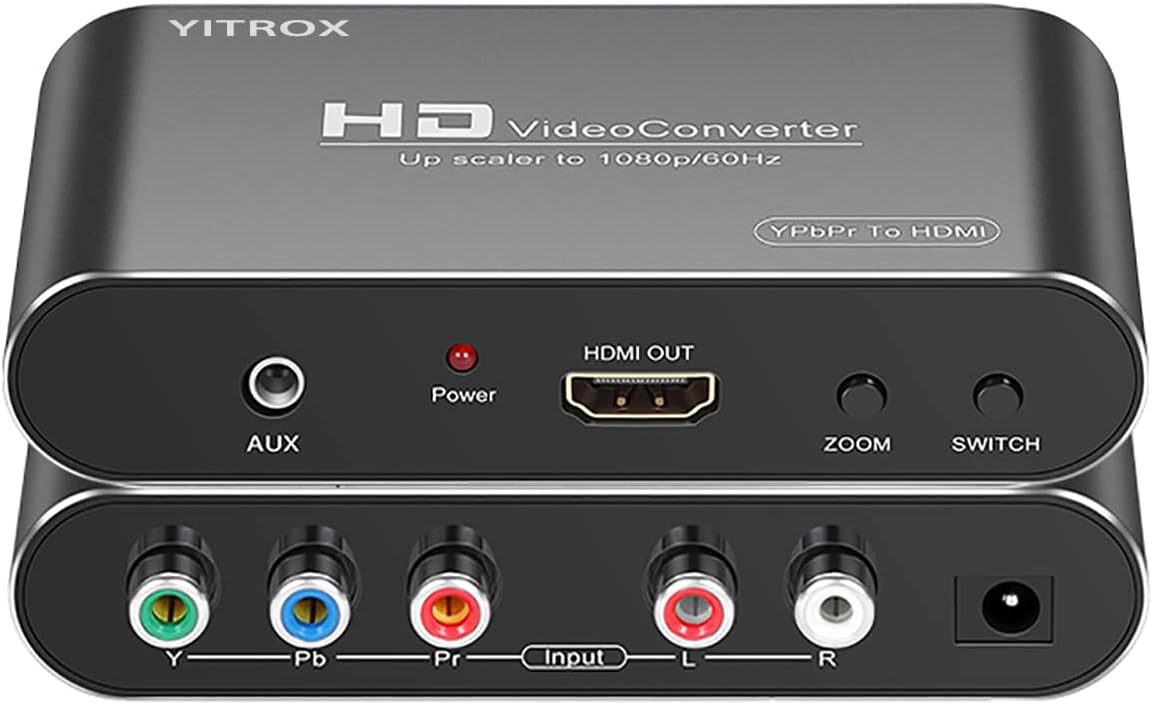
Component to HDMI Converter Upscaler Scaler
4.1Editor score
Five selectable output resolutions
Multiple zoom and scaling options
Broad legacy console support
Our Original Xbox Upscaler guide compares 10 adapters and converters for compatibility, signal quality, resolution, setup needs, and modern display use.
An Original Xbox upscaler connects the console’s legacy video output to a modern television or monitor while making setup as uncomplicated as possible. The right device depends on the outputs available on your console, display, desired resolution, willingness to use external power, and whether you need basic HDMI conversion or active image processing.
This guide compares ten Original Xbox upscalers, adapters, and related conversion solutions using the supplied product information. It examines native resolution support, signal type, audio handling, power requirements, included cables, display compatibility, and the practical differences between simple adapters and more advanced scalers.
The rankings reveal that the strongest options serve different needs: a dedicated Xbox converter is easiest for plug-and-play use, a multi-console scaler offers broader flexibility, and a component-to-HDMI device provides more output choices. Ratings and availability can change, and current prices should be checked before purchasing.
4.1Editor score

4.4Editor score

3.8Editor score
The comparison below highlights each solution’s core hardware, signal path, resolution support, and setup requirements, making it easier to identify the most appropriate adapter for an Original Xbox and modern display setup.


This Component to HDMI Converter Upscaler Scaler carries a 4.1 rating and stands apart through the breadth of its display controls. It accepts analog YPbPr component video and R/L audio, then produces an HDMI signal for contemporary televisions, monitors, and projectors. That makes it a strong choice for an Original Xbox owner who wants more than a fixed pass-through adapter.
We may earn a commission when you buy through this link, at no additional cost to you.
Five selectable output resolutions are available, including 800×600, 1024×768, 1280×720, 1280×1024, and 1920×1080. The device also provides seven zoom configurations, including gradual enlargement, gradual reduction, and automatic adaptation. Its image-processing features reportedly address motion, contrast, color, and digital noise, although actual results depend on the source game, console settings, and display.
The trade-off is complexity. A component cable must already be available because the product does not work backward from HDMI to component video, and the supplied information specifically warns against using an S-Video cable. The external HDMI cable is also not included. The adapter is better for someone comfortable choosing a source resolution and comparing picture modes than for someone seeking a completely cable-free solution.
Despite those requirements, it is the most versatile option in the list for users who also own legacy systems such as the Wii, PS2, PS3, Xbox 360, and older disc players. An Original Xbox owner who values menu flexibility and multiple display options should give this model serious consideration, while simplicity seekers should look toward the Jadebones adapter.
The selectable output modes make this converter valuable when a television or monitor handles 1080p awkwardly. Users can select a lower or alternative resolution instead of relying on one fixed conversion path, making the device adaptable to different legacy sources and modern displays.
Supporting several component-output consoles and media devices gives this model more long-term utility than a strictly Original Xbox-only adapter. The common denominator is YPbPr input, so users must verify that the source device provides the correct analog component signal.
We may earn a commission when you buy through this link, at no additional cost to you.
The Jadebones HDMI Adapter Converter for Original Xbox Console has a 4.4 rating, the highest numerical rating among the products with published scores. It is purpose-built for owners of the original Microsoft Xbox who want to connect the console to a modern HDTV or monitor without introducing a large, general-purpose scaler into the setup.
We may earn a commission when you buy through this link, at no additional cost to you.
The adapter converts the Original Xbox’s YPbPr component signal into HDMI. It requires no external power supply, which removes one common source of installation difficulty and makes it convenient to place near a television. Setup consists of connecting the adapter and an HDMI cable, although the HDMI cable is not included in the package.
Its strongest benefit is clarity of purpose. There are no advertised menus, external power requirements, or multi-console settings to manage. The tradeoff is that the product description does not list selectable output resolutions, zoom options, or advanced image processing. It transfers the console’s existing picture quality rather than improving the underlying game rendering.
This is the most straightforward recommendation for an Original Xbox owner with a modern display. Choose it when minimizing cables, avoiding external power, and obtaining a clean HDMI connection matter more than having a scaler with several resolution modes. It is also a sensible first step for a player who wants a functional, dedicated adapter before investing in more elaborate hardware.
Not needing a power brick simplifies setup and reduces the number of connections around the console. The adapter only needs its console-side connection and an HDMI cable to the television, reducing opportunities for setup errors.
A dedicated design can be reassuring because it avoids the menu configuration and source-type decisions associated with a universal scaler. The trade-off is that it is less versatile with other legacy devices.
We may earn a commission when you buy through this link, at no additional cost to you.
The 4K Gaming Upscaler & Enhancer is the most technically advanced converter in this roundup, although it does not have a published numerical rating. It accepts a 1080p HDMI source and converts it to 4K at 60 frames per second, using image sharpening, color tuning, enhanced depth perception, and signal processing intended to make older console output look more distinct.
We may earn a commission when you buy through this link, at no additional cost to you.
Compatibility is unusually broad for a gaming scaler. The product information lists support for the first-generation Xbox, Nintendo Switch, multiple PlayStation generations, GameCube, PS2, Wii, Dreamcast, PS3, Xbox 360, and Wii U. It also mentions specialized adapters such as mClassic and RetroLink 5x. The original Xbox must therefore already be producing 1080p HDMI output through another adapter.
Important restrictions apply. The upscaler supports only 1080p input, requires an HDMI 2.0a-or-higher cable, and works only with a 4K at 60Hz display. It is not compatible with the original HDMI 1.4 cable, 4K at 30Hz displays, or 1440p monitors as stated in the supplied information. A black screen or stuttering may therefore result from using the wrong display mode or cable specification.
This product suits a user who already has a functional Original Xbox-to-HDMI adapter and wants a second-stage 4K conversion. It is not the most direct route for a first-time Original Xbox owner, because that owner would need a separate component adapter and a suitably compatible display. Its processing claims should also be viewed as an enhancement pathway rather than a replacement for the console’s native rendering capability.
The Original Xbox does not directly provide the HDMI input this unit expects. A user therefore needs a working component-to-HDMI adapter first, making the 4K model a second-stage device for an already converted console.
The 60Hz-only 4K requirement is the most important compatibility checkpoint. A capable television or monitor, a suitable modern HDMI cable, and a confirmed 1080p source are all necessary for a stable picture.
We may earn a commission when you buy through this link, at no additional cost to you.
The Retro Video Game Console Converter Adapter-HDMI Adapter Converter for Original Xbox Console focuses on preserving the range of native Xbox output modes. Its stated compatibility covers 480i, 480p, 720p, and 1080i, giving users access to the console’s progressive and high-definition options rather than forcing every game through a single output path.
We may earn a commission when you buy through this link, at no additional cost to you.
The adapter converts the Original Xbox’s analog component signals to digital HDMI and is designed to carry audio and video together. It requires no additional power supply and is intended as a simple plug-and-play bridge between the console and a contemporary television. That is a useful combination for players who want an original hardware experience with a modern display.
The main uncertainty concerns the amount of technical detail in the supplied listing. There is no published rating, and the description provides fewer control and troubleshooting specifics than the leading products. Although the listed native resolutions are valuable, buyers may need to verify the exact console-side connection and confirm the included components before ordering.
For an Original Xbox owner searching for a straightforward component-to-HDMI path with native resolution support, this product remains a viable choice. It may appeal particularly to users who understand the console’s original AV standards and want a compact adapter without a separate power lead. It is less appropriate for someone who requires detailed documentation or advanced scaling menus.
Supporting 480i through 1080i allows the console to use its highest compatible mode for suitable games. This can be more valuable than forcing every title to a fixed setting, though actual options depend on the game and console configuration.
Combining audio and video through a single HDMI connection reduces the number of separate cables required at the display. Users still need to connect the appropriate source-side adapter to the console.
We may earn a commission when you buy through this link, at no additional cost to you.
The HD Link Cable for Original Xbox System has a 4.1 rating and offers a compact adapter format for connecting the original Microsoft console to contemporary displays. Its cable-based approach is attractive for users who prefer a direct connection and want to keep the number of separate boxes around the entertainment area low.
We may earn a commission when you buy through this link, at no additional cost to you.
This product appears aimed at the same basic use case as several other HD Link-style adapters: translating the Original Xbox’s legacy video output into a signal that a modern television or monitor can accept. That is an understandable priority for retro players who want the console to remain the centerpiece of the gaming setup.
The challenge is that the supplied product data contains no descriptive bullet points or confirmed specifications beyond the title, rating, and product identity. Consequently, details such as supported resolution, whether external power is needed, whether an HDMI cable is included, and the precise source connection should be verified in the current listing before purchase.
The 4.1 rating is encouraging, but it should not substitute for technical confirmation. A buyer who values a compact form factor may find this cable convenient, while someone who needs known 720p or 1080p support, explicit power requirements, and a clearly stated package contents should favor a better-documented model.
Cable-style adapters can make a retro console setup look less cluttered than a larger standalone scaler. The exact routing and connector arrangement should be reviewed in the listing before purchase.
Because the supplied information is limited, compatibility details deserve careful attention. Confirm the output resolution, power arrangement, and included cables before assuming it will fit a particular display setup.
We may earn a commission when you buy through this link, at no additional cost to you.
The Hyperkin Panorama HD Cable for Original XBOX is officially licensed by Xbox, giving it a distinct provenance among the adapters in this guide. It is compatible with HDTVs and all Original Xbox models, while its seven-foot length offers practical flexibility when the console and television are not positioned directly beside each other.
We may earn a commission when you buy through this link, at no additional cost to you.
The cable supports output up to 1080i, depending on game compatibility. That is a meaningful improvement over standard-definition playback and is appropriate for many Original Xbox games, but it does not reach 1080p. The product information also describes clear picture quality and crisp audio, reinforcing its focus on preserving a recognizable high-definition presentation.
Compared with modern generic adapters, the primary limitation is resolution ceiling. The Original Xbox can support 1080p in some configurations, and some software offers 480p or 720p options, so a converter limited to 1080i may not exploit every available mode. Official licensing also does not eliminate the need to confirm that the target television accepts the resulting signal.
This is a sensible choice for an Original Xbox collector who values official licensing, broad model compatibility, and a long cable. It is less attractive for a player whose priority is the highest possible output resolution or active scaling. Those users should choose a model with explicit 1080p support and more detailed image adjustment.
The licensed branding can provide confidence in the product’s intended Original Xbox use. Its stated support for all Original Xbox models also makes it a familiar choice for owners with different regional console variations.
A 1080i ceiling is useful for many games but is not the highest format available from the console. Buyers who prioritize maximum detail should verify whether 1080p output matters to their preferred titles.
We may earn a commission when you buy through this link, at no additional cost to you.
The Y.D.F Cable for Original Xbox carries a 3.9 rating and is designed to transfer the console’s native YPbPr component signal to a modern display through HDMI. Its supported modes include 480i, 576i, 480p, 720p, and 1080i, providing a meaningful range of standard and high-definition options for different games.
We may earn a commission when you buy through this link, at no additional cost to you.
A distinctive detail is the inline switch, which allows the adapter to be turned off when it is not in use. This provides direct control over power without requiring the user to reach a separate wall adapter. The product also carries audio and video together and uses a plug-and-play design, simplifying the connection between the console and an HDTV, monitor, or projector.
The listing explicitly notes that the device only works with the Original Xbox and cannot improve video quality. It transfers the highest picture quality available from the console and game but does not add detail that was never generated. It is also not a universal solution for other consoles or component sources.
This adapter makes sense for an Original Xbox owner who appreciates having a physical power control and wants broad support for the console’s common video modes. It is less appropriate for a multi-console gaming room or for anyone expecting active upscaling. Users should purchase a suitable HDMI cable if one is not already available.
The inline on-off switch gives users immediate control over the adapter’s power state. It is a small feature, but it can simplify daily use and reduce unnecessary standby operation.
The adapter’s stated purpose is accurate signal transfer rather than new detail generation. The resulting image remains limited by the original Xbox game’s rendering and selected output mode.
We may earn a commission when you buy through this link, at no additional cost to you.
The COMeap Xbox AV Cable System is a complete connection package for an original Microsoft Xbox. It includes a six-foot RCA-style AV lead, a six-foot 4K-capable HDMI cable, an RCA-to-HDMI converter, and a USB power cable. That combination is especially useful for a new owner who does not already have the necessary leads.
We may earn a commission when you buy through this link, at no additional cost to you.
The converter supports 720p and 1080p output, along with PAL and NTSC sources. The included HDMI cable supports 4K at 60Hz with 18Gbps bandwidth and is backward compatible with HDMI 1.4 and 2.0 devices. Setup follows a clear sequence: connect the console to the converter, connect the converter to the television, provide USB power, and select the correct HDMI input.
The significant caveat is the source connection. This is an AV-to-HDMI system using red, yellow, and white RCA connectors, not a YPbPr component adapter. Composite video carries substantially less picture information than the Xbox’s component output, so the advertised 1080p conversion should be understood as an output format rather than equivalent to a native 1080p component signal.
The product is exclusively for the Original Xbox and does not fit the Xbox 360 or Xbox One. It also requires a 5V USB power source. Despite those limitations, it is a strong budget choice for a player seeking a straightforward all-in-one package and already using or willing to use the console’s standard AV connection.
Including both the console-side AV cable and the display-side HDMI cable reduces the need for separate accessories. The USB lead is also included, although a USB power adapter is not, so a suitable 5V source must be available.
The standard AV connection is easy to use but provides a lower-detail source than YPbPr component video. Players seeking the best available Xbox image should use a component-based converter instead.
We may earn a commission when you buy through this link, at no additional cost to you.
The Mcbazel OSSC SCART Component VGA to HDMI Open Source Scan Converter v1.6 is a specialized retro-gaming device rather than a direct Original Xbox upscaler. It supports SCART, component, and VGA-style retro inputs, making it relevant to owners of systems such as the Saturn, SNES, PS1, GameCube, and Mega Drive. Its 4.1 rating reflects a generally favorable product history.
We may earn a commission when you buy through this link, at no additional cost to you.
The package includes the open-source scan converter, remote control, US-plug power supply, and user manual. Two AAA batteries are needed for the remote but are not included. A suitable high-quality RGB SCART cable is also required and excluded from the package, and the manufacturer warns against using converted or split cable connections.
This limitation is decisive for an Original Xbox buyer. The console’s standard AV arrangements do not provide the RGB input required by the OSSC, and the product information does not identify the Original Xbox as a supported system. Attempting to use a conventional Xbox AV or component cable with this converter would not meet its stated input requirements.
The OSSC is excellent for a collector building a broad retro setup around RGB sources, but it is a poor match for a shopper searching specifically for an Original Xbox upscaler. Original Xbox owners should choose a component-to-HDMI adapter designed for YPbPr input. The OSSC becomes relevant only if the same setup includes multiple RGB-capable European consoles and the buyer can provide the correct SCART cable.
The OSSC’s strongest feature is its scan conversion for high-quality RGB equipment. It is built for systems with the correct SCART or RGB output rather than for consoles that rely on composite or YPbPr video.
The Original Xbox’s usual component output is not the RGB input this converter requires. Without a compatible, explicitly supported pathway, an OSSC is not a practical solution for that console.
We may earn a commission when you buy through this link, at no additional cost to you.
The HD Link HDMI Cable for Original Xbox provides a combined console connection and HDMI adapter with selectable 720p or 1080p output. Its integrated male-to-male HDMI connection means users do not need to buy a separate HDMI cable for the television or monitor, which can make the setup more compact and convenient.
We may earn a commission when you buy through this link, at no additional cost to you.
The product converts the Original Xbox signal to HDMI for display through an HDTV or monitor, with audio and video handled by the same adapter. A button on the unit switches between 720p and 1080p, offering a simple way to match the output to different games or display preferences.
External power is required. The package includes a Micro USB power cable but explicitly does not include a USB wall adapter. That means the buyer must already have a suitable 5V power source or be prepared to obtain one. The 3.6 rating is the lowest among the rated products, which should prompt close attention to compatibility and build expectations.
The main appeal is convenience. It reduces cable shopping by supplying the display-side HDMI connection, while the resolution button keeps adjustment simple. However, the lack of a bundled wall adapter and the need for power offset some of that benefit. It remains a practical option for someone who values an integrated cable over a fully self-contained, power-free adapter.
The built-in HDMI cable removes the need to find a matching display cable. It also provides a fixed connection length, which may be less convenient when the console and television are far apart.
A physical switch between 720p and 1080p is easy to operate and useful for adapting to supported games. Because the choices are limited, it is simpler than the resolution menu found on a general-purpose scaler.
We may earn a commission when you buy through this link, at no additional cost to you.
Choosing an Original Xbox upscaler starts with the console’s available video output, the display’s accepted formats, and the level of control required. A dedicated adapter prioritizes simplicity, while a scalable converter offers resolution choices and broader source compatibility.
The Original Xbox can provide different levels of video quality depending on the connection method and game. Component YPbPr output generally carries more picture information than standard composite RCA video, so it is the preferred source for a quality-focused setup. Several recommended adapters explicitly accept YPbPr input, while the COMeap package uses red, yellow, and white composite connectors. A buyer should identify which console-side cable or adapter they already own and whether it passes component video. The distinction has a direct effect on the detail visible after conversion and determines whether a product will work with the intended source.
An adapter cannot create detail that the console never supplied. Support for 480i, 480p, 720p, and 1080i gives the player access to the output modes available from suitable games, while the flexible converter adds 1080p and other display targets. The Xbox can support 1080p in some configurations, but compatibility varies by title and region. The Hyperkin cable is explicitly limited to 1080i, while several other products advertise 720p or 1080p conversion. Buyers should prioritize an adapter that exposes the highest useful mode offered by their games rather than focusing only on a large number of claimed resolutions.
The conversion path must match both the source and the display. Most Original Xbox adapters accept YPbPr component video and provide HDMI output, which is the practical direction for modern screens. A converter that only works in the opposite direction would be useless for this purpose. The component-to-HDMI scaler explicitly does not support reverse HDMI-to-component operation. Similarly, the Mcbazel OSSC is designed for SCART, component, and VGA-style RGB inputs rather than the Original Xbox’s standard output. Checking input and output formats before ordering avoids the most common compatibility mistake.
Power arrangements range from completely passive to requiring a USB lead. The Jadebones adapter and the Retro Video Game Adapter advertise plug-and-play operation without external power, while the Y.D.F product has a convenient inline on-off switch. The COMeap converter and the 1-meter HD Link cable require USB power, and both listings make clear that a wall adapter is not included. Active processing hardware may need power, but a simple converter may not. Consider both convenience and setup complexity, and ensure that the required voltage and connector are available before purchasing an externally powered model.
A converter is rarely useful without the right connections. The Jadebones adapter does not include an HDMI cable, and the component converter also calls for a separate component cable and HDMI lead. By contrast, the COMeap package includes a six-foot AV cable, a six-foot 4K-capable HDMI cable, the converter, and a USB power lead. The integrated HD Link products reduce display-side cable requirements, although their fixed length may affect placement. Compare the package contents rather than assuming every essential cable is included, and consider whether the included cable length reaches the intended television or monitor position.
The connected display must accept the converter’s output and operate at a compatible refresh rate. The 4K Gaming Upscaler is especially specific: it accepts 1080p input, outputs 4K at 60Hz, requires an HDMI 2.0a-or-higher cable, and is not compatible with the original HDMI 1.4 cable. The supplied information also warns that 1440p and 4K at 30Hz displays may produce a black screen. For basic 1080p products, confirm that the television has an available HDMI input and that any separate cable meets the converter’s requirements.
A basic adapter transfers the console’s signal, while a scaler may add selectable output resolutions, zoom modes, sharpening, color adjustment, and noise reduction. These controls can help a picture fit a particular screen, although they cannot overcome the graphical limits of the original game. The component-to-HDMI converter provides the most extensive menus, while the dedicated Xbox adapters are intentionally more automatic. Players with a well-matched television may prefer the simpler approach, whereas users with unusual screen sizes or aspect ratios may value scaling and zoom controls.
A product marketed specifically for the Original Xbox may be the easiest choice, but a broader component converter can serve several classic systems. The component scaler supports the Wii, PS2, PS3, Xbox 360, Blu-ray players, and DVD players, while the 4K unit lists extensive console compatibility. Broader support requires compatible YPbPr output from each source and correct input settings. If the Original Xbox is the only classic console in the household, dedicated compatibility is often more valuable than extra device support. If several legacy systems are connected, a general scaler may be the more economical long-term choice.
Begin by identifying the output used by your Original Xbox. For the best source signal, use a YPbPr component cable and configure the game and console to a compatible progressive or high-definition mode when available. If using a composite-based system, connect the red, yellow, and white AV leads as directed and choose the appropriate source setting in the console menu. Never connect an S-Video cable to a converter that requires component video, because the supplied component converter warns that this can produce a black-and-white image.
Connect the console-side cable to the converter, then connect the converter to the television or monitor with an appropriate HDMI cable unless the product has an integrated HDMI lead. Products requiring USB power should be connected to a suitable 5V source before the television is powered on. Select the correct HDMI input, power on the display, and then start the console. If the picture is black, confirm that the source is outputting the expected resolution, that the converter is receiving the correct signal type, and that the display and cable meet the product’s stated specifications.
Allow the adapter to warm up and compare the available output modes or resolution settings. Keep the console and converter vents unobstructed, avoid placing power adapters beneath the console where heat can accumulate, and route cables firmly enough to prevent accidental disconnection. When using an inline power switch, turn the adapter off when it is not in use. For additional protection, connect the console and display to a properly rated surge protector, and clean the cable connectors gently with a dry, lint-free cloth rather than aggressive chemical cleaners.
An upscaler can improve how the console’s existing signal fits a modern display, but it cannot recreate detail that the game never rendered. A device may sharpen edges, adjust color, reduce noise, or provide a higher-resolution output, yet the underlying textures, polygons, and effects still come from the original Xbox. The Jadebones product also explicitly states that it transfers the signal without improving the source quality.
It depends on the product. Most dedicated Original Xbox HDMI adapters in this guide accept YPbPr component signals, while the COMeap kit uses standard red, yellow, and white composite RCA connections. Check the converter’s input specification before selecting a cable. Also avoid substituting an S-Video cable, as the component converter warns that doing so can result in a black-and-white picture.
The best available mode depends on the game, the console configuration, and the display. The Original Xbox can support several modes ranging from 480i to 1080p, and the supplied products variously support or advertise 480i, 480p, 576i, 720p, 1080i, and 1080p. A 720p or 1080p output is generally preferable when the specific game supports it, but a stable lower mode can still look better than an incompatible high-resolution setting.
The purpose-built adapters in this list are described as operating without delay, and the 4K scaler advertises low-latency conversion. Actual perceived lag can also depend on the television’s image processing, game, television mode, and the scaler’s implementation. For the lowest-latency experience, use a display with a low input-lag game mode and avoid unnecessary picture processing.
A black screen can result from an incorrect input type, an unsupported source resolution, a missing power connection, or an incompatible cable. The 4K model specifically requires 1080p input, HDMI 2.0a-or-higher cabling, and a 4K at 60Hz display. Other adapters may require component video rather than S-Video, so verify the source connection and confirm that the television is set to the correct HDMI input.
No. A dedicated adapter may provide a more reliable and simpler result for one console and one television. A premium multi-console scaler is more useful when several component-output devices are involved, when multiple output resolutions are needed, or when the display requires active scaling. The best choice is determined by signal type, resolution, display compatibility, and setup preferences rather than by cost alone.
Only if the product’s compatibility information expressly allows it. The Y.D.F adapter is restricted to the Original Xbox, and the COMeap AV cable is also designed exclusively for the first-generation console. The component converter and 4K scaler list broader legacy console support, but the exact source and output requirements must still be checked before connection.
That depends on the product. The Jadebones adapter and the component converter require an HDMI cable, and the latter also needs a compatible component cable. The COMeap kit includes both console-side AV and display-side HDMI leads, while the integrated HD Link cable already has its HDMI connection. Always check the package contents before ordering so that the entire signal path can be completed.
The Jadebones HDMI Adapter is the most direct recommendation for an Original Xbox owner who prioritizes a straightforward, power-free connection to a modern display. The component-to-HDMI Converter is the strongest flexible option, with multiple output resolutions and useful scaling controls, while the COMeap AV Cable System offers a complete budget package for players using the console’s standard RCA connection.
Prioritize signal compatibility before features. The ideal setup begins with YPbPr component output, uses an adapter that supports the modes needed by your games, and ends with a display and HDMI cable that meet the converter’s specifications. Choose a simple dedicated adapter if the television already handles the converted signal well; choose a broader scaler if several legacy consoles, unusual screen sizes, or multiple output resolutions are priorities.
Ratings, bundle contents, and current prices can change, so check the latest product listing before buying. Also verify the included cables, power requirements, display refresh rate, and exact console compatibility. With those details confirmed, a good Original Xbox upscaler can make classic games convenient and visually satisfying on modern equipment without pretending that conversion can surpass the source’s original limits.