
GIGABYTE B850 AORUS Elite WIFI7
4.4Editor score
14+2+2 power design
Three M.2 storage slots
DDR5 memory support
Discover the best motherboards for overclocking, comparing power delivery, cooling, memory support, expansion, connectivity, and stability.
Motherboards for overclocking must deliver clean power, effective cooling, flexible BIOS controls, and dependable support for demanding CPUs and memory. Beyond those essentials, the best models make tuning more accessible through automatic profiles, monitoring tools, and clear diagnostics while preserving the manual controls experienced builders expect.
We compared ten motherboards across AMD and Intel platforms, with particular attention to VRM design, power-stage ratings, thermal hardware, memory capabilities, storage expansion, networking, and enthusiast-oriented BIOS features. The list covers ATX and Mini-ITX options, current and older processor platforms, and boards suited to different budgets and build sizes.
Each numbered review explains the board's strongest overclocking traits, practical trade-offs, and ideal owner. The top three earn Best Budget, Editor's Choice, and Best Premium designations, while every other product receives an unbiased review. Availability and pricing change frequently, so confirm current details before purchasing.
4.4Editor score

4.4Editor score

4.4Editor score
The comparison highlights the processor platform, form factor, power design, memory generation, storage capacity, and networking features of all ten boards, helping builders match an overclocking platform to their processor, case, and tuning priorities.



The ASUS ROG Strix Z890-E Gaming WiFi is a high-end Intel motherboard built around the LGA 1851 platform and Core Ultra Series 2 processors. Its 4.4 rating reflects a strong balance of enthusiast features, modern connectivity, and substantial power delivery. The board stands out immediately in the number of M.2 positions, offering seven slots for unusually ambitious storage plans.
We may earn a commission when you buy through this link, at no additional cost to you.
Its 18+2+1+2-stage power configuration uses ProCool II connectors, MicroFine alloy chokes, and premium metallic capacitors. Rather than relying on stage count alone, the design is supported by ASUS technologies intended to simplify setup, including NPU Boost, AI Advisor, AI Overclocking, AI Cooling II, and AI Networking II. DIMM Fit, DIMM Flex, and AEMP III add memory configuration and profile support for higher-speed kits.
The main compromise is platform longevity. LGA 1851 is tailored to the current Intel generation rather than providing the broad socket compatibility associated with AM5, and the board's high-end feature set creates a substantial case and power-supply footprint. Seven M.2 drives can also generate meaningful heat, making the presence and quality of slot cooling important. Buyers should also verify physical clearance around the primary graphics slot and any add-in cards.
This is an excellent choice for an enthusiast committing to Intel's latest desktop platform, particularly when high-speed memory, abundant PCIe storage, and AI-assisted overclocking tools matter. It may be excessive for routine gaming, but for sustained multicore tuning and an expansive high-end build, the Strix Z890-E provides the electrical foundation and feature depth to justify it.
The 18+2+1+2-stage design gives the board considerable current capacity for Intel Core Ultra processors. Its ProCool II connections, alloy chokes, and metallic capacitors are the relevant details to compare with similarly positioned boards. The emphasis is clearly on sustained all-core performance rather than short boost-clock bursts.
Seven M.2 slots make this one of the most flexible options for high-speed RAID, scratch storage, or a large game library. AI Overclocking and AI Cooling II can help new builders begin with sensible profiles, while DIMM Fit, DIMM Flex, and AEMP III expand memory setup assistance.
We may earn a commission when you buy through this link, at no additional cost to you.
The ASUS ROG Crosshair X870E Hero is the most overtly premium motherboard in this guide, combining AMD's X870E platform with a robust 18+2+2-stage power system. The 4.4 rating and extensive feature list position it as a high-end foundation for Ryzen 9000, 8000, and 7000 series desktop processors. It is built for users who want both polished automatic assistance and granular control.
We may earn a commission when you buy through this link, at no additional cost to you.
ROG overclocking tools include Dynamic OC Switcher, Core Flex, Asynchronous Clock, and PBO Enhancement. These features sit alongside AI Overclocking, AI Cooling II, AI Networking, and AEMP, allowing a builder to start with guided optimization and move toward manual tuning. The electrical design uses ProCool II power connectors, MicroFine alloy chokes, and premium metallic capacitors, providing a serious foundation for power-hungry multicore configurations.
As a premium ATX board, it is not necessarily the rational choice for a modest system. The X870E platform adds cost without being essential for every AM5 processor, and buyers should compare its premium overclocking utilities with less elaborate models. The five M.2 slots offer generous storage expansion, but installing multiple drives still demands attention to shared lanes, airflow, and operating-system boot considerations.
For builders creating a high-end AMD workstation or gaming machine that will be tuned rather than merely configured, the Crosshair X870E Hero is hard to overlook. Its combination of AM5 compatibility, extensive controls, robust power delivery, and polished monitoring software makes it our premium recommendation for serious AMD overclocking.
Core Flex, PBO Enhancement, Asynchronous Clock, and Dynamic OC Switcher cover several useful overclocking paths. They give experienced users more ways to shape boost behavior and all-core performance. AI Overclocking provides a useful starting point when manually exploring every BIOS option is impractical.
The premium power stages and ProCool II connectors are well suited to sustained Ryzen workloads, while the AM5 socket supports three listed processor generations. That combination gives the board relevance beyond a single CPU release, provided the chosen processor and chipset features are appropriate.
We may earn a commission when you buy through this link, at no additional cost to you.
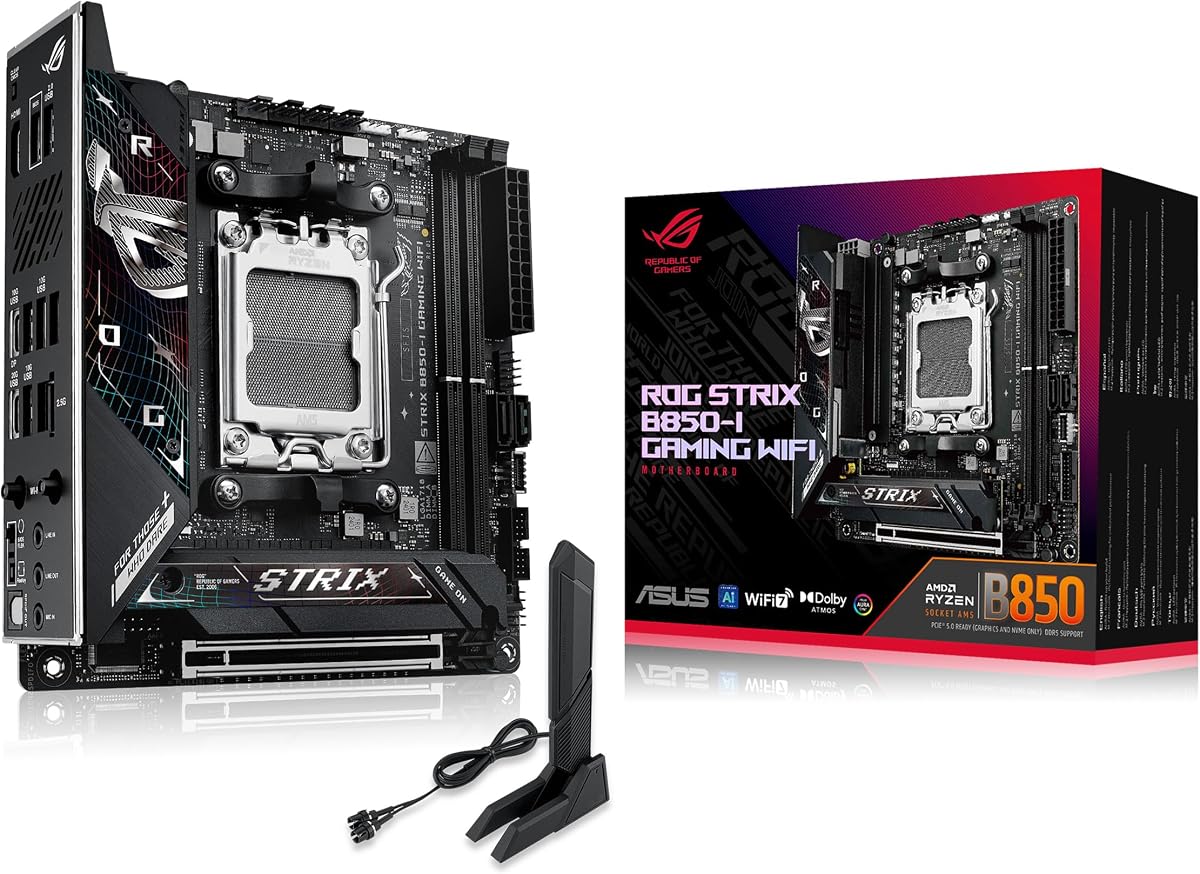
The ASUS ROG Strix B850-I Gaming WiFi proves that an overclocking motherboard can also be compact. It supports AMD Ryzen 9000, 8000, and 7000 series processors in a Mini-ITX enclosure, a combination attractive to builders who want a powerful system without a full-size tower. Its 4.3 rating reflects a capable overall design despite its reduced footprint.
We may earn a commission when you buy through this link, at no additional cost to you.
The 10+2+1 power solution is rated for up to 70A per stage and uses ProCool power connectors. Cooling is a major strength: massive VRM heatsinks, an integrated I/O cover, and high-conductivity thermal pads are designed to control heat in a confined case. Two onboard PCIe 5.0 M.2 slots include a large heatsink over one position, which is important when the included module is a high-power Gen 5 drive.
The unavoidable trade-off is expansion. Two M.2 slots, one primary graphics slot, and the Mini-ITX footprint leave little room for multiple GPUs, extra PCIe cards, or numerous storage devices. A compact tower cooler may also compete with the board's heat sinks, and cable routing can be more difficult in a tight chassis. Compact overclocking also demands careful airflow and case compatibility planning.
Choose the B850-I when small size is a core requirement and you still want ASUS's AI Overclocking, AI Networking II, strong memory features, and robust thermals. It is particularly convincing for a compact high-performance gaming build using a single graphics card and one or two fast SSDs.
Massive heatsinks and high-conductivity pads make physical cooling a central strength. In a small enclosure, case airflow and CPU cooler clearance become just as important as the motherboard's own thermal design. A tower cooler may require planning around the socket and surrounding components.
Two PCIe 5.0 M.2 slots are enough for a lean gaming system or a fast primary drive with one secondary drive. The cooled slot should be reserved for the hottest or fastest storage. Builders expecting several SSDs should consider a larger ATX alternative.
We may earn a commission when you buy through this link, at no additional cost to you.
The GIGABYTE B850 AORUS Elite WIFI7 is the strongest budget-oriented choice here for AMD builders. It combines an AM5 socket, a 14+2+2 power design, four DDR5 DIMM positions, and three M.2 slots without moving to the most expensive enthusiast models. Its 4.4 rating suggests a well-rounded board that covers the essentials of stable CPU and memory overclocking.
We may earn a commission when you buy through this link, at no additional cost to you.
Power and memory are the central considerations. The 14+2+2 phase arrangement should provide a competent foundation for Ryzen 7000, 8000, and 9000 processors, while four DDR5 slots permit a substantial memory upgrade. VRM and M.2 Thermal Guard components help manage heat, and PCIe 5.0 provides a current-generation path for compatible graphics cards and storage.
The trade-off is that this board does not advertise the deepest suite of specialized overclocking functions found on premium ASUS models. There is no listed emphasis on Core Flex, PBO Enhancement, or an AI Overclocking system, so users should verify the exact firmware controls and memory profile support for their chosen CPU. Three M.2 slots are useful but modest beside models with four or five.
Despite those limitations, this is a persuasive starting point for mainstream AM5 overclocking. It is especially suitable for builders who want modern connectivity, a solid phase count, expandable DDR5, and three storage slots while keeping spending under control. It is the sensible budget selection, while the X870E-E and Crosshair Hero serve higher tuning ambitions.
The 14+2+2 power design offers a more serious starting point than a basic office-oriented board. Four DDR5 DIMM slots also allow memory capacity and dual-channel performance to improve over a single-module setup. Confirm memory compatibility and supported profile formats before purchase.
Three M.2 positions, PCIe 5.0, USB-C, and 2.5GbE networking cover the most common enthusiast needs. Thermal Guard protection is useful when a fast SSD sits under sustained load. The board is less suitable for extremely large storage arrays than the five-slot alternatives.
We may earn a commission when you buy through this link, at no additional cost to you.
The ASUS ROG Strix X870E-E Gaming WiFi is our Editor's Choice because it balances extensive overclocking controls, robust electrical design, and exceptional connectivity better than most alternatives. It supports AMD Ryzen 9000, 8000, and 7000 processors, uses an 18+2+2 power solution rated at 110A per stage, and offers five M.2 positions. Its 4.4 rating reflects a capable enthusiast package.
We may earn a commission when you buy through this link, at no additional cost to you.
ASUS provides Dynamic OC Switcher, Core Flex, Asynchronous Clock, and PBO Enhancement for CPU tuning, alongside AI Overclocking, AI Cooling II, AI Networking, and AEMP. The memory and thermal tools are particularly valuable for finding stable settings, while dual ProCool II power connectors, massive heatsinks, and high-conductivity pads support sustained performance.
Storage and peripheral connectivity are major strengths. Three PCIe 5.0 M.2 slots and two PCIe 4.0 slots offer unusually flexible drive arrangements, while dual USB4 Type-C ports, a front-panel USB 20Gbps Type-C connector, and numerous 10Gbps ports serve demanding peripherals. DIY conveniences such as Q-Release Slim, M.2 Q-Latch, Q-Release, pre-mounted I/O shield, BIOS FlashBack, and Clear CMOS simplify assembly and troubleshooting.
The board's trade-offs are its full ATX footprint and premium feature set. A smaller or less expensive system may not use all five storage slots or dual USB4 connectivity. Even so, for a serious AM5 overclocking build that may also host fast SSDs, high-speed networking, and multiple peripherals, the X870E-E offers the most complete balance in this list.
Dynamic OC Switcher, Core Flex, Asynchronous Clock, and PBO Enhancement offer several routes to performance tuning. AI Overclocking and AEMP reduce the initial setup burden. Together, these tools suit both newcomers seeking guidance and experienced users who want direct control.
Three PCIe 5.0 and two PCIe 4.0 M.2 positions permit a large, high-speed storage mix. Substantial cooling solutions are fitted to the listed slots, though a multi-PCIe 5.0 setup still deserves airflow and motherboard lane planning. This is one of the guide's strongest storage configurations.
We may earn a commission when you buy through this link, at no additional cost to you.
The ASUS ROG Strix X870-A Gaming WiFi is a high-rated alternative to the more expensive X870E models. Its 4.5 rating is the second-highest among the boards reviewed, and its 16+2+2-stage power system, four M.2 slots, and full set of ROG overclocking tools make it an attractive choice for a high-end AMD build.
We may earn a commission when you buy through this link, at no additional cost to you.
The board supports Ryzen 7000, 8000, and 9000 processors and includes Dynamic OC Switcher, Core Flex, Asynchronous Clock, and PBO Enhancement. AI Overclocking, AI Cooling II, AI Networking, and AEMP offer a guided route into setup and tuning. Dual ProCool II connectors, alloy chokes, and durable capacitors form the power foundation, while DDR5 AEMP support is useful for compatible memory profiles.
Compared with the X870E-E, the X870-A uses a 16+2+2 design rather than 18+2+2 and provides four M.2 positions rather than five. The X870 chipset also represents a step below X870E in platform-specific capabilities. These distinctions may not matter for gaming or moderate all-core tuning, but they deserve consideration for maximum sustained loads, extensive storage, or platform-specific features.
This motherboard is best for an enthusiast who wants recognizable ASUS RoG tuning tools and strong AM5 performance without choosing the largest flagship model. Its 4.5 rating, robust power stages, and generous four-drive storage support make it a particularly well-rounded choice for gaming systems that will also receive memory and CPU tuning.
Core Flex, PBO Enhancement, Dynamic OC Switcher, and Asynchronous Clock cover the major AMD tuning approaches. AI Overclocking and AEMP can help establish a stable starting point. This software breadth is one of the board's strongest advantages over simpler models.
Sixteen 90A stages plus two additional phases provide a strong base for current Ryzen processors. The supplied thermal and power components support stable delivery, although the X870E-E and Crosshair Hero offer still larger configurations for the most sustained enthusiast loads.
We may earn a commission when you buy through this link, at no additional cost to you.
The MSI B850 GAMING PLUS WIFI bundle is a convenient starting point for an AM5 overclocking build. It combines an ATX motherboard with one 16GB TEAMGROUP T-Force Delta DDR5-6000 module, allowing a builder to install a CPU, memory, and graphics card without sourcing a separate memory kit. Its 4.6 rating is among the strongest in the guide.
We may earn a commission when you buy through this link, at no additional cost to you.
The motherboard supports Ryzen 9000 through 7000 processors and advertises DDR5 memory support up to 8200+ MT/s with overclocking. The included module itself runs at 6000MHz with CL38 and can reach that rated speed through AMD EXPO or Intel XMP 3.0. A PCIe 5.0 x16 slot, additional PCIe 4.0 x16 connectivity, M.2 Gen5 storage, WiFi 7, and 5Gb Ethernet make it a modern platform.
The major limitation is that a single 16GB module does not use dual-channel memory, which is generally undesirable for a performance-focused build. The open DIMM slot is useful for a later matching module, but mixed memory kits can complicate memory overclocking. The bundle therefore reduces the initial shopping burden without eliminating the need to upgrade memory for balanced performance.
Choose this bundle if you specifically want MSI's B850 platform and compatible DDR5 in one package, especially if you plan to add another module soon. For a finished high-performance system, select a matched two-DIMM kit instead. The board's wide memory-speed support, modern connectivity, and strong rating still make it an appealing AM5 foundation.
The included TEAMGROUP T-Force Delta module provides a straightforward 6000MHz starting point, and enabling EXPO or XMP is easier than manually entering timings. However, one module runs in single-channel mode. Adding a compatible second module is advisable for normal gaming and content-creation performance.
Advertised support for DDR5 speeds above 8200 MT/s suggests room for aggressive memory tuning, though the final result depends on the CPU's integrated memory controller and the selected DIMM kit. Start with the profile supplied by the memory manufacturer and increase settings gradually.
We may earn a commission when you buy through this link, at no additional cost to you.
The MSI PRO B760-P WiFi DDR4 is a practical choice for overclockers who want to use 12th, 13th, or 14th generation Intel processors with familiar LGA 1700 hardware. Its 4.6 rating makes it one of the best-reviewed products here, while DDR4 support can reduce the total cost of a performance build compared with a new DDR5 platform.
We may earn a commission when you buy through this link, at no additional cost to you.
The board uses a 12+1 Duet Rail power system with P-PAK, an eight-pin plus four-pin CPU power connection, Core Boost, and Memory Boost. An extended heatsink, MOSFET thermal pads rated at 7W/mK, additional choke thermal pads, and the M.2 Shield Frozr provide a practical thermal foundation. The six-layer PCB uses two-ounce thickened copper and server-grade materials, details that matter for a board expected to operate under load.
Its platform is not as current as the LGA 1851 Z890 option in this guide. PCIe expansion is based on PCIe 4.0, and the 12+1 power configuration is smaller than the 18+2+1+2 design of the ROG Strix Z890-E. It also carries older WiFi 6E rather than WiFi 7. These limitations make it more relevant to a value-focused upgrade than a new flagship workstation.
This motherboard makes sense for builders who already own compatible LGA 1700 components or can acquire DDR4 kits more affordably. It is particularly useful for modest CPU and memory tuning on supported Intel chips. It should not be selected over newer high-end hardware for heavy sustained overclocking, but it remains a sensible, well-regarded foundation.
LGA 1700 support across three Intel generations can make existing processor ownership easier. DDR4 availability and pricing may also help stretch a build budget. The limitation is that LGA 1700 is an established platform, so the board lacks the newest chipset and expansion capabilities.
The extended VRM heatsink, high-conductivity thermal pads, M.2 Shield Frozr, and thickened six-layer PCB support sustained operation. Good CPU cooler airflow remains essential. These features make the board more credible for tuning than a minimalist entry model, even though its phase count is modest.
We may earn a commission when you buy through this link, at no additional cost to you.
The ASUS ROG Strix B550-F Gaming WiFi II is the strongest legacy-oriented choice in this guide. It supports Ryzen 3000 and 5000 desktop processors along with 5000 and 4000 G-series desktop chips. Its 4.6 rating shows that it remains a well-regarded foundation for AM4 overclocking, particularly for an existing system or a carefully selected older processor.
We may earn a commission when you buy through this link, at no additional cost to you.
The 12+2 teamed power stages use a ProCool power connector, alloy chokes, and durable capacitors. Cooling support is integrated with the board's familiar ROG thermal design, while PCIe 4.0, dual M.2 slots, USB 3.2 Gen 2 Type-C, HDMI 2.1, and DisplayPort 1.2 cover the key needs of a gaming build. Intel 2.5Gb Ethernet and WiFi 6E provide dependable networking without a separate adapter.
AM4 is the decisive limitation. The platform cannot accept the Ryzen 7000, 8000, or 9000 processors used by most modern entries here, and future CPU upgrades are limited. Buyers should verify the exact BIOS revision and CPU support before relying on a particular processor. The included AIDA64 Extreme subscription and UEFI BIOS dashboard aid monitoring and setup, although the software ecosystem is no longer the newest.
Choose this board when you already own a supported AM4 processor or memory and want proven ROG overclocking features without changing platforms. It is a cost-aware route into CPU and memory tuning, but a new AM5 or LGA 1850 system is a better long-term foundation when the entire build is being assembled from scratch.
The 12+2 power design and established BIOS environment make the B550-F suitable for tuning supported Ryzen 3000 and 5000 chips. Existing AM4 components can lower upgrade costs. Confirm CPU and BIOS compatibility before finalizing a purchase.
WiFi 6E, Intel 2.5Gb Ethernet, dual M.2 slots, and USB Type-C cover practical gaming and productivity needs. BIOS Flashback is useful when troubleshooting a boot setup. While not cutting-edge, these features remain effective for an AM4-based system.
We may earn a commission when you buy through this link, at no additional cost to you.
The ASUS TUF Gaming B850-PLUS WiFi offers a durable and approachable AM5 foundation for overclocking. It supports Ryzen 7000, 8000, and 9000 desktop processors and combines a 14+2+1-stage DrMOS design with an eight-layer PCB. Its 4.4 rating makes it one of the strongest general-purpose choices, particularly for builders who prioritize physical robustness over elaborate ROG branding.
We may earn a commission when you buy through this link, at no additional cost to you.
The power stages are rated at 80A and use eight-plus-eight-pin ProCool connections, alloy chokes, and durable capacitors. One PCIe 5.0 M.2 slot and two PCIe 4.0 slots are equipped with heatsinks, while PCIe 5.0 x16 expansion, WiFi 7, Realtek 2.5Gb Ethernet, rear USB 20Gbps Type-C, front USB 10Gbps Type-C, and a Thunderbolt USB4 header provide current connectivity.
Compared with the ROG Strix X870E-E, this board has a smaller 14+2+1 power configuration, fewer storage positions, and a less specialized suite of advertised tuning tools. It should therefore be considered alongside the GIGABYTE B850 AORUS Elite, which has a similar power phase count but lists three M.2 slots and 2.5GbE networking. The TUF differentiates itself through its eight-layer PCB and 80A stages.
Choose the B850-PLUS for a sturdy AM5 build that may see memory or moderate CPU tuning and needs modern storage and network support. It does not offer the deepest manual toolkit or the largest expansion in this list, but its construction and feature balance make it a dependable recommendation for a long-lived gaming system.
The 14+2+1 arrangement uses 80A DrMOS stages, ProCool connectors, and an eight-layer PCB. That construction provides a credible base for Ryzen tuning without moving into flagship dimensions. Cooling quality still depends on the CPU cooler and case airflow.
Three cooled M.2 slots support a primary PCIe 5.0 drive and two PCIe 4.0 drives. WiFi 7, 2.5Gb Ethernet, USB-C, and USB4 header support keep the platform current. The three-slot limit is modest for very large storage arrays.
We may earn a commission when you buy through this link, at no additional cost to you.
The right overclocking motherboard must fit the chosen processor, sustain power under load, cool its VRM and storage, and provide the BIOS controls and memory support needed for stable tuning. Form factor, expansion, networking, and build quality should complement those core priorities.
Begin with the processor platform, because the socket determines which CPUs, memory generation, and chipset features the board can use. AM5 models in this guide support Ryzen 7000, 8000, and 9000 series, while the LGA 1700 options target 12th, 13th, and 14th generation Intel processors. The ROG Strix Z890-E uses the newer LGA 1851 socket for Core Ultra Series 2. Chipset choice also affects PCIe generation, networking, storage lanes, and platform-specific overclocking features, so a socket match alone is not enough.
Choose the chipset and processor together, then verify the motherboard's supported CPU list, BIOS version, and memory configuration. Favor the newest practical platform for a new build unless retaining current components offers a clear benefit.
A motherboard's voltage-regulation module supplies steady power to the CPU, especially during sustained all-core overclocking. Look beyond the headline phase count and consider the current rating, connector quality, chokes, capacitors, heatsink mass, and PCB construction. The strongest options here use 18-stage configurations with high-current power stages, while more affordable boards use smaller designs. Phase count is not a direct measure of achieved clocks, but it indicates the electrical scale of the design.
Prioritize a board with a substantial VRM heatsink and reputable components over one that merely advertises a large number of low-power phases. Match the board to the CPU's power envelope rather than choosing the largest design regardless of budget.
Overclocking increases heat, and stable tuning depends on keeping the VRM, CPU socket area, and high-speed SSDs within reasonable temperatures. Large heatsinks, effective thermal pads, and a case with directed airflow matter more than decorative heat pipes alone. The ROG Strix B850-I demonstrates how careful cooling is particularly important in Mini-ITX, where the VRM and CPU heat sources sit close together.
Check whether every M.2 position has a heat spreader. The TUF B850-PLUS, ROG Strix X870E-E, and ROG Strix B850-I provide cooling across their listed storage positions. Ensure the selected chassis can supply cool air around the upper heatsinks and drive area.
DDR5 motherboard models can run much faster memory than the DDR4 options, but CPU memory controllers, BIOS profiles, and kit compatibility determine the result. Look for two or four DIMM positions, support for EXPO or XMP, and profile-tuning utilities such as AEMP. The MSI B850 bundle includes a 16GB DDR5-6000 module, but a second matching DIMM is needed for a conventional dual-channel configuration.
For a new DDR5 build, use a matched two-DIMM kit rather than combining unrelated modules. For DDR4, the MSI PRO B760-P supports dual-channel DDR4 above 5333 MT/s through overclocking. Always verify the qualified memory list when stability is critical.
Overclocking software determines how easily a builder can adjust voltage, power limits, clock behavior, and memory timings. The ASUS ROG models provide Dynamic OC Switcher, Core Flex, Asynchronous Clock, PBO Enhancement, AI Overclocking, and related monitoring tools. AMD users should understand Curve Optimizer and Precision Boost Overdrive behavior, even when the board presents simplified controls.
Choose software that provides useful telemetry, clear failure identification, and the ability to save or revert profiles. Automated features can provide a strong starting point, but manual validation remains necessary because motherboard algorithms cannot know every case, cooler, and memory kit's behavior.
Expansion requirements depend on the build. A gaming system usually needs one graphics slot and one or two fast SSDs, while a compact PC demands careful lane and heat management. This guide ranges from two M.2 slots on the Mini-ITX ROG Strix B850-I to five on the ROG Strix X870E-E and ROG Crosshair X870E Hero. Multiple PCIe 5.0 M.2 drives can share CPU or chipset lanes depending on the board, so check the manual when installing several devices.
Count the drives and expansion cards the system will actually use, then verify the slots support the intended speed. Also check physical clearance with large graphics cards. More storage is useful only if each position has adequate cooling and the chipset lanes support the planned arrangement.
ATX provides more expansion, storage, and cooling options, while Mini-ITX reduces the enclosure footprint. The ROG Strix B850-I is the only Mini-ITX board in the list and is suited to compact gaming systems with one graphics card and limited storage. Larger ATX models can be easier to work with because they provide more space around the socket and slots, although they demand a suitably large chassis.
Measure the case's motherboard support, GPU length, CPU cooler height, and I/O clearance. Pay special attention in compact cases, where a large tower cooler may conflict with the board's upper M.2 heatsink or RAM. A smaller board cannot compensate for incompatible case dimensions.
Modern boards increasingly include WiFi 7, 2.5Gb Ethernet, USB4, and front-panel USB-C, but these features vary by model. The ROG Strix X870E-E includes dual USB4 Type-C ports and Realtek 5Gb Ethernet, while the TUF B850-PLUS provides a USB4 header and 2.5Gb Ethernet. Quality installation features such as pre-mounted I/O shields, M.2 Q-Latch, PCIe slot release mechanisms, BIOS FlashBack, and Clear CMOS buttons can make assembly and troubleshooting easier.
Select the connectivity that directly supports your devices rather than paying for unused ports. Consider the number of rear and front USB connections, network speed, WiFi standard, and practical installation aids. A well-built board with a few needed features can be a better purchase than a more expensive model filled with unused extras.
Install the CPU, cooler, memory, and storage before applying power, and read the board manual for socket-specific mounting instructions. Use the supplied CPU socket hardware, seat the processor evenly, and avoid inserting it at an angle. Install DIMMs in the slots recommended by the manual for the intended channel configuration, then attach the correct power connectors and route cables without restricting airflow.
Begin with conservative settings. Load the BIOS defaults first, update to the appropriate stable firmware if needed, and enable the intended memory profile such as EXPO or XMP. Apply modest CPU changes one at a time, recording voltage, temperature, clock speed, and any errors. Test stability under load, check thermals, and increase a setting only after confirming the previous one is reliable.
Monitor temperatures and avoid repeated hard resets while a system is unstable. Keep the chassis interior clean, confirm all cooler fans are connected, and periodically check that thermal pads and heatsinks remain properly seated. Save working BIOS profiles, document the components and settings used, and keep a recovery path available through BIOS FlashBack, Clear CMOS, or a known-good memory configuration.
No. A capable midrange board can often provide enough power, cooling, and BIOS control for moderate overclocking. Premium models are more attractive for sustained maximum all-core tuning, extensive memory speeds, multiple high-power SSDs, and sophisticated monitoring. Match the board to the processor and the amount of tuning you actually intend to perform.
Both platforms support enthusiast tuning, and the better choice depends on the processor, memory, board, and budget. AM5 offers broad support for Ryzen 7000, 8000, and 9000 processors in this guide, while LGA 1700 provides access to established 12th, 13th, and 14th generation Intel components. LGA 1851 is newer but has a more limited upgrade path.
No. Phase count is only one part of the electrical design. Current rating, controller quality, power connectors, chokes, capacitors, PCB layers, VRM cooling, firmware, and the CPU's own power behavior all affect results. A well-cooled 14+2+2 design may be more practical than a poorly cooled design with a larger headline number.
Yes, memory tuning and CPU tuning share the same motherboard, BIOS, memory controller, and power-delivery system. Start by enabling the memory kit's EXPO or XMP profile, verify that the system is stable, and then adjust CPU settings cautiously. If instability appears, return to a known-good memory configuration before continuing.
One fast M.2 drive is enough for a focused gaming system, while two slots allow separate operating-system and game storage.
Three or more become useful for large game libraries, scratch drives, and content creation.
The ROG Strix X870E-E and ROG Crosshair X870E Hero provide five slots, whereas compact systems often accept only one or two.
Network speed does not directly increase CPU clocks, but faster connectivity can reduce stalls during large downloads, game launches, backups, and streaming. WiFi 7 and 2.5Gb or 5Gb Ethernet are convenient modern additions. They should be treated as quality-of-life features rather than substitutes for good power delivery, cooling, or memory support.
Only when both the socket and chipset support it. The ROG Strix B550-F supports listed Ryzen 3000 and 5000 series processors, while the AM5 boards in this guide support specified Ryzen 7000, 8000, and 9000 chips. Check the manufacturer's CPU list and ensure the board has a suitable or updateable BIOS before buying.
Yes, provided the design has strong VRM cooling and the case receives adequate airflow. The ROG Strix B850-I combines a 10+2+1 power solution, massive heatsinks, and thermal pads in a compact format. Its smaller size reduces expansion options, so builders must be deliberate about the CPU cooler, graphics card, storage, and chassis airflow.
The GIGABYTE B850 AORUS Elite WIFI7 is the best budget choice for a modern AM5 build, the ASUS ROG Strix X870E-E Gaming WiFi is the strongest overall option, and the ASUS ROG Crosshair X870E Hero takes the premium award. Together, they represent three sensible ways to approach Ryzen overclocking without compromising the essentials of power delivery, memory support, or BIOS control.
Prioritize the processor platform first, then choose a VRM and cooling arrangement that can sustain your intended workload. Pay equal attention to memory profile support, M.2 placement, case clearance, and the availability of useful monitoring tools. The largest phase count is not automatically the best choice, and automatic overclocking features still require independent stability testing.
Before purchasing, verify the current BIOS, CPU list, memory qualifications, physical dimensions, and accessory availability. Product pricing and retailer availability change over time, so compare current offers and confirm that the board's features align with the complete system rather than the processor alone.