
Dell 24 Plus S2425HSM
4.7Editor score
144Hz refresh rate
1ms MPRT response
AMD FreeSync support
Integrated stereo speakers
A strong monitor for CS2 should make enemies, muzzle flashes, and smoke effects easy to read while keeping movement smooth. Refresh rate, pixel response, resolution, and image quality all influence competitive play, but the best choice depends on your PC, display preferences, and budget. This guide covers ten options for different priorities.
We compared the monitors using the supplied specifications, focusing on refresh rate, response time, resolution, adaptive synchronization, color performance, connectivity, and practical gaming features. The list includes high-speed competitive displays, curved models, OLED options, portable screens, and more affordable 1080p choices, without overlooking the basics that affect daily comfort.
Each review explains where a monitor is strongest, where trade-offs appear, and which type of CS2 player may benefit most from it. Rankings reflect the balance of information available for this guide rather than hands-on testing. Product availability, feature bundles, and prices can change, so confirm the current listing before buying.
4.7Editor score

4.6Editor score

4.7Editor score
As an Amazon Associate we earn from qualifying purchases.
The table below compares the core specifications of all ten displays, making it easier to identify the right balance of speed, resolution, color, connectivity, and physical features for CS2.





The ASUS ROG XG27AQDMGR combines a 26.5-inch QHD OLED panel, 240Hz refresh rate, and 0.03ms gray-to-gray response time, making it an unusually complete choice for CS2. Its 4.6 rating reflects a strong overall proposition for players who want competitive speed without giving up resolution, HDR capability, or accurate color.
We may earn a commission when you buy through this link, at no additional cost to you.
QHD is particularly useful in a fast shooter because the higher pixel density can make small opponents and interface details easier to distinguish than on a 1080p display. The 240Hz rate gives the GPU and display plenty of headroom, while the 0.03ms response specification supports quick transitions between bright and dark areas. True 10-bit color, 99% DCI-P3 coverage, and DisplayHDR 400 True Black compliance also make the monitor useful outside CS2.
The glossy surface is the main visual compromise because it can reflect room lighting, and the OLED format deserves sensible care rather than displaying static content continuously. ASUS addresses burn-in concerns with OLED Care Pro, a Neo Proximity Sensor that switches the screen to black when the user leaves, plus a three-year warranty that includes burn-in coverage. The included DisplayWidget Center makes the protection features and settings easier to manage.
This is the strongest all-around recommendation for a player who can use both QHD and 240Hz well and values sharp visuals. It may be excessive for an entry PC or a smaller desk, but for a capable gaming system it balances speed, clarity, color, and protection unusually effectively. Choose it when competitive responsiveness and a premium image matter more than a low purchase cost.
The 2560 x 1440 panel provides more usable detail than a standard 1080p screen, which can help when identifying distant characters and reading subtle scene elements. Combined with 240Hz, it suits systems powerful enough to drive competitive settings at high frame rates.
OLED Care Pro, its proximity sensor, and the included control software give owners practical tools for managing long sessions. These features strengthen the case for the display when it will be used for gaming, work, and media over time.
We may earn a commission when you buy through this link, at no additional cost to you.
The Samsung Odyssey G55C is a 32-inch QHD monitor with a 1000R curve, 165Hz refresh rate, and 1ms MPRT response time. It is designed for players who want more screen area and a deeper field of view while retaining a high refresh rate and adaptive synchronization for smooth CS2 sessions.
We may earn a commission when you buy through this link, at no additional cost to you.
Its QHD resolution is a major advantage over 1080p alternatives, providing enough pixel density for crisp HUD elements and more visible detail across a large display. The 1000R curve wraps around the viewer, which can make the action feel more immersive and reduce the sense of peripheral distraction. AMD Radeon FreeSync helps align the display and graphics card refresh rates to reduce tearing.
HDR10 support adds brightness and shadow detail, while Eye Saver Mode and reduced screen flicker are intended to improve comfort during extended gaming. The 165Hz rate is not as aggressive as 240Hz or 400Hz options, and 32 inches can feel large on a compact desk. The supplied information also does not identify an adjustable stand, so buyers should verify desk clearance and positioning.
This monitor suits players who prefer a spacious, curved QHD experience and want a more immersive alternative to a compact 1080p screen. It is a practical choice for mixed gaming and entertainment use, though players pursuing the absolute lowest response times should consider one of the OLED models reviewed here.
A 32-inch 1000R display places the edges of the picture relatively close to the viewer, which can make the game feel more encompassing. The curve is especially useful for players who want a large view without the visual bulk of a traditional flat television-style monitor.
The combination of 165Hz, 1ms MPRT, and FreeSync targets fast action without requiring a 240Hz panel. QHD also makes this a strong choice when the same display will be used for movies, browsing, and general productivity.
We may earn a commission when you buy through this link, at no additional cost to you.
The Sceptre E225W-FW144 is a compact 22-inch 1080p gaming monitor that reaches up to 144Hz and includes both HDMI and DisplayPort connections. Its 4.4 rating and practical feature set make it a straightforward option for CS2 players who value speed, affordability, and a smaller desk footprint.
We may earn a commission when you buy through this link, at no additional cost to you.
A 144Hz refresh rate provides a clear improvement over standard 60Hz screens, allowing the display to present more of the frames produced by a compatible PC. Full HD remains the most common competitive resolution, while the 22-inch size keeps enemies and HUD elements relatively close together. That scale can make it easy to turn the head quickly and reacquire a target, although it does not provide the wider field of view of a 27-inch or 32-inch panel.
Built-in speakers are a useful inclusion for a compact setup, allowing game audio and other media without separate desktop units. Blue-Light Shift is designed to reduce blue-light emissions during extended sessions, and the nearly bezel-free frame supports a tidy appearance and dual-monitor arrangement. The main limitation is the native 1080p resolution, which is less detailed than QHD.
Choose this monitor for a smaller gaming space, a travel-friendly secondary display, or a lower-cost competitive setup. It may not satisfy buyers who want maximum visual detail or a broad field of view, but it covers the essential CS2 categories of smooth motion, clear connectivity, and low screen clutter.
The 22-inch format is easier to position on a modest desk and can keep important game information within a compact viewing area. It is particularly suitable for players who prefer less screen movement and want a dedicated display without occupying a large workstation.
HDMI and DisplayPort give desktop and laptop owners useful connection options, while the integrated speakers keep basic audio within the display. This makes the monitor approachable for a straightforward gaming setup with fewer separate accessories.
We may earn a commission when you buy through this link, at no additional cost to you.
The ZZA 25-inch curved monitor combines FHD resolution, a refresh rate of up to 240Hz, 1ms MPRT, and AMD FreeSync. Its 4.2 rating places it behind several higher-rated options, but the aggressive speed specification makes it a notable choice for CS2 players whose graphics cards can drive very high frame rates.
We may earn a commission when you buy through this link, at no additional cost to you.
DisplayPort 1.2 is the key connection when using the monitor at 240Hz, while HDMI 1.4 is limited to 144Hz. That distinction matters because high refresh rates require the correct cable, port, graphics card, and game settings. The 2800R curve is more subtle than the Samsung G55C's 1000R curve, and the 25-inch size offers a middle ground between compact and large displays.
The 120% sRGB specification, blue-light filter, and flicker-free technology complement the speed features. A three-sided frameless bezel helps create a clean dual-monitor arrangement, and VESA 75×75 compatibility supports wall mounting. The supplied information also lists broad platform compatibility, including PC, PS5, Xbox Series S/X, and Switch, subject to the appropriate connection and output limitations.
This monitor is worth considering for players who prioritize frame delivery and motion clarity over higher resolution. It can serve as an affordable step into 240Hz behavior, but the 1080p panel and 4.2 rating make it less refined than the ASUS or Samsung OLED choices. It is best used with DisplayPort and a PC that can take advantage of the top refresh mode.
The monitor's headline refresh rate is available through DisplayPort 1.2, making cable selection and correct Windows or game settings important. HDMI remains convenient for consoles and other devices, although its maximum listed refresh rate is lower.
The modest 2800R curve adds some wraparound without the pronounced curvature of more aggressively curved models. A 75×75 VESA pattern gives users another way to position the screen and free up desk space.
We may earn a commission when you buy through this link, at no additional cost to you.
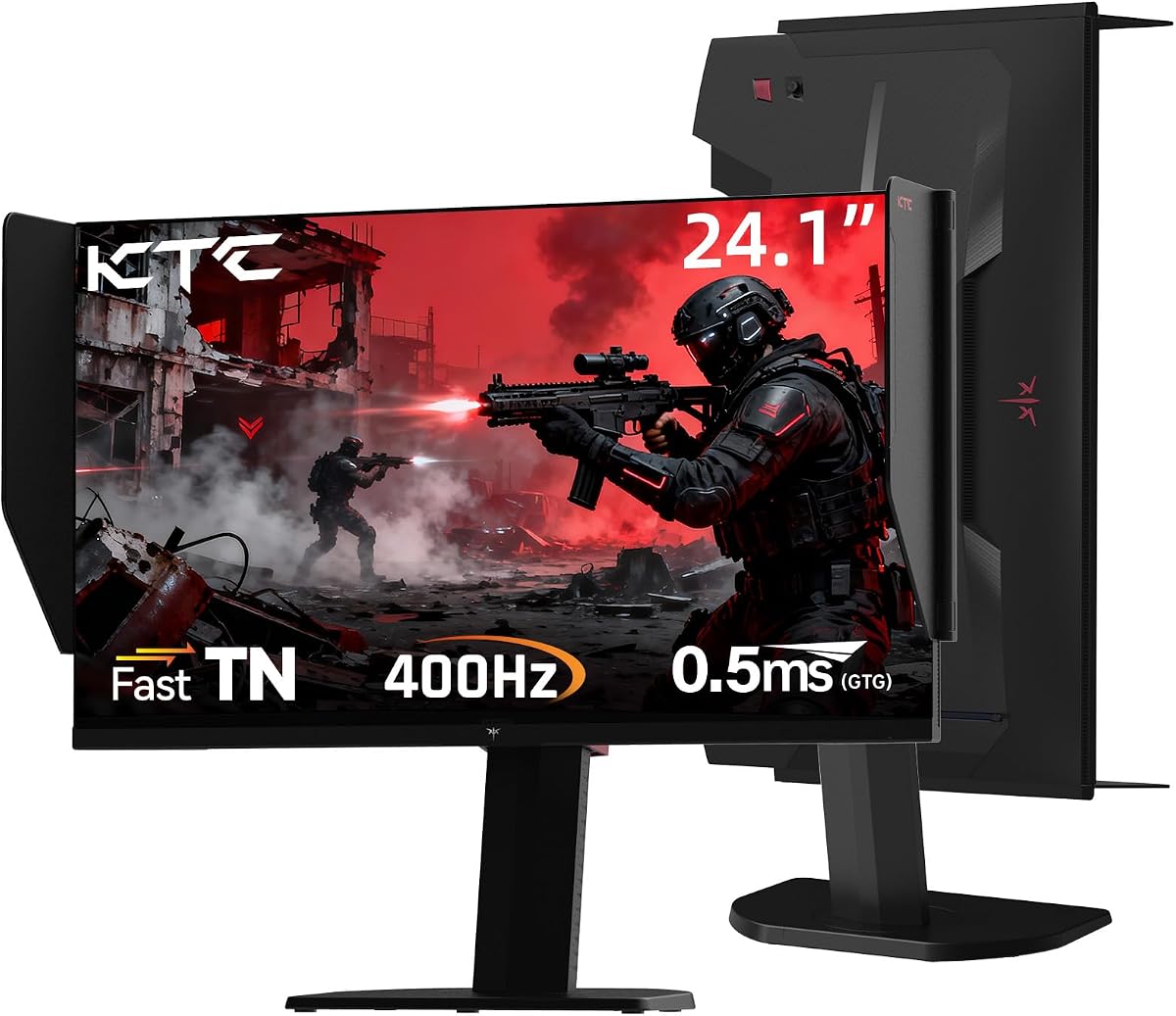
The KTC 25M1 is built around a very high 400Hz ceiling, a 0.5ms GTG response specification, and a 24.1-inch Fast TN panel. It is a specialized option for CS2 players who care most about immediate motion response and are willing to make compromises in viewing angles and color consistency.
We may earn a commission when you buy through this link, at no additional cost to you.
The maximum refresh rate is available through DisplayPort 1.4, while HDMI 2.0 supports up to 240Hz. A PC capable of driving extremely high frame rates is therefore important to realize the display's full potential. Adaptive synchronization is included, and an external controller allows quick changes among gaming modes, making the screen easier to configure according to the title or task.
The shielding hood is designed to absorb reflections and reduce interference from surrounding light, which can improve perceived contrast and immersion. Ergonomic support includes height adjustment, tilt, swivel, pivot, and VESA mounting. Against those strengths, the TN panel is the central trade-off: it is well suited to rapid competitive motion, but IPS and OLED models generally offer broader viewing angles and more refined color behavior.
Choose the 25M1 if you are building a dedicated competitive station and want the highest possible refresh specification available in this guide. It is less convincing as a general-purpose family display and may feel visually less refined than the OLED options. For most competitive PC users, however, it represents a focused attempt to minimize temporal smearing and keep movement as immediate as possible.
A 400Hz ceiling offers substantial headroom for players with powerful systems and competitive settings that generate very high frame rates. DisplayPort 1.4 is required to reach the maximum listed rate, making setup knowledge important.
The flocked shielding hood helps reduce reflections around the active picture, while the external controller makes mode changes more convenient. Height, pivot, swivel, and tilt controls also allow the display to be aligned to a preferred position.
We may earn a commission when you buy through this link, at no additional cost to you.
The JSHIX 18.5-inch portable monitor offers a 120Hz refresh rate, FHD resolution, HDR, and a 125% sRGB gamut in a compact format. Its 5.0 rating is the highest in the group, although ratings alone cannot account for the smaller screen size or the nature of a portable display.
We may earn a commission when you buy through this link, at no additional cost to you.
The 120Hz rate is fast enough to present a smoother experience than a standard 60Hz screen, which is useful for CS2 when the connected computer can generate suitable frame rates. Its 16:9 format matches the aspect ratio used by many PC games, while dual speakers reduce the need to carry separate audio equipment. The listed compatibility includes laptops, smartphones, consoles, and PCs through USB-C or HDMI.
Portability is the defining advantage. The screen is described as slim and light enough for a backpack, and the built-in heat dissipation is intended to support stable use during gaming or work. The trade-off is size: an 18.5-inch display cannot provide the peripheral awareness, target separation, or visual comfort of a larger desktop monitor during long sessions.
This is a compelling secondary display for travel, dorm rooms, competitions away from home, or a temporary gaming station. It is not the first choice for a permanent desk where a larger 24-inch, 27-inch, or 32-inch screen is available. Buy it for mobility first and treat its solid specification as an added advantage.
The 120Hz panel and 16:9 format preserve a familiar competitive layout in a highly portable form. It is particularly useful at tournaments, while traveling, or when using a laptop as the gaming system.
USB-C and HDMI connections support a wide range of devices, and dual speakers provide a more complete standalone setup. Buyers should still verify cable, power, and display-output compatibility for their specific hardware.
We may earn a commission when you buy through this link, at no additional cost to you.
The Samsung Essential S30GD is a 27-inch IPS display with a 100Hz refresh rate, slim bezels, and gaming-oriented picture adjustments. Its 4.5 rating and 27-inch size make it a credible general-purpose choice, especially for CS2 players who also need a monitor for office work, study, or everyday content.
We may earn a commission when you buy through this link, at no additional cost to you.
The IPS panel is the key attraction for users who value consistent color and wide viewing angles. Samsung says colors remain clear as the viewing angle changes, which can help when the monitor is not perfectly centered or when multiple people share a desk. The 100Hz rate reduces lag and motion blur relative to 60Hz, although it is well below the 144Hz, 165Hz, 240Hz, and 400Hz options in the guide.
Game Mode adjusts the image to fill the screen and emphasize detail, while adjustable color and contrast can help players inspect dark areas. Reduced blue light and screen flicker are also listed for long-session comfort. Ultra-thin borders give the display a modern appearance and help it fit neatly into a dual-monitor arrangement, although the supplied details do not list a specific stand adjustment range.
Choose the S30GD for an inexpensive general-purpose setup where 27 inches, IPS consistency, and a tidy design matter more than maximum frame rate. It will not replace a high-refresh competitive panel in a high-level match, but it can deliver a substantially smoother experience than a basic 60Hz monitor and remain useful for many non-gaming tasks.
The IPS panel provides stable color and viewing-angle performance, making the monitor well suited to mixed entertainment and productivity. It is a sensible option when the display must serve more than one purpose during the day.
Game Mode and adjustable contrast or color let players tailor the image without requiring a complex adjustment process. These features are useful for making shadows and fast-moving details easier to evaluate.
We may earn a commission when you buy through this link, at no additional cost to you.
The Samsung Essential S36GD pairs a 27-inch FHD panel with a 1800R curved design, 100Hz refresh rate, and TÜV-certified eye comfort features. It is a strong alternative for CS2 players who appreciate a rounded display and want one screen to handle gaming, video, and general productivity.
We may earn a commission when you buy through this link, at no additional cost to you.
At 100Hz, it can show more frames per second than a conventional 60Hz monitor, making movement visibly smoother in capable games. The curved panel wraps slightly around the viewer to create a wider, more engaging feel and can reduce some peripheral distraction. Game Mode adjusts the image for fuller-screen viewing, while color and contrast controls let users examine details in shadowed areas.
Eye comfort is a notable focus. Advanced eye-comfort technology is certified by TÜV and is designed to reduce blue light and irritating screen flicker during long sessions. As with the flat S30GD, however, the 100Hz rate and 1080p resolution place it below the faster, sharper competition for dedicated competitive play.
This monitor makes the most sense for a player who values a comfortable curved format, modern styling, and versatility at a moderate specification. It is a good step up from a basic office screen, but competitive enthusiasts who can run a higher-refresh display should prioritize speed and resolution before curvature.
The 1800R curve creates a gentler wraparound than very tight gaming curves, making the monitor suitable for both games and general content. It provides a more involved visual shape without requiring the footprint of a large ultrawide.
TÜV-certified eye-comfort technology addresses blue light and flicker concerns for extended use. That makes the display more versatile for a desk shared between gaming, work, and entertainment.
We may earn a commission when you buy through this link, at no additional cost to you.
The Dell 24 Plus S2425HSM combines a 23.8-inch FHD panel, 144Hz refresh rate, 1ms MPRT response, AMD FreeSync, and extensive stand adjustment. Its 4.7 rating and balanced feature set make it the strongest value-focused recommendation in this guide for CS2 players who want more than a basic 60Hz screen.
We may earn a commission when you buy through this link, at no additional cost to you.
The 144Hz rate provides a meaningful competitive upgrade, while AMD FreeSync helps reduce tearing when the graphics card and display can operate in compatible ranges. A stated 1ms MPRT and 1500:1 contrast ratio support fast motion and clearer differentiation between bright and dark areas. The 1920 x 1080 resolution remains standard for competitive shooters, where keeping visual elements and enemy models close to the center can be desirable.
Unlike many similarly positioned alternatives, the stand supports height, tilt, pivot, and swivel adjustment. That makes it easier to place the panel at a comfortable height and align it with a second screen. Two 3W speakers cover basic audio, and the TÜV-certified eye-comfort design is intended to reduce blue light while preserving color quality. The listed connectivity is limited to HDMI, so DisplayPort users should verify their needs before purchasing.
Choose the Dell for a well-rounded, budget-conscious CS2 setup, especially if 144Hz, adjustable positioning, and integrated speakers matter. It is not as sharp as a QHD OLED and cannot match a 240Hz or 400Hz refresh ceiling, but it offers a more competitive feature set than many similarly accessible alternatives.
144Hz, 1ms MPRT, and FreeSync cover the fundamental needs of a responsive competitive display. The result is more compelling for CS2 than a basic 60Hz model, particularly on hardware capable of sustaining higher frame rates.
Height, tilt, pivot, and swivel controls allow a more precise ergonomic setup than a fixed or minimally adjustable stand. These options are valuable in competitive sessions and dual-screen arrangements.
We may earn a commission when you buy through this link, at no additional cost to you.
The Samsung Odyssey OLED G6 is a 27-inch QHD QD-OLED gaming monitor with a 240Hz refresh rate, 0.03ms response time, and AMD FreeSync Premium. Its 4.7 rating, strong color specifications, and high-end motion performance make it one of the most compelling premium options for CS2.
We may earn a commission when you buy through this link, at no additional cost to you.
The 1440p panel provides a sharper image than standard FHD while remaining manageable for many gaming systems. At 240Hz, it can present exceptionally fluid movement, and the 0.03ms response figure supports crisp transitions without the blur associated with slower panels. FreeSync Premium is designed to reduce choppiness, lag, and tearing when the full feature set is supported by the graphics card and game.
QD-OLED technology brings high brightness, broad color, and deep contrast, while HDR10 improves highlights and shadow detail. The Pantone Validated screen is specified to reproduce more than 2,100 colors and over 110 skin-tone shades. Glare Free Technology helps maintain clarity around reflections, and OLED Safeguard uses thermal modulation to help protect against burn-in. The stand supports height adjustment, pivoting, tilting, and swiveling.
Choose this display when competitive speed, QHD clarity, HDR quality, and color accuracy all matter. Like other OLED panels, it is best managed with sensible settings and varied content rather than static imagery left onscreen for long periods. It is the premium alternative to the ASUS ROG, with a similar core speed specification and a strong emphasis on validated color and glare control.
The pairing of 240Hz and QHD is difficult to underestimate for a competitive shooter. It offers a large refresh ceiling for high-frame-rate PCs while preserving the visual detail needed to identify distant elements.
Pantone validation, HDR10, and wide QD-OLED color make the monitor excellent beyond CS2. Glare Free Technology is a useful addition in rooms where reflections could otherwise reduce visibility.
We may earn a commission when you buy through this link, at no additional cost to you.
The right CS2 monitor depends on how much your PC can drive, how you compete, and whether you also want the screen for general use. The following factors explain the specifications that deserve the most attention before purchase.
Refresh rate determines how many times the display can redraw each second, while the frame rate is the number of images your PC actually produces. A 144Hz monitor can only show its full benefit when the game reaches or approaches 144 frames per second, so monitor speed and GPU capability should be considered together. The Dell S2425HSM and Sceptre E225W-FW144 offer up to 144Hz, the Odyssey G55C reaches 165Hz, and several faster models reach 240Hz or 400Hz.
Aim for a refresh rate your system can consistently feed, and look for a model that leaves some headroom for sudden frame drops.
Fast movement can look smeared when a panel responds slowly, especially when a weapon swings across the screen or an opponent crosses a bright area. The listed response specifications range from 0.03ms on the ASUS and Samsung OLED models to 0.5ms GTG on the KTC and 1ms MPRT on several alternatives. MPRT and GTG describe different measurement approaches, so they should not be treated as perfectly identical numbers.
Prioritize a very low stated response time, while also considering whether your PC can generate smooth motion at the display's target rate.
Resolution determines how much information the panel can display and how crisp the result appears. FHD remains common in competitive shooters because the view feels familiar and keeps opponents close to the center, while QHD adds useful detail for players who want better visual clarity. A 27-inch QHD OLED combines both advantages, whereas 32-inch QHD or 18.5-inch portable designs involve clear size compromises.
Match resolution and diagonal size to your desk, viewing distance, and GPU rather than selecting the largest or sharpest option automatically.
FreeSync-family features synchronize the display refresh with the compatible graphics output to reduce tearing and keep animation fluid. The list includes standard FreeSync on the Samsung G55C, ZZA, and Dell monitors, while the Samsung OLED G6 supports FreeSync Premium. Adaptive synchronization works best when the game and graphics driver expose the required modes.
Confirm that your graphics card supports the advertised synchronization standard and that the selected connection can carry the intended refresh rate.
HDR can improve the separation of bright highlights and dark shadows, while a wide color gamut gives game scenes more vivid color. The ASUS ROG supports DisplayHDR 400 True Black, 99% DCI-P3, and true 10-bit color. The Samsung OLED G6 combines HDR10 with Pantone validation, and the portable JSHIX display lists HDR and 125% sRGB coverage. These features are especially attractive for a monitor that will also handle movies and creative work.
Color and HDR specifications matter for immersion, but competitive speed should remain the priority if your main goal is reaction and aim performance.
The required connection determines the maximum refresh rate in some cases. DisplayPort is essential for the ZZA monitor's listed 240Hz mode and the KTC's 400Hz mode, while the Dell listing includes HDMI. Portable displays need USB-C or HDMI support for laptops, phones, and consoles. Screen size and stand adjustment should also be checked before buying, especially for compact desks and dual-monitor arrangements.
List your intended PC, console, laptop, and any second display, then verify ports, cables, dimensions, and available desk space.
Long CS2 sessions make eye comfort and display care important. Several models list blue-light reduction, flicker-free operation, or formal eye-comfort certification. OLED screens need additional attention because static interface elements can contribute to uneven aging over time, although the ASUS and Samsung OLED models include technologies intended to help manage burn-in risk. The ASUS also uses a proximity sensor to switch to a black screen when the user leaves.
Use features designed for long-term care, vary onscreen content, and avoid leaving static menus or images displayed for extended periods.
Built-in speakers, shielding hoods, gaming modes, external controllers, and adjustable stands can improve convenience even when they do not change raw performance. The Dell includes two 3W speakers and extensive stand movement, the Sceptre and portable monitor include speakers, and the KTC provides a hood and external controller. These extras are most useful when they support your desk arrangement and routine.
Treat extra features as usability additions rather than substitutes for the refresh rate, response time, and resolution that directly affect CS2.
Connect the monitor with the appropriate cable and set its refresh rate to the highest mode supported by both the display and your graphics card. On Windows, the display settings and graphics control panel should show the chosen mode, while compatible games may also contain their own refresh-rate option. If a high-refresh mode is missing, check the cable, port, graphics output, and system capabilities before adjusting other settings.
Before a competitive session, use a game mode or neutral color profile and confirm that adaptive synchronization is enabled where supported. Adjust brightness to suit the room rather than maximizing it blindly, and avoid sitting directly in front of a glossy screen if strong reflections interfere with enemy visibility. Keep the display at a stable position and use available height, tilt, swivel, or pivot controls to reduce neck strain.
For OLED models, allow the included protection features to operate and avoid leaving the same static game menu, scoreboard, or desktop image onscreen for long periods. Take regular breaks, clean the panel with a soft and appropriate cloth, and follow the manufacturer's care instructions. For any monitor, update the graphics driver, use the correct input, and retest settings whenever the PC, cable, or game changes.
No, 240Hz is not necessary for every CS2 player. A capable 144Hz or 165Hz monitor can provide a very smooth competitive experience, especially when the game is consistently played at a high frame rate. The real benefit of 240Hz appears when the PC can generate enough frames to use it consistently. A high refresh rate also cannot compensate for a weak processor, low graphics settings, or unstable network connection.
QHD offers more pixel density and can make distant characters and small interface details easier to see. FHD remains popular because enemies occupy a smaller portion of the screen and many competitive PCs can sustain very high frame rates at that resolution. The right choice depends on your GPU, preferred viewing distance, and whether maximum frame rate or maximum detail matters more to you.
No. A 1ms figure describes a particular response specification, and real-world clarity also depends on the panel technology, frame rate, display settings, and the way the monitor handles varying brightness levels. It is also important to distinguish MPRT from GTG measurements. The listed speed figures are useful for comparison, but they should be considered alongside refresh rate, synchronization, and image quality.
An OLED is compelling for players who want very low response times, high refresh rates, strong contrast, and wide color. Both OLED recommendations here also provide QHD resolution and 240Hz refresh. The trade-offs include premium pricing, sensitivity to static content, and the importance of using burn-in protection features. A fast TN or IPS option may be more practical for a focused competitive setup.
A portable monitor can be a good choice for travel, tournaments, dorm rooms, and temporary setups. The 18.5-inch JSHIX model supports 120Hz, FHD resolution, USB-C, and HDMI, which are useful specifications for CS2. Its smaller screen is the main limitation, however, because it offers less peripheral awareness and a more compact visual experience than a 24-inch, 27-inch, or 32-inch desktop monitor.
FreeSync can make gameplay smoother by reducing tearing and keeping the frame presentation aligned with the compatible graphics output. It does not increase the PC's processing power, input responsiveness, or network performance. For best results, enable the appropriate synchronization option in the graphics driver and game, and use a connection that supports the intended refresh rate.
Many of the displays can be used with a laptop if it provides a compatible video output and you have the correct cable. The portable monitor is especially oriented toward USB-C and HDMI use, while DisplayPort is needed for the highest listed modes on several desktop gaming models. Check the laptop's supported resolution, refresh rate, and whether its port supports DisplayPort Alternate Mode.
Both matter, and neither should be considered in isolation. Refresh rate determines how often the screen can present frames, while response time influences how quickly pixel transitions occur. Your PC must also generate enough frames, so a stronger setup should prioritize a balanced combination of high refresh, low latency, adaptive synchronization, and stable graphics settings.
The ASUS ROG XG27AQDMGR is the strongest all-around choice because it combines QHD resolution, 240Hz, exceptional response, HDR, accurate color, and useful OLED protection features. The Samsung Odyssey OLED G6 is the leading premium alternative, with similar core performance and particularly strong color validation and glare control. For a budget-oriented setup, the Dell 24 Plus S2425HSM stands out with 144Hz, 1ms MPRT, FreeSync, speakers, and broad stand adjustment.
Prioritize the specifications your PC can actually drive, the balance between refresh rate and resolution, and the panel characteristics that match your priorities. Competitive players may prioritize speed and a familiar FHD view, while mixed-use buyers may favor QHD, HDR, wider color, and a more adjustable physical design. Portable and curved alternatives serve different desk and lifestyle needs rather than competing in exactly the same category.
Before purchasing, verify the current specification details, supported connection modes, stand dimensions, and protection features on the live listing. Prices, promotional bundles, and product configurations can change, and the supplied Adobe Creative Cloud offer on the ASUS has its own validity conditions. A current compatibility check is the final step between choosing a monitor and configuring it for CS2.