
HP OmniBook 3 14 2K OLED
4.1Editor score
Up to 41.5-hour battery claim
14-inch 2K OLED display
Fast 45-minute charging cycle
Snapdragon X efficient processor
A laptop with the longest battery life gives you more freedom to work, study, travel, and attend meetings without constantly searching for an outlet. The most useful models combine efficient processors, capable displays, dependable connectivity, fast charging, and enough performance for both routine tasks and demanding multitasking.
This guide compares ten laptops using their published battery claims, component specifications, displays, ports, weight, and practical feature sets. It covers premium ultraportables, ARM-based Windows machines, touchscreen notebooks, and more affordable everyday options, while clearly separating long advertised runtimes from confirmed real-world endurance.
Each review explains the battery figure, major strengths, limitations, and ideal buyer. The list also compares the complete range in one table, discusses how to evaluate battery life responsibly, and explains why current prices, configurations, and retailer listings can change. Product availability and technical details should always be confirmed before purchase.
4.1Editor score

3.7Editor score

4.8Editor score
As an Amazon Associate we earn from qualifying purchases.
The comparison below places all ten finalists side by side, emphasizing stated battery endurance, screen quality, portability, memory, storage, and the processor families that drive their efficiency.





The Lenovo IdeaPad Slim 3 is a conventional, approachable Windows laptop built around an AMD Ryzen 7 5825U processor, 16GB of RAM, and a 512GB SSD. It carries a 4.4 customer rating, and its appeal comes from the combination of a large touchscreen, practical everyday specifications, and a stated battery life of up to 10 hours. It is not the endurance leader in this guide, but it delivers a more balanced package for people who want a comfortable screen and a familiar x86 platform.
We may earn a commission when you buy through this link, at no additional cost to you.
Its eight-core Ryzen processor can handle office documents, web browsing, online learning, video calls, and light creative work. The 16GB memory configuration gives users comfortable room for many browser tabs, messaging applications, and background tools, while the SSD supports quick boot and application access. The 15.6-inch 1920-by-1080 touchscreen has 300-nit brightness and an anti-glare finish, making it more versatile than a typical productivity panel and well suited to classes, presentations, and media.
Connectivity is one of the strongest aspects of this configuration. It includes USB-C 3.2 Gen 1, two USB-A 3.2 Gen 1 ports, HDMI with support for a 4K external display at 60Hz, and an SD card reader. Wi-Fi 6 and Bluetooth 5.2 are appropriate for current wireless accessories. The 720p webcam and physical privacy shutter support private video calls, and Windows 11 Home with Copilot is preinstalled. The main limitation is that the up-to-10-hour claim is substantially below the headline figures of the ARM-based finalists.
This laptop is best for students, families, home-office users, and commuters who value the touchscreen, familiar x86 compatibility, and generous memory more than maximum unplugged runtime. It should be considered the balanced conventional option in the group, while buyers whose priority is an entire workday or longer away from a charger should favor one of the Snapdragon-based models. For those needs, the IdeaPad Slim 3 remains an easy, capable daily machine rather than the category's endurance champion.
The Ryzen 7 5825U, 16GB of RAM, and 512GB SSD form a versatile everyday combination. They support common productivity tasks, learning applications, browsing, and simultaneous communication apps without encouraging buyers to rely on cloud storage for smaller working files.
The mix of USB-A, USB-C, HDMI, and a card reader makes this model convenient for existing peripherals. An external 4K monitor can also be connected directly, reducing dependence on a docking station for a two-screen work arrangement.
We may earn a commission when you buy through this link, at no additional cost to you.
The Dell XPS 13 9345 combines premium design, a stated battery life of up to 27 hours, and Snapdragon X Elite hardware. Its 4.8 rating is the highest among the ten products featured here, making it a particularly compelling choice for professionals who need strong endurance without accepting a bulky chassis. The 13.4-inch FHD+ panel, refined construction, and broad connectivity create a high-end mobile package.
We may earn a commission when you buy through this link, at no additional cost to you.
The X1E-80-100 Snapdragon X Elite processor includes 12 cores and a dedicated NPU capable of 45 TOPS of local AI processing. It is joined by 16GB of LPDDR5X memory and a 512GB PCIe NVMe SSD, a configuration designed for efficient multitasking, quick application launches, and professional workflows. The NPU can support local features such as Recall, Cocreate, Windows Studio Effects, and Live Captions, reducing reliance on cloud processing for supported tasks.
The 500-nit anti-reflective display is bright enough for demanding indoor environments and maintains a sharp 1920-by-1200 resolution. Two USB4 ports with DisplayPort and Power Delivery can drive two external 4K monitors at 60Hz without a dock. Wi-Fi 7, Bluetooth 5.4, a fingerprint reader, and a backlit keyboard complete the modern feature set. Windows 11 Pro adds business-oriented tools such as BitLocker, Remote Desktop, Hyper-V, and Group Policy management.
The key trade-off is the Arm-based architecture. Modern Windows applications and an increasing number of mainstream programs support Snapdragon processors well, but specialized software, drivers, or legacy utilities may still require checking. Buyers should confirm that their essential applications are compatible. For a professional who values exceptional portability, battery life, build quality, and a high-quality display, the XPS 13 9345 is an excellent recommendation.
The combination of a stated 27-hour runtime and a thin 13.4-inch design makes the XPS 13 9345 suited to flights, commutes, and mobile workdays. Its efficient processor architecture helps explain how it can offer extended runtime while retaining strong multitasking capability.
The 45-TOPS NPU is useful for compatible Copilot+ features that process work locally. This can improve responsiveness for supported functions and provide useful presentation, collaboration, and privacy features without requiring every task to be sent to a cloud service.
We may earn a commission when you buy through this link, at no additional cost to you.
The HP OmniBook 3 14 2K Touch offers one of the strongest combinations of battery endurance, display quality, and portability in the guide. HP claims up to 30 hours of local video playback from its 60Wh battery, while a supplied 65W USB-C GaN adapter can restore the charge from zero to 50 percent in approximately 45 minutes. Its 4.6 rating adds further confidence to an already persuasive specification sheet.
We may earn a commission when you buy through this link, at no additional cost to you.
The Snapdragon X X1-26-100 processor operates alongside 16GB of onboard LPDDR5X memory and a 512GB PCIe Gen4 NVMe SSD. A dedicated 45-TOPS NPU can handle supported AI workloads locally, including summaries and generative content features. This hardware is designed for efficient multitasking, and the 14-inch 1920-by-1200 IPS touchscreen provides a roomy 16:10 workspace with 300-nit brightness and an 88 percent screen-to-body ratio.
Physical portability is aided by a 3.13-pound weight, while the 1080p IR camera and privacy shutter support secure sign-in and video calls. Connectivity includes Wi-Fi 6E, Bluetooth 5.3, two 10Gbps USB-C ports with charging and DisplayPort 1.4, two 5Gbps USB-A ports, and HDMI 2.1. The main consideration is software compatibility: buyers using specialized engineering, corporate security, or older device-control applications should verify support for the Snapdragon platform before purchasing.
This OmniBook is well suited to mobile professionals, students, and hybrid workers who want a long battery life, a sharp touchscreen, and modern ports. It is a particularly logical choice for anyone who regularly works away from an outlet but still needs a large display and flexible high-speed connectivity. Its 30-hour claim and rapid charging make it one of the most complete choices for extended mobile productivity.
The ability to recover roughly half a charge in 45 minutes reduces the disruption caused by a short break. It also gives travelers a practical way to extend a day without carrying a large second battery or remaining near an outlet.
The 16:10 touchscreen offers more vertical room than a conventional 16:9 panel, which can help with documents, browsing, and note-taking. Its 300-nit brightness and 88 percent screen-to-body ratio make it useful for both mobile productivity and shared workspaces.
We may earn a commission when you buy through this link, at no additional cost to you.
The Lenovo 15.6 FHD i7-13620H is a performance-oriented general-purpose laptop with 24GB of memory, a 1TB NVMe SSD, and a 10-core Intel processor. Its 4.6 rating is among the strongest in the list. Although the supplied product information does not state a maximum battery runtime, the laptop's portable 1.65-kilogram design, business durability, and broad connectivity make it worth considering for people who need computing power away from a desk.
We may earn a commission when you buy through this link, at no additional cost to you.
The 13th-generation Core i7-13620H has six performance cores and four efficiency cores, delivering 16 threads with boost speeds up to 4.9GHz. It is well suited to demanding productivity, content creation, and multitasking. The dual-channel 24GB DDR4 memory is unusually generous for this category, while the PCIe 4.0 NVMe drive provides quick boot times, responsive file access, and enough capacity to keep substantial work collections on the device.
Its 15.6-inch 1920-by-1080 anti-glare display has an 87 percent screen-to-body ratio, Dolby Audio stereo speakers, and a 720p privacy-shutter camera. Connectivity is extensive, including Wi-Fi 6, Bluetooth 5.2, Gigabit Ethernet, USB-C with power delivery and DisplayPort, HDMI 1.4b, and multiple USB ports. A bundled expansion module adds USB-C, Ethernet, two USB 3.0 ports, memory-card slots, an audio jack, and a 4K HDMI connection, offering flexibility for a full desktop-style setup.
The absence of a stated battery figure is the decisive caveat for a guide centered on endurance. Buyers should request verified runtime information rather than infer it from processor generation alone. This Lenovo is a strong choice for performance-minded professionals who value memory, storage, and ports, while the more efficient Snapdragon alternatives are better positioned for users whose primary goal is the longest possible unplugged working day.
The 24GB allocation gives the machine room to retain many applications and browser sessions simultaneously. It is a meaningful advantage over many similarly compact laptops, particularly for users who move between office suites, browser-based systems, communication tools, and media applications.
The included expansion module adds useful connections that are not always available on ultraportables. It can make the Lenovo more practical in a fixed office while preserving the flexibility to travel with only the notebook and essential peripherals.
We may earn a commission when you buy through this link, at no additional cost to you.
The Dell XPS 13 9350 delivers a premium combination of endurance, craftsmanship, and modern Intel performance. Dell states that it can run for up to 26 hours, placing it close to the Snapdragon-based XPS 13 9345 while retaining a conventional Intel platform. Its 4.5 rating, slim construction, high-refresh display, and professional Windows 11 Pro feature set make it a refined choice for mobile business users.
We may earn a commission when you buy through this link, at no additional cost to you.
The Intel Core Ultra 7 256V has eight cores and boost speeds up to 4.8GHz, paired with 16GB of DDR5 memory and a 1TB PCIe SSD. These specifications support multitasking, data analysis, content creation, and professional applications. The 13.4-inch 1920-by-1200 display reaches 500 nits and 120Hz, providing smoother motion and a crisp image for presentations, creative review, and everyday use.
Premium interaction details include a haptic glass touchpad, a streamlined function row, a backlit keyboard, and an FHD RGB camera with dual-array microphones. Two Thunderbolt 4 ports support external displays and peripherals, including dual 4K output at 60Hz. Wi-Fi 7 and Bluetooth 5.4 provide current wireless capabilities, while Windows 11 Pro includes BitLocker, Remote Desktop, Hyper-V, and Group Policy features for professional environments.
The main disadvantages are the cost of the high-end configuration and the fact that memory is not user-upgradeable. Some buyers may also prefer the battery headline of the HP OmniBook 3 or the 27-hour claim of the Snapdragon XPS. Nevertheless, the Dell XPS 13 9350 offers an excellent balance for someone who wants long endurance, x86 compatibility, a high-quality 120Hz screen, and a refined daily driving experience.
The 120Hz panel and 500-nit brightness distinguish this model from many endurance-focused business laptops. Paired with the haptic glass touchpad and illuminated keyboard, it feels especially appropriate for long typing sessions, detailed editing, and frequent presentations.
BitLocker, Remote Desktop, Hyper-V, and Group Policy support make the notebook suitable for managed work environments. Its small footprint and long stated runtime reduce the need to remain near office power or to carry a charger for routine travel.
We may earn a commission when you buy through this link, at no additional cost to you.
The Lenovo Essential 15.6 FHD is a basic Windows 11 laptop centered on efficiency rather than high-end performance. It uses an Intel N150 quad-core processor, 8GB of LPDDR5-4800 memory, integrated graphics, and 128GB of UFS 3.1 storage. Its 4.1 rating reflects a more modest overall proposition, but for browsing, document editing, streaming, online learning, and routine video calls, the components are appropriately focused.
We may earn a commission when you buy through this link, at no additional cost to you.
The processor can boost to 3.6GHz and includes a 6MB cache, allowing the laptop to handle common tasks without the heat and power demands of a high-performance notebook. The 15.6-inch 1920-by-1080 anti-glare display has 250-nit brightness and an 88 percent screen-to-body ratio. A 720p webcam with a privacy shutter supports safer video communication, while stereo speakers and dual-array microphones cover entertainment and meetings.
Connectivity is a genuine strength for an entry-level device. It includes two 5Gbps USB-A ports, one USB-C port with power delivery and DisplayPort, HDMI 1.4, a headphone jack, and an SD card reader. Wi-Fi 6 and Bluetooth 5.2 provide current wireless standards. At 3.42 pounds and 0.70 inches thick, the device is also reasonably portable, and its ENERGY STAR 9.0 certification and EPEAT Silver registration reflect attention to efficiency.
No maximum battery runtime is provided in the available product information, so this model cannot be ranked confidently on endurance alone. Its 128GB drive and 8GB of memory may also require careful management as files and applications accumulate. It is best for students, light users, and families seeking a straightforward, energy-conscious laptop with a large display and useful connectivity, provided their software needs remain modest.
The N150 processor and LPDDR5 memory are designed around efficient everyday computing. They are appropriate for web browsing, schoolwork, documents, streaming, and communication without the power draw associated with a high-end mobile workstation.
USB-A, USB-C, HDMI, and an SD card reader reduce the need for adapters. That makes the Essential more versatile for home offices and classrooms where a user may need to connect a monitor, storage device, or wired network accessory.
We may earn a commission when you buy through this link, at no additional cost to you.
The HP OmniBook 5 14 stands out with a stated battery life of up to 34 hours, a 2K OLED display, and rapid charging that can take the battery from zero to 50 percent in approximately 30 minutes. HP describes it as its longest-lasting laptop. Although its 3.7 rating is the lowest among the products in this guide, the supplied specifications make it a compelling endurance choice for buyers who prioritize screen quality and battery life above conventional x86 compatibility.
We may earn a commission when you buy through this link, at no additional cost to you.
The Snapdragon X Plus X1P-42-100 processor and Qualcomm Adreno GPU are designed for responsive everyday performance and efficient mobile operation. A generous 16GB of LPDDR5X memory supports multitasking, while the 1TB PCIe Gen4 NVMe SSD provides fast storage for a large application and file library. The laptop also includes HP AI Companion tools, Paint Cocreator, Live Captions, and Windows Copilot+ PC features.
Its 1920-by-1200 OLED panel reaches up to 300 nits and has a stated 0.2-millisecond response time. That combination benefits video, creative applications, general viewing, and fast on-screen movement. The hardware is completed with Windows 11 Home, a dedicated Copilot key, and a 14-inch form factor suited to mobile work. The major buying consideration is compatibility: specialized utilities or applications without native Snapdragon support may run less smoothly or require an x86 alternative.
This model is best for a mobile student, creative user, or professional whose applications support Arm-based Windows and who wants to travel with minimal charging anxiety. Its 34-hour claim, OLED panel, and 30-minute charging cycle form a particularly attractive bundle. The lower rating warrants checking recent customer feedback and confirming the exact software requirements, but for supported workflows, the OmniBook 5 is an excellent long-running mobile computer.
The 34-hour maximum claim gives substantial margin for document work, browsing, communication, and local media. The figure is based on specific testing conditions rather than a promise that every workload will last equally long, but it indicates strong efficiency.
The OLED display improves contrast, color richness, and response time, while fast charging reduces downtime. Together they make the OmniBook particularly appealing for users who spend long periods in transit and prefer a vivid screen over a conventional matte panel.
We may earn a commission when you buy through this link, at no additional cost to you.
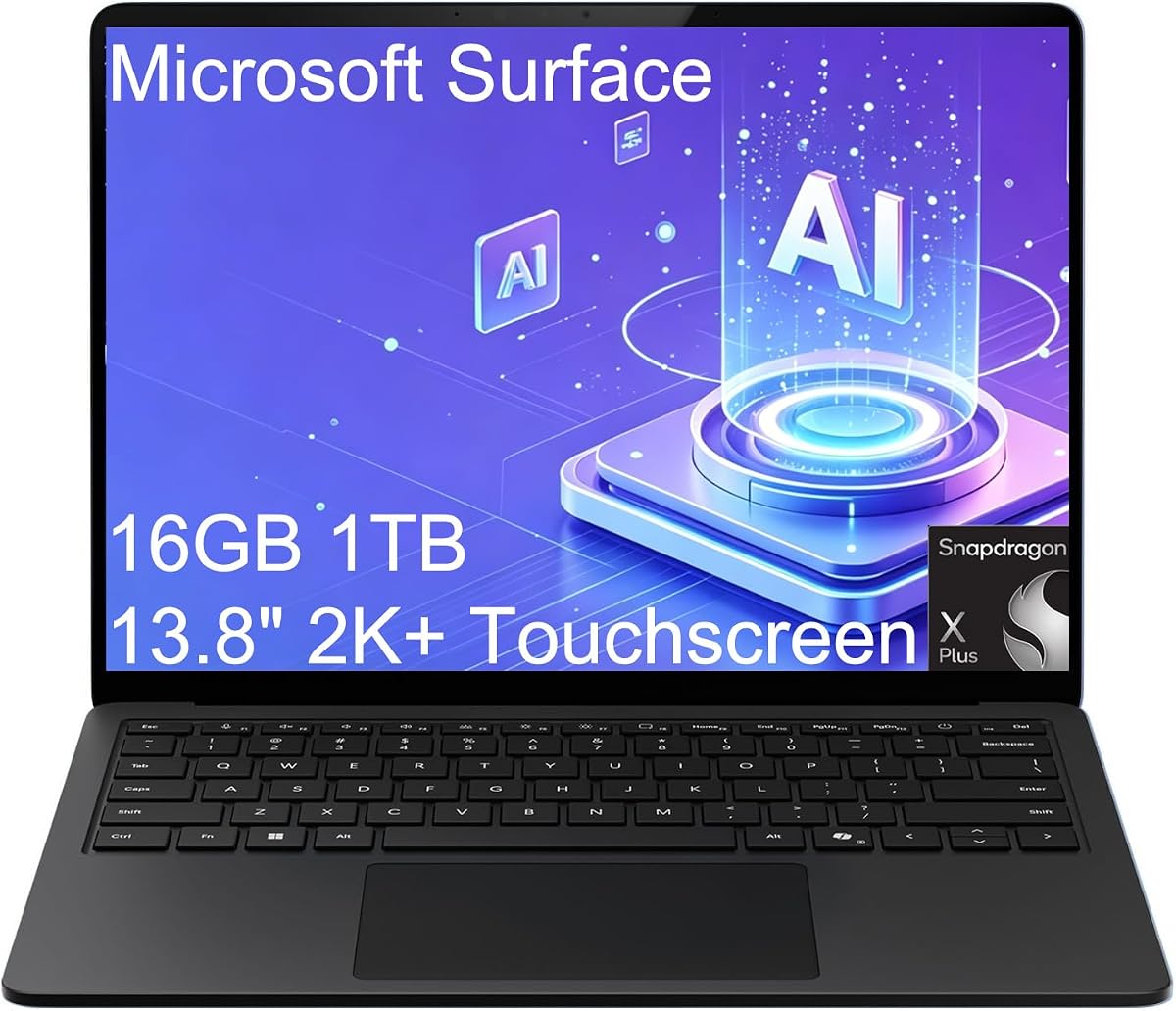
The Microsoft Surface Laptop 7 is a polished touchscreen ultraportable with a stated battery life of up to 20 hours. It weighs just 2.96 pounds and combines a Snapdragon X Plus processor, 16GB of memory, and a 1TB SSD in a restrained, highly portable enclosure. Its 4.3 rating places it securely among the stronger products here, while the 120Hz display and modern design give it a clear identity.
We may earn a commission when you buy through this link, at no additional cost to you.
Its 13.8-inch 2K+ touchscreen has a 2304-by-1536 resolution and a 120Hz refresh rate, offering the sharpest conventional display specification in this group. The enhanced 1080p front IR camera supports Windows Studio Effects, including background blur and automatic framing. A dedicated Copilot key and a 45-TOPS NPU provide access to compatible on-device AI functions, while Qualcomm Adreno graphics support smooth everyday visuals.
The interface includes two USB4 ports, one USB-A port, Surface Connect, and a 3.5mm audio jack. USB4 supports two external 4K monitors at 60Hz without a docking station, making the notebook viable for a mobile dual-screen arrangement. Wi-Fi 7 and Bluetooth 5.3 provide fast wireless connectivity, and the backlit keyboard helps during low-light work. The limited number of standard ports means that some users may still carry an adapter.
With a 20-hour stated runtime, the Surface Laptop 7 is not the category leader, but its low weight, excellent screen, and strong portable design make it particularly compelling for consultants, remote workers, and business travelers. It is also a more conventional touchscreen option than many convertibles. Buyers should confirm application and peripheral compatibility with the Snapdragon platform before committing.
At 2.96 pounds, the Surface is easy to carry for an entire workday. Its battery claim and high-resolution screen reinforce the benefit of a device that can handle work in transit without adding much weight to a bag.
The 2K+ 120Hz panel combines high pixel density with smooth motion. That makes it well suited to detailed documents, video communication, media, and touch-driven workflows while remaining easy to use in a compact footprint.
We may earn a commission when you buy through this link, at no additional cost to you.
The Lenovo Slim 7i Aura Edition is an exceptionally light 14-inch OLED laptop built for professionals and creators. It weighs only 2.82 pounds, includes 32GB of LPDDR5X memory and a 1TB SSD, and has a stated battery life of up to 17 hours. Its 4.3 rating reflects a balanced premium offering, although its endurance headline is shorter than those of the HP and Snapdragon-based XPS models.
We may earn a commission when you buy through this link, at no additional cost to you.
The Intel Core Ultra 7 258V has eight cores and works with integrated Intel Arc graphics and a 47-TOPS NPU. It supports demanding business applications and local Copilot+ features such as Recall, Cocreate, Windows Studio Effects, and Live Captions. The 32GB memory allocation is particularly generous for a notebook of this size, providing ample capacity for creative applications, browser-heavy workflows, and simultaneous communication tools.
The 14-inch OLED touchscreen covers 100 percent of DCI-P3 and reaches up to 600 nits, making it particularly appealing for color-sensitive work. TÜV Low Blue Light certification is intended to improve comfort during late-night sessions. Connectivity includes two Thunderbolt 4 ports, USB-A, HDMI 2.1, and an SD card reader. The system can support up to three external monitors, with HDMI and Thunderbolt 4 outputs rated for 4K at 60Hz.
A durable aluminum chassis and MIL-STD-810H standards support the premium construction, and the 5MP IR camera includes a privacy shutter. The trade-offs are the 17-hour maximum claim and soldered memory. Nonetheless, the Slim 7i is ideal for a mobile professional who values low weight, an exceptional OLED screen, abundant memory, and serious multi-monitor support more than maximum published runtime.
The 100-percent DCI-P3 display and 600-nit peak brightness provide accurate, vivid color. Those characteristics make the panel a compelling option for photo review, design work, presentations, and high-quality media consumption.
The Core Ultra 7 258V and 32GB of memory provide enough headroom for serious multitasking. Its 47-TOPS NPU adds local AI capability, while the ability to drive three external monitors broadens its usefulness in a professional desk setup.
We may earn a commission when you buy through this link, at no additional cost to you.
The HP OmniBook 3 14 OLED has the most ambitious battery claim in this guide, with HP advertising up to 41 hours and 45 minutes of battery life. That figure makes it the natural first place to look for a laptop built to cross an entire workday and beyond without a charger. Its 4.1 rating is respectable, and the combination of a Snapdragon X processor, 16GB of memory, and a 2K OLED display adds useful features beyond endurance.
We may earn a commission when you buy through this link, at no additional cost to you.
The X1-26-100 processor and Qualcomm Adreno GPU emphasize efficient mobile performance, AI capability, and rich graphics. The notebook includes 16GB of LPDDR5X memory and a 256GB PCIe Gen4 NVMe SSD. The storage capacity is more modest than that of several competing finalists, but it should be sufficient for an operating system, essential applications, active documents, and locally stored media when managed thoughtfully.
Its 1920-by-1200 OLED display reaches up to 300 nits and offers strong contrast and color for work, entertainment, and creative viewing. HP Fast Charge can move the battery from zero to 50 percent in approximately 45 minutes, reducing downtime when an outlet is available. The machine also provides an FHD IR camera with HDR auto-switching, Qualcomm Wi-Fi 6E, a Copilot key, and integration with Otter.ai for recording, transcription, and meeting summaries.
The leading battery figure should be interpreted as a maximum under specified conditions rather than a universal result. Screen brightness, wireless activity, application load, and plugged-in peripherals all affect runtime. Buyers should also confirm that their essential software supports the Arm-based Snapdragon platform. For compatible applications, however, this OmniBook is the strongest value-oriented answer to the search for the longest battery life, particularly when its OLED display and rapid charging are also priorities.
The 41-hour-and-45-minute maximum figure far exceeds the other published claims in the guide. It suggests a device designed for heavy travel, long school or workdays, and situations where access to a charger is uncertain.
Otter.ai support can assist with recording, transcription, slide capture, note generation, and meeting summaries. These features are particularly relevant to hybrid workers, although users should consider their organization's recording, consent, and data-handling requirements.
We may earn a commission when you buy through this link, at no additional cost to you.
Battery runtime depends on the entire system rather than a single specification. The most reliable purchasing decision combines the manufacturer's maximum claim with processor efficiency, screen characteristics, workload demands, portability, charging support, and software compatibility.
A maximum battery figure is usually measured under controlled laboratory conditions that may involve local video playback, reduced screen brightness, a particular power profile, and limited wireless activity. It should be treated as an upper boundary rather than a guaranteed result. Heavy browsing, video calls, high display brightness, gaming, continuous external-monitor use, and many open applications can reduce the observed runtime. Comparing claims is still useful, but only when the manufacturer uses broadly similar test methods.
Prioritize the longest published figure, then investigate independent runtime results for the exact configuration. Pay attention to the screen size, resolution, and panel technology because these often have a large effect on consumption. Treat claims of 30, 34, or more than 40 hours as promising, but understand that actual experience may be shorter.
The processor determines how efficiently a laptop completes work while consuming power. Efficient ARM-based Snapdragon X chips can provide exceptional battery life, but software support varies. Modern Windows applications, browsers, Microsoft Office, communication tools, and many mainstream creative programs have broad support, while specialist utilities, drivers, virtual machines, and some engineering or corporate applications may work better on Intel or AMD processors. A conventional x86 platform provides broader compatibility, while a Snapdragon platform can provide stronger endurance.
Choose the processor based on your actual applications rather than the battery headline alone. For mainstream office work, browsing, streaming, and communication, an efficient Snapdragon chip is attractive. For specialized software or extensive virtual-machine use, verify support carefully or favor a current Intel or AMD system with lower power modes.
Displays are among the largest power consumers in a portable computer. A 15.6-inch panel generally needs more energy than a smaller one, high-resolution screens require more graphics power, and OLED panels can consume additional energy when displaying bright content. The 2K and 2K+ OLED screens in this guide are visually impressive, but their size and brightness settings should be considered when maximum runtime is the primary objective. A lower-resolution panel or a smaller display may preserve more energy, particularly for text-heavy work.
Look for automatic brightness, adaptive refresh rates, energy-saving modes, and a matte or anti-reflective finish where possible. OLED users can lower brightness and use dark themes, which can reduce energy use and improve viewing comfort. Do not assume that a high-resolution panel is automatically inefficient, but always review real battery observations for the intended workload.
Long battery life is most valuable when a charger is unavailable, but fast charging provides a useful safety net for days when the battery is consumed unexpectedly. The HP OmniBook 3 14 is advertised to reach 50 percent in approximately 45 minutes, the HP OmniBook 5 in about 30 minutes, and the larger HP OmniBook 3 14 2K Touch in roughly 45 minutes. Other models support USB-C power delivery, allowing a compatible charger to be used across multiple devices. Confirm the adapter wattage and whether a charger is included.
A USB-C charger that can replenish the laptop quickly also reduces the need to carry a bulky dedicated power brick. Look for Power Delivery or USB4 compatibility, and check whether the included cable supports the advertised charging rate. Fast charging is especially helpful for travelers who can recharge during a meal, airport wait, or short work break.
A laptop can be easy to carry but tiring to use on a train, or comfortable on a desk but burdensome in a backpack. The finalists range from a 2.82-pound Lenovo Slim 7i to a 3.42-pound Lenovo Essential, with most premium options clustered near or below three pounds. Their displays range from 13.4 to 15.6 inches. Smaller, lighter models are generally better for frequent travel, while larger screens are more comfortable for document work, presentations, and media.
Consider the charger, sleeve, and any accessories as part of the portability equation. A highly efficient system paired with a compact charger can be more travel-friendly than a less efficient laptop with a large power supply. Also consider keyboard quality and screen size together, since an undersized keyboard can become tiring even when the total device is light.
Battery-focused buying guides naturally feature many ARM-based Windows laptops, but users should confirm that every required application, driver, accessory, and security tool is compatible. Check whether proprietary company software, VPN clients, accounting tools, creative plugins, virtual environments, or hardware drivers have native Snapdragon versions. USB-A support is also relevant for legacy peripherals, while Thunderbolt or USB4 docking can provide a broader desktop experience when appropriate adapters are available.
Do not discount the value of x86 compatibility without checking your software list. The Intel-based Lenovo 15.6, Dell XPS 13 9350, and Lenovo Slim 7i Aura may be more appropriate for users who depend on specialized Windows programs. Conversely, compatible mainstream users may benefit greatly from the efficiency and long runtime of the Snapdragon alternatives.
Battery life does not eliminate the need for sufficient memory and storage. The list includes configurations ranging from 8GB of memory and 128GB of storage to 32GB and 1TB. Students handling documents and browsing may be comfortable with the lower allocation, while designers, developers, and heavy multitappers benefit from more memory and faster storage. A constrained drive can also become a hidden source of slowness, particularly when it fills with updates and applications.
Match the hardware to the number of applications you expect to keep active. A 16GB configuration is a practical middle ground for most users, while 24GB and 32GB provide better room for specialized workflows. If possible, choose a model with more storage or verify that the drive can be expanded before purchase.
A portable computer is exposed to drops, temperature changes, spills, and repeated handling. Several finalists include MIL-STD-810H testing or durable aluminum construction, while business models offer TPM 2.0, fingerprint readers, IR cameras, privacy shutters, and Windows Pro management tools. These features do not extend runtime directly, but they influence whether the laptop remains dependable over years of mobile use. Warranty terms and seller support are also worth verifying, especially for modified or resealed configurations.
Prioritize security features that match your environment. A physical camera shutter and IR camera improve privacy, while BitLocker and TPM 2.0 support business data protection. For students and home users, durability, repairability, and accessible service may matter more than enterprise policy controls.
Start by learning the difference between a maximum runtime and the battery life available during your normal routine. A mixed day of browser tabs, video calls, bright displays, and streaming may consume power faster than a local video test. Check the remaining charge periodically, enable the operating system's battery-saver mode when appropriate, and reduce display brightness to a comfortable level. For the most accurate estimate, compare full-charge duration with the kinds of applications you actually use.
Protect battery health by avoiding prolonged states of extreme heat, deep discharge, or inactivity. Keep the laptop ventilated, use a stable and appropriately rated charger, and avoid leaving it inside a hot vehicle. When the device will remain unused for a long period, consult the manufacturer's guidance for the recommended charge level. Modern systems include charging protections and power-management controls, but user habits still affect long-term consistency. Update the operating system and drivers because efficiency improvements can be included in software releases.
To maximize the usable duration of a travel day, carry the smallest compatible USB-C charger that supports the laptop's required charging rate, enable airplane mode when connectivity is unnecessary, and disconnect unused accessories. For video calls, use a wired headset when appropriate and close high-activity applications. Limit the number of external displays, since driving one or two screens from the laptop can increase consumption. When selecting a route, keep the charger in a readily accessible place rather than buried inside a larger bag.
The HP OmniBook 3 14 OLED has the highest published figure, with HP advertising up to 41 hours and 45 minutes of battery life. That is a maximum under particular test conditions, so real runtime will depend on brightness, wireless activity, applications, and peripherals. The HP OmniBook 5 and HP OmniBook 3 14 2K Touch also offer especially long stated runtimes of up to 34 and 30 hours, respectively.
A 40-hour claim can be realistic for relatively light tasks under conditions similar to the manufacturer's test, but it is not a guarantee for every workload. Continuous video calls, high screen brightness, gaming, software development, and external monitors can reduce runtime considerably. Treat the claim as an upper limit and look for independent observations of the exact configuration you are considering.
Snapdragon X laptops often achieve strong battery life because their processors and integrated components are designed around efficiency. They can also provide instant-on behavior, quiet operation, and good standby performance. The trade-off is compatibility, so users should verify their essential applications, drivers, VPN clients, and peripherals before purchasing.
Fast charging is a useful complement rather than a replacement for battery capacity. It can add several hours of productive use during a short break and helps recover from an unexpected drain. The charger must support the laptop's advertised rate, so check wattage, USB-C Power Delivery, and whether the included cable can carry the necessary power.
OLED can consume additional power in some situations, particularly when displaying bright content across a large area. Black backgrounds, dark system themes, and moderate brightness can reduce that effect, and modern OLED panels also use adaptive power-management features. A bright OLED may still be worthwhile if display quality matters, but display size and brightness should be considered alongside runtime.
Smaller displays generally require less power, making 13-inch and compact 14-inch models strong choices for maximum mobility. A 15.6-inch screen is usually more comfortable for documents, media, and presentations, but it adds weight and may reduce available runtime. The processor and display technology also matter, so screen size should be evaluated as part of the complete system.
It often does, because the laptop must power an additional display while driving it through its graphics hardware. The effect varies by panel size, brightness, refresh rate, and whether the external screen is connected by USB4, DisplayPort, or HDMI. For the longest mobile runtime, use the built-in display and disconnect external monitors when traveling.
First, check for pending operating-system and driver updates, restart the system, and review the active battery plan. Screen brightness, background applications, video calls, wireless connections, and external accessories are common causes of reduced runtime. If the difference remains substantial, compare the battery settings and test procedure with the manufacturer's guidance and consider contacting the seller or manufacturer.
The HP OmniBook 3 14 OLED leads the group with its exceptional claimed runtime of up to 41 hours and 45 minutes, while also offering a vivid 2K OLED panel and 16GB of memory. The HP OmniBook 5 14 OLED follows with up to 34 hours, faster 30-minute charging, and a larger 1TB drive. For a premium x86 alternative, the Intel-based Dell XPS 13 9350 combines up to 26 hours with refined construction and a smooth 120Hz display, while the Snapdragon-based Dell XPS 13 9345 offers up to 27 hours and the highest customer rating.
Your ideal choice depends on more than the largest number. Consider processor architecture, application compatibility, screen size, weight, storage, charging speed, and the kind of work performed away from an outlet. Mainstream users can gain substantial freedom from efficient Snapdragon hardware, while users of specialized software may prefer the compatibility of an Intel platform. A slightly lower maximum figure can still be the better purchase if the display, keyboard, ports, and overall mobility fit your work more closely.
Before ordering, verify the current specification, battery claim, charger contents, warranty, and application support on the live product listing. Prices and retailer configurations change over time, and the same model may appear with different memory, storage, operating systems, or power adapters. Confirming the exact configuration protects your decision and helps ensure that the laptop you choose truly matches the endurance and features you need.