
Fortinet FortiGate-70G
5.0Editor score
Ten Gigabit Ethernet ports
Next-generation firewall protection
Secure SD-WAN capabilities
Centralized cloud management
Hardware Firewalls guide comparing ten business security appliances for throughput, ports, threat protection, VPN, management, and deployment needs.
A hardware firewall gives a small office, branch, or growing business a dedicated security boundary instead of relying entirely on a consumer router. The right appliance should combine useful inspection throughput, flexible ports, VPN support, manageable administration, and the security subscriptions required for continuous protection.
This guide compares ten hardware firewalls based on the supplied specifications, including processor and port configurations, firewall and VPN throughput, user capacity, threat-protection capabilities, centralized management, and deployment requirements. It covers compact units, subscription-bundled appliances, hardware-only models, and a renewed Cisco option.
Each review explains where a product fits and where its limitations matter. FortiGate 40F and Netgate 1100 cover simpler deployments, while larger Zyxel, SonicWall, Fortinet, Sophos, and Cisco appliances serve more demanding offices. Availability, licensing requirements, and current prices can change, so verify those details before purchasing.
5.0Editor score

4.7Editor score

5.0Editor score
The comparison below places all ten appliances side by side, emphasizing the differences in network capacity, inspection performance, subscription structure, port flexibility, and centralized management.
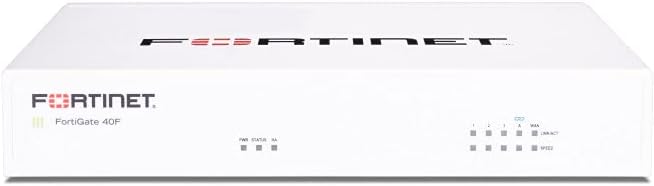


The FortiGate-40F is a compact next-generation firewall intended for small businesses and enterprise branch offices. Its 4.2 rating reflects a generally capable appliance for organizations that want Fortinet security without a large rack-based system. The standout quality is its balanced approach: five Gigabit Ethernet RJ45 ports, silent fanless operation, automated deployment, and access to Fortinet's broader security ecosystem in a desktop enclosure.
We may earn a commission when you buy through this link, at no additional cost to you.
Connectivity includes one WAN port and four internal ports, which is enough for a modest office or branch connected through a downstream switch. Performance figures of up to 1 Gbps IPS throughput and 600 Mbps threat protection throughput provide useful capacity for many smaller networks. Fortinet's purpose-built security processor and AI-powered FortiGuard Labs are intended to identify both known and previously unseen threats, while the management console offers automation and network visibility.
The central trade-off is the appliance-only format. The listing explicitly excludes a subscription, so buyers should not expect the hardware alone to provide the full range of continuously updated security services. It also offers fewer ports and less headroom than the FortiGate-70G, Zyxel USGFLEX700, or SonicWall models farther down this list. These limitations are reasonable for a compact installation, but less attractive for heavily inspected traffic or numerous wired endpoints.
Choose the FortiGate-40F for a small office, satellite branch, or security-conscious home setup that values a compact appliance and straightforward deployment. It is a sensible recommendation when five Gigabit ports are sufficient and the organization is prepared to arrange the appropriate Fortinet licensing. Buyers needing broader port expansion or integrated multi-year protection should examine one of the bundled alternatives.
The fanless desktop design reduces noise and physical space requirements, making the FortiGate-40F easier to place beside other office equipment. It is particularly useful where a full-size rack appliance would be unnecessary.
Zero Touch Integration and FortiGate Cloud or FortiManager workflows can simplify initial setup and ongoing visibility. These features are valuable for administrators who want centralized control across distributed sites.
We may earn a commission when you buy through this link, at no additional cost to you.
The Netgate 1100 combines routing, firewalling, and VPN functions in a compact pfSense+ appliance. Its 4.1 rating makes it a credible choice for technical administrators who want an open-style network gateway in an appliance rather than a general-purpose router. The strongest selling point is the included pfSense+ software update path, backed by Netgate technical assistance and a one-year hardware warranty.
We may earn a commission when you buy through this link, at no additional cost to you.
A dual-core ARM Cortex-A53 processor running at 1.2 GHz provides near-gigabit routing for common iperf3 traffic and firewall throughput in excess of 650 Mbps. Three switched Gigabit Ethernet ports can be configured as WAN, LAN, or optional network interfaces, allowing a useful combination of routing and segmentation. Low power draw and silent operation make it practical for a desk, wall, or small rack installation.
Its limitations come from the same simplicity that makes it attractive. Three ports may be restrictive for a busy office, and the appliance does not offer the many physical connections found on higher-capacity business firewalls. Larger organizations must also consider how many locations they need to administer and whether a centrally managed ecosystem would be preferable to a pfSense+ environment.
The Netgate 1100 is best for a small business, branch, technical home lab, or secure edge deployment where three ports and solid sub-gigabit firewall performance are sufficient. It is especially attractive when included lifetime software updates and direct assistance with setup outweigh the convenience of vendor-specific cloud management.
Because pfSense+ is preloaded, the device can be configured as a firewall, router, and VPN gateway without first building a software environment. The included assistance is a useful starting point for administrators who are new to the platform.
Its low power consumption and silent enclosure suit offices with limited space. The hardware is designed to remain unobtrusive while supplying dedicated perimeter protection for a modest network.
We may earn a commission when you buy through this link, at no additional cost to you.
The Zyxel USGFLEX100H is a compact business firewall designed for small deployments and branch networks. Its 4.0 rating reflects a capable hardware platform whose included Entry Defense Pack focuses on reputation filtering and SecuReporter visibility. Eight software-defined Gigabit RJ45 ports, Nebula management, and a broad set of VPN options make it more flexible than the smallest appliances in this guide.
We may earn a commission when you buy through this link, at no additional cost to you.
Its specifications include 4,000 Mbps SPI firewall throughput, 1,500 Mbps IPS throughput, and 900 Mbps VPN throughput. The platform supports up to 50 users, 300,000 concurrent sessions, 50 IPsec tunnels, 25 SSL VPN users, and 16 VLANs. Administrators can assign the eight ports as WAN or LAN, use WAN load balancing and active-backup failover, create link aggregation, and coordinate multiple sites through Nebula.
An important distinction is the licensing structure. The Entry Defense Pack includes IP, DNS, and URL reputation filtering with SecuReporter visibility, while anti-malware, sandboxing, web filtering, IPS, and full UTM require the optional Gold Security Pack. Buyers seeking those advanced controls should account for that add-on rather than assuming the base listing includes every threat-protection feature.
The USGFLEX100H fits small offices, distributed teams, and organizations that value flexible port assignment and centralized cloud workflows. Its offline-capable setup and firmware update process can also help sites with unreliable internet access. It is a stronger fit than an entry router, although buyers wanting comprehensive UTM from the outset should plan the appropriate license.
Software-defined port assignment makes it easier to reshape a deployment as WAN or LAN requirements change. Load balancing, failover, and link aggregation add resilience without relying on a fixed-port layout.
Centralized configuration, policy synchronization, and SD-VPN orchestration are especially helpful for administrators managing branch sites. Tailscale and IPsec support broaden the available connection options.
We may earn a commission when you buy through this link, at no additional cost to you.
The SonicWall TZ280 stands out as the most balanced modern small-business firewall in this collection. Its 4.7 rating, 2.5 Gbps firewall inspection capability, and mix of copper and SFP connectivity make it a strong all-around recommendation. The appliance is designed for small businesses and branches that need more than basic packet filtering but do not require a high-end data-center system.
We may earn a commission when you buy through this link, at no additional cost to you.
Performance reaches 1 Gbps threat prevention and 1.2 Gbps IPsec VPN throughput, using SonicWall's RFDPI engine. Connectivity consists of eight Gigabit Ethernet ports and two Gigabit SFP ports. Administrators can deploy the device with zero-touch configuration and manage it locally or through the cloud Network Security Manager. SonicOS 8 supports intrusion prevention, gateway anti-malware, application control, TLS and SSL decryption, Capture ATP sandboxing, and reputation filtering when an active subscription is present.
The hardware-only format is the most important caveat. Security services, firmware updates, and support are not included, and a separate subscription is required to activate full protection. That makes the total ownership cost more complex than with a bundle. Nevertheless, it gives experienced administrators flexibility to select a suitable service term and separates appliance procurement from activation.
Buy the TZ280 for a growing branch, professional office, or distributed small business that values throughput, modern inspection, and flexible management. It is our Editor's Choice because its hardware and threat-protection platform offer a convincing balance of capability and compact deployment. Buyers who want a simpler subscription arrangement may prefer a Fortinet or Zyxel bundle.
The RFDPI platform and SonicOS 8 provide a broad inspection toolkit, including application control, encrypted-traffic visibility, anti-malware, sandboxing, and reputation filtering. These functions require an active service subscription.
Eight Gigabit Ethernet and two Gigabit SFP ports provide useful copper and fiber options. IPsec and SSL VPN, secure SD-WAN, and Zero-Trust Network Access support branch and remote-worker requirements.
We may earn a commission when you buy through this link, at no additional cost to you.
The FortiGate-70G is the strongest value-oriented pick in this guide, earning a 5.0 rating for its combination of ten Gigabit Ethernet RJ45 ports and comprehensive business security features. It is explicitly designed for branch and small-office use, yet it includes capabilities often sought in larger appliances, including next-generation firewall controls, IPS, web filtering, encrypted-traffic inspection, and application control.
We may earn a commission when you buy through this link, at no additional cost to you.
Secure SD-WAN is a major differentiator. It is intended to improve cloud and SaaS performance while maintaining a consistent security policy across participating paths. SSL inspection and application control give administrators deeper visibility into encrypted traffic. Deployment can be managed through FortiGate Cloud or FortiManager, and the firewall integrates with FortiSwitch and FortiAP for a more unified wired and wireless environment.
The supplied data does not state specific firewall, IPS, or VPN throughput figures, so buyers should not assume parity with higher-capacity models based only on the port count. Licensing and subscription requirements should also be confirmed for the exact listing. Those points matter because FortiGate security capabilities and management access can depend on the selected service arrangement.
The FortiGate-70G is a compelling recommendation for small offices and branches that need more ports than a compact four-port appliance but do not require multi-gigabit inspection performance. Its Fortinet integration makes it especially attractive to organizations already using FortiSwitch, FortiAP, FortiManager, or FortiGate Cloud.
Ten dedicated Gigabit Ethernet RJ45 connections make the appliance adaptable to a larger mix of WAN, LAN, server, and branch connections. That physical flexibility is unusual in an entry-oriented business firewall.
Integration with FortiGate Cloud, FortiManager, FortiSwitch, and FortiAP can reduce management friction for existing Fortinet environments. Centralized control is particularly useful when multiple branches need consistent policies.
We may earn a commission when you buy through this link, at no additional cost to you.
The Sophos XGS 128 is aimed at larger offices and networks that need substantial raw firewall throughput and modern physical connectivity. It has nine 2.5 Gigabit Ethernet copper ports and one SFP fiber port, with a stated firewall throughput of up to 19.1 Gbps. That capacity separates it from compact appliances intended mainly for modest branch links.
We may earn a commission when you buy through this link, at no additional cost to you.
Its SD-WAN architecture provides intelligent traffic routing and resilient connectivity across multiple WAN connections. The VPN-ready design supports secure site-to-site networking and encrypted remote employee access. As a purpose-built next-generation firewall appliance, it is engineered for reliable operation, visibility, and high performance in business networks rather than for use as a basic home router.
The primary caveat is that this is a hardware-only purchase. A Sophos subscription is needed to enable IPS, web security, VPN, and advanced threat defense. Without that service, the buyer should not expect the full enterprise protection described by the platform to operate. The listing also provides no customer rating, so there is no numerical feedback value to weigh alongside the specifications.
Choose the XGS 128 when port speed and throughput are more important than the smallest possible appliance. It is well suited to larger offices with several multi-gigabit connections, distributed sites, or growing networks that need SD-WAN. Organizations should budget for the appropriate security subscription and verify licensing details before installation.
Nine 2.5 Gigabit copper ports allow modern computers, access points, and switches to operate without bottlenecking at one-gigabit Ethernet. The SFP port adds an option for fiber connectivity.
Intelligent routing across WAN connections can improve application behavior and network resilience. This makes the appliance relevant to branches that use multiple providers or need better control over traffic steering.
We may earn a commission when you buy through this link, at no additional cost to you.
The Zyxel USGFLEX700 is the premium selection in this guide because it pairs high-capacity business hardware with a complete first-year UTM package. Its 5.0 rating reflects a strong overall proposition for mid-size and large offices, particularly those that want Nebula cloud management without assembling every service separately. It is recommended for internet connections up to 900 Mbps.
We may earn a commission when you buy through this link, at no additional cost to you.
The appliance delivers 5,400 Mbps SPI firewall throughput, 1,450 Mbps UTM performance with anti-malware and intrusion detection, 1,100 Mbps VPN throughput, and support for 1.6 million sessions, with results varying by testing method. Twelve configurable Gigabit Ethernet ports and two Gigabit SFP fiber ports provide extensive local connectivity. The first-year bundle covers anti-malware, ransomware blocking, web filtering, application control, intrusion detection and prevention, and Nebula Cloud Pro management.
The main caution is that the included UTM term is temporary. Long-term protection requires attention to renewal and service continuity. Its desktop-sized footprint and high port count are also more than a very small network needs. Buyers should compare the relevant UTM throughput, rather than only the much faster SPI figure, against their expected traffic and inspection demands.
The USGFLEX700 suits established offices, larger branches, and organizations that value a broad protection bundle from the beginning. It is also a good choice when centralized Nebula monitoring and flexible copper-to-fiber connectivity matter more than choosing the smallest appliance. For buyers with lighter requirements, the USGFLEX100H offers a more modest path into the same ecosystem.
Anti-malware, ransomware blocking, web filtering, application control, and intrusion prevention are included for the first year. That bundle gives an organization a practical starting point instead of leaving essential threat controls for later.
Nebula Pro management makes monitoring and configuration more accessible across an organization. Centralized visibility is especially valuable for teams responsible for multiple offices or branch networks.
We may earn a commission when you buy through this link, at no additional cost to you.
The SonicWall TZ680 is the high-end small and medium-business option, offering up to 5 Gbps firewall inspection and 2.5 Gbps threat-prevention performance. It is designed for distributed organizations that need more network speed and connection flexibility than the TZ280 provides while retaining a desktop appliance form factor.
We may earn a commission when you buy through this link, at no additional cost to you.
Connectivity includes eight Gigabit Ethernet ports, two 5G SFP+ ports, and two 10G SFP ports. This mix can support high-speed uplinks, fiber links, and numerous local connections. The platform also provides 2.5 Gbps IPsec VPN throughput and uses SonicWall's RFDPI engine. Zero-touch deployment and management through on-box tools or the cloud Network Security Manager fit organizations that need centralized administration.
As with the TZ280, the appliance-only configuration excludes security services, firmware updates, and support. Active subscription status is necessary for intrusion prevention, gateway anti-malware, application control, TLS and SSL decryption, Capture ATP sandboxing, and reputation-based filtering. The absence of a customer rating in the supplied data also means buyer feedback should be checked independently.
The TZ680 is appropriate for growing businesses, high-traffic branches, and distributed workforces requiring secure SD-WAN, IPsec or SSL VPN, and Zero-Trust Network Access. It is most compelling for organizations that can use its faster connections and are prepared to add the appropriate SonicWall service subscription.
Five-gigabit inspection and 2.5-gigabit threat-prevention figures create useful headroom for busier offices and branches. The higher performance also makes the model a stronger fit for encrypted traffic than a basic small-office appliance.
Two 5G SFP+ and two 10G SFP ports allow administrators to build faster uplinks and flexible fiber-based infrastructure. The eight copper ports preserve compatibility with standard local devices.
We may earn a commission when you buy through this link, at no additional cost to you.
The FortiGate 60F is positioned as a medium-sized-business firewall with a three-year FortiCare Premium and FortiGuard Unified Threat Protection bundle. Its 4.4 rating gives it a favorable customer-feedback signal, while the long included service term makes it convenient for organizations that want immediate protection without a separate initial subscription decision.
We may earn a commission when you buy through this link, at no additional cost to you.
The Unified Threat Protection package addresses advanced online threats through web filtering and anti-botnet technologies. FortiCare Premium adds dependable customer support and service continuity. Together, the appliance and services are aimed at organizations that need stronger protection than a basic router but do not want the infrastructure complexity of a large enterprise deployment.
The supplied product information does not include port counts or throughput numbers, which limits direct performance comparison with the FortiGate-40F and 70G. The 60F is also an older platform generation, so buyers should confirm current firmware status, lifecycle considerations, and management compatibility. The three-year bundle is valuable, but buyers should still understand what occurs when that term ends.
Buy the FortiGate 60F when a bundled, supported security service is more important than selecting the newest hardware generation. It is a practical recommendation for medium-sized organizations seeking a straightforward Fortinet package and reliable support. For newer models or broader physical flexibility, compare the FortiGate-70G and other current appliances.
Thirty-six months of Unified Threat Protection and FortiCare Premium provide a substantial initial period of threat updates, support, and service coverage. This simplifies budgeting and initial deployment.
Web filtering, anti-botnet protection, and advanced online-threat defenses offer a more complete security layer than a standard router. FortiCare Premium adds an established support channel for troubleshooting.
We may earn a commission when you buy through this link, at no additional cost to you.
The Cisco ASA5525-X ASA5525-K9 is a renewed, eight-port Gigabit Ethernet security appliance with a 4.3 customer rating. It is the most conventional Cisco option in the guide and can appeal to organizations familiar with the ASA platform. The supplied information is limited, so the model should be evaluated primarily on its hardware fit and current licensing availability rather than assumptions based on newer appliances.
We may earn a commission when you buy through this link, at no additional cost to you.
Its eight Gigabit Ethernet ports offer more physical connections than the smallest firewall routers. Cisco ASA appliances have historically been used for perimeter firewalling, routing, VPN, and related network-security functions, making the model recognizable to many enterprise administrators. Renewed hardware can be attractive when a recognized platform is needed but the newest appliance is not necessary.
Renewed status introduces uncertainty that buyers must account for. Cosmetic wear, prior usage, remaining lifecycle, available licenses, and included accessories should all be confirmed. The supplied data does not state security-service coverage, subscription requirements, throughput, or VPN performance, so the product is less fully documented than several newer alternatives. Software and support availability also matters because a firewall without current protection is not a complete security solution.
The ASA5525-X is best for technically experienced buyers who specifically want a Cisco ASA appliance, understand the renewed market, and can confirm licensing and support. It may suit a lab, a secondary site, or an established ASA environment, but newer appliances generally provide clearer specifications and more accessible management ecosystems. Verify compatibility before relying on it for a critical perimeter.
The ASA5525-X name and K9 designation provide a recognizable platform for administrators who already use Cisco firewall systems. That familiarity can simplify training and integration in suitable environments.
Renewed equipment can reduce acquisition costs, but condition and support details should be checked carefully. Buyers should confirm licensing, accessories, firmware eligibility, and the appliance's expected service life before deployment.
We may earn a commission when you buy through this link, at no additional cost to you.
Selecting a business firewall requires balancing inspected throughput, physical ports, security features, licensing, management demands, and the size of the network. The following factors help narrow the field before comparing purchase options.
Firewall throughput describes the maximum rate at which the appliance can process traffic before inspection, whereas UTM or threat-prevention throughput reflects the lower rate available when advanced security functions are active. A common mistake is to compare only the headline SPI or firewall figure. Organizations should estimate their average and peak traffic, allow room for growth, and ensure that the inspected rate remains comfortably above expected demand.
Choose a unit with genuine performance headroom, not one that merely matches your current link. The Zyxel USGFLEX700 provides 5,400 Mbps SPI throughput but 1,450 Mbps UTM throughput, illustrating why relevant inspection figures matter. In short, select based on the protections you will actually enable.
Count the WAN, LAN, server, management, and expansion connections needed today and after the next growth phase. Copper RJ45 ports are convenient for ordinary office devices, while SFP or SFP+ ports support fiber or higher-speed uplinks. Multi-gigabit ports can prevent bottlenecks around modern switches, servers, and access points.
Match the connector mix to the site rather than simply choosing the highest port count. The FortiGate-70G offers ten Gigabit RJ45 ports, the Sophos XGS 128 provides nine 2.5-gigabit ports plus SFP, and the SonicWall TZ680 combines copper with 5G and 10G SFP connections.
A firewall can include basic firewall functions while requiring separate services for intrusion prevention, web filtering, anti-malware, sandboxing, application control, and encrypted-traffic inspection. Hardware-only models may offer strong processing but leave important protections inactive until a subscription is purchased. Bundled models are often easier for a new organization to deploy.
Compare what is active on day one with what must be added later. Also verify subscription length, renewal terms, and whether management is included. The Sophos XGS 128 and both SonicWall models are hardware-only, while the FortiGate 60F and Zyxel USGFLEX700 include extended or complete initial service bundles.
Remote workers, branch offices, and partners create a steady need for encrypted connectivity. Compare supported IPsec and SSL VPN capabilities, user limits, tunnel counts, and throughput rather than assuming every VPN feature is enabled in every license tier. Some appliances also support modern overlay or software-defined VPN options.
Select enough remote-user capacity and VPN performance for realistic concurrency. The Zyxel USGFLEX100H supports 50 IPsec tunnels and 25 SSL VPN users, while SonicWall TZ280 and TZ680 advertise dedicated IPsec VPN throughput and SSL VPN support.
A single-site appliance can often be managed locally, but growing organizations need consistent policies, visible health information, and efficient configuration across sites. FortiGate Cloud, FortiManager, Nebula, and SonicWall Network Security Manager are examples of centralized workflows represented in this guide. pfSense+ provides a different hands-on approach that experienced administrators may prefer.
Prioritize a console your team can use confidently. Cloud management can simplify distributed administration, while local or platform-specific control can offer deeper configuration. The right choice depends on staff skills, network size, and the broader product ecosystem already in use.
User ratings and concurrent-session limits offer an initial sense of scale, but they are not substitutes for performance testing. The Zyxel USGFLEX100H is positioned for up to 50 users, while the USGFLEX700 supports up to 500 users and 1.6 million sessions. Larger offices should examine throughput and session handling alongside the nominal user count.
Avoid buying a model that is technically fast but physically or logically constrained for the intended team. Identify all users, devices, applications, guest connections, and expected growth, then choose the appliance with a comfortable margin above those numbers.
Organizations using multiple internet providers or steering application traffic across WAN links may value SD-WAN capabilities. The FortiGate-70G and Sophos XGS 128 are designed with secure SD-WAN optimization, while the SonicWall TZ280 and TZ680 also support it. SD-WAN can improve path selection and application performance while preserving consistent security policies.
Choose SD-WAN only if it addresses a real connectivity need. A single-connection small office may not need the added configuration complexity. For branches using several WANs or cloud services, the feature can be a decisive business advantage.
A firewall must fit the available space, power, and noise tolerance of its location. The FortiGate-40F and Netgate 1100 use compact, silent designs, while larger desktop appliances provide more ports and processing capacity. Desktop form factors are easier to deploy than rack equipment but still need adequate ventilation and secure placement.
Think about who will maintain the appliance after deployment. A fanless unit can be welcome in an office, while a larger high-throughput appliance may deserve a locked equipment area. Choose a form factor and management model that the responsible team can support consistently.
Begin by documenting the existing network, including internet circuits, router roles, LAN segments, servers, VPN users, and critical applications. Install the firewall in a location with stable power, ventilation, and secure physical access. Connect the appropriate WAN and internal interfaces, then use the manufacturer-supported initial setup process rather than restoring an unrelated configuration file.
Create a backup of the baseline configuration as soon as the appliance is operational. Establish firewall policies using least-privilege rules, restrict administrative access, enable appropriate logging, and confirm that threat-protection subscriptions and firmware are active. Test internal routing, external access, VPN connections, DNS, and each critical service before moving user traffic to the new appliance.
For ongoing care, review the dashboard for unusual traffic, failed VPN sessions, resource saturation, and expired licenses. Keep firmware and security services current, revisit policies when applications or business locations change, and periodically test restoration from configuration backups. If the appliance is renewed, inspect it for physical issues, verify its identity and license state, and replace any aging cables or accessories.
A hardware firewall is a dedicated appliance that filters and inspects network traffic between trusted internal systems and external networks. Unlike a basic router, many business models add VPN support, intrusion prevention, web filtering, anti-malware, application control, and centralized management. The exact feature set depends on both the hardware and any required security subscription.
A dedicated firewall becomes more valuable as a business depends on hosted applications, remote access, customer data, and multiple connected devices. It provides a clearer security boundary and more advanced inspection than a typical consumer router. Very small or simple networks may manage with fewer features, but growth, compliance demands, or hybrid work often justify a business appliance.
No. Firewall throughput normally describes traffic processing without full application-level inspection, while UTM or threat-prevention throughput measures performance with security services enabled. Because advanced inspection consumes more resources, compare the figure that matches your intended feature set. The gap can be substantial on high-speed appliances.
You can generally use the appliance for its core routing and basic firewall functions, but many advanced protections remain unavailable without a service subscription. The Sophos XGS 128, SonicWall TZ280, SonicWall TZ680, and FortiGate-40F listing are hardware-only. Confirm exactly which functions remain active and whether required firmware updates are included before relying on the device for security.
The answer depends on traffic, enabled inspections, and session behavior rather than a single user label. The Zyxel USGFLEX100H is listed for up to 50 users, while the USGFLEX700 supports up to 500 users and 1.6 million sessions. For other appliances, use the supplied performance figures and consult current capacity documentation before making a final decision.
Gigabit Ethernet is sufficient for many ordinary offices, especially when computers, printers, and access points do not collectively saturate a single link. SFP ports become useful for fiber uplinks, longer runs, or connections between infrastructure devices. Products such as the Sophos XGS 128 and SonicWall TZ680 provide these options for networks that need higher-speed or more flexible links.
A renewed firewall can be suitable when its condition, remaining lifecycle, software support, licensing, and warranty are acceptable for the role. The Cisco ASA5525-X listing offers eight Gigabit Ethernet ports in a recognized platform, but buyers should inspect the exact unit and verify current security-service access. It is best compared against the cost of maintaining and licensing a newer alternative.
Cloud management is often easier for distributed organizations because policies, site health, and configuration can be viewed centrally. Local or platform-specific administration can provide deeper control for experienced teams. Fortinet, Zyxel, and SonicWall offer centralized workflows, while pfSense+ is attractive to administrators who prefer direct hands-on configuration.
The Fortinet FortiGate-70G is the best budget-oriented recommendation for its ten-port layout, secure SD-WAN, and integrated Fortinet management. The SonicWall TZ280 earns the Editor's Choice for its balanced 2.5-gigabit inspection performance, broad threat platform, and flexible management. For a more comprehensive premium bundle, the Zyxel USGFLEX700 provides high capacity, extensive ports, Nebula Pro management, and a complete first year of UTM services.
Prioritize the protections you will actually enable, not merely headline firewall throughput. Check port types, VPN requirements, user capacity, management workflow, and whether essential security services are included. A smaller appliance can be ideal for a modest office, while multi-gigabit ports, SD-WAN, and centralized control become valuable as offices, hosted applications, and distributed teams expand.
Finally, confirm the current availability, licensing structure, subscription term, accessory coverage, and price of the exact model before purchasing. Hardware firewalls are long-term infrastructure decisions, and the correct choice should provide comfortable performance, maintainable administration, and protection that remains available beyond the first year.