
FortiGate-60F
4.4Editor score
Ten Gigabit Ethernet ports
Dedicated security processing
FortiGuard threat intelligence
Our firewall appliances guide compares 10 models for port count, throughput, security features, management ease, deployment needs, and overall value.
A firewall appliance creates a controlled security boundary between trusted devices, external networks, and potential threats. The right unit balances port capacity, processing power, management options, and protection features, while also fitting the space, budget, and technical expertise available in your environment.
This guide compares ten firewall appliances using the supplied specifications, ratings, connectivity details, and feature descriptions. It covers compact open-source platforms, business-focused security appliances, integrated UniFi systems, and bundled licensing options without treating any particular product category as universally superior.
Each review explains the hardware's standout characteristics, practical trade-offs, and likely audience. The top picks highlight strong overall versatility, premium business features, and approachable value, while the complete ranking helps readers identify the right appliance for a home lab, small office, branch, or distributed business.
4.4Editor score

4.6Editor score

4.5Editor score
The comparison below highlights the principal differences in port count, processing platform, management approach, and intended deployment environment across all ten firewall appliances.


The Protectli Vault FW4B combines a compact mini-PC design with enough connectivity and processing capability to serve as a flexible firewall appliance for home labs, small offices, branch connections, and experienced network administrators. Its 4.6 rating reflects a favorable balance of build quality, performance, and versatility, while the four Gigabit Ethernet ports make it easy to build a basic routed or segmented network.
We may earn a commission when you buy through this link, at no additional cost to you.
Its Intel Celeron J3160 processor is a 64-bit quad-core chip that can operate up to 2.2 GHz and includes hardware AES-NI support. The appliance ships with 8GB of DDR3L memory and a 120GB mSATA SSD, giving an administrator more room for operating systems, logging, and services than many similarly compact alternatives. Two USB 3.0 ports, two HDMI outputs, and an RJ-45 serial console broaden its usefulness beyond a basic router.
The main compromise is that no operating system is preinstalled. Instead, Protectli tests the hardware with pfSense, Untangle, OPNsense, and other popular open-source solutions. That approach gives tremendous control but means the buyer must handle image selection, installation, updates, and initial configuration. The optional coreboot BIOS must also be installed by the user, adding another setup consideration for administrators who value firmware customization.
The FW4B is best for buyers who want a capable general-purpose firewall platform without paying for a proprietary subscription ecosystem. It is particularly attractive when four wired connections, silent operation, and expandable mini-PC hardware matter more than turnkey delivery. For users unwilling to install and maintain firewall software, one of the preconfigured or managed alternatives in this guide will be easier to deploy.
The FW4B is more than a basic network appliance: its J3160 processor, 8GB memory, and mSATA storage provide room to run a selected operating system and choose the features that match your network. That makes it useful for labs, remote sites, and administrators who prefer open-source configuration.
Its compact, fanless construction suits offices, living spaces, and equipment areas where appliance noise would be distracting or inconvenient. The four Gigabit ports are enough for WAN, LAN, management, and an additional segment in many small deployments.
We may earn a commission when you buy through this link, at no additional cost to you.
The FortiGate-60F is a feature-rich business firewall with 10 Gigabit Ethernet RJ45 ports and a 4.4 rating among buyers. It stands out for high-density connectivity, hardware-accelerated security processing, and support for network automation, making it a strong candidate for small and medium organizations that need more than a basic home router.
We may earn a commission when you buy through this link, at no additional cost to you.
Two WAN ports, one DMZ port, and seven internal ports provide flexible physical layouts. The included security processor supports up to 1.4 Gbps IPS throughput and 700 Mbps threat-protection throughput, while enhanced SSL inspection and SD-WAN functionality address the demands of modern business traffic. The management console adds visibility and automation, and Zero Touch Integration with Fortinet's Security Fabric streamlines deployment into an established ecosystem.
This listing is appliance only and does not include a subscription. As a result, buyers must evaluate the cost and coverage of the security services required for their organization. The platform's advanced capabilities also create a steeper learning curve than a simple appliance. These considerations do not diminish the hardware, but they are essential parts of the total ownership decision.
Choose the FG-60F when port density and enterprise-oriented security capabilities are priorities. It is especially well suited to organizations that already use Fortinet services or want a dedicated path from compact deployment to broader branch security. Buyers seeking a self-contained software experience should instead consider the preloaded Netgate or the appliance-and-service bundle listed later.
The mix of two WAN ports, a DMZ connection, and seven internal ports supports practical network segmentation without requiring several adjacent boxes. It also leaves room to connect management, guest, server, and user networks while preserving wire-speed Gigabit Ethernet access.
Purpose-built security processing and FortiGuard threat intelligence make the FortiGate-60F more than a basic packet filter. Its IPS, threat protection, SSL inspection, and SD-WAN features target the encrypted and application-heavy traffic common in business networks.
We may earn a commission when you buy through this link, at no additional cost to you.
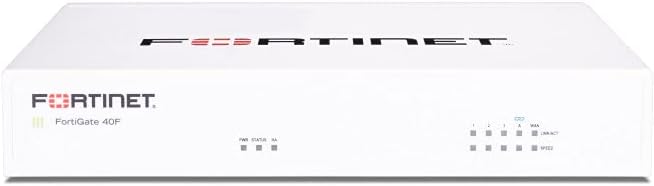
The FortiGate-40F is a compact security appliance aimed at small businesses, branch offices, and other modest networks. Its 4.2 rating indicates generally positive buyer reception, and the combination of five Gigabit Ethernet ports, dedicated security acceleration, and business-oriented management makes it a practical middle ground in the Fortinet range.
We may earn a commission when you buy through this link, at no additional cost to you.
The physical layout includes one WAN port and four internal ports, providing enough connectivity for a small segmented environment. Fortinet's purpose-built security processor supports up to 1 Gbps IPS throughput and 600 Mbps threat-protection throughput, including protection for SSL-encrypted traffic. The appliance also integrates with FortiGuard Labs threat intelligence and Fortinet's Security Fabric.
The principal limitation is again the appliance-only format. Security subscriptions are not included, and buyers must decide which services their deployment requires. The smaller port count also limits physical expansion compared with the FortiGate-60F. Nevertheless, the fanless desktop chassis is space-efficient and quiet, while the management console provides automation and visibility for administrators.
The FG-40F is a sensible option for a small business that values dedicated business-security hardware but does not need the FG-60F's ten-port density. It works particularly well for organizations already committed to Fortinet, although a preloaded pfSense+ unit may be easier for a buyer who prioritizes fast setup over a broad proprietary ecosystem.
One WAN connection and four internal ports cover the core needs of a compact office without taking up much room. The fanless desktop design also allows the appliance to sit quietly on a shelf, desk, or small rack.
The included security processor is designed to move inspection workloads away from general-purpose processing. That supports the appliance's stated IPS and threat-protection throughput while preserving resources for routing and other network functions.
We may earn a commission when you buy through this link, at no additional cost to you.
The Ubiquiti Unifi Security Appliance is an approachable choice for users who want firewall functions within a broader Ubiquiti network. Its 4.5 rating reflects solid user sentiment, while controller integration, VLAN support, QoS, and a VPN server deliver a clear feature set for homes and small offices.
We may earn a commission when you buy through this link, at no additional cost to you.
Three 10/100/1000Base-T ports provide the physical foundation, with one identified as a management port. The white desktop enclosure can also be wall-mounted, which is convenient where shelf space is limited. VLAN support helps separate network traffic, and the listed QoS capability is particularly relevant to enterprise VoIP, where consistent handling of voice traffic matters.
Its strongest advantage is ecosystem alignment rather than raw port abundance. A buyer already managing UniFi access points, switches, and cameras through the controller will likely appreciate the centralized experience. In contrast, someone with many wired segments may find three ports restrictive. The product also centers on Ubiquiti's approach, so organizations committed to a different firewall platform may find limited appeal.
This USG is best for a home, small office, or distributed setup already built around UniFi equipment. It provides useful routing and security functions without the installation burden of a bare mini-PC firewall. For more demanding business networks, a FortiGate, SonicWall, or preconfigured pfSense+ appliance offers greater capacity and a broader feature set.
Controller integration reduces the need to learn and maintain a completely separate firewall interface. Networks, policies, and connected UniFi devices can fit within a more consistent management environment for administrators and users.
VLAN support helps organize clients and services, while the stated QoS functionality gives voice applications a better chance of behaving predictably. The built-in VPN server also adds remote-access capability without another listed appliance.
We may earn a commission when you buy through this link, at no additional cost to you.
The SonicWall TZ280 is a high-speed next-generation firewall for small businesses and branch locations. It carries a 4.7 rating, the highest among the listed products, and its headline performance figures make it a compelling choice for organizations that need throughput beyond a basic small-office firewall.
We may earn a commission when you buy through this link, at no additional cost to you.
The desktop appliance has eight 1GbE ports and two 1G SFP ports, giving it a useful combination of wired copper and fiber connectivity. SonicWall states firewall inspection throughput up to 2.5 Gbps, threat-prevention throughput up to 1 Gbps, and IPSec VPN throughput up to 1.2 Gbps. Its Reassembly-Free Deep Packet Inspection engine is central to those performance claims.
The hardware-only configuration is the most important trade-off. Security services, firmware updates, and support are not included and must be purchased separately. SonicOS 8 features such as intrusion prevention, gateway anti-malware, application control, TLS or SSL decryption, Capture ATP sandboxing, and reputation-based content and DNS filtering depend on an active subscription for the protected functions.
Despite that limitation, the TZ280 is ideal for a branch or small business seeking strong inspection performance, SD-WAN, IPSec and SSL VPN, and Zero-Trust Network Access through Cloud Secure Edge. Zero-touch deployment and management through Network Security Manager simplify distributed administration, making the appliance particularly relevant to organizations with multiple sites or remote workers.
The stated inspection and threat-prevention figures place the TZ280 in a class suited to busy small-business connections. Its fiber-ready SFP ports also provide a path toward flexible network uplinks when copper cabling is insufficient.
Secure SD-WAN, multiple VPN options, and Cloud Secure Edge support make the appliance relevant to branch networks and remote access. Zero-touch deployment reduces the amount of manual work involved when rolling out consistent policies.
We may earn a commission when you buy through this link, at no additional cost to you.
The Netgate 1100 is a preconfigured pfSense+ security gateway designed for users who want open-source firewall capabilities without installing the operating system themselves. Its 4.1 rating reflects a functional, approachable appliance, and the included software updates and support make the ownership experience more defined than a bare mini-PC.
We may earn a commission when you buy through this link, at no additional cost to you.
A dual-core ARM Cortex-A53 processor running at 1.2 GHz provides routing performance near gigabit speeds for common home iPerf3 traffic, while firewall throughput is stated at more than 650 Mbps. Three switched Gigabit Ethernet ports can be configured as WAN, LAN, and optional interfaces, supporting separate routed segments and bidirectional Gigabit traffic.
Its resource limitations are more noticeable than those of the x86 Protectli models. Three ports restrict larger segmented networks, and the lower firewall throughput makes it less suitable for demanding enterprise links. The supplied adult-signature delivery requirement may also add a small logistical consideration for some buyers, although it is a defined part of this listing rather than a product defect.
The Netgate 1100 works well for home offices, small branches, lab networks, and users who prefer pfSense but do not want to manage the installation. Lifetime pfSense+ updates, Netgate TAC Lite support, a one-year hardware warranty, and 24/7/365 setup assistance offer a reassuring starting point. High-traffic administrators should consider a faster four-port or multi-gigabit alternative.
The preloaded operating system removes a major obstacle for first-time firewall administrators. Users can unbox the unit, connect it, and begin customizing the secure-edge configuration rather than preparing storage and installing software first.
The ARM Cortex-A53 platform provides useful routing and firewall performance in a low-power, silent enclosure. Three independently configurable Gigabit ports are sufficient for a straightforward WAN-to-LAN arrangement with an optional third network.
We may earn a commission when you buy through this link, at no additional cost to you.
The FortiGate-100E is a Fortinet network security appliance with a 4.7 rating, placing it among the strongest-reviewed options in this guide. The supplied information emphasizes protection against known exploits, malware, malicious websites, and unknown attacks, along with the identification of thousands of applications.
We may earn a commission when you buy through this link, at no additional cost to you.
Those capabilities point toward a security-conscious business deployment where administrators need more control over traffic behavior than a basic home router offers. Application identification can help teams understand which services are using network resources, while the stated malware and malicious-site protections address common everyday attack channels.
The supplied listing is much less detailed than those for the FortiGate-60F and 40F. It does not provide port counts, throughput figures, form-factor details, or subscription information. That makes it difficult to compare physical capacity and total service requirements without consulting the manufacturer's current documentation and identifying the exact configuration being sold.
The FG-100E is best for an organization already invested in Fortinet and seeking an established appliance family with a strong user rating. Prospective buyers should confirm port count, performance, management requirements, and licensing before purchasing. The FortiGate-60F models offer more complete information in this comparison and may be easier to evaluate for a new deployment.
The stated defenses cover known exploits, malware, and malicious websites, addressing several routine ways unwanted traffic enters a business network. These protections are most valuable when backed by current intelligence and an appropriate service configuration.
Identifying thousands of applications gives administrators more visibility into the services using network paths. That information can support policy design and reveal unexpected application traffic in an environment where simply allowing or blocking traffic would be too crude.
We may earn a commission when you buy through this link, at no additional cost to you.
The Palo Alto PA-220 is listed as a new, eight-port next-generation firewall security appliance. It has a 3.0 rating, the lowest among the ten products, and the supplied data provides little detail beyond the product name, port count, condition, and platform identification.
We may earn a commission when you buy through this link, at no additional cost to you.
The eight-port format suggests an opportunity for multiple physical network connections, which can be useful when separating users, servers, management, and external services. The Palo Alto name also places it in a recognized next-generation firewall category, where application awareness and traffic inspection are central selling points.
However, this roundup cannot responsibly expand the claims beyond the supplied facts. There are no provided throughput figures, processor details, subscription details, management options, or descriptions of specific security capabilities. A 3.0 rating is not proof of failure, but it does provide less positive buyer feedback than the other options and warrants closer investigation before purchase.
The PA-220 may suit an organization already using the Palo Alto ecosystem and seeking a specific hardware model, but the listing requires more validation than most alternatives here. Check the current hardware specification, licensing model, support requirements, and intended threat-protection subscription before deploying it. Buyers seeking transparent specifications may prefer the FortiGate, SonicWall, or Netgate options.
The stated eight-port design provides more physical connectivity than several competing appliances in the list. It can offer room for a WAN, multiple internal zones, and management connections in a compact deployment.
A model name and rating alone are not enough to judge operational fit. Buyers should confirm the exact port types, performance targets, required subscriptions, management model, and support coverage before making a purchase decision.
We may earn a commission when you buy through this link, at no additional cost to you.
The Protectli Vault FW4C is a compact open-source firewall platform distinguished by four 2.5 Gigabit Ethernet ports. Its 4.5 rating indicates positive buyer reception, and the combination of multi-gigabit networking, AES-NI support, and mini-PC flexibility makes it a notable option for modern home labs and small professional networks.
We may earn a commission when you buy through this link, at no additional cost to you.
Its Intel J3710 Pentium processor is a quad-core, four-thread chip operating at 1.6 GHz and boosting to 2.6 GHz. The appliance includes 4GB of DDR3 RAM, a 32GB SSD, two USB 3.0 ports, two HDMI outputs, and an RJ-45 serial console. As with other Protectli systems, the hardware has been tested with pfSense, Untangle, OPNsense, and other open-source solutions.
Compared with the FW4B, the FW4C's standout advantage is faster Ethernet rather than more memory or storage. Its 2.5G ports can avoid bottlenecks on modern local links and may be useful for storage, workstation, or lab connectivity. Conversely, the smaller 4GB memory configuration and 32GB storage leave less room for demanding services, and the absence of a preinstalled operating system keeps setup in the buyer's hands.
The FW4C is a strong fit for technically capable users who want multi-gigabit internal networking with a self-managed firewall. Choose it when a standard Gigabit port limit would be frustrating. If four conventional Gigabit connections are enough, the FW4B's larger memory and storage may offer a better balance for extensive logging or additional services.
All four Ethernet ports support 2.5 Gbps, which is valuable where computers, storage, and virtualized environments exchange large volumes of data. It also provides more performance headroom than a typical four-port Gigabit firewall for modern local networks.
Compatibility with pfSense, OPNsense, Untangle, and other open-source solutions gives administrators meaningful control over the firewall platform. The trade-off is responsibility for installation, configuration, updates, and recovery planning.
We may earn a commission when you buy through this link, at no additional cost to you.
The FortiGate-60F Security Bundle combines the FortiGate-60F appliance with one year of FortiGuard Unified Threat Protection and FortiCare Premium. Its 4.2 rating suggests positive but not exceptional buyer sentiment, while the bundle addresses the main weakness of the hardware-only FortiGate listing by including protection and support for the first year.
We may earn a commission when you buy through this link, at no additional cost to you.
Unified Threat Protection includes broad web filtering and anti-botnet capabilities intended to guard against advanced online threats. FortiCare Premium adds support and service continuity, making the package better suited to organizations that want a defined operational foundation rather than activating protection piecemeal.
The one-year term should not be mistaken for permanent service coverage. A business that keeps the appliance beyond the included period will need to review its ongoing security and support requirements. The bundle also carries a higher upfront cost than the hardware-only FG-60F, so its value depends on the included first-year coverage matching the organization's needs.
This listing is most appropriate for a medium-sized business seeking the FortiGate-60F's ten-port design with initial security services and premium support already attached. It can simplify procurement and make the intended service level clearer. Shoppers who do not need the bundle should compare the hardware-only model and calculate the ongoing service cost for an accurate long-term comparison.
The bundled Unified Threat Protection subscription gives the buyer a defined set of web filtering and anti-botnet tools during the first year. This can help an organization establish an operating baseline without separately arranging every service.
FortiCare Premium adds access to customer support and a service-continuity component. That is valuable for teams that need a clear escalation path, although long-term renewal terms should be reviewed before deployment.
We may earn a commission when you buy through this link, at no additional cost to you.
The right firewall appliance depends on network size, required services, management preferences, and physical constraints. These factors help separate basic routing appliances from dedicated business-security systems.
Begin by counting the physical connections your design requires, including WAN, LAN, management, DMZ, and optional network segments. Four Gigabit Ethernet ports are enough for many home and small-office arrangements, while the FortiGate-60F provides ten RJ45 ports for higher-density business use. Multi-gigabit ports can matter when local workstations, servers, or storage systems exchange large files, and SFP options can provide more flexible fiber or network-uplink choices.
Choose enough ports for the intended layout without paying for unused capacity, but leave a little expansion room if segments may grow. Verify connector types because a count alone does not reveal whether a port supports PoE, multi-gigabit rates, SFP modules, or only basic Gigabit Ethernet.
Throughput figures help indicate whether an appliance can inspect traffic without becoming a bottleneck. For example, the SonicWall TZ280 is listed at up to 2.5 Gbps firewall inspection, the FortiGate-60F at up to 1.4 Gbps IPS throughput, and the Netgate 1100 at more than 650 Mbps firewall throughput. These numbers describe different processing tasks and should not be treated as perfectly interchangeable.
Match the appliance to the busiest expected link rather than the total connection count. A high-throughput appliance is especially valuable when intrusion prevention, encryption inspection, VPN, and other intensive features are enabled simultaneously.
Some appliances include only the hardware, while others arrive with operating-system software, security subscriptions, or support. The SonicWall TZ280 and hardware-only FortiGate listings explicitly require separate service purchases, whereas the FortiGate-60F bundle includes one year of Unified Threat Protection and FortiCare Premium. The Netgate 1100 includes pfSense+ updates for the product lifetime.
Compare both the initial package and the recurring service requirement. Threat intelligence, application control, intrusion prevention, anti-malware, filtering, and support may all depend on a license, and an incomplete service package can reduce the value of the hardware.
A managed appliance can reduce configuration effort, while a bare mini-PC can offer deeper control. Ubiquiti's USG is positioned around UniFi Controller integration, FortiGate products provide a dedicated management console, and SonicWall supports on-box and cloud Network Security Manager management. Protectli appliances leave operating-system selection and installation to the buyer.
Choose the model that matches your team's maintenance ability. A feature-rich platform nobody can configure may offer less practical protection than a simpler system that is properly maintained, monitored, and updated.
Preinstalled software offers a shorter path to operation. The Netgate 1100 ships with pfSense+, allowing configuration to begin immediately, while the FortiGate-60F Security Bundle includes hardware and first-year services. Protectli's FW4B and FW4C have no operating system preinstalled but support pfSense, OPNsense, Untangle, and other open-source environments.
Preinstalled products are generally easier for first-time buyers, while open hardware rewards users who want to select, maintain, and customize their own platform. Either approach requires a credible update, backup, and recovery plan.
A firewall often operates continuously, making size and noise practical considerations. The Protectli FW4B and FW4C use compact fanless designs, the FortiGate-40F is also described as a quiet fanless desktop appliance, and the Netgate 1100 emphasizes low power draw and silent operation. Desktop and wall-mountable options can make it easier to place the unit near the network entry point.
Prioritize a quiet enclosure for homes, studios, and offices. Also account for ventilation, cable reach, mounting security, and whether the location is convenient for physical maintenance.
Memory and storage determine how comfortably a firewall can run its operating system, collect logs, and provide additional services. The Protectli FW4B includes 8GB of DDR3L memory and a 120GB mSATA SSD, while the FW4C includes 4GB of DDR3 RAM and a 32GB SSD. Neither includes an operating system, and both provide USB connectivity for additional flexibility.
More memory and storage can improve headroom for logging, packages, and future requirements. Do not overspend on capacity if the selected software has modest needs, but avoid a minimal configuration that may need immediate expansion.
Remote work and branch connectivity can make VPN support a deciding feature. The Ubiquiti USG includes a VPN server, the SonicWall TZ280 supports IPSec and SSL VPN plus Cloud Secure Edge access, and the Netgate 1100 is positioned as a firewall, router, and VPN platform. The FortiGate models also target secure distributed networking through business-focused features.
Verify the protocol and licensing requirements for your exact use case. A remote-access gateway, site-to-site tunnel, and user identity integration are related but distinct requirements, and not every subscription includes the same VPN capabilities.
Begin with a documented network design that identifies the WAN connection, internal networks, management access, servers, guest clients, and any site-to-site tunnels. Before moving the appliance into service, document the existing router, switch, and DHCP arrangements so the new firewall can take over those functions without creating address conflicts or an accidental loop.
Install the selected firmware or operating system, update it fully, and configure administration access before connecting critical systems. Set the management interface and access rules deliberately, create the required VLANs or interfaces, and confirm that DNS, DHCP, time synchronization, logging, and automatic update behavior are appropriate for the environment.
Treat the firewall as critical infrastructure. Keep a recoverable configuration backup stored securely, use secure credentials, maintain a spare connection for recovery, and review rules and access logs regularly. Monitor service status and update subscriptions, and schedule power, storage, and configuration checks so problems can be addressed before they become security incidents.
A dedicated firewall concentrates network filtering, segmentation, VPN, and threat-control functions in a specialized appliance. A typical home router combines routing and basic firewalling with Wi-Fi, switching, and DHCP features. The dedicated appliances in this guide generally provide greater port control, business security capabilities, or more advanced configuration options.
It depends on technical preference and deployment needs. A Protectli Vault offers freedom to install pfSense, OPNsense, Untangle, or another supported platform, but the buyer must handle the software installation and maintenance. A preconfigured Netgate or bundled Fortinet product is usually easier to deploy and may include defined support or protection services.
Only when connected devices or internal links can realistically exceed Gigabit Ethernet throughput. Multi-gigabit ports can help with large file transfers, storage, high-resolution media, or virtualized workloads. A standard Gigabit firewall remains sufficient for many internet connections because the external WAN link is usually the main limiting factor.
It depends on the product. The SonicWall TZ280 and the hardware-only FortiGate-60F listing do not include the required service subscriptions. The FortiGate-60F Security Bundle includes one year of FortiGuard Unified Threat Protection and FortiCare Premium, while the Netgate 1100 includes pfSense+ updates for the product lifetime. Always verify the exact package before buying.
Most small networks need one WAN port, one or more LAN ports, and sometimes a dedicated management or server connection. The Protectli models and FortiGate-40F cover common small-office layouts, while the FortiGate-60F's ten ports support denser segmentation. Add a switch for additional endpoint connections when the firewall's port count is otherwise sufficient.
Sometimes. Several products, including the Netgate 1100, include switched Gigabit ports that can be assigned to separate networks. A larger deployment may still need an external managed switch for endpoint access, VLAN aggregation, and server connectivity. The firewall should handle routing, filtering, and segmentation while the switch expands physical LAN capacity.
IPS throughput measures performance when the firewall performs intrusion-prevention inspection, while threat-protection throughput reflects a broader security-processing scenario that may involve several inspection functions. These figures are useful within a product's own test context, but they are not automatically equivalent to ordinary routing speed or directly comparable across vendors.
Cloud management is convenient for distributed environments because administrators can configure devices through a central service, while local or on-box management can provide direct control and useful independence from cloud connectivity. The SonicWall TZ280 supports both styles, Ubiquiti emphasizes controller integration, and the FortiGate products provide dedicated management consoles. Choose based on administration style and operating requirements.
The Protectli Vault FW4B is the most versatile overall choice for technically capable administrators, combining a silent four-port mini-PC design with 8GB of memory and broad open-source compatibility. The FortiGate-60F stands out as a premium business platform with ten ports, dedicated security processing, and SD-WAN capabilities, while the Ubiquiti Unifi Security Appliance is an approachable budget option for homes and offices already using UniFi equipment.
Prioritize port requirements, throughput, management effort, and service licensing rather than rating alone. Open platforms offer control and flexibility, preconfigured units reduce setup work, and security subscriptions can be essential to unlocking the advertised protection. Physical noise, memory, storage, VPN needs, and future network growth should also shape the final decision.
Product availability, configuration details, and prices can change, so confirm the current listing and support requirements before purchasing. Compare the exact package, especially for appliance-only firewalls, and verify that the hardware performance suits the busiest link and the services required by your organization.