
10Gtek 82576-2T-X1
4.4Editor score
Dual 1GbE RJ45 ports
Intel 82576 controller
PCIe 2.0 x1 interface
Standard and low-profile brackets
Our Dual RJ45 Port Network Card guide compares ten dual-port PCIe adapters for speed, controller quality, operating-system support, installation, and server
A dual RJ45 port network card adds two copper Ethernet connections to a compatible PCIe system, making it useful for servers, workstations, hypervisor hosts, and systems with limited built-in networking. The best choice depends on link speed, controller features, supported operating systems, physical dimensions, PCIe lane requirements, and the network infrastructure already in place.
The ten products compared here span 1GbE, 2.5GbE, and 10GbE dual-port adapters built around Intel 82576, Intel X540, Intel I226-V, and Broadcom BCM5720 controllers. We evaluated the supplied specifications, compatibility claims, port capabilities, installation features, management functions, and practical server-oriented features rather than claiming hands-on testing.
Each review shows what the card is best suited to, including budget networking, high-speed storage, virtualization, and multi-gigabit upgrades. The top selections are the I226-V 2.5GbE model, the GIGAPLUS X540 model, and the 10Gtek X540 adapter. Product availability and prices can change, so confirm current specifications before purchasing.
4.4Editor score

4.6Editor score

4.6Editor score
This side-by-side comparison highlights each adapter's controller, maximum link speed, PCIe configuration, and intended environment, making it easier to match a card to a particular server, workstation, or virtualization host.


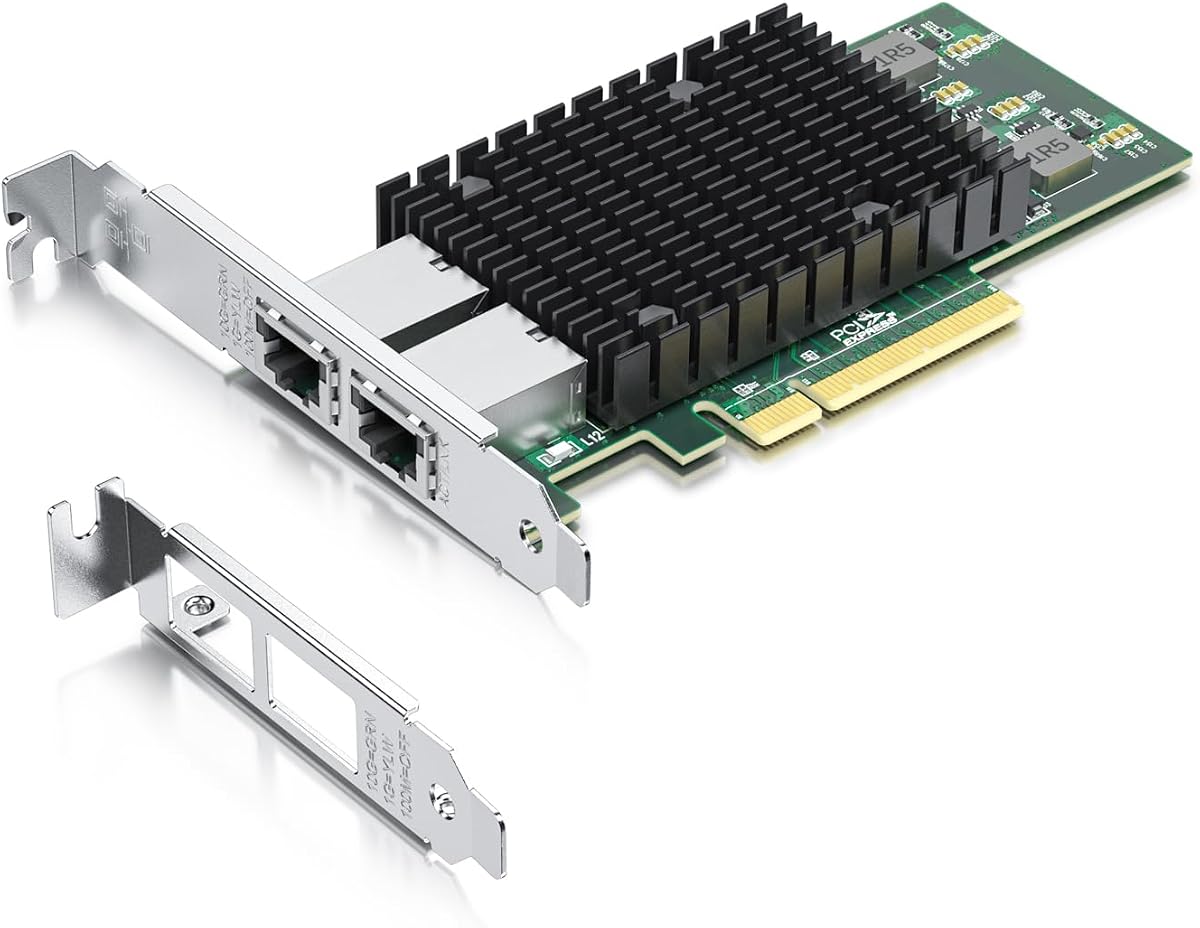

The 10Gtek X540-10G-2T is a dual-port 10GbE adapter built around an original Intel X540 controller. It carries a 4.1 rating, the lowest among the ten selections, but its specifications place it squarely in the high-throughput server category. It is best suited to data center systems, NAS appliances, and virtualization hosts that need two high-speed copper uplinks rather than ordinary 1GbE connectivity.
We may earn a commission when you buy through this link, at no additional cost to you.
Two independent RJ45 ports support Category 6A cabling over distances of up to 100 meters, while Category 6 connections are described as suitable up to 55 meters. Its PCIe 2.1 x8 interface can operate in x8 or x16 slots, giving it more bandwidth headroom than typical gigabit adapters. Intelligent offload support, iSCSI, FCoE, NFS, and compatibility with several server operating systems add value for infrastructure-oriented installations.
The trade-offs are practical rather than hidden. The card does not support hot swapping, Windows 11 requires manual configuration and installation guidance, and a system must have a suitable PCIe slot, airflow, and network infrastructure capable of 10GbE. Category 6A cabling also costs more to deploy than Cat5e or Cat6 wiring, although the card avoids the fiber transceiver expense associated with many enterprise 10GbE deployments.
Buy this card when two 10GbE RJ45 links, data center cabling, and a recognizable Intel X540 platform are priorities. It is a strong match for servers that already use 10GbE copper rather than an entry-level system seeking its first additional network port. Confirm physical clearance, operating-system drivers, and switch capability before installation.
The X540 controller and dual 10GbE interfaces make this card a practical option for consolidating two high-bandwidth connections into one PCIe device. Category 6A support also gives installations more cabling flexibility than fiber-only server adapters.
Intelligent offloads, storage networking support, and broad OS compatibility make the adapter more compelling for servers. The included standard and low-profile brackets help it fit both conventional and compact enclosures.
We may earn a commission when you buy through this link, at no additional cost to you.
The Intel I226-V dual-port adapter combines 2.5GbE performance with a 4.6 rating, making it the most balanced pick in this guide. It is especially useful for modern workstations, compact servers, and virtualization hosts that can benefit from faster network links without moving to the cabling and switch requirements of 10GbE. Two copper ports provide flexibility for separate networks, management access, or aggregation.
We may earn a commission when you buy through this link, at no additional cost to you.
Each port supports 2500BASE-T, 1000BASE-T, 100BASE-TX, and 10BASE-TE operation. The PCIe 3.1 x1 interface works with x1, x4, x8, and x16 motherboard slots, and a low-profile bracket is included for smaller systems. The supplied information describes improved packet stability over longer cables, more accurate data transmission, and reduced active power consumption compared with the discontinued I225-V generation.
Compatibility deserves careful attention. The product supports Windows 10 and 11, several Linux distributions and kernels, RHEL, Ubuntu, FreeBSD, VMware ESXi 7 and 8, DPDK, OpenWrt, UNRAID, PVE, and PXE. Nevertheless, buyers should confirm that the motherboard and BIOS support the specific I226-V chip, enable the NIC interface, and provide an appropriate driver.
This is the best general recommendation for someone who wants more than gigabit speed but does not need 10GbE. It is particularly attractive for NAS use, small business servers, development systems, and home labs. The switch, router, and cables must also support 2.5GbE to realize the card's highest listed rate.
Dual 2.5GbE ports deliver a meaningful step above 1GbE for file transfers, backups, and networked storage. Backward-compatible rates allow the card to work with ordinary gigabit equipment when 2.5GbE is unavailable.
Support for current Windows releases, multiple Linux environments, and recent VMware ESXi releases makes the adapter broadly useful. Checking chipset and BIOS support before purchase reduces the chance of a frustrating setup.
We may earn a commission when you buy through this link, at no additional cost to you.
The VIMIN X540-T2 is a dual 10GbE RJ45 card built around the Intel X540-T2 controller and carries a 4.5 rating. Its straightforward specification makes it a natural fit for high-end servers and workstations that already have 10GbE network equipment and want to add two high-speed copper ports through PCIe.
We may earn a commission when you buy through this link, at no additional cost to you.
The card supports Windows and Windows Server, Linux, and VMware, while its PCIe design is compatible with x8 and x16 slots. Both standard and slim brackets are included, making it suitable for servers and devices with different case heights. A heat sink, carefully designed gold-finger connector, and stated focus on heat dissipation indicate attention to sustained operation.
The important limitation is its speed ladder. The adapter does not support 2.5GbE or 5GbE, so a network device offering one of those rates will not receive the expected benefit. It will operate at 1GbE instead. That behavior may be acceptable in a 10GbE-oriented deployment, but it is a major consideration for buyers whose switches currently support only multi-gigabit rates.
Choose the VIMIN when a full 10GbE design is already in place and the two ports need to fit both standard and compact systems. It is less suitable as a general-purpose upgrade for a 1GbE or 2.5GbE network. Verify the host's physical clearance and confirm that the selected switches and cabling support 10GbE end to end.
Using an Intel X540-T2 provides a clear platform for dual 10GbE links. The card is aimed at users who want the full bandwidth rather than negotiating among multiple multi-gigabit rates.
Standard and slim brackets improve compatibility across different server and workstation cases. The included heat sink is a useful feature in systems where sustained network traffic could otherwise increase component temperatures.
We may earn a commission when you buy through this link, at no additional cost to you.
The Intel 82575/82576 dual-port NIC carries a 4.4 rating and focuses on established 1GbE server workflows. Its appeal comes less from speed and more from the breadth of legacy operating-system support and remote-boot functions, making it relevant for labs, industrial systems, and infrastructure built around older software.
We may earn a commission when you buy through this link, at no additional cost to you.
The adapter supports Windows versions from XP-era releases through Windows 8, several Windows Server generations, Novell NetWare, Linux, FreeBSD, DOS, SCO Open Server, UnixWare, Sun Solaris x86, and VMware ESX. Its PCIe 2.1 x1 lane fits x1 through x16 slots, including low-profile configurations. IPMI pass-through, iSCSI boot, Wake-on-LAN, PXE, VLAN filtering, SNMP, and RMON broaden its server-management relevance.
This is not a modern virtualization pick. The product information specifically says it does not support VMware ESXi 7.0 or later, and the 1GbE ceiling makes it unsuitable for bandwidth-heavy consolidation or large storage transfers. Older supported operating systems also require suitable drivers, and deployment security should be considered separately from hardware compatibility.
Buy this NIC when maintaining or expanding a legacy host that depends on PXE, iSCSI boot, DOS-era tools, or specific old server operating systems. For current 10GbE servers, 2.5GbE workstations, or recent hypervisor hosts, one of the newer-controller alternatives offers a better foundation.
PXE, iSCSI boot, Wake-on-LAN, IPMI pass-through, and VLAN filtering give the adapter value beyond basic file transfer. These functions are especially useful in managed legacy data center environments.
The extensive operating-system list is the card's main advantage in older systems. Prospective buyers should still verify exact driver availability for their intended environment.
We may earn a commission when you buy through this link, at no additional cost to you.
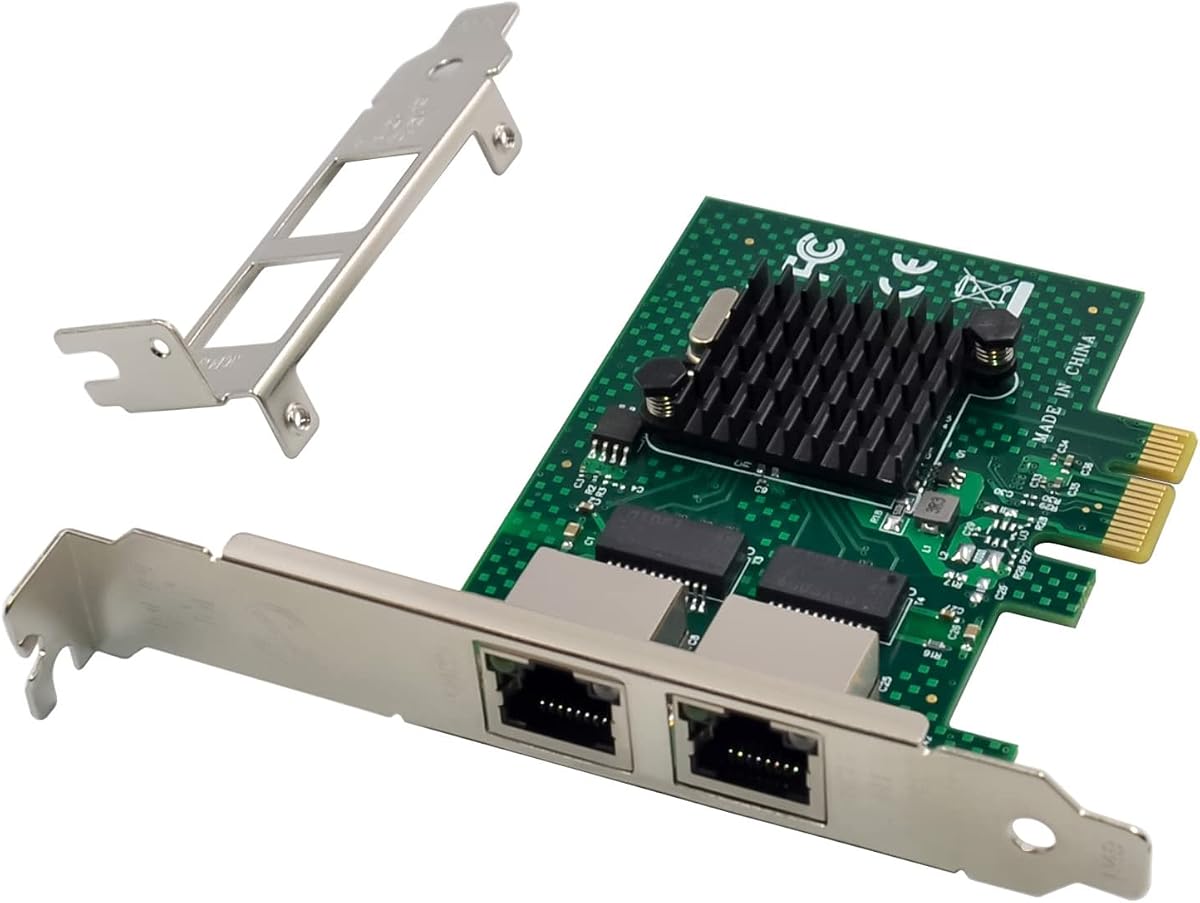
The 10Gtek 82576-2T-X1 is the best budget selection in this roundup, offering a 4.4 rating and two familiar 1GbE RJ45 connections. It is a sensible way to add separate networks, a management connection, or redundancy to an older desktop or server that lacks the required built-in Ethernet ports.
We may earn a commission when you buy through this link, at no additional cost to you.
An original Intel 82576 controller supplies the networking foundation, while the PCIe 2.0 x1 design remains compatible with a broad range of host slots. Category 5 or better cabling can be used over distances up to 100 meters. The package includes a standard bracket and an additional low-profile bracket, helping the card fit compact computers and servers. The supplied support terms include a three-year warranty and lifetime technical support.
Its limitations reflect its focus on basic dual-gigabit networking. VMware ESXi 7.0 and later are not supported, hot swapping is unavailable, and each port tops out at 1GbE. As a result, it cannot take advantage of 2.5GbE switches or modern 10GbE infrastructure and is not the right choice for high-volume storage or heavily consolidated virtualization.
This is a strong recommendation for a budget-conscious buyer restoring or upgrading a legacy 1GbE system. It combines a recognized controller with easy copper cabling and flexible physical installation. Choose a 2.5GbE or 10GbE model instead when future network capacity, current hypervisor support, or faster local storage access are important.
The dual 1GbE design provides an uncomplicated way to connect two networks over standard copper. It suits offices, labs, and home servers where a modern multi-gigabit upgrade is unnecessary.
Both standard and low-profile brackets are included, allowing the adapter to fit more types of cases. The x1 interface also avoids requiring a large number of PCIe lanes.
We may earn a commission when you buy through this link, at no additional cost to you.
The 10Gtek Intel 82576 adapter pairs two 1GbE connections with a 4.5 rating and one of the broadest operating-system lists in the guide. It is a versatile general-purpose option for desktop, workstation, and server owners who need copper network expansion across a varied collection of systems.
We may earn a commission when you buy through this link, at no additional cost to you.
Its Intel 82576 controller supports Quality-of-Service functionality, and both RJ45 ports support 10, 100, and 1000Mbps rates over Cat5e cabling up to 100 meters. The PCIe 2.0 x1 card fits x1, x4, x8, and x16 slots. Windows 7 through 11, multiple Windows Server releases, CentOS and RHEL, Ubuntu, Debian, FreeBSD, older VMware ESXi versions, and SLSE are listed as compatible.
The card is not a current ESXi 7 or later solution, and the product information excludes Mac OS and bypass mode. It also remains limited to 1GbE, making it unsuitable where network consolidation would be the main purpose. Driver selection still matters when adding the card to a modern Windows system, despite the broad compatibility claim.
Choose this model for inexpensive expansion of ordinary gigabit networks, especially where a mixture of Windows and Linux systems is involved. The two included brackets simplify chassis planning, while the established controller offers a more conservative upgrade path than a new multi-gigabit platform. Users with current virtualization or storage demands should prioritize a faster, more contemporary controller.
The combination of Windows, Linux, and older virtualization support makes the adapter convenient for mixed estates. A QR code and Intel driver route are provided to simplify software setup.
Two gigabit ports provide redundant or segmented networking without requiring fiber equipment. Cat5e support and a 100-meter reach fit most offices and small server rooms.
We may earn a commission when you buy through this link, at no additional cost to you.
The GIGAPLUS X540 stands out with a 4.6 rating, dual 10GbE links, and a clear focus on server and workstation expansion. It is a premium choice for installations that already have a 10GbE network and need two independent high-speed RJ45 connections from a single PCIe adapter.
We may earn a commission when you buy through this link, at no additional cost to you.
The Intel X540 controller supports link rates of 10Gbps, 1Gbps, and 100Mbps across two independent ports. Its PCIe 2.0 x8 interface uses 5.0GT/s and is compatible with x8 and x16 slots, while clearly excluding legacy PCI slots. Standard and low-profile brackets cover a wide range of desktops, workstations, servers, and mini-towers. A QR code offers a route to operating-system drivers.
Compatibility is extensive, covering Windows Server releases, Windows 7 through 11, Linux, VMware, ESX, and ESXi. A 10GbE card still depends on a complete supporting ecosystem: switches, routers or NAS appliances, compatible cabling, and appropriate host configuration must all support the intended rate. The eight-lane interface also makes slot availability more important than with an x1 card.
This is the most compelling premium recommendation for users committed to 10GbE copper who want two ports, strong compatibility, and convenient physical installation. It is particularly suitable for high-end workstations, virtualization infrastructure, and servers needing storage or transfer bandwidth. Verify ESXi or other hypervisor driver requirements before finalizing the purchase.
Independent 10GbE ports can serve separate fabrics, management duties, or high-volume data paths. This makes the card more flexible than a single-port 10GbE adapter.
Windows Server, Linux, ESX, and ESXi support gives the adapter a broad operational range. Driver access through a QR code or Intel's website helps with initial configuration.
We may earn a commission when you buy through this link, at no additional cost to you.
The H!Fiber X540-BT2 is a dual 10GbE copper adapter with a 4.5 rating and a strong emphasis on broad operating-system support. It is well suited to servers and high-end systems that need 10GbE over familiar RJ45 connectivity and already have compatible switches and cabling.
We may earn a commission when you buy through this link, at no additional cost to you.
The original Intel X540-BT2 controller provides 10Gbps, 1Gbps, and 100Mbps rates, with Cat6a support highlighted for the 10GbE transition. Its PCIe 2.1 x8 design fits x8 and x16 slots. Windows 7, 8, 10, Windows Server releases, CentOS, RHEL, Ubuntu, Debian, FreeBSD, VMware ESXi 6 and 7, and SLSE are among the listed environments.
The card does not support 2.5GbE or 5GbE, which matters if the surrounding network is multi-gigabit rather than 10GbE. Mac OS and bypass mode are also excluded. Windows 11 can be used, but the supplied information says it works only when the Windows 10 driver is configured correctly, so buyers should review the installation material before ordering.
Choose the H!Fiber for 10GbE environments that need both high speed and varied operating-system support. It offers a more mature deployment profile than the I226-V card for full 10GbE copper. Confirm the host's PCIe lanes, physical case clearance, driver method, and network infrastructure before installation.
The X540-BT2 provides a recognizable foundation for dual 10GbE copper networking. It is an effective option for established server ecosystems with compatible Intel drivers.
Both full-height and low-profile brackets support different chassis designs. The broad OS list also helps organizations standardize a card across heterogeneous server roles.
We may earn a commission when you buy through this link, at no additional cost to you.
The 82576 SR-IOV NIC is a dual-port gigabit adapter whose 4.5 rating reflects a practical server feature set. Its support for SR-IOV, PXE, iSCSI boot, and related management functions gives it a distinct role in data center and virtualization-focused environments that still operate at 1GbE.
We may earn a commission when you buy through this link, at no additional cost to you.
Unlike many x1 dual-port cards, this adapter uses PCIe 2.0 x4 and remains compatible with x4, x8, and x16 slots, including low-profile configurations. It supports Windows 7, 8, 2000, XP, Vista, Windows Server 2003, 2008, and 2012, Novell NetWare, Linux, FreeBSD, DOS, SCO Open Server, UnixWare, Sun Solaris x86, and VMware ESX.
VMware ESXi 7.0 and later are explicitly not supported, and 1GbE per port limits throughput. SR-IOV also depends on compatible processors, firmware, hypervisors, drivers, and virtual networking configuration, so possessing the card alone does not guarantee that every advertised virtualization function will work as intended. An alloy heat sink is included to manage temperatures during sustained use.
Buy this model when an existing platform specifically needs dual gigabit ports with SR-IOV and remote-boot capabilities. It may fit a carefully managed legacy virtualization environment better than a modern multi-gigabit card. For new ESXi 7 or later deployments, or for larger data transfers, choose a more recent controller instead.
SR-IOV support can help segment workloads and improve virtual networking efficiency in compatible platforms. The remaining management functions make the card useful beyond ordinary desktop connectivity.
PXE, iSCSI boot, Wake-on-LAN, VLAN filtering, SNMP, and RMON support are valuable for centrally managed infrastructure. These features allow the adapter to participate in provisioning and monitoring workflows.
We may earn a commission when you buy through this link, at no additional cost to you.
The Broadcom BCM5720-2P is a dual-port gigabit server adapter with a 4.6 rating. Its distinguishing strength is broad support for enterprise operating systems and virtualization platforms, including VMware ESXi versions 5, 6, 7, and 8, making it a practical alternative for mixed server fleets.
We may earn a commission when you buy through this link, at no additional cost to you.
The NetXtreme BCM5720-2P chipset operates over PCIe 1.x and 2.x interfaces, while the x1 design is compatible with x2, x4, x8, and x16 slots. The card includes a low-profile bracket and uses a single lane, easing installation where wider slots or more lanes are unavailable. CentOS, Debian, Microsoft Windows, Oracle Linux, Oracle Solaris, RHEL, SUSE Linux Enterprise Server, Ubuntu, VMware, vSphere, Hyper-V, and Windows Server are listed as supported.
The product information positions the adapter for cloud and web servers, private clouds, machine learning clusters, high-performance computing, container platforms, NVMe-over-Fabrics storage, and database servers. While that range illustrates the adapter's server relevance, the actual 1GbE limit means link bandwidth will constrain many of those high-throughput workloads unless traffic is distributed across multiple interfaces.
Choose the BCM5720-2P for dual-gigabit server connectivity where operating-system breadth and recent ESXi compatibility are priorities. It is a sensible fit for management networks, storage controllers, and general-purpose server connectivity where gigabit performance is sufficient. The included warranty and customer service provide additional reassurance for business deployments.
Support spanning major Linux distributions, Windows Server, Hyper-V, VMware, and vSphere makes the adapter adaptable to existing enterprise standards. That breadth reduces the need to standardize on one narrow platform.
The x1 interface uses minimal PCIe bandwidth and works across larger slots. A low-profile bracket further broadens its usefulness in compact servers and storage appliances.
We may earn a commission when you buy through this link, at no additional cost to you.
Choosing a dual RJ45 port network card requires balancing link speed, controller capabilities, operating-system support, PCIe and physical requirements, and the exact networking functions your system will use.
Start by identifying the fastest switch, router, NAS, or peer device that the computer will connect to. A 1GbE card is sufficient for ordinary office traffic and management access, while 2.5GbE is valuable for faster local storage, backups, and modern small business networks. A 10GbE card makes the most sense when the surrounding infrastructure already supports 10GbE and workloads involve large transfers, consolidation, or high-bandwidth storage.
Choose a speed your network can actually sustain. The 10GbE cards listed here do not support 2.5GbE or 5GbE, while the I226-V card supports 2.5GbE and lower rates. Verify cables, switches, and endpoints before selecting a model.
Controller familiarity and driver availability can matter as much as the headline speed. Windows 10 and 11 are supported by the I226-V and several X540-based cards, while Linux, server operating systems, and VMware deployments should be matched against the exact version in the product listing. Older systems may benefit from the extensive legacy support of the Intel 82576 adapters.
Use the most current operating system and virtualization releases available in your environment. In particular, verify ESXi 7 or 8 support, required kernel versions, BIOS behavior, and whether a driver is included or must be obtained separately.
The card's lane count and PCIe generation determine slot requirements and available bandwidth. A PCIe 2.0 or 2.1 x1 card generally fits x1 through x16 physical slots, while the X540-based 10GbE models use x8. The I226-V card uses a modern PCIe 3.1 x1 connection but still requires a motherboard slot that provides the correct electrical and physical configuration.
Check whether the motherboard supports the required lane width, whether the slot is shared with other devices, and whether the operating system recognizes the card after installation. A physically visible x16 slot is not automatically an electrically x16 connection.
RJ45 adapters remain attractive because copper is familiar and generally easier to deploy than fiber transceivers. Gigabit models can work with Cat5e or better over distances up to 100 meters. For 10GbE, the 10Gtek and GIGAPLUS cards describe Category 6A support up to 100 meters, while Category 6 may be limited to 55 meters depending on the installation and product guidance.
Follow the cable requirements of the selected adapter and confirm that every patch panel, coupler, and switch cable meets the necessary category. Longer runs or mixed cable grades can cause link errors, downshifts, or unstable performance.
An established controller can provide a more predictable platform than an unfamiliar chipset. The Intel X540 family is associated with server offload functionality and 10GbE workloads, the Intel 82576 family is widely used in older dual-port servers, and the I226-V is a contemporary option for 2.5GbE. The Broadcom BCM5720-2P adds a separate enterprise-oriented path for general server networking.
Review QoS, intelligent offloads, packet stability, and power consumption alongside raw link speed. These details are important when a card will run continuously, aggregate traffic, or participate in latency-sensitive services.
Features such as PXE, iSCSI boot, Wake-on-LAN, VLAN filtering, IPMI pass-through, SR-IOV, SNMP, and RMON can be more valuable than extra speed in a managed data center. The 82576-based cards are particularly noteworthy for legacy remote-boot and management capabilities, while the SR-IOV model offers a dedicated virtualization-oriented feature set.
Do not assume that a listed feature works automatically. Confirm hypervisor support, platform firmware, operating-system drivers, switch configuration, and whether the host or virtual switch must enable the function manually.
Dual-port cards vary in bracket height, port spacing, and heat dissipation requirements. Standard and low-profile brackets are listed for most models, but the included bracket must match the chassis. Ports can also compete with adjacent cards for clearance, and high-speed X540 designs benefit from adequate airflow around their heat sinks.
Measure the available space and inspect the host's expansion-card layout before ordering. In compact systems, use the supplied low-profile bracket and avoid placing the card where an adjacent component obstructs its RJ45 sockets.
Driver downloads, QR-code setup instructions, technical support, and warranty terms can reduce installation time. Several products provide Intel driver access and multi-year coverage, while the BCM5720-2P lists a 180-day warranty and the other cards describe longer terms. These are useful differentiators when the adapter is destined for a server rather than a temporary workstation.
Check whether the manufacturer provides installation guidance for your exact system and operating system. For Windows 11, virtualization hosts, and unusual Linux distributions, clear driver instructions are especially important before purchase.
Before installation, power off the computer, disconnect the power cable, and open the case according to its service instructions. Identify a compatible PCIe slot, check the required lane width, and determine whether the system needs the full-height or low-profile bracket. If the operating system or hypervisor requires a specific driver, obtain it before installing the card so the system can recognize it immediately.
Seat the adapter firmly in the appropriate slot, attach the correct bracket, secure the card, and connect high-quality Ethernet cables to the two RJ45 ports. Restore power, enter the BIOS or UEFI if necessary, and confirm that the PCIe device and network interface are enabled. Install the appropriate operating-system driver, then verify that both ports appear, negotiate the intended link rate, and receive valid addresses through DHCP or your static configuration method.
For ongoing care, keep the ports clear of dust and avoid sharply bent or pinched cables. Check the card's temperature and airflow in a busy server, particularly with a 10GbE X540 design. After driver updates, operating-system upgrades, or switch changes, recheck link speed and dual-port activity. If a connection is unstable, inspect the cable category, seating, switch compatibility, and driver state before assuming the card itself has failed.
Yes. A dual-port card can connect to two separate switches, VLANs, storage devices, or management networks, provided the host configuration allows each interface to be assigned appropriately. Operating systems can treat the two ports as separate adapters or combine them through teaming, bridging, or another supported configuration. Teaming behavior depends on the controller, driver, switch configuration, and network design.
Only when the rest of the network supports 10GbE. A 10GbE card provides more headroom for large file transfers, storage traffic, and consolidated workloads, but it also requires compatible switches, endpoints, and suitable cabling. A 2.5GbE solution is usually more economical and easier to deploy when the available equipment supports only multi-gigabit rates.
No. Compatibility varies significantly by controller and generation. Some cards support broad legacy operating systems, while others target current Windows, Linux, and VMware environments. The X540 models also do not support 2.5GbE or 5GbE, and the 10GbE card without a 5GbE rate will not provide a 10GbE connection to a network device that only offers those intermediate speeds.
SR-IOV allows compatible hardware to provide direct virtual-function access to physical network resources. It can improve virtual networking efficiency by reducing some software-mediated overhead. Support requires compatible processors, firmware, drivers, a supporting hypervisor, and a correctly configured host and virtual switch, so the card should be selected for a specific platform rather than by feature name alone.
Most of the listed cards support both desktop and server installations, but the physical bracket, operating system, and thermal environment must be suitable. Low-profile brackets suit compact cases, while full-height brackets fit standard servers and workstations. High-speed 10GbE cards also benefit from the airflow typically found in server enclosures.
At 1GbE, the listed gigabit adapters generally support Cat5e or better over distances up to 100 meters. For 10GbE, higher-grade cable such as Cat6 or Cat6a may be required, with the supplied guidance noting Cat6a for the longest runs. A cable that supports 1GbE does not automatically provide a reliable 10GbE connection.
Driver requirements depend on the controller, operating system, and whether the computer already has a compatible driver installed. Several products provide a QR code or direct access to Intel driver downloads. Server and hypervisor environments should be checked carefully because generic or mismatched drivers can prevent the ports from appearing or may limit supported functions.
Yes, when the card and host platform support virtualization features such as SR-IOV, VMware, Hyper-V, or compatible device passthrough. The operating-system driver and hypervisor configuration determine how virtual machines access the two ports. A standard virtual switch may also be used, but its performance and traffic isolation differ from direct SR-IOV assignment.
The best overall choice is the Intel I226-V dual 2.5GbE adapter because it balances modern link speed, broad current platform support, a single-lane PCIe interface, and flexible physical installation. The GIGAPLUS X540 is the strongest premium option for dual 10GbE, while the 10Gtek 82576-2T-X1 delivers the most budget-friendly way to add two independent gigabit connections.
Prioritize the speed your network can actually sustain, then verify controller compatibility, operating-system drivers, PCIe lanes, and bracket dimensions. Legacy servers may benefit more from PXE, iSCSI boot, or SR-IOV than from faster links, while modern NAS and virtualization systems usually gain more from 2.5GbE or 10GbE bandwidth. Make sure switches, endpoints, and cables are ready before buying.
Finally, review the seller's current listing, included components, warranty, driver instructions, and compatibility notes at the time of purchase. Product specifications and prices can change, and exact operating-system support can differ by version. The links provided in this guide lead to the relevant product pages for the latest information.