
Desk Grommet Power Outlet with 20W USB-C
4.5Editor score
Fits standard 2.5-inch openings
Two 20W USB-C ports
One 20W USB-A port
Includes 6-foot cord
Desk grommets with USB C combine a recessed power outlet and compact charging hub in one desktop installation, helping reduce adapter clutter and keep frequently used cables close at hand. A worthwhile model should match your cutout, provide the charging power your devices need, and include dependable safety protections.
The products in this guide were compared by examining their cutout requirements, AC outlet capacity, USB-C and USB-A charging output, cord length, installation method, and safety features. The list covers compact single-sided designs, double-sided models, higher-wattage laptop charging options, and a retractable-cable grommet.
Each review highlights the most useful strengths and trade-offs of its selected grommet, from 20W phone charging to 100W laptop charging. Product ratings reflect the supplied marketplace feedback, while specifications and availability can change, so readers should confirm current details and prices before purchasing.
4.5Editor score

4.5Editor score

4.6Editor score
As an Amazon Associate we earn from qualifying purchases.
This side-by-side comparison makes it easier to identify the right grommet by comparing charging output, physical cutout size, AC capacity, USB port mix, and included installation features.


The Recessed Power Grommet 65W USB-C is an editor's choice because it combines useful everyday charging capacity with a relatively restrained installation. Its 4.5 rating reflects positive marketplace feedback, and the 65W USB-C output gives it more flexibility than grommets limited to 20W phone and tablet charging. Two AC outlets and four USB ports also make it practical for a working desktop.
We may earn a commission when you buy through this link, at no additional cost to you.
The grommet uses two USB-C ports and two USB-A ports, allowing several accessories to charge at once. USB Power Delivery 3.0, QC3.0, and PPS support help it negotiate suitable output for compatible devices. A 125V, 12A, 1500W AC rating and built-in 1200J surge protector strengthen its appeal for users who want more than a basic charger embedded in a desk.
The main compromise is installation. It is designed for a 3-inch hole, so it will not fit many smaller pre-cut cable openings without additional drilling. The 65W maximum should also be understood as a ceiling rather than a guaranteed rate for every laptop. Cable quality, device compatibility, and the power requirements of the connected computer all affect the final charging result.
This is a strong choice for a home office, L-shaped desk, conference table, end table, or headboard where a laptop and several smaller devices need convenient power. Its mix of 65W laptop charging, multiple USB ports, two AC outlets, and surge protection offers an unusually balanced feature set. For most buyers who can accommodate the 3-inch cutout, it is the most versatile model in this guide.
The 65W USB-C output is the defining feature because it can serve compatible USB-C laptops as well as phones, tablets, earbuds, and watches. Keeping the USB-A and USB-C ports together makes it easier to connect several devices without reaching for a separate charging brick or under-desk power strip.
Once installed in a 3-inch opening, the low-profile grommet leaves the desktop less cluttered while keeping frequently used outlets close at hand. The six-foot flat cord, 1200J surge protection, and fire-resistant plastic construction further support a tidy, practical installation.
We may earn a commission when you buy through this link, at no additional cost to you.
The 100W USB C Desktop Power Grommet is the premium option in this roundup, offering the highest stated USB-C output and the most extensive connection array. Its 4.6 rating reflects strong marketplace feedback, while the GaN-based 100W port makes it particularly relevant to users who regularly charge demanding USB-C laptops at a desk.
We may earn a commission when you buy through this link, at no additional cost to you.
This model offers five AC outlets split between the top and bottom of the grommet, along with one 100W PD USB-C port, a 30W USB-C port, and USB-A ports rated up to 18W. The double-sided arrangement is unusual and potentially valuable in conference tables, large workstations, and L-shaped desks where users may need access from different positions.
Its larger requirements are the primary drawback. The grommet needs a 4-inch standard opening and more clearance than the more compact 2-inch and 2.5-inch alternatives. Even though the 100W maximum can support many USB-C notebooks, actual output depends on the device, its power profile, and whether it is the only connected load requesting the highest power level.
Choose this model when a single desktop should serve as a serious charging and power hub, especially if a high-power laptop and several accessories are used simultaneously. It is less suitable for a small side table or a desk that already has a standard 2.5-inch cable hole. For users willing to make a larger cutout, however, its output, outlet count, and two-sided access are exceptional.
A 100W USB-C connection can meet the needs of many power-hungry laptops, tablets, and other compatible devices without requiring a full-size desktop charging brick. The included 100W and 30W USB-C ports also allow two different charging levels to coexist with the USB-A connections.
Putting outlets on both faces makes the grommet especially interesting for large desks, meeting tables, and furniture used by more than one person. The fire-resistant PC and aluminum shell, 1200J surge protection, and switch add practical safeguards for a shared installation.
We may earn a commission when you buy through this link, at no additional cost to you.
The 2.5-Inch 20W Grommet offers a simple, affordable route to recessed power and everyday device charging. Its 4.5 rating indicates solid marketplace feedback, and the combination of one AC outlet, two 20W USB-C ports, and one 20W USB-A port covers many common desk accessories without attempting to provide laptop-level charging.
We may earn a commission when you buy through this link, at no additional cost to you.
Both USB-C ports support PD 3.0 output up to 20W, while the USB-A connection uses QC3.0 and reaches 20W when used alone. The 125V, 10-to-12A, 1500W AC specification and included six-foot cord make it suitable for offices, conference rooms, nightstands, coffee tables, and ordinary home workspaces.
This is not the model to choose if your primary goal is charging a laptop. Its stated 20W USB-C limit is oriented toward phones, tablets, earbuds, and lower-power accessories. It also provides only one AC outlet, so a monitor, lamp, and other AC-powered equipment may still require another connection point.
The grommet is best for readers who want a straightforward 2.5-inch installation, multiple fast-charging ports, and a flush desktop appearance at a modest level of complexity. Drilling a 2.5-inch opening or reusing a compatible cable hole, inserting the unit, and tightening the locking ring makes it approachable for a weekend workspace upgrade.
The two PD 3.0 USB-C ports can deliver up to 20W, making them suitable for many phone, tablet, and accessory charging routines. The additional QC3.0 USB-A port adds flexibility for accessories that still use the older connector.
A 2.5-inch cutout is widely compatible with standard desk and countertop cable holes. The flush round design, included locking ring, and six-foot cord make the unit equally suitable for conference tables, furniture, and compact home-office surfaces.
We may earn a commission when you buy through this link, at no additional cost to you.
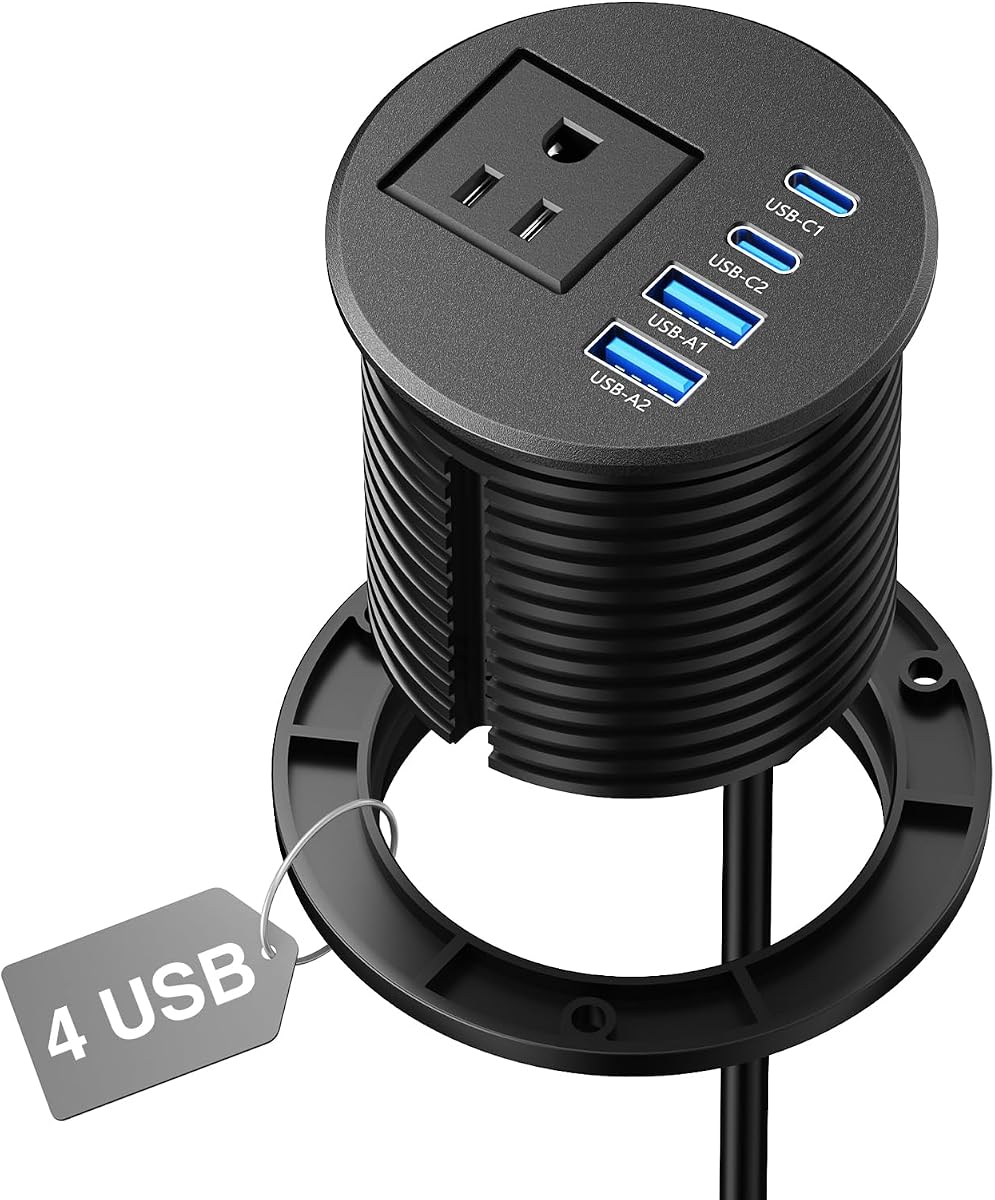
The 2.5-Inch Four-Port Grommet stands out with a 4.8 rating, the highest rating in this group, and a balanced collection of four USB ports. Two USB-C ports deliver up to 20W each, while two USB-A ports provide up to 18W. This makes it a strong fit for desks where several mobile devices or accessories need to charge at the same time.
We may earn a commission when you buy through this link, at no additional cost to you.
The recessed design keeps plugs below the work surface and removes the visual clutter created by a traditional power strip. A 12A, 1500W AC rating and six-foot extension cord support everyday use in a home office, gaming setup, nightstand, countertop, or console area. Installation requires a 2.5-inch or 2-1/2-inch cutout and places the grommet nearly flush with the furniture.
It is important to note the product description explicitly says the USB-C ports are not designed for laptop charging. The 20W maximum is useful for phones, tablets, and smaller accessories, but users with a notebook should look toward a 35W, 65W, or 100W model. With only one AC outlet, it also offers less flexibility for non-USB equipment.
Despite that limitation, the four-port arrangement makes this one of the strongest choices for shared charging without a high-wattage laptop requirement. Its compact 2.5-inch installation, generous USB selection, and strong marketplace rating make it especially attractive for a modern desk that needs convenient power in several device formats.
Two USB-C and two USB-A ports provide more flexibility than many similarly sized grommets. The mix supports newer USB-C accessories while retaining useful capacity for legacy USB-A headphones, controllers, and other peripherals.
The 20W USB-C maximum is designed for phones, tablets, and compatible accessories rather than notebooks. That honest scope makes the grommet attractive for users who value several ports and a clean installation more than high-wattage laptop charging.
We may earn a commission when you buy through this link, at no additional cost to you.
The VILONG 2 Inch Recessed Power Grommet is a two-pack, giving buyers the option to install charging power in two separate surfaces rather than concentrating everything at one opening. Its 4.7 rating reflects favorable feedback, and the 2-inch cutout makes it one of the easier choices to accommodate in compact furniture.
We may earn a commission when you buy through this link, at no additional cost to you.
Each grommet includes a flush-mount round body, a 20W PD USB-C port, a QC3.0 USB-A port rated up to 5V/3A, one AC outlet, and a six-foot extension cord. The socket is described as ETL certified, which is a useful point for buyers who prioritize recognized safety testing. Both units can be placed in separate desks, tables, or sections of a larger work area.
The two-pack format is not automatically the right value for every household. A buyer who only needs one opening receives two complete units, and each has only one AC outlet. The 20W USB-C output is also best suited to mobile devices and smaller accessories rather than laptops, so this set is not intended to replace a high-wattage charging station.
This package works well for users creating an organized charging point in multiple rooms, for example a desk and a nightstand, or for a shared office with more than one table. It is also a good option when a smaller 2-inch hole is already present. The compact cutout, safety certification, and two complete installations give the package broad practical appeal.
The two-pack is especially useful for home offices that want both a primary workstation and a secondary charging area. It also suits shared spaces, craft rooms, and furniture projects where having a spare grommet on hand can be more valuable than adding a second cable-management accessory.
A 2-inch opening is smaller than the common 2.5-inch cutout used by many competitors, which can simplify retrofitting. The stated ETL certification and included six-foot cords add reassurance, while the flush round profile integrates neatly into compatible furniture.
We may earn a commission when you buy through this link, at no additional cost to you.
The 65W 3-Inch Power Grommet provides a broad charging hub for compatible laptops, phones, tablets, watches, and earbuds. Its 4.1 rating is the lowest among the listed products, so buyers should evaluate the specifications and installation fit carefully, but the hardware mix is still capable for a shared desktop.
We may earn a commission when you buy through this link, at no additional cost to you.
Two USB-C ports and two USB-A ports support simultaneous charging, while the USB-C side can reach 65W using PD 3.0, QC3.0, and PPS. The AC side includes two outlets rated at 125V, 12A, and 1500W. A 6.6-foot extension cord gives a little more reach than the common six-foot cord when the wall outlet is not directly beneath the desk.
The physical requirements are modest in comparison with the 4-inch premium model, but a 3-inch hole is still larger than the 2-inch and 2.5-inch alternatives. The lower marketplace rating may reflect installation, fit, or overall experience issues that are not fully explained in the supplied information. It is therefore wise to check dimensions and recent customer feedback before modifying furniture.
This grommet is most suitable for a home office or school workspace where a laptop and several mobile accessories need to share a central power location. Its 65W charging capability, four USB ports, and two AC outlets provide more than enough connectivity for many users, particularly those who prefer a 3-inch installation over the larger double-sided design.
The 65W maximum gives compatible USB-C notebooks a useful charging option, while the remaining ports handle phones, tablets, watches, and earbuds. Supporting PD 3.0, QC3.0, and PPS broadens device compatibility for a mixed collection of accessories.
The 6.6-foot extension cord adds a modest amount of placement flexibility around a desk leg or furniture panel. Two AC outlets add useful capacity for a monitor, lamp, or other wired equipment without requiring a separate desktop strip.
We may earn a commission when you buy through this link, at no additional cost to you.
The 2-Inch Three-Port Grommet prioritizes a compact footprint and a low-profile appearance. Its 4.7 rating reflects strong marketplace feedback, and the design fits a standard 2-inch or 50mm opening while rising only five millimeters above the desktop. That makes it an appealing choice when visual clutter matters as much as charging capacity.
We may earn a commission when you buy through this link, at no additional cost to you.
The charging array includes two 20W USB-C Power Delivery ports and one 18W USB-A fast-charge port. A single 10A AC outlet handles a lamp, monitor, or other standard plug without crowding the surface. The included six-foot, 18 AWG extension cord provides flexibility for reaching a wall outlet from the center of a desk.
The 20W USB-C ceiling means it is intended for phones, tablets, and wireless earbuds rather than laptops. It also has only one AC outlet, so workspaces with several conventional plugs will still need additional power. Before cutting a new hole, buyers should confirm the material, thickness, and underside clearance of their furniture.
This model is best for compact desks, small workspaces, and users who want a discreet charging point without drilling a large opening. Its simple installation, slim recessed profile, and combination of USB-C and USB-A ports make it particularly useful for creating a tidier nightstand, side table, or compact workstation.
The five-millimeter raised profile keeps plugs tucked below the desktop and leaves the surrounding surface easier to wipe. A round 2-inch opening is also less disruptive to small tables and furniture than a 3-inch or 4-inch installation.
Two 20W USB-C ports can handle common phone and tablet charging routines, while the USB-A port serves accessories that have not moved to USB-C. The arrangement is compact but offers enough flexibility for a typical personal charging zone.
We may earn a commission when you buy through this link, at no additional cost to you.
The Eight-Port VILONG Grommet is designed for shared workspaces and heavily equipped desks that need many charging connections. Its 4.6 rating indicates strong marketplace feedback, and eight USB ports give it the largest USB count in this roundup. The opening remains a reasonably standard 3.15 inches, or 80 millimeters.
We may earn a commission when you buy through this link, at no additional cost to you.
Four USB-C ports support PD 3.0 output up to 20W each, while four USB-A ports use QC3.0 and also reach 20W when operated individually. Two AC outlets add 125V, 15A, 1500W capacity for conventional plugs. The six-foot cord and included locking ring support a straightforward recessed installation in desks, countertops, and furniture.
The important limitation is that this is a high-count, moderate-output design rather than a high-wattage charging station. Twenty-watt USB-C connections are appropriate for phones, tablets, earbuds, and other smaller devices, but not for demanding laptops. Depending on how the internal charging allocation works when many ports are active, buyers should verify individual output before relying on simultaneous maximum ratings.
Choose this grommet for a conference table, shared office desk, gaming station, or family workspace where numerous people and devices need USB access. The two AC outlets are a bonus for group installations, while the flush design keeps the substantial port count from dominating the desktop. It is less appropriate where a laptop requires 65W or more.
Eight USB ports are difficult to match in a recessed desktop unit. The balanced four-to-four split between USB-C and USB-A allows different device types to share a single installation, reducing the number of external adapters needed around a busy workspace.
The 15A, 1500W AC rating and two outlets provide capacity for standard desk equipment. A 3.15-inch opening fits an 80mm cable route, making this model a practical option for larger furniture and shared tables that cannot support only a small charging point.
We may earn a commission when you buy through this link, at no additional cost to you.
The Retractable-Cable 35W Grommet stands apart with two built-in USB-C cables that pull out and retract into the desktop. Its 4.6 rating reflects positive marketplace feedback, and the combination of retractable cables, fixed USB ports, and AC outlets creates one of the most complete desktop power arrangements in the guide.
We may earn a commission when you buy through this link, at no additional cost to you.
The retractable USB-C leads extend as far as 2.2 feet, giving users enough reach for a nearby phone, tablet, or accessory without leaving long cables across the surface. There is also a 35W USB-C port, two additional 35W USB-C ports, and two 18W USB-A ports. Two AC outlets support conventional devices, while the included six-foot cord connects the entire unit to a wall.
Users should consider that the retractable cables have a fixed maximum length and cannot be swapped. The 3.25-inch opening is also larger than the most compact options, and the dense port arrangement may be more than necessary for a small side table. As with any multi-port charger, maximum figures should be understood as the stated ceiling for compatible devices under suitable conditions.
This is a compelling choice for users who dislike loose charging leads but still want a connector within reach. It suits home offices, conference tables, end tables, and headboards where a phone is frequently picked up and connected. The retractable-cable feature distinguishes it clearly from standard flush grommets, while 35W charging broadens compatibility beyond ordinary 20W phone chargers.
Two retractable USB-C cables provide convenient access while eliminating the permanent loops of wire left by conventional charging leads. They are particularly useful for users who connect and disconnect their phone or tablet many times throughout the day.
In addition to the two retractable leads, the unit supplies one 35W USB-C port, another pair of 35W USB-C connections, two USB-A ports, and two AC outlets. This variety supports a broad mix of modern and legacy accessories from one recessed installation.
We may earn a commission when you buy through this link, at no additional cost to you.
The 3-Inch ETL-Listed Two-Pack gives buyers two complete recessed outlets with USB-C charging, multiple AC sockets, and stated safety protections. Its 4.6 rating indicates favorable marketplace feedback, and the two-unit package is useful for furnishing more than one table, room, or section of a shared workspace.
We may earn a commission when you buy through this link, at no additional cost to you.
Each grommet has three USB ports, including PD 20W USB-C charging, plus two AC outlets. The included cords are 6.5 feet long, giving slightly more placement flexibility around desk legs and furniture. The round body installs in a 3-1/8-inch opening, and the stated ETL certification and short-circuit, grounded, and over-voltage protections are meaningful additions to the buying decision.
The 20W USB-C output is intended for mobile and lower-power accessories rather than laptops. The manufacturer also provides specific clearance guidance, including enough space around the countertop and underneath it, so buyers should measure the furniture before ordering two installations. A two-pack is most valuable when both locations are needed rather than when only one compact charging point is required.
This package is a good fit for home offices, conference tables, sofas, bedside tables, and shared work areas where two separate charging zones are desirable. It combines a manageable USB-C output, generous AC outlet count, certified safety testing, and flexible mounting into a practical set. For buyers who can use both units, it offers more installation flexibility than a single larger outlet.
The package can create organized charging points in two separate desks or furniture pieces. This is useful for offices, shared workspaces, and homes where keeping a charger within reach in more than one location is preferable to carrying a power strip between spaces.
The stated ETL listing provides a clear safety-focused point of comparison, while short-circuit, grounded, and over-voltage protection add further reassurance. Buyers should still follow the stated cutout and clearance measurements and avoid overloading the outlets.
We may earn a commission when you buy through this link, at no additional cost to you.
The right recessed charging hub depends on your furniture dimensions, device mix, and tolerance for installation work. Evaluate cutout size, charging output, outlet capacity, safety design, and cord arrangement before making a choice.
The required hole diameter is the most consequential installation detail because many desks already have a standard cable opening that differs from the grommet's specification. The models in this guide use nominal openings ranging from 2 inches to 4 inches, while one two-pack lists a 3-1/8-inch cutout. Measure both the visible opening and the available clearance below the desktop before drilling, and check whether the furniture material is compatible with your intended cutting method.
Choose the grommet based on an exact fit rather than a broad category such as standard desk hole. A slightly smaller opening cannot be forced safely into place, and an oversized opening can leave the recessed body unsupported. Confirm the body diameter, locking-ring clearance, cord direction, and space beneath the surface whenever a furniture product has a particularly thin or unusual top.
USB-C output ranges from 20W on many compact grommets to 35W, 65W, and 100W on higher-power models. Twenty watts is generally aimed at phones, tablets, earbuds, and smaller accessories, while a 35W or 65W connection may charge compatible lighter laptops. A 100W port is the most appropriate choice for demanding USB-C notebooks and high-power tablets, provided the device supports USB-C Power Delivery and the cable is rated for the required current.
Do not treat a grommet's maximum rating as a guarantee that every connected device will receive the same wattage. Power allocation can change when several ports are active, and a device may negotiate a lower rate. For laptop charging, verify the manufacturer's supported input range and use a certified cable capable of carrying the intended power. For phone-only setups, 20W is generally the practical target.
The best port mix is the one that reflects your actual desk inventory. One AC outlet may be enough for a monitor, while a shared conference table may need two or more. USB-C ports suit modern phones, tablets, and laptops, but USB-A remains useful for older accessories, game controllers, flash drives, and low-power peripherals. A four-port model balances general charging, while an eight-port design is better for a crowded or shared surface.
Avoid buying solely by the total port count. A model with eight low-power USB connections may be less useful than a smaller hub with one 65W or 100W port, depending on whether you need to charge a laptop or several small accessories. List the devices you expect to connect regularly and then balance AC capacity, connector types, and simultaneous charging needs.
A flush or recessed grommet places plugs below the work surface, reduces snagging hazards, and keeps the desktop easier to wipe. Round recessed bodies are particularly common because many standard desk openings are circular. Double-sided designs add flexibility because outlets can be reached from above and below, which is helpful in thick conference tables, L-shaped desks, and furniture where one side is inaccessible.
A double-sided unit is not always better than a compact single-sided model. It may require a larger opening and offer more capacity than a small personal desk needs. The physical profile also matters when a laptop, monitor arm, or desk organizer is positioned near the opening. Low-profile products are ideal where every millimeter of surface space and visual simplicity counts.
A recessed power strip performs the same essential job as a desktop power strip, so recognized testing and built-in protections deserve attention. Look for surge protection, over-current or over-voltage safeguards, grounded construction, short-circuit protection, and flame-resistant materials where applicable. Some products in this guide explicitly mention a 1200J surge protector, while others highlight ETL certification or compliance with recognized electrical standards.
Certification does not eliminate the need for sensible use. Keep high-draw appliances and power tools on a properly rated circuit, avoid daisy-chaining extension cords, and do not exceed the grommet's stated AC amperage and wattage. Confirm the stated certifications in the listing and manufacturer documentation, particularly when safety claims are important for a shared office or public meeting area.
The grommet's extension cord needs to reach a wall outlet without leaving a hazardous loop across the floor. Included lengths range from six feet to 6.6 feet, with the two-pack offering 6.5-foot cords. A flat cord can fit more neatly along a wall or under a desk, while a longer cord provides more freedom if the nearest outlet is offset from the installation point.
Route the cord behind a desk leg or through an approved cable-management channel, and avoid pinching it between moving furniture sections. Extension cords should not run under rugs in high-traffic areas or create a tight loop at the wall plug. If the listed cord is too short, using a suitable extension arrangement may be possible, but buyers should review the manufacturer's instructions and electrical limits first.
A retractable USB-C grommet is useful when a connector needs to be available repeatedly but a permanently loose cable creates visual clutter. The featured retractable model includes two leads that extend up to 2.2 feet and disappear back into the body when not needed. This makes frequent phone and tablet connections less disruptive to the surface.
Retractable systems have trade-offs. Their fixed reach may be shorter or longer than a user prefers, and the internal cable mechanism cannot usually be replaced like a conventional detachable lead. They also tend to require a larger cutout and can include more internal complexity than a basic grommet. Choose one when convenience and a tidy surface outweigh having only standard fixed ports.
Most grommets are installed by drilling or reusing a hole, inserting the body, and tightening a locking ring from below. The work is usually straightforward, but the desktop can chip, scratch, or crack if the cutting tool or dimensions are wrong. For a valuable desk, consider professional installation or practice on a scrap piece of the same material first.
Before cutting, disconnect any nearby electrical equipment, measure repeatedly, and make sure the area beneath the desktop is clear. Confirm that the locking ring and body will not interfere with modesty panels, drawers, support rails, or cable trays. The included instructions and any stated clearance guidance should take priority, especially for stone, composite, glass, or unusually thick surfaces.
Before installation, turn off and unplug any equipment connected to the intended outlet. Measure the existing opening or mark the exact grommet diameter on the desktop, account for the body and locking ring, and check the space below the surface. Clear nearby items, protect the work surface, and follow the manufacturer's instructions for drilling and assembly.
After the grommet is secured, route the extension cord safely to a wall outlet. Plug compatible devices into the USB-C and USB-A ports, using cables that support the intended charging rate. Connect only approved AC devices to the outlets, avoid overloading the unit, and do not exceed its amperage or wattage rating. Leave the locking ring and housing undisturbed to preserve the fit.
For routine care, unplug the cord before cleaning. Use a soft, dry or lightly damp cloth to wipe the recessed surface and remove dust or spills, but avoid flooding the opening with liquid. Inspect the cord for damage, keep the ports free of debris, and check that plugs fit securely. Replace the unit if the housing cracks, the cord shows damage, or ports become loose or discolored.
The required opening depends on the model, and the listed grommets range from 2 inches to 4 inches. Measure both the desktop opening and the available space beneath the surface before cutting. Some products fit a common standard hole, while others require a new opening and adequate clearance for the locking ring.
It depends on the grommet's maximum USB-C output and the laptop's charging requirements. Models rated at 20W are intended mainly for phones, tablets, and smaller accessories, while 35W, 65W, and 100W options may suit compatible notebooks. Check the device's supported input range and use a cable rated to carry the required power.
A grommet can charge multiple devices simultaneously when its ports and internal power allocation are designed for that use, but each device may receive less than the advertised maximum. Avoid exceeding the grommet's AC amperage or wattage rating. For predictable high-power charging, use a dedicated port for a laptop and reserve the remaining ports for smaller accessories.
Not every grommet includes surge protection, so buyers should check the listing carefully. Some models in this guide include a 1200J surge protector, while others emphasize over-voltage, short-circuit, or grounded protection. Even with built-in safeguards, it is sensible to avoid overloading the outlet and to use a properly rated circuit.
Usually, if the existing hole matches the grommet's required diameter and the body can pass through the desktop. The 2-inch and 2.5-inch models may fit common cable openings, while 3-inch, 3.15-inch, 3.25-inch, and 4-inch products may require a larger modification. Also verify the available clearance beneath the furniture.
USB-C is the newer connector shape and is used by many current phones, tablets, and laptops. USB-A remains common on older accessories and can still provide useful fast charging when the grommet includes QC support. A mixed configuration gives greater device compatibility, although the maximum wattage may differ by port.
They can be, particularly for users who repeatedly connect a phone or tablet and want to avoid leaving charging leads across the desk. The featured retractable model provides two cables extending up to 2.2 feet. The fixed reach and larger installation footprint may not suit every desk, so consider how and where you would use the connectors.
Disconnect the extension cord and wipe the surface with a soft, slightly damp cloth, then dry it thoroughly. Do not pour cleaner into the ports or allow moisture to enter the housing. Keep dust away from the USB connections, and stop using the unit if its cord, plug, housing, or locking mechanism becomes damaged.
The 65W Recessed Power Grommet is the most balanced selection for most readers who want laptop-capable USB-C charging, two AC outlets, and multiple USB connections in a conventional 3-inch installation. The 100W Double-Side Grommet leads for premium workstations and shared tables, while the 2.5-Inch 20W Grommet offers the most straightforward everyday configuration at a lower level of complexity.
Prioritize exact cutout compatibility first, followed by the charging level your primary device needs. Choose 20W for mobile accessories, 35W or 65W for a broader mix of compatible devices, and 100W for demanding USB-C laptops. Then consider AC outlet count, connector mix, cord routing, safety features, and whether one-sided or two-sided access best suits the furniture.
Product specifications, marketplace ratings, availability, and prices can change, so confirm the current listing before buying. Review the cutout dimensions, electrical ratings, supported charging protocols, included components, and installation requirements carefully. A little measurement before ordering can make the difference between a clean, useful desktop upgrade and an installation that does not fit.