
PC Power Supply Diagnostic LCD Computer Testing Device
4.4Editor score
LCD voltage and PG display
Automatic audible fault alarm
Broad ATX connector support
Our ATX Computer Power Supply Testers guide compares ten LCD diagnostic tools for connector support, voltage readouts, alarms, portability, and ease of use.
ATX computer power supply testers provide a fast way to inspect a PSU outside a running system, making them useful during upgrades, troubleshooting, recycling, and routine maintenance. A capable tester should combine broad connector coverage with readable voltage and power-good displays, audible fault warnings, and a layout that is easy to operate.
We compared ten power supply testers using the information supplied for each model. The evaluation focuses on ATX compatibility, supported power connectors, LCD and LED visibility, voltage-resolution claims, fault alarms, enclosure materials, portability, and the practical information each device provides during a diagnostic session.
Each review highlights the standouts, limitations, and ideal use case for its tester, while the comparison table makes the main differences easier to scan. Ratings and availability can change over time, and current prices should be checked at the linked retailer before making a final purchasing decision.
4.4Editor score

4.8Editor score

4.6Editor score
The following comparison summarizes connector coverage, display behavior, diagnostic alerts, and construction details for all ten testers, helping you narrow the field before considering the full reviews.

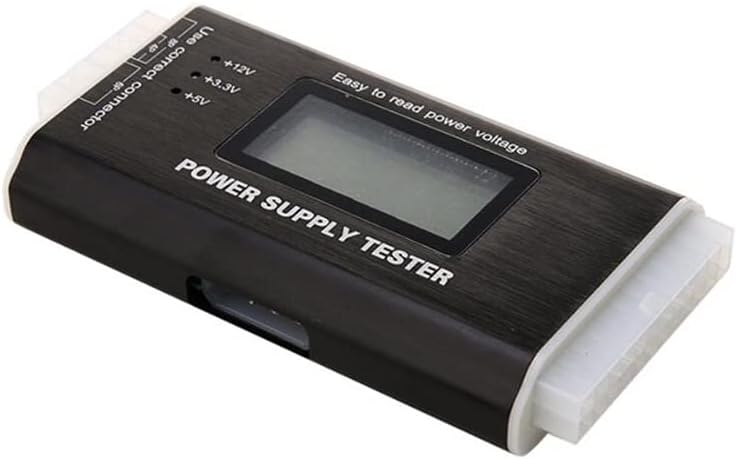


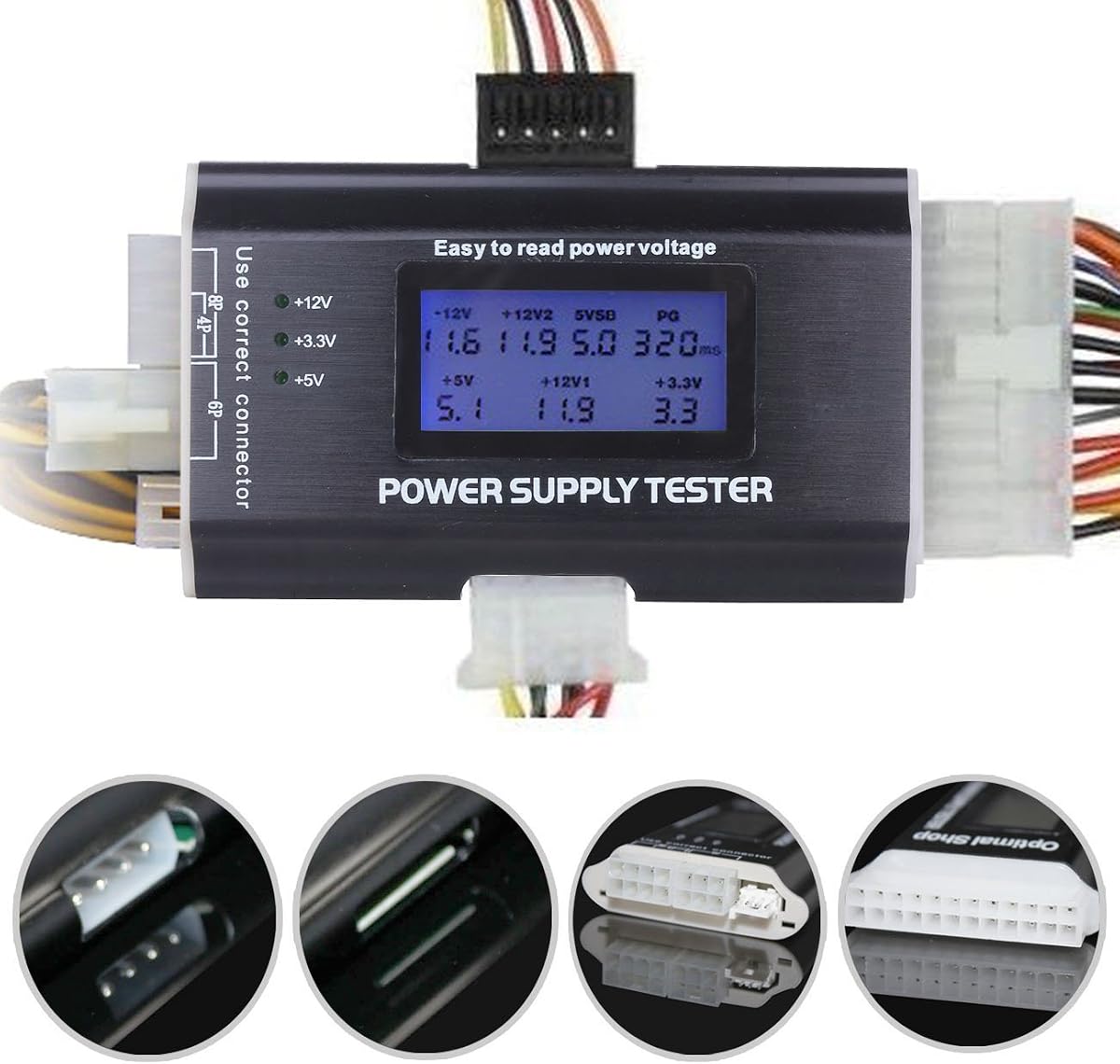
The Computer PC Power Supply Tester combines a 1.8-inch LCD, an aluminum enclosure, and one of the most comprehensive connector arrangements in this roundup. Its 4.5 rating reflects a practical balance of diagnostic visibility, portability, and broad support for both modern and older power supplies.
We may earn a commission when you buy through this link, at no additional cost to you.
The tester is described as an eight-in-one device supporting 20-pin ATX, 24-pin ATX, HDD or IDE, four-pin floppy, six-pin PCI-e, four-pin, and eight-pin EPS connections. Its LCD displays the principal rails and signals, while LEDs identify voltage presence on IDE, floppy, and SATA connectors. A buzzer provides an audible warning when readings fall outside the normal range.
There are two important qualifications. The stated eight-pin EPS support does not extend to PCI-e 8-pin, so it should not be treated as a universal eight-pin graphics connector solution. The LCD is also vulnerable to scratches, although the supplied protective film offers a useful first layer of protection during transport and storage.
This tester is a strong fit for technicians, builders, and collectors who regularly encounter older PCs or mixed connector types. It provides more information than a simple LED tester without requiring the manual probe placement associated with many multimeters. For broad ATX-focused diagnostics in a compact package, it is one of the most convincing choices.
Support for 20-pin and 24-pin ATX, SATA, IDE, floppy, and graphics-related connectors makes this useful across both vintage and contemporary systems. It reduces the need to keep separate adapters for routine inspection work.
The LCD separates major voltage rails and the PG signal, while side LEDs show which power lines are present on smaller connectors. The buzzer adds a useful hands-free warning when a reading is abnormal.
We may earn a commission when you buy through this link, at no additional cost to you.
This 20/24-pin LCD tester is built for quick PSU screening and carries a 4.4 rating. Its strongest attraction is the combination of detailed voltage and PG information with an automatic warning system, allowing a user to connect the tester to an ATX connector and evaluate the result at a glance.
We may earn a commission when you buy through this link, at no additional cost to you.
The display can present 3.3V, 5V, 12V, negative 12V, standby 5V, and PG information, with a stated accuracy or resolution of plus or minus 0.01V. It supports ATX, BTX, ITX, and TFX power supplies, along with 20-pin and 24-pin interfaces, SATA, four-pin, eight-pin, six-pin PCI-e, floppy, and IDE connections.
As with many testers in this category, the LCD is limited to the 20-pin and 24-pin connections. P4, P6, P8, SATA, IDE, and other outputs are assessed through external indicator lights rather than separate numerical displays. This remains useful, but it does not provide the same amount of numerical detail for every cable.
The product suits users who want clearer rail-level information than a basic beep tester and need broad support for different PC form factors. Repair technicians and experienced hobbyists may appreciate the compact layout, although anyone requiring detailed readings from every individual connector should consider a more specialized multimeter.
A numerical LCD is more informative than a collection of pass or fail lights when diagnosing unstable rails. The stated plus or minus 0.01V display resolution makes the tester especially appealing for users familiar with expected PSU outputs.
When a parameter leaves its normal range, the corresponding display flashes and the buzzer sounds. This feedback is useful when the tester is positioned where the LCD is not constantly in view.
We may earn a commission when you buy through this link, at no additional cost to you.
The Kingwin Digital Power Supply Tester is the most feature-forward choice in this group, combining an aluminum body, digital voltage display, broad compatibility, and stated safety protections. Its 4.6 rating is the second-highest among the ten listed products, making it a strong all-around recommendation.
We may earn a commission when you buy through this link, at no additional cost to you.
The tester is designed for ATX, ITX, IDE, HDD, SATA, and BTX power supplies. The LCD provides real-time voltage information, including major rails such as 12V, 5V, and 3.3V, while the plug-and-play format is intended to remain accessible to beginners. Multiple connector types broaden its use for system builders and repair technicians.
The supplied description emphasizes safeguards against short circuits and overvoltage, although it does not explain every protection mechanism in technical detail. It also promises precise readouts without stating the same 0.01V resolution offered by several competing products. These are minor gaps when judging the tool primarily as a fast screening and diagnostic instrument.
Buyers who value a polished digital display, portable aluminum construction, and a broad format range should give this model serious consideration. It is especially suitable for maintenance benches where a tester will be used frequently on mixed desktop hardware, provided the expected connector type is supported.
The digital screen, aluminum housing, and stated safety safeguards create a more professional-looking package. It should fit comfortably into a toolkit intended for regular inspections rather than occasional emergency use.
Support for ATX, BTX, and ITX systems, along with SATA, IDE, and HDD connections, broadens the range of power supplies that can be evaluated. This makes the tester relevant to both older and newer desktop builds.
We may earn a commission when you buy through this link, at no additional cost to you.
The second Computer PC Power Supply Tester in this list is oriented toward detailed monitoring and maintenance. It displays several key parameters in real time, sounds a buzzer for abnormal readings, and flashes the problematic value, earning a 4.4 rating for its useful combination of visibility and warning feedback.
We may earn a commission when you buy through this link, at no additional cost to you.
Its LCD includes 12V, negative 12V, 5V, negative 5V, 3.3V, standby, and PG signals. The stated measuring precision is 0.01V, and the supported interfaces include 20-pin and 24-pin ATX, SATA, four-pin, eight-pin, six-pin PCI-e, floppy, and other power interfaces.
The product information does not identify the enclosure material, so buyers who prioritize a metal body should compare it with the explicitly aluminum models. The description also does not make clear whether every supported connector provides a numerical LCD value or uses indicator lights. That distinction matters for users performing rail-specific troubleshooting.
Despite those uncertainties, the device is a compelling option for technicians who want a full parameter display and immediate fault identification. Its portability and intuitive operation make routine maintenance faster, while the broad interface list reduces the chance of discovering that a commonly used cable is unsupported after purchase.
Showing several voltage and signal values at once helps users compare rails without moving probes or relying on a separate multimeter. Real-time updates also make intermittent instability easier to observe during repeated testing.
The combination of a flashing abnormal parameter and a buzzer reduces the chance that an out-of-range value will be overlooked. That feedback is especially helpful during repetitive inventory or repair work.
We may earn a commission when you buy through this link, at no additional cost to you.
The ATX Power Supply Tester is a compact diagnostic tool intended to make basic PSU inspection easier than using a multimeter. It carries a 4.3 rating and offers an LCD for principal voltage information, a buzzer for defects, and support for several of the power connectors encountered in desktop computers.
We may earn a commission when you buy through this link, at no additional cost to you.
Its numerical display is available when the 20-pin or 24-pin ATX connector is attached. P4, P6, P8, SATA, and IDE wiring is instead evaluated through indicator lights. The product supports ATX, BTX, ITX, and TFX power supplies, allowing the same device to cover several common desktop formats.
The lower rating in the group does not correspond to a major shortage of features, but it does suggest that some buyers may have found aspects of the overall experience less satisfactory. The supplied information also provides fewer details about enclosure materials and protection features than it does for some alternatives.
This model is a sensible choice for a compact repair kit, particularly when the main goal is to check 20-pin or 24-pin voltage rails and confirm several common auxiliary connectors. Users who need exact numerical readings for every output may prefer a more advanced meter-based approach.
The tester turns several basic voltage checks into a compact visual process. It is particularly useful for confirming whether a suspect PSU is producing output before it is connected to expensive system components.
Coverage of P4, P6, P8, SATA, and IDE outputs means the tool can inspect more than the main motherboard plug. The LED-only presentation for these outputs keeps the overall design uncomplicated.
We may earn a commission when you buy through this link, at no additional cost to you.
This Computer Power Supply Tester is a compact option with an LCD, aluminum enclosure, and audible PG alarm. It supports ATX, BTX, ITX, and TFX power supplies, and its 4.2 rating places it near the lower end of the featured group while still offering a practical feature set.
We may earn a commission when you buy through this link, at no additional cost to you.
The clear LCD provides real-time voltage levels, while the buzzer is triggered when the power-good value fails. The aluminum housing is described as lightweight, strong, thermally conductive, and suitable for storage or transport. These traits make the tester convenient for technicians who move between locations.
Compared with several competitors, the supplied description provides less detail about the exact secondary connectors and numerical resolution. It also has the lowest rating among the ten products, although that figure remains within a commonly positive range and does not negate its core functionality.
Its strongest appeal is the combination of a metal shell, real-time display, and audible warning in a portable package. It is suitable for basic ATX testing and routine inspection, while buyers requiring highly detailed specifications may want to cross-check the included connector set before ordering.
Aluminum provides a durable, lightweight shell without adding excessive bulk. The enclosure is easy to place in a technician's tool bag or store on a workbench.
The audible warning is tied specifically to a PG failure, providing a useful prompt that the PSU may not be ready for use. The real-time display supplies additional context for the status of the voltage readings.
We may earn a commission when you buy through this link, at no additional cost to you.
The Computer PC Power Supply Tester ATX Power Supply Testing Kit is the highest-rated product in this roundup, with a 4.8 rating. Its approachable operation, readable LCD, and automatic fault alarm make it an especially attractive general-purpose choice for PC users and repair technicians.
We may earn a commission when you buy through this link, at no additional cost to you.
Connecting the tester to the PSU's 20-pin or 24-pin ATX connector provides an intuitive indication of whether the output is normal. The LCD displays groups of voltage and PG values, and the buzzer activates when a defect is detected. The description also notes that the display remains easy to read in darker work areas.
Its thick plastic shell is described as hard to break and intended for long service. The material is less premium-looking than the aluminum enclosures offered by several rivals, but it keeps the tool light and compact. As with many competing models, P4, P6, P8, SATA, and IDE outputs are represented by lights rather than separate LCD numbers.
This tester is a strong recommendation for anyone who wants a straightforward PSU screening tool without navigating a complex interface. It covers ATX, BTX, ITX, and TFX units, supports the common 20-pin and 24-pin formats, and offers the clearest overall combination of rating, display usability, and fault feedback in the list.
The LCD is specifically highlighted as easy to read even in dark places, a valuable trait for repairs performed in a crowded workshop or at the back of a desk. Voltage and PG values are presented together for quick interpretation.
A user connects the main ATX plug and reads the result, without needing to position individual multimeter probes. The automatic alarm makes abnormal output difficult to miss during a fast inspection.
We may earn a commission when you buy through this link, at no additional cost to you.
The 20/24 4/6/8 Pin Computer PC Power Supply Tester combines a digital display with a buzzer and wide support for common desktop power connectors. Its 4.4 rating places it among the stronger products in the group, particularly for users who need both primary and auxiliary connection coverage.
We may earn a commission when you buy through this link, at no additional cost to you.
The tester supports ATX, BTX, ITX, and TFX power supplies and can measure P4, P6, P8, SATA, and IDE output wiring. The 20-pin or 24-pin connection provides LCD voltage and PG information, while the smaller output groups use indicator lights. The stated voltage display resolution is plus or minus 0.01V.
One part of the supplied description is internally awkward: it says the buzzer operates when the value is in the normal range, while the broader product text describes an automatic fault alarm. The latter interpretation is consistent with the other models, but a buyer should expect the sound to function as a fault indicator rather than a success chime.
This device is a good fit for general computer repair, system-building checks, and inspecting a varied collection of older and newer PSUs. Its principal strength is the combination of digital main-rail readings and LED-assisted testing for multiple auxiliary cables.
ATX, BTX, ITX, and TFX support allows the same tool to be used across a wide range of power-supply formats. P4, P6, P8, SATA, and IDE coverage further improves its usefulness for legacy and mixed systems.
Numerical voltage and PG data is available through the main 20-pin or 24-pin connection. Secondary outputs remain visible through LEDs, providing a faster status check without overcomplicating the display.
We may earn a commission when you buy through this link, at no additional cost to you.
The PC Power Supply Diagnostic LCD is a value-oriented tester that brings together a numerical voltage display, PG monitoring, an automatic buzzer, and broad format support. Its 4.4 rating demonstrates a favorable buyer reception despite the more unconventional wording in its product title.
We may earn a commission when you buy through this link, at no additional cost to you.
It detects ATX, BTX, ITX, and TFX power supplies and displays voltage and PG information by group. The listed connector coverage includes 20-pin and 24-pin supplies as well as SATA, IDE, and HDD connections, with the title also referencing four-pin, six-pin, and eight-pin outputs. Abnormal voltage or PG conditions trigger a warning and make the corresponding value flash.
The supplied information does not identify the enclosure material or provide a clear numerical resolution figure, so the tester is harder to compare on those specific construction points. However, the core diagnostic behavior is clearly described and aligns with the needs of a general-purpose PSU screening tool.
This is our best budget recommendation for owners who want more information than a basic LED tester without moving to a full bench multimeter. It is particularly useful for quick checks, resale preparation, and troubleshooting desktop systems that use common ATX-family connectors.
The LCD reports voltage and PG values by group, providing more diagnostic context than a simple green or red indicator. It is a practical middle ground between minimal PSU testers and manually probing each rail.
The buzzer and flashing parameter provide two forms of fault feedback. This makes abnormal output easier to identify even when the user is watching the PSU rather than the screen.
We may earn a commission when you buy through this link, at no additional cost to you.
The 20+4 Pin LCD Computer Power Supply Tester pairs a 1.8-inch display with an aluminum alloy housing and broad connector support. Its 4.5 rating makes it a solid choice for users who want a durable, portable diagnostic tool for both older and modern desktop power supplies.
We may earn a commission when you buy through this link, at no additional cost to you.
It supports 20-pin and 24-pin ATX-style connections, SATA, IDE, HDD, floppy, four-pin, six-pin PCI-e, and eight-pin outputs. Main voltage information appears on the LCD, while LEDs show 12V, 3.3V, and 5V presence on the HDD, floppy, PCI-e, four-pin, eight-pin, and SATA connections. A buzzer warns when the PG reading fails.
The screen arrives with a protective film because it is susceptible to scratches. Users concerned about the initial appearance can remove it, although the film remains useful while the device is stored. Like most tools in this category, the auxiliary connectors do not receive their own numerical LCD values.
This tester is well suited to technicians who regularly work with legacy hardware because of its floppy and IDE support, while its modern connectors keep it relevant for current systems. The metal case and straightforward interface also make it a durable addition to a compact repair toolkit.
The unusually broad interface list includes both modern SATA and legacy floppy and IDE connections. That makes this a practical choice for mixed-vintage PC repair work rather than only recent builds.
The aluminum alloy shell resists corrosion while remaining easy to carry. A readable LCD and a buzzer tied to PG failure provide visible and audible confirmation of the test state.
We may earn a commission when you buy through this link, at no additional cost to you.
The right power supply tester depends on the connectors you encounter, the depth of readings you need, and where you plan to use the tool. Compare display functions and alert behavior alongside portability and included formats before purchasing.
Begin by confirming that the tester supports the main connector used by your power supply. A 20-pin and 24-pin arrangement is common, but older systems may use 20-pin hardware while newer units frequently expose a 20+4 configuration. The tester should also be able to accept the plug without forcing or modifying it, and the main ATX connection should power the LCD and supply the most complete diagnostic information.
A numeric LCD is far more useful than an unlabeled pass-or-fail indicator when diagnosing a PSU. Look for separate readouts for the main positive rails, standby power, and PG. Models advertising plus or minus 0.01V resolution or precision may be attractive for detailed troubleshooting, but the display should also be large enough to read comfortably while cables remain attached.
Graphics cards, drives, and older peripherals use several different power plugs. Common options include four-pin, six-pin PCI-e, eight-pin EPS, SATA, IDE, and floppy connectors. Check whether the tester merely detects voltage on these leads or provides numerical readings. In most compact models, detailed LCD values are reserved for the 20-pin and 24-pin connection, while auxiliary cables use LEDs.
A buzzer is valuable because it lets you hear that a rail or PG signal has failed while you watch the PSU or work elsewhere in the case. Flashing abnormal readings provide a second layer of feedback. Check whether the product description frames the sound as a fault alarm, since some listings contain ambiguous wording about whether a normal condition also produces a tone.
ATX is the keyword focus, but many desktop PSUs are sold under related form-factor labels. ATX, BTX, ITX, and TFX support gives a tester broader relevance in a repair inventory. This does not necessarily mean every cable is represented in the same way, so format compatibility should be considered alongside the exact connector list rather than used as a substitute for it.
Aluminum enclosures offer a light, durable, corrosion-resistant option that is often associated with bench or professional tools. Thick plastic can also provide adequate strength while keeping the package compact. Consider the size of the LCD, the strain placed on attached cables, and whether a small housing will remain stable on a workbench. A tester intended for transport should also have a screen surface that is less vulnerable to damage.
Most ATX testers are small, but their attached leads can make them awkward to organize. A compact body, clear connector labels, and a screen that remains readable in a dim workspace improve usability. If you travel between customers or repair multiple computers in one session, a durable shell and uncomplicated interface are often more valuable than a marginal difference in display resolution.
A basic tester is appropriate for deciding whether a PSU appears to be alive before a full system test. A numerical tester is better for maintenance and fault isolation. If you need exact measurements for every individual pin, load testing, ripple analysis, or switch-on sequencing, a dedicated oscilloscope and multimeter remain more appropriate than any compact connector tester in this roundup.
Before testing, disconnect the PSU from the AC mains and from all system components. Inspect the tester and its cables for bent pins, damaged insulation, or loose connectors, then confirm that the PSU connector and tester interface match. Keep the work area dry and uncluttered, and do not connect or remove plugs while the PSU is energized.
Connect the tester to the appropriate 20-pin or 24-pin ATX interface with the PSU switched off, then apply power according to the tester's instructions. Read the displayed voltage rails and PG value, noting any flashing values or audible warnings. Test auxiliary connectors individually only when the manufacturer identifies the expected LED pattern for the attached cable.
After completing the inspection, disconnect power and remove the tester before returning the PSU to a computer. Store the unit in a protective location, retain any screen film for protection, and clean the housing with a dry or lightly damp cloth. Avoid liquid cleaners, extreme heat, and repeated bending of the connector leads.
An ATX power supply tester checks whether a PSU is producing expected voltage rails and a valid PG signal while it sits outside a computer. It is useful for initial troubleshooting, testing salvaged or used units, and confirming that a power supply appears healthy before it is connected to expensive components. It provides a screening tool rather than a complete substitute for load testing or oscilloscope measurements.
It is safer to test a power supply outside the system and with the mains disconnected while changing cables. Some testers may be designed to draw power from the ATX connector while the PSU is active, but connection procedures vary by model. Follow the manufacturer's directions and never insert or remove connectors while energized unless the device explicitly supports that procedure.
Most compact ATX testers reserve the LCD for the primary 20-pin and 24-pin connection, where several voltage rails and the PG signal can be monitored together. Auxiliary connectors generally use LEDs to indicate the presence of 12V, 5V, and 3.3V. If you need numerical readings for every individual output, use a multimeter or another instrument designed for pin-by-pin measurement.
PG stands for power good and indicates that the PSU believes its output is stable and ready for the system to use. A missing or failed PG indication can prevent a computer from starting even when some voltage rails appear present. A tester that flashes the PG value and sounds an alarm can help flag this condition for further investigation.
No. The featured devices primarily monitor voltage readings, signals, and the presence of power on supported connectors. They do not necessarily simulate a realistic system load, measure ripple in depth, or evaluate hold-up time. For detailed power-quality analysis, combine the tester with a multimeter, electronic load, and oscilloscope as appropriate.
Most support six-pin PCI-e and eight-pin EPS-style connectors, but the exact fit varies. Some products explicitly state that an eight-pin EPS connector is not compatible with a PCI-e 8-pin cable, and other listings use the terms loosely. Check both the connector shape and the stated compatibility warning before relying on a tester with a modern GPU.
Neither material is universally superior. Aluminum testers tend to feel durable, dissipate heat well, and resist corrosion, while a thick plastic shell can be lighter and still rugged. Choose based on how you will use the tool, the size of the display, the quality of the connectors, and the overall information shown rather than on housing material alone.
Some compact LCD surfaces are easy to scratch, so the manufacturer may cover them with a thin protective layer. The film can prevent cosmetic damage during storage and shipping. It may create a cloudy or scratched appearance at first, and it can usually be removed carefully if you prefer a clearer view, though retaining it may offer extra protection.
The Computer PC Power Supply Tester ATX Power Supply Testing Kit is the strongest overall pick because it combines a highly readable LCD, a simple ATX connection, automatic fault alerts, and the highest rating in the group. The PC Power Supply Diagnostic LCD represents the best budget approach, while the Kingwin Digital Power Supply Tester is the most premium-oriented option with an aluminum body and broad compatibility.
Prioritize the connectors you actually use, whether the LCD shows the rails you need, and whether secondary outputs provide enough information for your work. A metal housing, portable size, and 0.01V stated precision can improve suitability for frequent technical use, but simple operation and unmistakable fault warnings are often more valuable day to day.
Product ratings, availability, and prices can change, so check the current listing and retailer information before buying. Compare the complete connector list against your collection of PSUs and confirm any special warnings about eight-pin connectors before making a final choice.