
Magnasonic All-in-One Film Scanner
4.3Editor score
24MP film scanning
Five-inch preview display
Computer-free JPEG saving
A scanner for old negatives can transform fragile boxes of color and black-and-white film into organized digital memories. The right unit should support the formats in your collection, produce accurate-looking images, and make editing and saving straightforward. Display size, sensor quality, loading system, and computer-free operation also matter.
This guide compares ten scanners based on the supplied specifications, including supported film formats, effective resolution, screen size, editing controls, storage options, connectivity, and batch-scanning convenience. It covers dedicated film scanners, two smartphone-based options, and one flatbed scanner that is useful for printed photographs but is not designed for negatives.
Each review identifies the product's strongest use case, practical trade-offs, and who may benefit most from it. The top picks highlight a budget all-in-one, a premium standalone model, and an approachable scanner for mixed collections. Product availability and pricing can change, so confirm current specifications and costs before buying.
4.3Editor score
4.3Editor score

4.0Editor score
As an Amazon Associate we earn from qualifying purchases.
The comparison below highlights each scanner's resolution, display, supported formats, and workflow so you can identify the model that best fits your collection, budget, and preferred level of hands-on control.
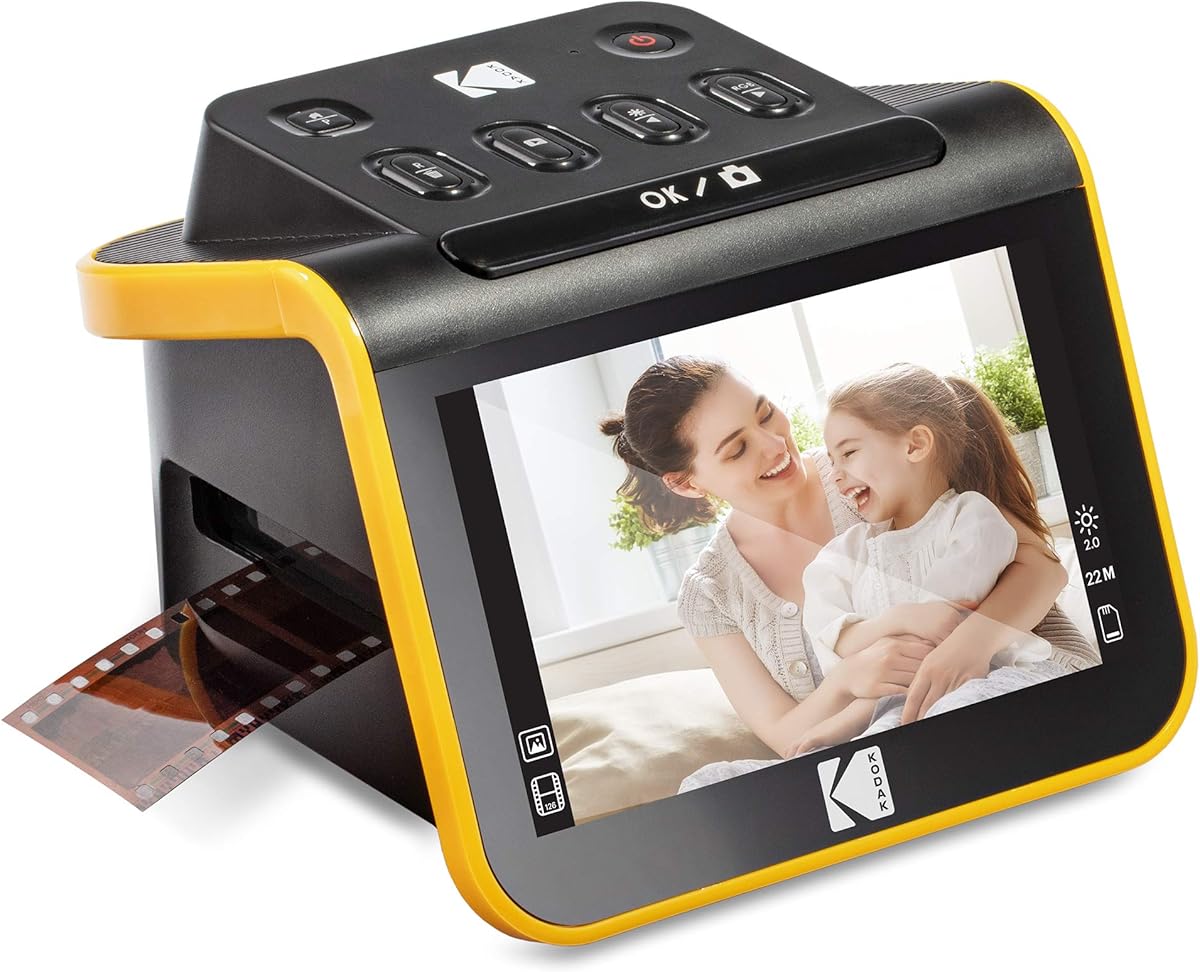




The KODAK Slide N Scan 22MP earns a 4.3 rating and stands out as a balanced, approachable way to digitize 135, 110, and 126mm negatives and slides. Its 22MP interpolated output, five-inch LCD, and standalone workflow give it broad appeal for families converting mixed collections without wanting to manage complicated computer software.
We may earn a commission when you buy through this link, at no additional cost to you.
Its strengths center on a straightforward sequence from loading to saving. The quick-feeding tray supports continuous scanning, while a dedicated 50mm holder and adapters for 135, 110, and 126mm film broaden compatibility. On-device controls allow users to select film type, adjust color and brightness, resize images, and assign date or time information before saving to an SD or SDHC card up to 32GB.
The five-inch display provides enough room to inspect framing, color, and orientation, and the gallery mode can also present digitized pictures. This makes the unit useful for more than immediate preservation: it can serve as a compact digital frame for reviewing family photographs. The included USB and HDMI cables, cleaning brush, and adapters reduce the number of extra items needed for a first session.
The main limitation is that an SD card is not included, and the scanner does not support the wider set of motion-picture formats found on some competing models. It is also dependent on its own software rather than a conventional desktop workflow. For someone with standard still-film negatives who values simplicity, however, this is an excellent general-purpose choice and our premium pick for a refined standalone experience.
The continuous-loading tray reduces the need to reposition each frame, making the scanner well suited to boxes containing many images. Its straightforward controls also help users work through an archive without first learning a complex editing program.
The built-in LCD and gallery mode let you inspect and present scans immediately after capture. Connectivity through USB and HDMI adds flexible options for viewing results on a larger screen or moving files to a computer.
We may earn a commission when you buy through this link, at no additional cost to you.
The Magnasonic FS71 has a 4.3 rating and is the strongest budget-oriented option in this group. It combines 24MP scanning, a five-inch LCD, and support for 35mm, 126, 110, and Super 8 negatives, making it notably versatile for collections that include home-movie film as well as standard still negatives.
We may earn a commission when you buy through this link, at no additional cost to you.
Unlike the smartphone-based models in this guide, the Magnasonic operates as a self-contained digitizing station. It saves JPEG files to an SD card, requires no photo-editing software or driver installation, and includes direct controls for brightness, RGB color correction, horizontal flipping, and mirroring. The screen can display film, slides, and stored images, while HDMI offers a larger-screen viewing option.
The included fast-loading trays and claimed sub-five-second scanning workflow are useful for sizable archives. Its SD slot accepts cards up to 128GB, offering more capacity than several 32GB-compatible alternatives. This combination of format breadth, generous storage support, and no-computer operation is particularly valuable for users who want to begin scanning without assembling a computer-based setup.
A card and HDMI cable are not included, and the product details do not mention 8mm support even though some competing scanners do. Its 24MP figure should also be considered in light of the underlying sensor rather than treated as a guarantee of visible detail. Even so, the FS71 offers an unusually complete feature set at a budget-friendly tier and is the best pick for users who prioritize capability per dollar.
Support for 35mm, 126, 110, and Super 8 film makes this scanner a practical choice for collections with several kinds of negatives. The included holders reduce the need to improvise adapters for each format.
Built-in brightness and RGB color controls allow basic corrections before saving. This keeps the workflow accessible and can reduce the time spent importing every image into separate editing software.
We may earn a commission when you buy through this link, at no additional cost to you.
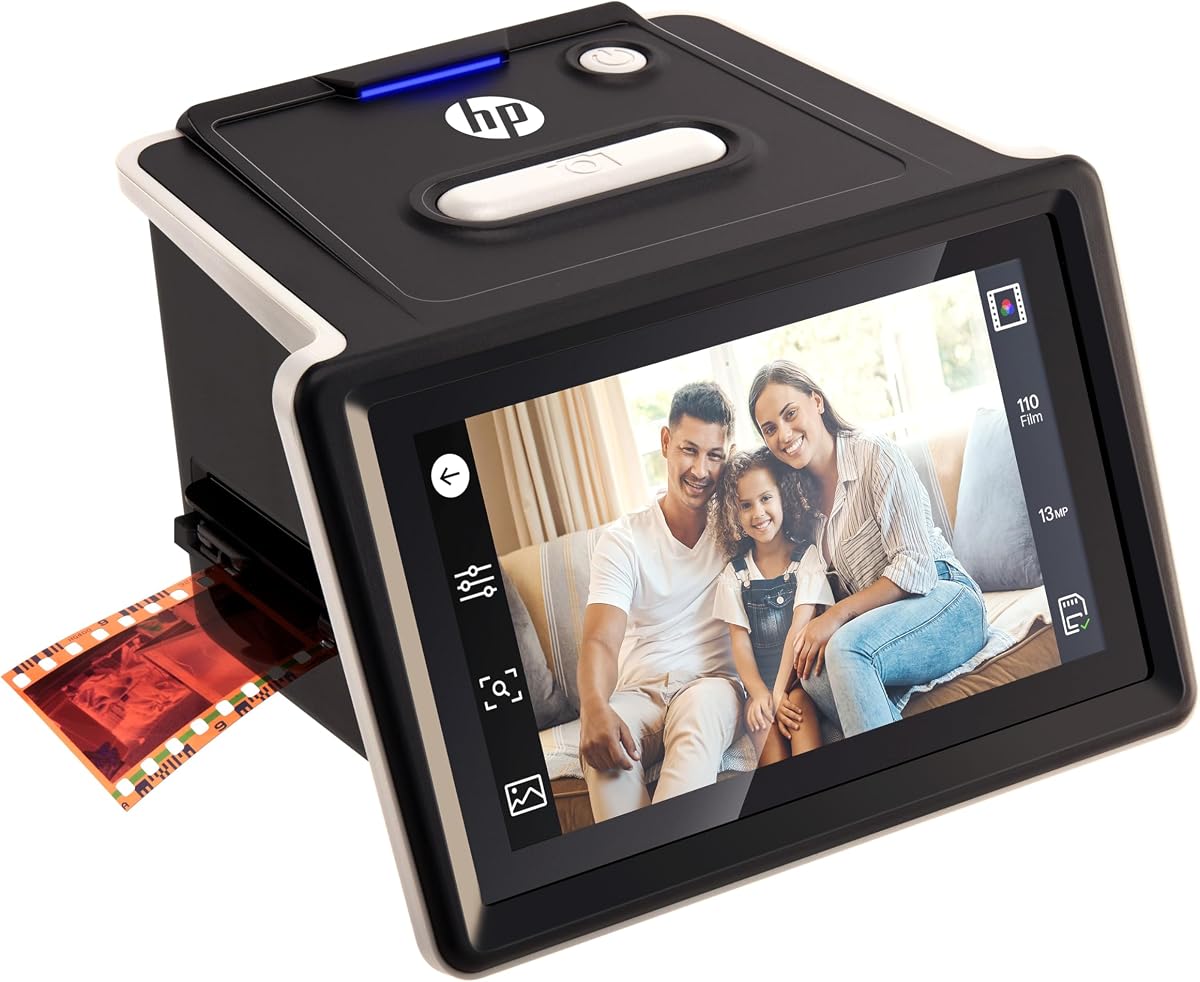
The HP FilmScan HPFS500 carries a 4.3 rating and is the strongest all-around choice for users who want detailed control without a mandatory computer. Its 13MP CMOS sensor, 22MP interpolation, five-inch all-angle touchscreen, and quick-load tray combine thoughtful archival features in a compact standalone design.
We may earn a commission when you buy through this link, at no additional cost to you.
Compatibility is a central strength. The scanner handles 135, 126, and 110 negatives along with positive slides, allowing a mixed collection to be processed without switching between dedicated devices. The touchscreen supports direct preview and editing, while the quick-load tray helps reduce interruptions during longer sessions. That combination makes the HPFS500 especially effective for people who want to digitize many boxes over several evenings.
Its most important trade-off is the distinction between 13MP native sensor data and 22MP interpolated output. Interpolation can increase the file dimensions, but it does not create detail that the sensor did not record. Users seeking very fine grain or maximum enlargement should understand this distinction, though the touchscreen still makes framing and image review convenient at normal viewing sizes.
For families, collectors, and archivists who value an interactive interface and a genuine do-not-need-a-computer workflow, this is the most balanced recommendation. It combines useful format support, efficient loading, hands-on controls, and modern USB-C connectivity without requiring advanced photo-editing knowledge.
The all-angle five-inch touchscreen places preview and editing controls directly in the scanning process. This makes it easier to check exposure, orientation, and image quality before committing each frame to storage.
The quick-load tray supports efficient transitions between frames, while support for three common negative formats accommodates mixed collections. That combination favors repeat sessions over one-off conversion tasks.
We may earn a commission when you buy through this link, at no additional cost to you.
The KODAK Slide N Scan Max has a 4.1 rating and focuses on comfortable viewing and efficient loading. Its seven-inch tiltable LCD is larger than the screens on most conventional film scanners, while the quick-feeding tray helps users move through a large collection without repeatedly repositioning the carrier.
We may earn a commission when you buy through this link, at no additional cost to you.
It supports 135mm, 110mm, and 126mm films and positive slides, making it a solid option for standard family negatives. Direct one-touch editing covers resizing, conversion, and basic adjustments without complex menu navigation. Scans save to SD or SDHC cards up to 32GB, so a computer is not required for the basic digitization process.
The screen's size and tilt are the model's defining advantages. They make framing and color review easier, particularly for older users or anyone who wants to compare a scan before saving it. The gallery-style function can then turn the scanner into a digital picture frame, extending its value beyond archival work.
Users should note the 32GB storage ceiling and need to supply an appropriate card themselves. The listed formats do not include Super 8 or 8mm, so it is less comprehensive than scanners built for motion-picture film. Its 4.1 rating also trails several higher-rated options, but the large display and straightforward operation make it attractive for review-focused home archiving.
The seven-inch tiltable display provides a clearer view of composition and color than smaller built-in screens. Its angle can also make a tabletop session more comfortable by reducing the need to lean directly over the device.
Basic resizing, conversion, and image adjustments are accessible without navigating complicated settings. This favors repeatable scanning sessions in which speed and consistency matter more than advanced post-processing.
We may earn a commission when you buy through this link, at no additional cost to you.
The BEONEGLOBAL ClearScan P7 has a 4.1 rating and offers an unusually complete package for people beginning a home archive. It combines a seven-inch LCD, 24MP scanning, no-computer operation, broad film compatibility, and an included SD card, allowing a new user to start without purchasing several basic accessories.
We may earn a commission when you buy through this link, at no additional cost to you.
Its 1/2.3-inch CMOS sensor is designed for film capture, and the scanner can produce images up to 24MP. It supports 35mm/135, 126, 110, Super 8, and 8mm film, plus slides. That range is one of the broadest among the dedicated devices in this guide and makes it relevant for mixed collections containing both still and motion-picture material.
The upgraded layout places buttons below the seven-inch screen, which reduces awkward hand movement during operation. One-touch controls handle scanning, editing, and color enhancement, while image-size adjustment gives users some control over framing. JPEG output and direct saving to SD storage simplify the path from physical film to portable digital files.
Its 4.1 rating suggests some compromises relative to the highest-rated models, and the supplied details emphasize convenience more than sophisticated manual adjustment. Nevertheless, the included branded SD card and broad compatibility distinguish it from scanners that require immediate extra purchases. It is a strong choice for beginners who want comprehensive format support and an approachable package.
The included SD card removes a common first-time obstacle. With storage, film holders, and device controls already arranged, users can concentrate on sorting and scanning their collection rather than assembling accessories.
Super 8 and 8mm compatibility gives this model an advantage for families with old home movies. The broad format support makes it easier to consolidate several kinds of analog media in one archiving project.
We may earn a commission when you buy through this link, at no additional cost to you.
The KODAK SCANZA has a 4.2 rating and remains a versatile option for people who want one unit to cover several negative formats. It converts 35mm, 126, 110, Super 8, and 8mm negatives and slides to JPEG files through a standalone process with a 3.5-inch TFT display.
We may earn a commission when you buy through this link, at no additional cost to you.
Its 14/22MP specification combines a stated 14MP mode with 22MP output, giving users a choice depending on how much detail or convenience they prioritize. A bright, adjustable display and tilt make operation and image viewing easier. The interface supports RGB and resolution edits, gallery browsing, and one-step scanning, while the included insert directory helps users match film to the correct holder.
A major practical strength is support for SD cards up to 128GB. That provides ample room for extensive collections without tying the workflow to internal memory. The package also includes a USB power cable, HDMI cable, AC adapter, video cable, and cleaning brush, creating a comparatively complete setup for immediate use.
The 3.5-inch display is smaller than those on the seven-inch competitors, and an SD card must be purchased separately. The product also warns that films outside the listed formats will not be converted. For a collector with home movies or mixed standard negatives, though, this broad compatibility and generous storage support remain persuasive.
Super 8 and 8mm support expands the SCANZA beyond conventional 35mm negatives. Multiple included inserts make it practical for sorting an archive containing several film formats into a single digitization project.
SD card support up to 128GB is helpful for high-volume collections. The computer can remain optional while digital files accumulate on removable media for later organization and backup.
We may earn a commission when you buy through this link, at no additional cost to you.
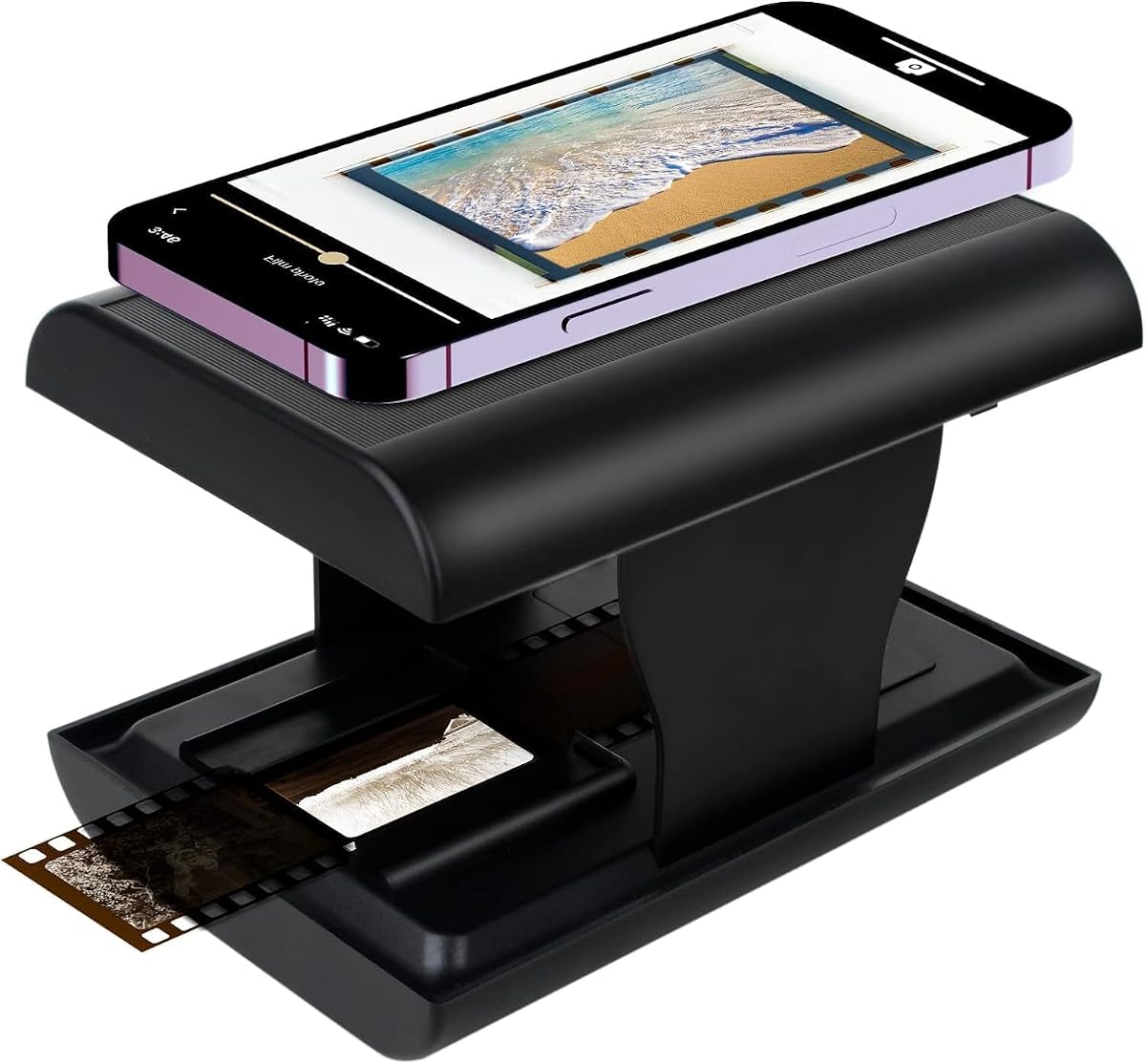
The TCNEWCL Mobile Film Scanner has the highest supplied rating in the group at 4.4 and provides a notably different approach. Rather than using its own high-resolution sensor, it places a slide or 35mm negative behind a small opening and uses a smartphone camera with an integrated LED light to capture the image.
We may earn a commission when you buy through this link, at no additional cost to you.
Its biggest advantage is portability. The foldable housing packs down to approximately the size of a small box, making it easier to carry than a desktop scanner or a tabletop standalone unit. Setup is also conceptually simple: insert the film, activate the light, position the smartphone camera over the opening, and take the image through the supplied application.
The free app supports capture, rotation, color and contrast adjustment, filtering, and sharing, with Snapseed recommended as an additional editing option. This gives smartphone users a familiar way to correct and organize images without relying on a scanner's limited internal menu. The result can be attractive for small collections, travel, or an initial low-cost archiving pass.
Final image quality is limited by the resolution and camera performance of the user's phone, and the process requires steadier manual alignment than a dedicated optical scanner. It is specifically described for 35mm slides and negatives rather than 110, 126, or motion-picture formats. Users seeking predictable archival results should therefore favor a dedicated scanner, while occasional converters may find this model impressively convenient.
The approach uses equipment most people already own and avoids a separate computer workflow. A dedicated application helps bridge physical film and digital photo libraries, with editing and sharing tools close at hand.
The folding design reduces storage space and makes the scanner easier to carry between family members or locations. It is particularly useful when film must be viewed or captured away from a permanent desk setup.
We may earn a commission when you buy through this link, at no additional cost to you.
The HP FilmScan 7-Inch Touch has a 4.0 rating and emphasizes visual review through a large, interactive display. Its seven-inch color touchscreen supports direct preview, cropping, editing, and slideshow presentation, while the 13MP color CMOS sensor converts color and black-and-white negatives into digital files.
We may earn a commission when you buy through this link, at no additional cost to you.
The quick-feed tray and included 50mm adapter support 135, 126, and 110 formats. This combination is well suited to archive sessions where the user must repeatedly load frames, inspect them, make corrections, and continue. On-device editing reduces friction by allowing basic crop and adjustment work without immediately transferring every image to a computer.
Connectivity adds further flexibility. USB can be used to transfer photos to a computer, while HDMI allows a gallery slideshow on a television or other display. These features extend the scanner beyond a conversion appliance and make it useful for reviewing results with family members as part of a shared archiving project.
The 4.0 rating is the lowest among the dedicated scanners listed, and the 13MP native sensor may limit extremely large prints compared with higher-resolution systems. It is also one of the costliest options in the guide. Still, the expansive touchscreen and polished review workflow make this model appealing for users who prioritize hands-on control and a large, clear interface over the highest possible native resolution.
Direct touchscreen cropping and adjustments make it possible to refine images while the physical film is still part of the active workflow. This is especially useful for mixed-orientation frames and pictures that need a quick framing correction.
HDMI supports television slideshows, while USB provides a path to a computer for larger backups. Gallery mode turns the scanner into a display for finished digital memories.
We may earn a commission when you buy through this link, at no additional cost to you.
The KODAK 22MP Scanner has a 3.9 rating but offers an attractive storage package for new users. It includes a 64GB SD card and card reader, allowing users to begin saving scans without immediately buying removable storage. The scanner itself provides 13/22MP output and a five-inch wide-angle LCD for previewing and editing.
We may earn a commission when you buy through this link, at no additional cost to you.
Its quick-feeding tray supports efficient scanning, and the included 50mm slide holder plus 135, 110, and 126mm adapters cover common still-film formats. One-touch controls handle enhancement, resizing, conversion, film-type selection, and color or brightness adjustments. The gallery mode also allows digital photographs to be displayed in the home or office.
The supplied specifications present some ambiguity around removable storage: the title highlights a 64GB SD card and reader, while the feature details state that supported SD or SDHC cards should be no larger than 32GB. Buyers should verify the current manual and actual card behavior rather than assuming the larger included card will be accepted by every unit or firmware version.
The 3.9 rating is the lowest supplied among the ten products, so it should be considered carefully against better-rated alternatives. However, the included storage, adapters, cleaning brush, USB and HDMI cables, and easy-load system create a convenient starting package. It may suit a new archivist who values a ready-to-use bundle more than the highest native resolution or the largest screen.
Providing an SD card and reader reduces setup friction. Users can begin organizing and saving digital files immediately, while still following the device's stated card-capacity requirements.
Film-type selection and color or brightness adjustment help preserve a consistent look across varied negatives. The gallery function adds value by making the scanner a convenient display for completed scans.
We may earn a commission when you buy through this link, at no additional cost to you.
The Canon CanoScan LiDE110 has a 4.3 rating and is a capable flatbed scanner, but it is important to place it in the correct category. Its supplied specifications describe 2400-by-4800-DPI color scanning, automatic detection, USB connectivity, and an expandable lid. None of those details indicate dedicated support for 35mm negatives or mounted slides.
We may earn a commission when you buy through this link, at no additional cost to you.
For printed photographs, documents, and flat items, the LiDE110 offers a familiar high-resolution workflow. Auto Scan Mode detects what is being scanned and adjusts settings, reducing the need for manual configuration. A single USB cable handles both data and power, while the advanced expandable lid can accommodate thicker or bulkier items.
This model is relevant to readers who want to digitize prints first and later need a dedicated negative scanner. It can also serve as a general-purpose home scanner for paperwork and photographs. Its stated speed of approximately 18 seconds for a letter-size color scan is convenient for occasional rather than high-volume archival tasks.
However, a flatbed scanner should not be placed directly over a negative strip or slide without a suitable transparency unit, and this product's supplied data does not confirm such support. It also lacks film holders, a built-in film light source, and direct memory-card workflow. For the stated keyword, it is a supporting option for printed photos rather than a true scanner for old negatives.
Once negatives have been digitized, a high-resolution flatbed can help preserve printed photographs and other paper keepsakes. Automatic detection simplifies the task for occasional scanning sessions.
A single USB cable handles power and data for compatible computers. This familiar setup differs from standalone film scanners that can save directly to SD cards or display images without a computer.
We may earn a commission when you buy through this link, at no additional cost to you.
The best scanner for old negatives depends first on the media you own. After confirming compatibility, compare native sensor resolution, screen usability, editing tools, loading speed, storage, and connectivity to find a workflow that suits your collection.
Begin by identifying every format in your collection rather than relying on a generic label such as 35mm film. Standard still-film negatives commonly include 135mm, 126mm, and 110mm formats, while some collections also contain Super 8 or 8mm motion-picture film. The Magnasonic, ClearScan P7, and SCANZA support motion-picture formats, whereas the KODAK Slide N Scan models are primarily intended for 135, 110, and 126mm material. Mounted slides may require a separate 50mm holder, and some scanners describe that capability differently.
Match the scanner's supported formats to your actual archive before comparing features. In short, verify every negative size and slide type you own rather than assuming one model will handle everything.
A megapixel figure is useful only when the underlying sensor can capture meaningful detail. The HP FilmScan models specify a 13MP CMOS sensor with 22MP interpolation, while the ClearScan P7 and Magnasonic list 24MP output. Interpolation increases image dimensions and may improve suitability for certain uses, but it cannot reproduce detail that was not optically recorded. If your goal is large prints, close inspection of grain, or archival crops, prioritize sensor quality and credible optical performance over the largest advertised number.
Choose a resolution appropriate to the size of your intended prints. In short, distinguish native sensor data from interpolated output before deciding that a higher number guarantees better scans.
A built-in display is central to reviewing negatives correctly. The ClearScan P7 and KODAK Slide N Scan Max use seven-inch screens, the HP 7-Inch Touch offers an interactive version, and several other models use five-inch displays. The SCANZA has a smaller 3.5-inch TFT screen. Larger screens can make framing, color comparison, and orientation corrections easier, while touchscreens add direct interaction but may require more attention to controls.
Choose the smallest screen you can comfortably inspect, or favor a larger one for shared family sessions. In short, a clear preview is more valuable than a specification that sounds impressive but does not support accurate review.
Standalone scanners can scan, edit, and save images without a computer, making them convenient for users who want a simple, self-contained process. Most dedicated models in this guide support direct SD card storage, and many can display saved images as a gallery or slideshow. The TCNEWCL alternative uses a smartphone and app, while the Canon LiDE110 uses a computer-connected flatbed workflow. Consider your comfort with file organization, device management, and backups when deciding between these approaches.
Standalone operation offers convenience, but your digital files still need backups. In short, choose a workflow you can sustain, and plan to copy important scans from removable cards to more than one location.
Negative scanning usually requires color correction, brightness adjustment, orientation control, and sometimes cropping. The HP 7-Inch Touch provides direct crop and adjustment tools, the HPFS500 uses an interactive touchscreen, and several KODAK and Magnasonic models offer one-touch or built-in RGB and brightness controls. The TCNEWCL workflow relies on a phone application with color, contrast, filter, and rotation tools. Built-in editing is convenient for quick corrections, while computer software may provide finer control later.
Make sure the device can handle the corrections you expect to make before saving each image. In short, basic on-device editing is enough for straightforward archives, while advanced restoration is better handled after the initial capture.
A quick-feed or fast-loading tray can significantly reduce the time spent handling a large archive. The KODAK Slide N Scan 22MP and Slide N Scan Max emphasize continuous loading, the HP models include quick-load trays, and the Magnasonic is specified to scan in less than five seconds per image with its included trays. Automatic detection can further reduce pauses between frames. If your collection contains only a few negatives, loading speed matters less, but frequent users should consider how the carrier releases each image and whether it is easy to use.
Test the workflow mentally from removing a sleeve to saving the next scan. In short, for more than a small box of film, smooth loading and few menu steps can matter as much as headline resolution.
Removable SD cards keep standalone scanners portable and make it easy to move files into a larger archive. Capacity requirements vary: some models support up to 32GB, while the Magnasonic and SCANZA list support up to 128GB. The ClearScan P7 and the KODAK 22MP bundle include cards, while the Magnasonic, SCANZA, and original Slide N Scan do not. USB and HDMI connections provide paths to a computer and larger display, but a card reader or card reader is still needed for many workflows.
Choose sufficient capacity and plan regular backups before deleting originals. In short, treat the SD card as working storage rather than the only copy of irreplaceable family images.
A smartphone-based scanner can be inexpensive, compact, and easy to carry, but it depends on the phone's camera resolution and careful manual alignment. Dedicated scanners use purpose-built illumination, holders, optics, and sensors to make framing more consistent. A phone workflow is attractive for occasional conversions or travel, while a dedicated device is generally more appropriate for a sizable archive, consistent color capture, and large batches. Neither approach should substitute for keeping the physical originals in a safe, labeled collection.
Choose smartphone capture for convenience and dedicated hardware for consistency. In short, the best method is the one that produces acceptable results while motivating you to finish the entire collection.
Begin by sorting and identifying the film before inserting it. Keep negatives in labeled sleeves, note the format on each envelope, and avoid touching the emulsion surface. Inspect the film holder and light box for dust, and use the included cleaning brush where applicable. A fingerprint, scratch, or dust speck can become conspicuous when a negative is enlarged on the scanner's display.
Select the correct holder and film type in the scanner's settings. Insert the strip in the orientation recommended by the tray or insert directory, then preview before saving. Check the borders, orientation, brightness, and color on the display. Make basic corrections, use a consistent naming and folder system, and save in the highest practical setting rather than repeatedly downsizing during capture.
After each session, remove the film and return it to its sleeve. Copy digital files from the SD card to a computer and then to at least one additional backup location before formatting the card. Keep the scanner on a stable surface, protect its screen and light box from impact, and follow the manufacturer's instructions for lens and light-box cleaning. Never force a film strip into the wrong holder, and do not scan damaged or badly stuck film without checking the device's compatibility.
A dedicated film scanner is usually best because it provides a controlled light source, correctly sized holders, and software or controls designed to invert and color-correct negatives. Choose a model that supports every format in your collection and matches your preferred level of hands-on control. Consider a seven-inch touchscreen for easier review or a more compact model for occasional use.
Only when it has a suitable transparency or film-scanning capability. The Canon CanoScan LiDE110 included here is documented for flatbed scanning and does not list negative-film support. Using a flatbed without a proper transparency unit can produce dark or low-quality results and may risk damaging the original.
Not with most of the dedicated scanners in this guide. They can scan, make basic edits, and save directly to SD cards, while some can also present images on a television through HDMI. A computer is still useful for detailed editing, large-scale organization, and creating backup copies of your digital files.
Check the dimensions and type of every item in your collection. Common still negatives include 135mm, 126mm, and 110mm formats, while some scanners also support Super 8 and 8mm motion-picture film. Mounted slides may require a 50mm holder, so verify both negative and slide support before purchasing.
No. Native sensor resolution matters more than an interpolated headline figure. A 22MP image derived from 13MP sensor data may be useful for certain workflows, but interpolation cannot restore genuine detail that the sensor did not record. Consider resolution alongside the scanner's light source, optics, color reproduction, and intended print size.
That depends on the selected resolution, image format, and the scanner's capacity limit. Models in this guide list removable-card support ranging from 32GB up to 128GB, with some packages including a card. Check the model specification before purchase and avoid using a card larger than the manufacturer allows.
They can produce useful digital copies, especially for occasional viewing and sharing. The TCNEWCL unit depends on the smartphone camera, so final resolution and consistency are limited by the phone and manual alignment. A dedicated scanner is generally more repeatable for a large collection or large prints.
Yes. Digitization creates a valuable backup, but it does not eliminate the need to preserve the originals. Continue storing negatives in archival sleeves in a cool, dry, dark location, organized by event or date and protected from excessive heat, moisture, and handling.
The HP FilmScan HPFS500 is the best overall choice for its standalone workflow, touchscreen interface, quick-load tray, and support for common negative formats. The Magnasonic FS71 stands out as the best budget option with 24MP output, broad format coverage, and useful built-in corrections, while the HP FilmScan 7-Inch Touch takes the premium experience with its large interactive display and on-device editing tools.
Prioritize compatibility before resolution. Confirm the film sizes, slide formats, storage requirements, and editing features you need, then choose the display and loading system that will make repeated sessions practical. For the smallest or most occasional jobs, the TCNEWCL smartphone scanner may be sufficient; for printed photographs, the Canon LiDE110 is useful but is not a substitute for a dedicated film scanner.
Finally, check the current product listing, included accessories, storage requirements, and price before purchasing, as specifications and offers can change. Whichever model you choose, work systematically, save high-quality files, and maintain at least two digital backups while keeping the original negatives safely organized.