
Arteck Split Ergonomic Keyboard
4.3Editor score
Split ergonomic keyframe
Cushioned wrist and palm rest
Rechargeable wireless receiver
Ergonomic keyboards for programmers can reduce wrist and forearm strain while supporting the focused, repetitive work required for long coding sessions. The best model depends on your hand shape, preferred layout, desk space, operating system, and tolerance for unfamiliar key arrangements, so comfort should be evaluated alongside practical features.
This guide compares ten ergonomic keyboards using the supplied product specifications, covering split or curved layouts, palm support, key feel, connectivity, programmability, backlighting, and multi-device use. It includes wireless business models, traditional wired options, membrane designs, and fully programmable mechanical boards for different coding workflows.
Each review explains the product's strongest qualities and practical compromises, while the top picks identify standout choices for general use, tighter budgets, and advanced customization. Prices and availability can change over time, so compare current listings, warranty terms, dimensions, and compatibility before making a purchase.
4.3Editor score

4.4Editor score

4.1Editor score
As an Amazon Associate we earn from qualifying purchases.
The comparison below places all ten keyboards side by side across layout, comfort, connectivity, and programmability, making it easier to identify the model that matches your coding habits and workstation.




The Logitech Ergo K860 combines a gently curved split frame, sloped typing surface, and integrated pillow-shaped wrist rest in a wireless full-size keyboard. Its 4.4 rating reflects a balanced approach to comfort, familiar functionality, and multi-device productivity. It is especially relevant to programmers who spend many hours typing but do not want to abandon a conventional full-size arrangement.
We may earn a commission when you buy through this link, at no additional cost to you.
The keyframe is designed to place the hands more naturally while reducing strain across the wrists and forearms. Scooped Perfect Stroke keys follow the shape of the fingertips, and the memory-foam wrist rest provides substantially more support than a bare desktop. Tilt legs offer positions of 0, -4, and -7 degrees, making it possible to adjust the relationship among the keyboard, forearms, and desk.
Programmers retain a full-size layout, including a numeric keypad, familiar modifier arrangement, a Caps Lock indicator, and customizable Fn shortcuts. Connection options include a USB receiver and Bluetooth, while Logitech Options supports shortcut assignments and battery notifications. The practical compromise is learning curve: the split shape and sloping design feel different from a standard keyboard, although they are less radical than an adjustable columnar or ortholinear model.
This is the most broadly appealing choice for developers who want meaningful ergonomic design without extreme layout disruption. It suits laptop users, remote workers, and programmers who alternate among several computers. Anyone with a compact desk or a strong need for independently movable key modules should compare it with the KINESIS Freestyle2, but the K860 offers the gentler and more familiar route to comfort.
The sloped keyframe and memory-foam wrist rest work together to support the palms and reduce wrist bending. The three palm-lift positions let users fine-tune the angle for either seated or standing work rather than relying on a single fixed posture.
Unlike many heavily remapped ergonomic boards, the K860 preserves a full-size layout and common Windows navigation patterns. Programmers can keep their numeric keypad and standard shortcuts while using Logitech Options to assign more useful actions to the Fn keys.
We may earn a commission when you buy through this link, at no additional cost to you.
The KINESIS Freestyle2 is a wired, fully separated ergonomic keyboard whose two modules can rotate, tilt, and move apart. It carries a 4.3 rating and stands out as the most adjustable mainstream option in this group. The VIP3 lifters and palm supports are preinstalled, allowing programmers to tailor the position of their hands, wrists, and forearms.
We may earn a commission when you buy through this link, at no additional cost to you.
Users can separate the modules by as much as nine inches and select 5-, 10-, or 15-degree tenting. That level of adjustment is valuable when a fixed split frame does not align with the user's shoulders or preferred forearm angle. Low-force membrane switches provide tactile feedback while reducing finger fatigue compared with switches requiring greater activation pressure.
The standard Windows layout includes common editing hotkeys, multimedia controls, and a numeric keypad, and the supplied information confirms that no special software or drivers are required. Its trade-off is complexity. New users must experiment with separation, splay, and tenting, and the full-size construction occupies more space than a compact ergonomic keyboard. It is less convenient for frequent travel than wireless models.
Programmers who have already found conventional keyboards uncomfortable, or who are willing to spend time learning a new layout, will get the greatest benefit. Those wanting a gentler transition can start with the Logitech K860, while users seeking deeper programming control may prefer the more extensively programmable KINESIS Advantage360.
Independent module movement allows each hand to approach the torso at a more natural angle. Tenting options and cushioned palm supports add another layer of adjustment, making the Freestyle2 useful for programmers whose shoulders, arm length, or hand size do not suit a fixed split design.
The embedded numeric keypad, familiar Windows shortcuts, and plug-and-play operation preserve productivity during the transition. Tactile low-force switches offer enough feedback for extended typing without making heavy keystrokes necessary.
We may earn a commission when you buy through this link, at no additional cost to you.
The Logitech Wave Keys offers a softer alternative to a pronounced split keyboard. Its wavy, compact layout places the hands, wrists, and forearms in a more natural position, while a memory-foam palm rest adds support. The 4.2 rating reflects a comfortable design that prioritizes accessibility, compactness, and wireless convenience.
We may earn a commission when you buy through this link, at no additional cost to you.
This model is particularly attractive to programmers working in smaller spaces or switching frequently between a laptop, tablet, and phone. Bluetooth and the Logi Bolt receiver support Easy-Switch across three devices, and the Logi Options+ app allows shortcut personalization. Its 61% post-consumer recycled plastic content in Graphite is another point of differentiation for environmentally conscious buyers.
The main limitation is the absence of a numeric keypad, which may inconvenience developers who enter numbers frequently. The wave shape also offers less aggressive positioning support than a true split board with independently movable modules. Nevertheless, it offers a manageable learning curve and retains familiar letter placement more closely than columnar or ortholinear alternatives.
Choose the Wave Keys if you want ergonomic support without a large split footprint and do not rely on a number pad. It is a particularly sensible match for programmers using a laptop as their primary machine, a multi-device workspace, or a compact standing desk.
The gently waved frame reduces the abrupt center break found on many split keyboards while retaining a more natural hand position than a standard rectangle. Its compact dimensions make it easier to move between seated and standing setups.
Bluetooth and Logi Bolt connectivity support quick switching among a computer, tablet, or phone. This is useful for developers who alternate between local coding, remote environments, documentation, and communication applications.
We may earn a commission when you buy through this link, at no additional cost to you.
The Arteck Split Ergonomic Keyboard delivers the basic benefits of a separated typing layout at a comparatively accessible tier. Its 4.3 rating indicates a well-received combination of split positioning, wrist support, and straightforward wireless operation. The design is aimed at users who want more neutral wrist positioning without paying for elaborate tenting or programming controls.
We may earn a commission when you buy through this link, at no additional cost to you.
A split frame positions the wrists and forearms more naturally, while the soft cushioned rest supports the wrist and palm between bursts of typing. Setup requires only inserting the included nano receiver, and the rechargeable battery is stated to last up to six months when used for two hours per day. A USB-C charging cable is included for convenient recharging.
This model does not offer the wide device compatibility, independent tenting, or custom layout features found in higher-end choices. It relies on 2.4G wireless rather than Bluetooth, which may also prevent convenient switching among several devices. Users who work across multiple systems should check their connectivity requirements before committing.
For programmers building a comfortable home office on a constrained budget, this keyboard covers the essentials with few complications. It works especially well for general coding, text editing, and terminal work in a single Windows computer setup. Those wanting a more premium feel or extensive remapping should consider the KINESIS Freestyle2 or Advantage360.
The split center and padded rest address the most common ergonomic concerns without requiring software installation or extensive setup. It is a practical starting point for developers who suspect a standard keyboard contributes to wrist discomfort.
The stored nano receiver keeps the connection process straightforward. A rechargeable battery and included USB-C cable reduce ongoing maintenance while preserving a cable-free desktop.
We may earn a commission when you buy through this link, at no additional cost to you.
The ProtoArc EK01 Plus combines a curved split frame, full-size key arrangement, adjustable backlighting, and wireless multi-device connectivity. Its 4.3 rating makes it a versatile option for programmers who work across changing lighting conditions and multiple computers. The scooped keys and curved structure are designed to support fingertip alignment and relaxed wrist positioning.
We may earn a commission when you buy through this link, at no additional cost to you.
Backlighting offers low, medium, and high levels, plus an off setting, with battery duration varying substantially by brightness. The keyboard can pair with three devices through Bluetooth and 2.4G USB, supporting switches among a laptop, tablet, and computer. Compatibility includes current Windows and Mac systems as well as Android, while the 2000mAh rechargeable battery is a substantial upgrade over the cited predecessor.
The main compromises are physical. The full-size format may occupy more desk space than a compact model, and the keyboard cannot be connected by cable. It also lacks the independent module movement and deeper software remapping of specialized programmable boards. The adjustable tilt feet and cushioned wrist area help compensate, but the design remains less precisely tailored than a true modular ergonomic keyboard.
This is a strong option for developers who frequently work in dim rooms, alternate between laptop and desktop systems, or want a full-size keypad with wireless flexibility. Check the dimensions before ordering, particularly on a small desk, and confirm that your required devices support the listed Bluetooth and 2.4G options.
Three brightness levels make it possible to balance visibility against battery consumption. The stated operating durations are longest when the backlight is off, making lighting control an important part of long-session planning.
The 2000mAh battery provides ample capacity for extended work, while three-device switching simplifies a multi-computer setup. Automatic sleep and a one-minute backlight shutoff help conserve power between coding tasks.
We may earn a commission when you buy through this link, at no additional cost to you.
The Logitech Ergo K860 Business is aimed at organizations that want the K860's curved split comfort alongside enterprise-oriented wireless deployment. It has a 4.1 rating and uses Logi Bolt with encrypted Secure Connections Only mode. The full-size layout includes a numeric keypad, and the keyboard can connect with up to three devices.
We may earn a commission when you buy through this link, at no additional cost to you.
Its sloping split frame, integrated pillowed wrist rest, and three palm-lift positions provide the same broad ergonomic concept as the standard K860. Two years of stated battery life suit fixed desks and busy workdays. IT departments can remotely deploy and manage device firmware and the Logitech Options app, adding an operational advantage for large teams.
Compared with the standard K860, the business version is primarily differentiated by connection security, deployment support, certification, and enterprise management rather than by a radical redesign. That distinction may be decisive for a corporate IT team but irrelevant to an individual developer. As with any split keyboard, users need time to adapt, and the full-size frame takes up additional space.
Choose this model for managed development environments where encrypted wireless connections and centralized support matter. Individual programmers should compare it with the standard K860 to determine whether the business deployment features justify the distinction. Either way, the design remains a practical, familiar route to neutral wrist positioning.
Logi Bolt and Secure Connections Only mode are designed for organizations that need stronger wireless controls. Remote deployment and firmware management can simplify installation across larger teams.
Programmers retain a numeric keypad and multi-device convenience while gaining an integrated wrist rest and three palm-lift settings. The result balances familiar productivity features with a more neutral typing position.
We may earn a commission when you buy through this link, at no additional cost to you.
The KINESIS Advantage360 Professional is the most specialized and customizable model in the guide. Its 4.1 rating reflects the appeal of a fully programmable ortholinear layout, split key wells, thumb keys, adjustable tenting, and integrated palm supports. It is built for programmers and power users willing to invest time in learning and configuring a purpose-specific keyboard.
We may earn a commission when you buy through this link, at no additional cost to you.
The two halves can separate by as much as ten inches and use three tenting heights. A Kailh Box Pink Silent stem switch system provides a linear feel, low activation force, and a stated durability of 50 million presses. Users can reconfigure the base layout through GitHub or a web-based graphical interface, while the November 2026 firmware update improved Bluetooth and wireless linking functionality.
Unlike conventional ergonomic boards, this one can be reshaped around specific workflows, shortcuts, and finger assignments. The cost of that power is complexity: ortholinear placement, thumb clusters, and remapping require a substantial adjustment period. Premium palm pads are sold separately, and the split footprint may demand considerable desk space.
The Advantage360 is best suited to experienced programmers who want to reduce repeated strain, organize commands intelligently, and treat keyboard configuration as part of their development environment. Buyers who prefer conventional typing with a modest ergonomic correction should choose the K860, Arteck, or Wave Keys instead.
Open-source reconfiguration allows keys, layers, and commands to be organized around a developer's own application shortcuts. This flexibility can place frequently used functions closer to the fingers and reduce reliance on repeated mouse or keyboard combinations.
The silent linear switches respond with low activation force, supporting long typing sessions without the noise commonly associated with mechanical keyboards. A stated 50-million-press durability rating suits heavy daily use.
We may earn a commission when you buy through this link, at no additional cost to you.
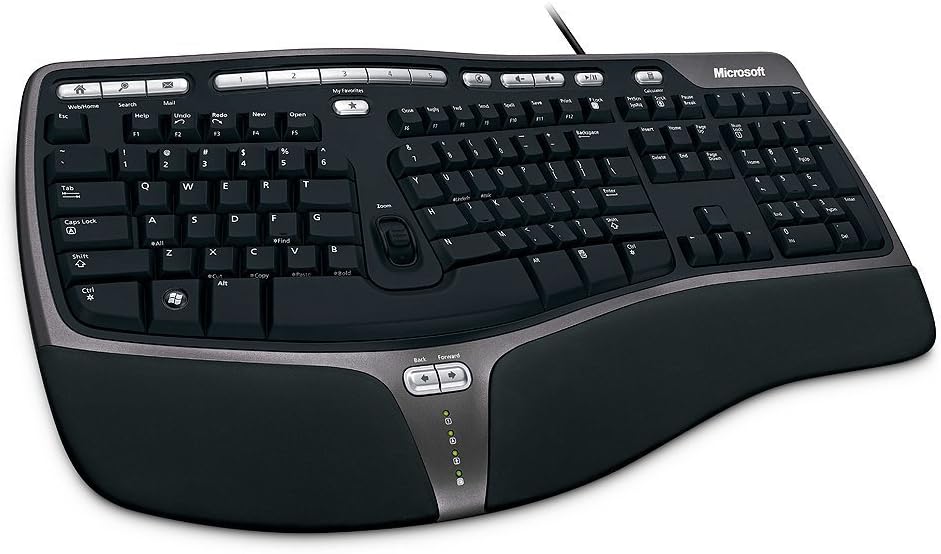
The Microsoft Wired Natural Ergonomic Keyboard 4000 is a conventional first-generation choice for users who want split ergonomics without wireless complexity. Its 4.4 rating is among the strongest in the guide, and the core design is immediately understandable: a curved split frame, cushioned palm rest, palm lift, and media controls.
We may earn a commission when you buy through this link, at no additional cost to you.
The split shape encourages the hands to approach the keyboard from a more natural angle, while the plush palm rest supports the wrists during pauses. A palm-lift feature helps create a relaxed wrist angle, and dedicated media keys provide quick control over music and video. The wired connection removes charging, pairing, and wireless interference from the setup process.
Its age brings visible limitations. The design offers no multi-device pairing, backlighting, adjustable tenting, or modern layout programming, and the fixed cable can be inconvenient in a flexible workspace. It also lacks the independently separated modules found in newer ergonomic models. Even so, the straightforward operation and conventional key arrangement make it easier to adopt than an ortholinear board.
This keyboard works well for programmers at a fixed desk who value reliability, immediate USB operation, and a recognizable layout. If wireless convenience or extensive personalization is important, the Logitech K860 or Arteck may be a better fit. If neutral positioning needs to be precisely tuned, consider the KINESIS Freestyle2.
A wired keyboard works as soon as it is connected, with no charging routine or device-pairing workflow. That simplicity remains useful in offices, laboratories, and fixed development desks.
The split curve, padded palm rest, and palm lift address common typing-posture concerns without introducing programmable layers or unfamiliar thumb clusters. It can be an accessible transition from a standard keyboard.
We may earn a commission when you buy through this link, at no additional cost to you.
The Microsoft Natural Keyboard Elite is an established ergonomic option built around a curved layout, multimedia controls, and customizable F-key commands. Its 4.3 rating indicates a well-received general-purpose design. It is less specialized than the latest split boards, but it can still offer a more comfortable alternative to a flat keyboard.
We may earn a commission when you buy through this link, at no additional cost to you.
The curved form supports a more natural hand position, while dedicated media keys control music and video files. Enhanced F-key commands provide shortcuts for common tasks, which can be useful alongside application-specific keyboard shortcuts. Connection through USB or PS/2 broadens its compatibility with desktop systems, although modern USB-only laptops may require an adapter.
The design does not offer independently adjustable tenting, modular separation, wireless switching, backlighting, or extensive remapping. Its white finish may also blend less cohesively with darker coding setups, although that is subjective. More importantly, the keyboard is a fixed design: users cannot refine the position of each half as they can with the KINESIS Freestyle2 or Advantage360.
For a programmer working at a permanent Windows desktop, the Natural Elite remains a practical option for basic ergonomic support and media control. It is less suitable for people who alternate among several modern devices or want a keyboard designed specifically for advanced layout customization.
Customizable F-key commands and dedicated multimedia controls make the keyboard practical for a workstation used for development, communication, and media. They reduce reliance on mouse clicks for frequent non-coding tasks.
USB and PS/2 support can be valuable on legacy or managed systems. Newer computers without legacy ports may need an appropriate adapter, so interface availability should be confirmed before purchase.
We may earn a commission when you buy through this link, at no additional cost to you.
The Microsoft Natural Ergonomic Keyboard 4000 for Business is a wired productivity model with a 4.4 rating. It combines a split curved design, plush integrated palm rest, and palm lift with a modified numeric keypad. That makes it a practical option for programmers who spend part of the day entering numbers and part of the day editing code.
We may earn a commission when you buy through this link, at no additional cost to you.
The keyboard's design promotes more natural positions for the hands, wrists, and forearms. Commonly used numeric functions, including equals, parentheses, and Backspace, are moved to locations above the number pad, improving access during spreadsheet or data-entry tasks. Windows 7 Taskbar Favorites also provide hotkey access to frequently used programs, although modern Windows users should verify how useful that dedicated feature remains.
Mac OS X 10.2.x users must install the enclosed IntelliType Pro and IntelliPoint software before connecting, which is an important compatibility consideration. Like the retail Natural 4000, the business version has no wireless pairing, backlighting, modular adjustment, or modern layout programming. It is a fixed ergonomic design whose main strengths are simplicity and productivity-oriented key placement.
Choose this model for a wired development desk where number entry and application access are regular tasks. It is less suitable for developers who move frequently between devices or want to customize layers and macros. The Logitech K860 provides modern wireless convenience, while the KINESIS Advantage360 provides extensive layout control.
Moving frequently used number-pad functions above the keypad can reduce awkward reaches during data entry. This makes the model more versatile than a basic ergonomic split keyboard for programmers who also handle reports or numeric code values.
Taskbar Favorites offer direct hotkey access to selected programs on the stated Windows 7 environment. On current systems, users should confirm whether the included feature set remains useful or whether newer keyboard shortcuts are preferable.
We may earn a commission when you buy through this link, at no additional cost to you.
The right ergonomic keyboard depends on your hand size, typing habits, desk dimensions, operating systems, and need for customization. Evaluate comfort and layout together rather than treating a split frame as a guarantee that every user will benefit.
A split frame moves the left and right key groups apart, reducing the need to bend the wrists outward. Curved, wavy, and fully separated designs vary in how aggressively they change the standard rectangle, so programmers should consider the depth of the break and whether their forearms can rest naturally without reaching around raised edges.
Tenting raises the keyboard's rear edge so the hands approach the keys at a steeper angle, while splay rotates the two halves outward. Models with selectable tenting positions or rotating modules can fit a wider range of shoulder widths and forearm angles, but they usually demand more desk space and a longer adjustment period.
A cushioned palm rest can reduce pressure during pauses, while a raised wrist support encourages a straighter wrist position. Memory foam and plush padding may feel comfortable initially but can compress over time. The support should reduce strain without forcing the wrists upward or keeping the hands in an unnatural raised position during active typing.
Low-force membrane switches can reduce finger effort, while silent mechanical switches combine tactile feedback with quieter operation. Programmers should also evaluate modifier placement, navigation keys, thumb clusters, and the number pad. A theoretically ergonomic layout may be less productive if daily shortcuts become difficult to reach.
Wired keyboards provide consistent, low-maintenance operation, while wireless models offer cleaner desks and easier movement between devices. Bluetooth is useful for switching among computers and mobile devices, whereas a dedicated 2.4G receiver can be simple and dependable in a single-computer setup. Confirm operating-system support before buying.
Programmable layouts can move frequently used commands, editor actions, and terminal functions closer to the fingers. They can also separate symbols into layers, reducing repeated hand travel. The tradeoff is setup time and a steeper learning curve, so buyers should compare open-source modification options with simpler companion-app customization.
Full-size keyboards retain numeric keypads but occupy more desk space. Compact wavy designs are easier to carry, while fully split models can occupy nearly the width of two separate keyboards. Measure your desk, monitor position, and available arm support before ordering, especially if you alternate between sitting and standing.
Mechanical switches, wired connections, and business management features can affect long-term suitability, but warranty and technical support are also important. Wireless models should be evaluated for stated battery duration, charging method, sleep behavior, and receiver availability. Enterprise programmers may prioritize deployment tools and secure wireless modes over advanced key customization.
Begin by positioning the keyboard directly in front of your body rather than pulling it to one side for space. Place it near the edge of the desk so your forearms can rest lightly without pressing the wrist against a hard edge. Start with the manufacturer's neutral settings, adjust tenting or palm lift gradually, and allow several days of normal typing before making major changes.
Begin with a familiar configuration and add shortcuts, layers, or remapped keys in small groups. If using a programmable ortholinear keyboard, learn the home row, modifier locations, and layer system before optimizing the entire layout. Keep a backup input method available, especially when traveling or connecting to a restricted work environment, and update keyboard software only when the computer and keyboard are connected safely.
Clean the keyboard by unplugging it or switching it off, then use a soft, lightly dampened cloth for the case. Avoid spraying liquid directly onto the keys, and do not force liquid beneath keycaps. Compressed air can remove loose debris, but users should follow the manufacturer's instructions and avoid tipping the keyboard in a way that could dislodge components. For wireless models, keep the receiver accessible and use the specified charging cable.
They can be, because many split designs place the hands, wrists, and forearms in a more neutral position than a flat keyboard. The benefit varies by person, and programmers must also consider shortcut reach, number-pad needs, and adaptation time. A gently curved model may be easier to adopt than a fully separated or ortholinear design.
No. Low-force membrane switches can reduce finger effort, and silent mechanical switches can offer more distinct feedback without excessive noise. The best choice depends on your preferences and the rest of the board. Ergonomic shape, palm support, and correct positioning often matter more than switch technology alone.
It depends on your work. Programmers who enter figures, use spreadsheets, or work with data may appreciate a numeric keypad, while others prefer the extra desk space of a compact layout. The Logitech K860, KINESIS Freestyle2, and ProtoArc EK01 Plus include number pads, whereas the Logitech Wave Keys does not.
Most users need several days to adjust, while extensive ortholinear or programmable layouts may take weeks. Begin with modest separation or tenting adjustments and avoid changing several variables at once. Keep your old keyboard available until muscle memory and shortcut habits stabilize.
Yes, as long as the computer supports the stated connectivity method and any required driver or software is available. Bluetooth is convenient for switching among several devices, while a USB receiver can be straightforward in a fixed setup. Check compatibility, battery expectations, and corporate wireless security requirements.
A more neutral posture may reduce strain for some users, but no keyboard can guarantee prevention of pain or injury. Workstation height, forearm support, breaks, stretching, task variation, and medical guidance also matter. Persistent discomfort should be discussed with an appropriate health professional rather than treated solely as a keyboard problem.
It can be worthwhile for experienced programmers who repeat complex commands or symbols throughout the day. Remapping can place actions on convenient layers and reduce finger travel. However, the setup and retraining effort are significant, so users should verify that open-source or web-based configuration suits their operating system and workflow.
A curved or wavy keyboard generally offers a smaller adjustment and preserves more of the conventional layout. A fully split keyboard allows independent positioning and usually better accommodates unusual shoulder or forearm geometry. Consider available desk space, tolerance for a new layout, and whether you need independent tenting or splay.
The Logitech Ergo K860 is the strongest all-around recommendation because it combines meaningful wrist support with a familiar full-size layout, wireless connectivity, and practical shortcut customization. The Arteck Split Ergonomic Keyboard provides a more accessible introduction to split typing, while the KINESIS Advantage360 Professional stands apart for programmers who want extensive programmability and precise physical positioning.
Your priorities should guide the final choice. Choose a gently curved or wavy keyboard for an easier transition, a fully separated model for adjustable tenting, or an ortholinear programmable board for advanced command organization. Also account for desk space, device switching, number-pad use, operating-system compatibility, and the time required to learn a new layout.
Before ordering, check the latest product listing, current dimensions, included accessories, warranty information, and compatibility details. Prices and availability can change, and features such as backlighting, receivers, software, or bundled accessories may vary by package. Use those current details to confirm that the selected keyboard fits your coding environment.