
Razer Freyja HD Haptic Gaming Chair Cushion
3.4Editor score
Directional game-linked haptics
Razer Synapse intensity controls
Wireless 2.4 GHz connectivity
Explore the best haptic gaming chair pads with expert comparisons of vibration, heat, motor power, controls, chair fit, comfort, and immersive gaming feedback.
Haptic gaming chair pads range from software-driven cushions that translate directional game events into physical feedback to portable vibration and heat pads designed to make long gaming sessions more comfortable. A worthwhile model should feel responsive, fit securely, offer useful controls, and suit the way and where you play.
This guide compares all ten products on the feedback mechanisms they provide, motor count, heating options, massage programs, adjustability, safety features, chair compatibility, and everyday convenience. It also separates true gaming haptics from vibration massage pads, since these categories deliver distinctly different experiences despite both using the word haptic.
Each review explains the strongest reasons to consider a particular pad, along with its limitations and ideal owner. The top recommendations cover premium game-linked haptics, versatile vibration and heat, and a simpler value-oriented option. Product details and availability can change, so readers should verify current specifications and prices before buying.
3.4Editor score
4.7Editor score

3.9Editor score
The comparison below highlights the main differences among true game-linked haptics and vibration massage chair pads, including feedback type, motor configuration, heat, controls, and practical fit features.


The Razer Freyja HD Haptic Gaming Chair Cushion is the only product in this list designed to convert in-game information into directional physical sensations. Its 3.4 rating should be interpreted in the context of a specialized gaming accessory rather than a conventional chair cushion. It stands apart through multi-directional haptics, Razer Synapse customization, and support for both 2.4 GHz and Bluetooth connections.
We may earn a commission when you buy through this link, at no additional cost to you.
Razer SENSA HD haptics are intended to mirror the intensity, direction, and duration of supported in-game audio. Sensations can move across different areas of the body, giving the cushion a spatial quality that ordinary vibration massage cannot reproduce. Users can fine-tune tactile feedback through Razer Synapse or use presets, while the 2.4 GHz connection supports low-latency PC gaming. The cushion also works over Bluetooth for Android media and other compatible activities.
The trade-offs are meaningful. This is not a simple universal massage pad, and its value depends on interest in Razer software and game-linked effects. The 3.4 rating is the lowest among the ten selections, so buyers should examine current user feedback and confirm that their games and setup are compatible before committing. Its quick-release power connection and adjustable backrest and seat straps help address common practical concerns.
Choose the Freyja for players who specifically want feedback tied to events in a game rather than generic chair vibration. It is the most specialized and immersive choice here, offering directional sensation, software control, and a wireless PC connection. For someone seeking warm, targeted body massage during work or gaming, one of the vibration and heat pads will be a more direct fit.
The cushion's strongest advantage is the ability to convey location, direction, and distance through physical feedback. That can make supported game events feel more immediate without requiring an additional visual or audio device.
Razer Synapse gives users a way to adjust haptic intensity or begin with presets. The quick-release cable and wireless options also make the cushion cleaner to operate than a permanently tethered chair accessory.
We may earn a commission when you buy through this link, at no additional cost to you.
The COMFIER 2026 Graphene Heated Chair Massager Pad combines two 4900 RPM vibration motors with broad heat and zone-based control. Its 4.1 rating reflects a practical package for people who spend long periods seated and want stronger lumbar and seat stimulation. It is especially relevant to gamers who prefer a comfortable massage pad over software-driven game feedback.
We may earn a commission when you buy through this link, at no additional cost to you.
The motors are positioned at the lumbar and seat areas, allowing the pad to focus vibration where prolonged sitting often feels most tiring. Five programs, three intensity levels, and separate selection of the neck, upper back, lower back, or seat make the experience adaptable. The enlarged graphene panel reaches comfortable warmth in about three minutes and full heat in approximately ten minutes, while distributing heat more evenly than a conventional coil element.
Safety and everyday practicality receive attention through UL listing, built-in overheat protection, and a 30-minute automatic shutoff. The included home adapter means it is intended for an office, recliner, sofa, or dining chair rather than a vehicle. It should be placed on padded seating, and users seeking a more forceful sensation should understand that high motor output does not translate into game-specific haptics.
This COMFIER is a strong fit for desk workers and gamers who spend hours in one chair and want adjustable lumbar massage with even warmth. Its strongest selling point is the combination of 4900 RPM motor output, targeted zones, and a relatively quick warm-up. It is less suitable for anyone who needs a portable, car-compatible, or game-synchronized feedback device.
Placing motors over the lumbar and seat regions concentrates the massage where support is most important. The 4900 RPM specification indicates a notably higher motor output than many conventional vibration pads.
The graphene panel begins warming in about three minutes and reaches full intensity around ten minutes. Its broad distribution makes it suitable for cool rooms and extended evening gaming sessions.
We may earn a commission when you buy through this link, at no additional cost to you.
The Snailax Vibration Back Massager with Heat is a straightforward option for adding massage and warmth to an office, gaming, dining, or recliner chair. It carries a 4.2 rating and uses six motors to cover the upper back, lower back, hips, and thighs. It is a vibration massager rather than a kneading or rolling system.
We may earn a commission when you buy through this link, at no additional cost to you.
Six massage modes offer a meaningful range of patterns, and the heat can be adjusted independently between low and high. A handheld controller makes it possible to change settings without reaching behind the chair. Adjustable straps help keep the pad in place, while the included home adapter supports use in a home or office environment.
The main limitation is that it does not create feedback linked to gameplay. Its effects are generic massage sensations, so players seeking explosions, footsteps, or directional impacts will not get that experience here. It also requires a power connection, which reduces the freedom associated with a fully portable cushion.
For a straightforward gaming-chair upgrade, this Snailax offers an effective blend of coverage, modes, heat, and uncomplicated controls. It works particularly well for viewers, streamers, and players who want comfort during breaks as much as they want tactile feedback. It is a balanced alternative to the more complex premium Razer cushion.
The controller separates heat adjustment from massage selection. Users can add warmth while selecting a vibration pattern, or switch the two functions according to the moment.
Its broad intended use includes office chairs, gaming chairs, dining chairs, and recliners. Adjustable straps make it more practical than a loose cushion that shifts during play.
We may earn a commission when you buy through this link, at no additional cost to you.
The CooCoCo Vibration Back Massager with Heat earns a 4.4 rating through a generous combination of eight motors, three heat zones, and flexible session controls. It is designed for work, reading, gaming, television, and general relaxation, providing a broader configuration than many compact chair pads.
We may earn a commission when you buy through this link, at no additional cost to you.
Five massage modes and three intensity levels let users adapt the sensation, while independent back and seat heating allows one region to be warmer than the other. Auto shutoff choices of 30, 60, and 90 minutes help accommodate different routines. The included carry bag makes it easier to move between an office, home room, or guest chair.
This is explicitly a vibration massager with no shiatsu rollers or rotating massage balls. The manufacturer also recommends using it on a padded chair, recliner, or sofa rather than a hard surface. That guidance matters because extra external cushioning may improve comfort and reduce pressure from the pad's structure.
The CooCoCo is a good choice for players who alternate between gaming and working and want different heat and massage settings for different body areas. It is especially useful for anyone who values independent zone control and longer timer options. It does not compete with the Razer for synchronized game events, but it delivers a polished, versatile comfort experience.
Three independent heating zones allow the back and seat to be used separately or together. This flexibility is useful when a player wants warmth in one area without making the entire cushion too warm.
The carry bag and selectable auto shutoff timers support regular movement between locations. These features make the pad more practical for shared workspaces and multi-room routines.
We may earn a commission when you buy through this link, at no additional cost to you.
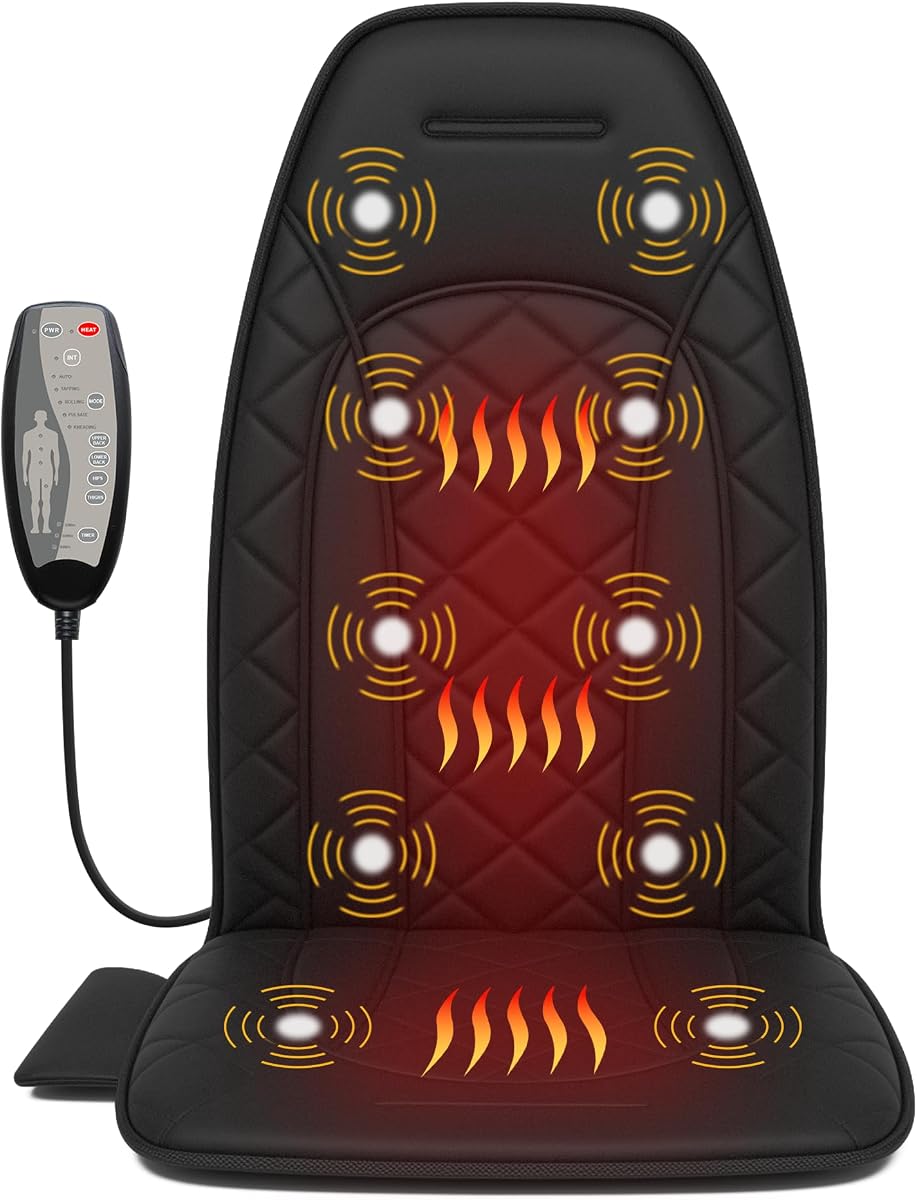
The Vibration Massage Chair Pad with Heat is the strongest all-around massage option in this guide, carrying the highest rating at 4.7. It uses ten built-in vibrating motors and offers four intensity levels, two heat settings, and three automatic shutoff durations. That combination makes it an easy recommendation for gamers who want dependable tactile comfort with very little setup.
We may earn a commission when you buy through this link, at no additional cost to you.
The motors support massage across the back and thighs, while the heat settings range from 104 to 113 degrees Fahrenheit. Users can choose a 30-, 60-, or 90-minute session and rely on built-in overheat protection. The lightweight, foldable design, securing straps, and low-noise operation make it suitable for office chairs, recliners, gaming chairs, sofas, and dining chairs.
It is important to distinguish this product from a true haptic gaming cushion. It provides repeating massage patterns, not feedback generated by explosions, impacts, or directional game audio. Users who need synchronized event-based sensations should look to the Razer instead. The wall-powered design also means this pad is less convenient for roaming than a fully wireless model.
For most readers seeking a gaming chair pad rather than specialized game hardware, this is the strongest general recommendation. Its ten motors, generous control range, quiet operation, broad chair compatibility, and high rating create a well-rounded package. It is especially attractive for regular streamers, remote workers, and players who game for hours and value comfort and heat.
The ten-motor layout provides stimulation across the back and thighs. Combined with four intensity levels, it offers a wider adjustment range than many six- or eight-motor alternatives.
Selectable 30-, 60-, and 90-minute shutoff periods accommodate different routines, while low-noise operation makes the cushion suitable for work, reading, or television as well as gaming.
We may earn a commission when you buy through this link, at no additional cost to you.
The Snailax Back Massager with Heat and Memory Foam is built for users who want additional physical cushioning as much as they want vibration. Its 4.2 rating reflects a well-equipped pad with six motors, four-zone targeting, multiple modes, and memory foam construction for longer periods of sitting.
We may earn a commission when you buy through this link, at no additional cost to you.
The high-density memory foam and soft polyester fabric add a padded layer between the user and the chair. Vibration can be selected across the upper back, mid back, lower back, or thighs, while five modes and four intensity levels offer considerable control. A handheld controller also provides access to two heat levels and 15-, 30-, or 60-minute timers.
The heat reaches up to 131 degrees Fahrenheit in approximately ten minutes, so it is better suited to patients than someone seeking immediate warmth. Automatic shutoff and overheat protection improve safety, while the 12V design makes operation straightforward. At 42 by 18.5 inches and 4.1 pounds, the pad is portable, and dual elastic straps plus a non-slip bottom help keep it stable.
This Snailax is an excellent choice for long office days, study sessions, and gaming breaks where a plush layer is important. It can also help soften a chair that feels rigid during extended use. It is not designed to translate gameplay into physical feedback, and buyers should expect the most noticeable heat benefit after a short warm-up period.
The high-density foam and ultra-soft cover provide more cushioning than a conventional fabric massage pad. That makes the model useful for users who want softness as a primary benefit.
Selectable upper back, mid back, lower back, and thigh zones let users concentrate vibration where it is wanted. Five patterns and four intensities broaden the range of available sensations.
We may earn a commission when you buy through this link, at no additional cost to you.
The Heated and Cooling Chair Pad stands apart with an adjustable 3D neck pillow and a lumbar cooling zone, features that are absent from the other massage-oriented selections. Its 4.5 rating makes it one of the most highly regarded products in the comparison and a good match for users who struggle with heat buildup during long sessions.
We may earn a commission when you buy through this link, at no additional cost to you.
The neck support can be raised or lowered with a manual pump to accommodate different users. Gentle heat in the pillow combines with vibration, soothing heat elsewhere, and a dedicated cooling area at the lower back. This lets a user combine warmth and cooling rather than selecting a single overall temperature. The padded structure covers the neck, lower back, and seat and fits office chairs, recliners, and home seating.
A handheld controller keeps operation simple, but the neck mechanism requires manual adjustment and is less streamlined than an electronic adjustment. The pad also does not provide feedback synchronized with games. It is better understood as a multi-sensory comfort chair accessory than a competitive gaming peripheral.
Choose this model when temperature flexibility and neck support matter more than true directional haptics. It is especially appealing in warm environments or for players who like warmth at the shoulders but cooling around the lumbar region. The combination of heat, cooling, vibration, and an adjustable pillow makes it unusually versatile for desk and gaming use.
The lumbar cooling zone balances the heated neck support and other warming areas. This mixed-temperature approach is useful when a full heated pad feels excessive.
Most chair pads focus on the back and seat, leaving the neck unsupported. The height-adjustable 3D pillow adds support for players who prefer a more reclined posture.
We may earn a commission when you buy through this link, at no additional cost to you.
The Snailax Eight-Motor Pad offers a straightforward combination of vibration, heat, and portability. Its 4.3 rating places it among the stronger products here, while the eight-motor configuration targets the neck, shoulders, back, and thighs to provide a wider sensation than a small seat-only cushion.
We may earn a commission when you buy through this link, at no additional cost to you.
Users can select among different massage modes and adjustable intensity settings, allowing the pad to move from a gentle massage to a more invigorating experience. Built-in heat adds a warming element for the seat and surrounding areas. The lightweight construction makes the pad straightforward to move between a home desk, office, or other chair.
Compared with the more detailed controllers and timer descriptions of several rivals, the product information is relatively concise. Buyers should therefore examine the current listing to understand the exact available programs and controls. It also remains a vibration pad rather than a system that reacts to game events.
This Snailax is a practical choice for players who want substantial motor coverage and portable comfort without a complicated setup. It works well for gaming, working, reading, and relaxing, with enough flexibility for different preferences. Its strongest advantage is the combination of eight motors, heat, and straightforward portability.
The motor layout extends from the neck and shoulder region through the back to the thighs. That broader coverage makes the pad useful when gaming posture shifts across different parts of the body.
A lightweight design makes it easier to move the cushion between rooms or worksites. The result is a versatile option for users whose gaming location is not fixed.
We may earn a commission when you buy through this link, at no additional cost to you.
The Heating and Vibrating Massage Pad for Home Office Chair is the value-oriented recommendation in this guide. Its 3.9 rating is modest compared with the leading massage pads, but the feature set is unusually broad: nine massage modes, nine intensity levels, three heat settings, and a handheld remote make it highly adjustable.
We may earn a commission when you buy through this link, at no additional cost to you.
The pad fits common home and office chairs, recliners, sofas, and car seats. Its straps help secure it to a desk chair, gaming chair, or couch, while the foldable construction simplifies storage. Heat begins within about three minutes and reaches its maximum level in around ten minutes, making it useful for daily tension release and seated warmth.
The product uses firm, supportive materials and gentle vibration without kneading or rolling nodes. Some users may therefore want to place a thin towel over the surface for added comfort. It is not water resistant, so care should be limited to wiping it with a damp cloth rather than soaking or machine washing it.
This is a good budget-oriented choice for users who value the number of settings more than sophisticated cushioning. It works across more seating types than several wall-powered competitors, including the option of car use. It is not a true game-feedback device, so the main appeal is adjustable massage, heat, and straightforward portability.
Nine modes and nine intensity levels create more combinations than most competing pads. This is useful for users who may find a single vibration pattern uncomfortable or insufficient.
Compatibility with office chairs, recliners, sofas, and car seats broadens the pad's use cases. Its folding design and included straps also make it convenient to store and reposition.
We may earn a commission when you buy through this link, at no additional cost to you.
The COMFIER Vibration Back Massager with Heat combines ten motors, high-output lumbar components, and graphene heating in a substantial chair pad. Its 4.1 rating reflects a well-equipped product for users who want a stronger massage sensation and broader coverage without the complexity of a game-specific haptic system.
We may earn a commission when you buy through this link, at no additional cost to you.
The reinforced 4900 RPM motors are placed around the waist and seat, while the full motor layout covers the neck, shoulders, upper back, lumbar, hips, and thighs. Users can choose individual zones or combine them, select from five programmed modes, and adjust across three vibration intensities. A corded hand controller provides direct access to these settings.
Graphene heating begins in approximately three minutes and peaks at 131 degrees Fahrenheit within ten minutes. The stated character is soothing, seat-warmer-style warmth rather than the intense sensation of a traditional heating pad. UL-listed overheat protection and a 30-minute auto shutoff support regular use. The included 12V wall adapter means the pad is not designed for vehicles, though it can lie flat on a bed or sofa.
The COMFIER is best for a gamer who spends long periods in a desk or gaming chair and wants deep vibration with significant heat. Dual straps help secure it, and the support for a recommended backrest height of at least 27.5 inches should be checked before purchase. It remains a comfort accessory rather than a source of synchronized gameplay feedback.
Reinforced 4900 RPM motors focus on the lumbar and seat, where prolonged sitting commonly creates tension. Starting on the low setting allows users to judge the stronger sensation comfortably.
The enlarged graphene heating pads distribute warmth across the treatment area. A UL-listed overheat-protection thermostat and 30-minute automatic shutoff provide the basic safety framework for regular sessions.
We may earn a commission when you buy through this link, at no additional cost to you.
The most important distinction is whether you want feedback synchronized with a game or a chair pad that provides generic massage, warmth, and vibration. Once that decision is clear, motor coverage, control options, fit, power requirements, and safety features should shape the final decision.
True gaming haptics translate supported game events into physical sensations. The Razer Freyja uses Razer SENSA HD technology to convey intensity, direction, duration, and spatial location, with customization available through Razer Synapse. By contrast, the other nine products generate repeating vibration patterns intended for relaxation. They may make gaming more comfortable, but they do not react to footsteps, impacts, or directional audio.
Choose game-linked haptics if synchronized feedback is the central reason for buying a pad. Choose a vibration massager if the goal is warmth, relaxation, or relief from stiffness after long periods of sitting. Confirm which games and applications support the haptic system before purchasing a specialized cushion.
Motor count offers a basic indication of coverage, but placement is equally important. Pads in this comparison use between six and ten motors, with some concentrating high-output motors around the lumbar and seat while others distribute sensation across the neck, shoulders, back, hips, and thighs. A larger layout may feel more comprehensive, while a targeted layout may be preferable for users who want strong lower-back stimulation.
Prioritize the body areas you actually want to treat. More motors do not automatically make a pad better, and motor quality, frequency, and placement can matter more than the raw count. For gaming comfort, vibration should remain noticeable without distracting from the screen or controls.
Heat can be valuable in a cool room, but useful control is more important than maximum warmth. The listed pads offer two or three heat settings, with several including separate back and seat zones. Graphene panels are designed to distribute warmth across a broad area, while some models also provide a cooling zone for users who become warm during long sessions.
Consider how quickly the pad warms and whether independent zones are important. Most begin producing noticeable warmth in about three minutes and reach their stated maximum in approximately ten. Users sensitive to heat should start with the lowest setting, place the pad over padded seating, and avoid confusing soothing seat-warmer warmth with the intense heat of a conventional heating pad.
A useful remote allows adjustments without reaching down beside the chair. Programs range from five to nine, and intensity counts range from three to nine. More settings are helpful for finding a comfortable pattern, but menus and controls should remain easy to understand. A handheld remote or corded controller is generally more convenient than changing modes through a built-in panel.
Look for independent zone selection if you want to focus on the lower back, thighs, or another specific area. A broad range of modes is less valuable if the lowest setting already feels too strong. Always begin with a gentle level, particularly on high-output models, and increase the intensity gradually.
A pad that looks comfortable in a photograph can shift, wrinkle, or press awkwardly on a real chair. Look for adjustable backrest and seat straps, elastic securing bands, or a non-slip bottom. Most products are intended for office chairs, gaming chairs, recliners, sofas, and dining chairs, while the best models also mention broader compatibility or include a carry bag.
Check the chair's backrest shape and available width before buying. Some manufacturers recommend a minimum backrest height, and pads with neck support require enough vertical space to accommodate the pillow. If the underlying surface is hard, placing the cushion on a padded chair or adding a thin towel may produce a more comfortable result.
Most vibration massage pads use a home adapter and remain tethered by a power lead. Some state that they are not compatible with car use, even when the chair itself would fit in a vehicle. The Razer differs with wireless 2.4 GHz and Bluetooth options, including a quick-release power connection. The heating and vibrating massage pad lists car-seat compatibility but still has a conventional cable.
Choose wireless connectivity when mobility and gaming-focused feedback are priorities. Choose a wired massager when predictable power, sustained heat, and lower wireless complexity matter more. Consider where the controller and cable will sit so they do not interfere with legroom, armrests, or a reclining mechanism.
Useful safety features include automatic shutoff, overheat protection, and independently tested electrical components. Timer options range from 15 minutes to 90 minutes, and the COMFIER 4900 RPM model is UL listed. Longer sessions are convenient, but a timer provides a useful boundary and prevents the pad from remaining active indefinitely.
Use the shortest timer that meets your needs at first, particularly when trying a new intensity or heating level. Follow the manufacturer's instructions about supported surfaces, ventilation, cleaning, and power adapters. Never treat a chair massager as a medical device or as a substitute for professional care for persistent pain.
Install the pad on a compatible chair before gaming, arranging the massage zones over the intended body areas and securing all straps. For a true game-linked cushion such as the Razer Freyja, connect through 2.4 GHz for PC use, complete the required Razer Synapse setup, select an appropriate preset, and begin with a moderate intensity. Confirm that the supported game is producing the expected audio and haptic signals before a long session.
For a vibration and heat massage pad, begin with the lowest intensity and heat setting. Use the handheld controller to choose a program, then increase intensity gradually according to personal comfort. Select individual zones when one area needs more attention, and use the available timer to define the session length. Place the pad on a padded chair or recliner rather than a hard surface, and add a thin towel if the material feels too firm.
After use, switch the pad off and unplug the power adapter before cleaning. Most fabric surfaces can be wiped with a lightly damp cloth, but the heating and vibrating massage pad is not water resistant, so it should not be soaked or machine washed. Let moisture avoid the controls and heating elements, fold the pad as directed, and store it in a dry place. Inspect straps, cables, and attachments periodically for looseness or visible damage.
No. A vibration massage pad produces repeating motor patterns intended for comfort, while a true gaming haptic cushion can translate supported game events into timed and directional physical feedback. Of the products in this guide, the Razer Freyja is the game-linked option; the other nine provide massage, heat, or both.
The Razer Freyja is designed to mirror supported in-game audio, including its intensity, direction, and duration. Its actual effects depend on compatible games and applications. The remaining pads use fixed or selected vibration programs, so they do not react to specific gameplay events.
Warmth and massage may provide temporary comfort for muscles that feel tired or stiff after prolonged sitting. These products are not medical devices, however, and persistent or severe pain should be discussed with an appropriate healthcare professional. Users should also avoid using massage settings that cause discomfort.
The listed heated pads include automatic shutoff and overheat protection, and two COMFIER models are described as UL listed. Even with those safeguards, users should follow the instructions, use a suitable timer, avoid covering the pad, and stop immediately if it becomes excessively hot or uncomfortable.
Most products in this guide use a home wall adapter and explicitly are not designed for vehicle use. The heating and vibrating massage pad is the exception in its listed compatibility because it supports car seats, but users should verify all power and safety instructions before operating any powered pad in a vehicle.
No, though most are designed for common gaming and office chairs. Check the product dimensions, chair-back shape, available width, and any minimum backrest-height recommendation. Adjustable straps, elastic bands, and a non-slip base can improve stability, but unusual chair designs may require careful positioning or a different pad.
Heat is most useful in cool environments or when a warming seated experience is preferred. Users who tend to overheat may prefer a non-heated vibration model or a pad with a dedicated cooling zone. The cooling and heating chair pad is the only listed product that explicitly combines both functions.
Switch it off, disconnect the power, and wipe the surface with a lightly damp cloth according to the manufacturer's care instructions. Do not immerse the pad, spray cleaner directly onto it, or allow liquid to enter the controls. The heating and vibrating massage pad is specifically not water resistant, making careful wiping especially important.
The Razer Freyja is the choice for players seeking genuine game-linked haptics, including directional sensations, software customization, and a low-latency 2.4 GHz PC connection. The Vibration Massage Chair Pad with Heat is the strongest general-purpose choice, combining ten motors, four intensities, two heat levels, quiet operation, and the highest rating. The Heating and Vibrating Massage Pad is the practical budget recommendation for broad controls, multiple seat types, and easy portability.
Prioritize the type of feedback you actually want. Game-linked haptics create a different experience from generic massage vibration, so choosing a Razer for directional events and a multi-motor pad for warmth and relaxation avoids paying for features that will not be used. For massage models, motor placement, zone control, chair fit, timers, power needs, and overheat protection are the most useful features to compare.
Ratings and product configurations can change, and current prices and availability may also vary. Check the latest listing, warranty information, chair dimensions, power requirements, and supported software before purchasing. The right pad should feel comfortable, remain secure, and provide the specific kind of physical feedback you want during play.