
Lian Li V100-ATX Mid-Tower PC Case
4.8Editor score
Four preinstalled ARGB fans
Broad motherboard compatibility
Tool-less side panels
Up to 360mm radiator support
Our aluminum PC cases guide compares aluminum chassis for airflow, compatibility, build quality, cooling support, storage, and compact or full-size designs.
Aluminum PC cases combine a light, rigid exterior with the strength needed to support demanding components, but the best enclosure depends on more than appearance. A useful chassis should manage airflow, make installation manageable, provide modern connectivity, and accommodate your motherboard, power supply, graphics card, and cooling hardware.
This guide compares ten aluminum cases spanning full towers, mid towers, compact ATX designs, small form factor builds, and open test-bench layouts. We evaluated published specifications, stated hardware limits, cooling provisions, structural features, storage options, accessibility, and suitability for different builders rather than claiming hands-on testing.
The selections show that there is no single aluminum PC case for every system. The list includes a highly rated value-focused mid-tower, a showcase-oriented dual-chamber design, a flexible full tower, portable compact models, and an open-frame option. Ratings and availability can change, so verify current product details and pricing before purchasing.
4.8Editor score

4.7Editor score
4.4Editor score
The comparison below organizes the ten cases by chassis type, stated hardware compatibility, cooling support, and notable design features, making it easier to identify the right aluminum enclosure for a conventional, compact, portable, or open-air build.



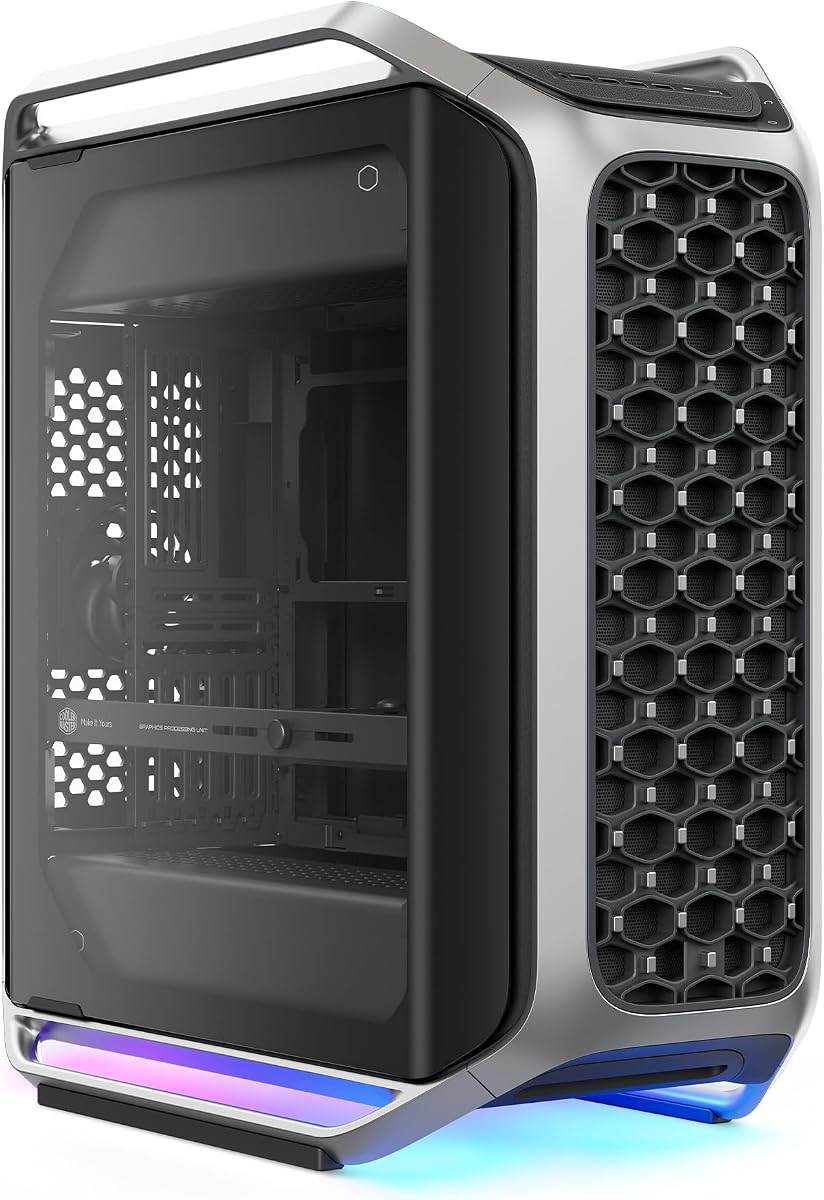
The Cooler Master Cosmos Alpha is a full-tower aluminum case built for builders who want both visual drama and substantial layout flexibility. Its 4.4 rating reflects a strong overall proposition, particularly for systems that need room for long graphics cards, E-ATX or EEB motherboards, and elaborate cooling arrangements. Curved aluminum framing, full tempered glass panels, and integrated ARGB lighting establish it as a showcase enclosure rather than a basic utility case.
We may earn a commission when you buy through this link, at no additional cost to you.
Its standout feature is the Freeform 2.0 layout, which allows internal components to rotate left or right for alternative airflow paths, desk positioning, and visual presentation. The sliding motherboard tray adds another layer of adaptability, letting builders move the GPU for improved cooling or display placement. Stated compatibility extends to GPUs up to 400mm, PSUs up to 240mm, and motherboards as large as E-ATX and EEB.
Thermal and connectivity provisions are equally serious. Removable dust filters help maintain airflow over time, while the front panel provides four 5Gbps USB-A ports and two 20Gbps USB-C ports. These connections are more useful for modern peripherals than a basic legacy panel, although prospective buyers should confirm that the included I/O arrangement meets their particular accessory and storage needs.
This is the strongest choice in the roundup for a builder who treats the enclosure as a central part of the system. Its full-tower dimensions, premium construction, and elaborate adjustment features are less suitable for a small desk or a simple office PC. For a high-end custom build with long components and a preference for visible, customizable presentation, however, the Cosmos Alpha is a compelling flagship recommendation.
The curved aluminum frame and tempered glass surfaces make the Cosmos Alpha immediately distinguishable from conventional rectangular towers. More importantly, its rotating internal layout preserves the visual appeal of a symmetrical build while giving builders practical control over component placement and airflow.
Support for 400mm graphics cards, 240mm power supplies, and E-ATX or EEB motherboards creates a generous foundation for workstation-class and enthusiast systems. The removable filters and broad motherboard tray movement add practical value to an enclosure designed primarily for presentation.
We may earn a commission when you buy through this link, at no additional cost to you.
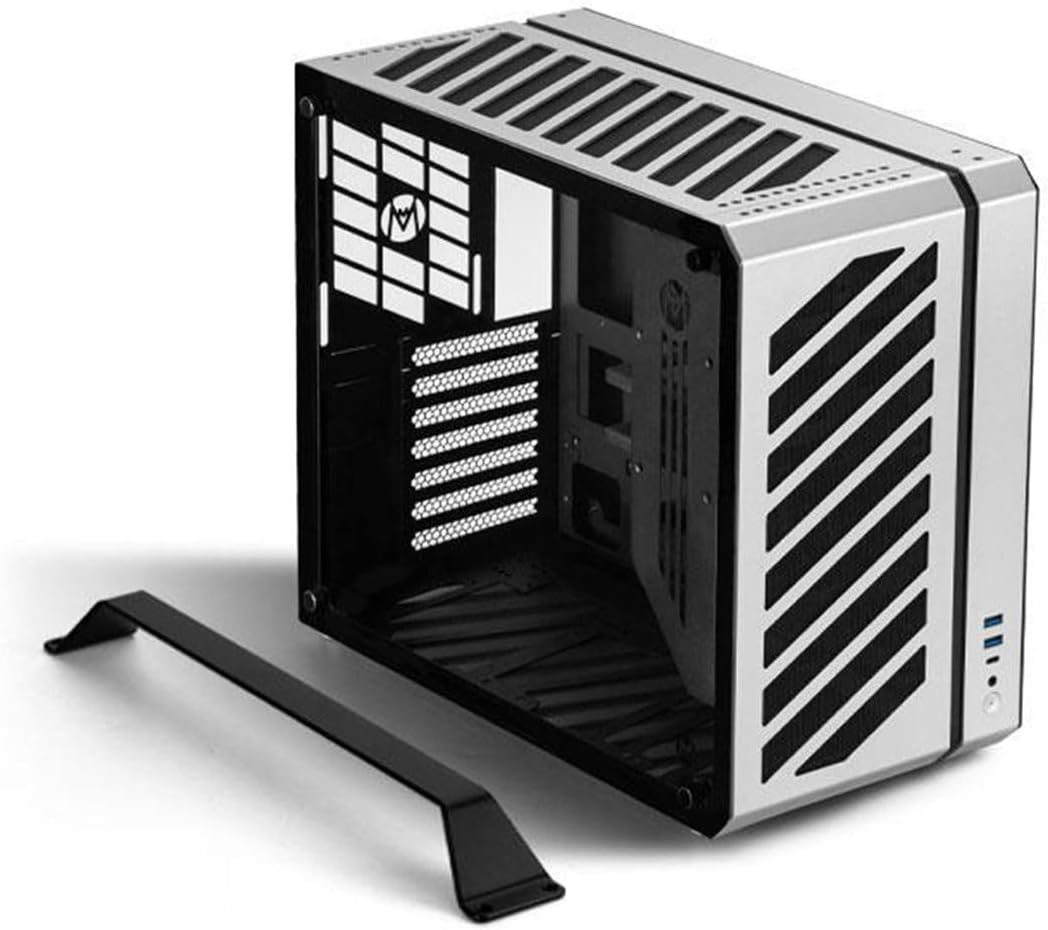
The MATX Case B2Pro is a compact silver aluminum enclosure that has earned a perfect 5.0 customer rating in the supplied data. It is designed for micro-ATX builders who want a substantially smaller desktop footprint without giving up ATX power-supply options, 240mm cooling support, or room for a three-slot graphics card. The 17.8-liter volume strikes a useful balance between capacity and compactness.
We may earn a commission when you buy through this link, at no additional cost to you.
Construction is specified at 3.0mm for the case frame and 2.0mm for the side panels, with other components using 1.5mm aluminum. It supports MATX and ITX motherboards, ATX power supplies within a stated 140–170mm length range, and SFX or SFX-L units. The graphics-card allowance reaches 340 by 142 by 78mm, giving mainstream builders room for a substantial card without moving to a full tower.
Cooling is the B2Pro's most persuasive feature. It supports CPU coolers up to 135mm, pumps up to 70mm, and an integrated 240mm or 120mm water-cooling solution. Fan positions include two top mounts, one rear position, two bottom mounts, and two side mounts. The mesh side-panel design also supports the compact thermal layout rather than treating the enclosure as a solid decorative box.
The right buyer is someone building a capable micro-ATX or compact ATX system and willing to measure components carefully before ordering. The exact case dimensions, power-supply range, radiator arrangement, and GPU dimensions should be compared with the planned hardware. With its strong rating, useful compatibility, and manageable size, the B2Pro is an excellent general-purpose recommendation for compact aluminum builds.
A 17.8-liter chassis can still be a capable build platform when the layout is designed deliberately. The B2Pro accommodates a 240mm integrated water-cooling option, a 135mm CPU cooler, multiple 120mm fans, and a three-slot GPU, giving builders several realistic thermal paths.
The silver anodized finish, mesh side panels, integrated stand, and top handle give the B2Pro a purposeful desktop appearance. Its listed dimensions make it easier to compare against an existing workspace, while the SFX compatibility provides another route to a smaller power-supply layout.
We may earn a commission when you buy through this link, at no additional cost to you.
The Open Air Frame Test Bench is an exposed aluminum chassis intended for builders who prioritize visibility, accessibility, and experimentation over a finished exterior. It carries a 4.4 rating and uses an aerospace magnesium aluminum alloy with a specified thickness of 8mm. The construction and corrosion-resistant surface treatment give the frame a substantial feel despite its open design.
We may earn a commission when you buy through this link, at no additional cost to you.
The listed MATX configuration measures 11.1 by 11.1 by 5.12 inches and supports standard MATX motherboards, four hard drives or solid-state drives, and standard ATX power supplies. Metal support rods organize the structure, while anti-slip pads on the bottom bracket help stabilize the platform. The open layout also allows integrated water-cooling installations from 120mm through 360mm.
Its biggest advantage is immediate access. Technicians, enthusiasts, and system integrators can see and reach components without removing panels, making the frame appealing for workbench use, iterative testing, and frequently reconfigured builds. The same openness also means there is little protection from dust, accidental contact, or cable snagging, so this is not the enclosure most people would choose for a polished everyday tower.
Buyers must also recognize that the product ships as an unfinished frame and requires assembly according to the instructions. That requirement is manageable for someone comfortable with PC construction, but it adds time compared with a ready-to-install case. For an exposed, reconfigurable aluminum workbench, it is a focused and practical selection rather than a conventional all-in-one chassis.
Because the system remains exposed, builders can inspect connections, swap components, and revise the layout without removing side panels. This makes the test bench particularly useful for technicians and users who repeatedly reconfigure hardware.
The 8mm magnesium aluminum construction and metal support rods provide a rigid base for the stated hardware. Support for several radiator sizes and ATX power supplies allows the open platform to handle more than a minimal test configuration.
We may earn a commission when you buy through this link, at no additional cost to you.
The Mechanic Master C34 brings standard ATX motherboards to a notably compact enclosure and includes a carry handle for easy movement. Its 4.6 rating makes it one of the stronger general recommendations in the roundup. The design is especially relevant to builders who want full-size component support without the footprint or visual bulk of a conventional mid-tower.
We may earn a commission when you buy through this link, at no additional cost to you.
The case supports standard ATX motherboards, full-size ATX power supplies, and graphics cards up to 335mm. Air cooling accommodates CPU coolers up to 162mm, while liquid cooling is supported through a 240mm radiator position. The optimized internal arrangement is intended to simplify installation, although the manufacturer specifically recommends an SFX or SFX-L power supply for the cleanest cable management.
Portability is unusually well integrated for a full ATX chassis. The handle makes the system easier to carry between workstations, LAN events, or different rooms, although the total dimensions and weight of the assembled computer still need to be considered. A metal front I/O panel includes USB 3.0 and USB Type-C connectivity, covering the two interfaces most commonly needed for peripherals and compatible devices.
This case fits a builder who values portability and motherboard compatibility in equal measure. It is less attractive for extensive custom water loops, many hard drives, or a very large power supply, since a compact chassis cannot provide the same freedom as a full tower. For a powerful travel-friendly PC with full ATX foundations, the C34 is a distinctive and well-reasoned choice.
The C34 avoids the Mini-ITX-only limitation found in many compact cases. Supporting standard ATX motherboards, full-size ATX power supplies, and 335mm graphics cards gives builders more component freedom while the integrated handle improves everyday portability.
A 240mm radiator and CPU coolers up to 162mm provide meaningful thermal options despite the compact shell. Proper planning is essential, and the recommendation to use an SFX-family power supply can create a cleaner, easier-to-service interior.
We may earn a commission when you buy through this link, at no additional cost to you.
The Cooler Master MasterFrame 500 Mesh uses an open aluminum exo-structure to make airflow and component access central to the design. Its 4.2 rating reflects a case suited to enthusiasts who want flexibility and visible components. Unlike a conventional closed tower, the frame can be arranged to suit a showcase build, a more conventional layout, or a compact workspace.
We may earn a commission when you buy through this link, at no additional cost to you.
Motherboard support stretches from Mini-ITX through E-ATX, with a stated maximum board size of 305 by 330mm. Interchangeable panels allow the enclosure's coverage to change as the build evolves. This is especially useful for builders who may switch between a restrained office-oriented presentation and a fully exposed enthusiast arrangement after the system is complete.
Cooling support is extensive. Two 200mm intake fans are preinstalled at the front, the case can accommodate as many as seven fans, and 360mm radiators are supported. The large preinstalled fans reduce the need to source an entire cooling set immediately, while the open frame gives them a direct path to draw air through the system.
This recommendation is less suitable for anyone who values a fully enclosed, minimalist tower or strong protection from dust. It also requires careful arrangement to keep wiring controlled and the final composition visually intentional. For a builder who prioritizes airflow, open access, and modular presentation, however, the MasterFrame 500 Mesh offers one of the most flexible layouts in the guide.
The open aluminum structure removes the need to push all intake air through a narrow filtered opening. Two preinstalled 200mm fans establish strong front-to-back airflow, and the frame can support up to seven fans for builders who want an extensively cooled configuration.
Interchangeable panels make the MasterFrame adaptable to different display and workspace needs. Broad board support makes it practical for both small and large enthusiast platforms, although the open format rewards deliberate cable and component planning.
We may earn a commission when you buy through this link, at no additional cost to you.
The Mechanic Master C34Pro is a compact high-performance aluminum case aimed at builders who want E-ATX-level hardware in a portable format. Its 3.9 rating is the lowest among the ten products, but the underlying specifications are impressive: graphics cards up to 420mm, ATX power supplies up to 220mm, 360mm radiators, and 165mm tower coolers are all supported.
We may earn a commission when you buy through this link, at no additional cost to you.
The chassis measures 429 by 205 by 349mm and provides 30.6 liters of internal volume. It uses a 2mm aluminum shell with a 1mm steel frame, along with 18mm of cable-management space. Multiple power-supply mounting positions at the front, bottom, and side allow builders to adapt the internal arrangement to the chosen hardware and preferred cable path.
Thermal planning includes fan mounts in the top, bottom, and front zones, with dust filters supporting the intake path. MATX expansion is possible through PCIe slot adjustments, while the modular design gives more flexibility than a simple fixed-layout micro-ATX case. A magnetic screwdriver kit is also included to assist assembly.
This is a strong fit for a compact gaming system using long, high-performance components. The lower rating may reflect buyer experience with fit, assembly, or expectations, so paying close attention to the dimensioned compatibility list is important. Buyers who need a full tower, extensive drive bays, or a conventional open layout will find larger alternatives more appropriate.
The 420mm GPU allowance is unusually generous for a 30.6-liter chassis, and support for 220mm ATX power supplies keeps the layout useful for demanding systems. Multiple PSU positions let builders make more of the available space than a fixed mount would allow.
Adjustable PCIe slots, multi-zone fan mounting, and dedicated cable space help compensate for the compact dimensions. The result is best suited to builders who are comfortable mapping every major component before assembly begins.
We may earn a commission when you buy through this link, at no additional cost to you.
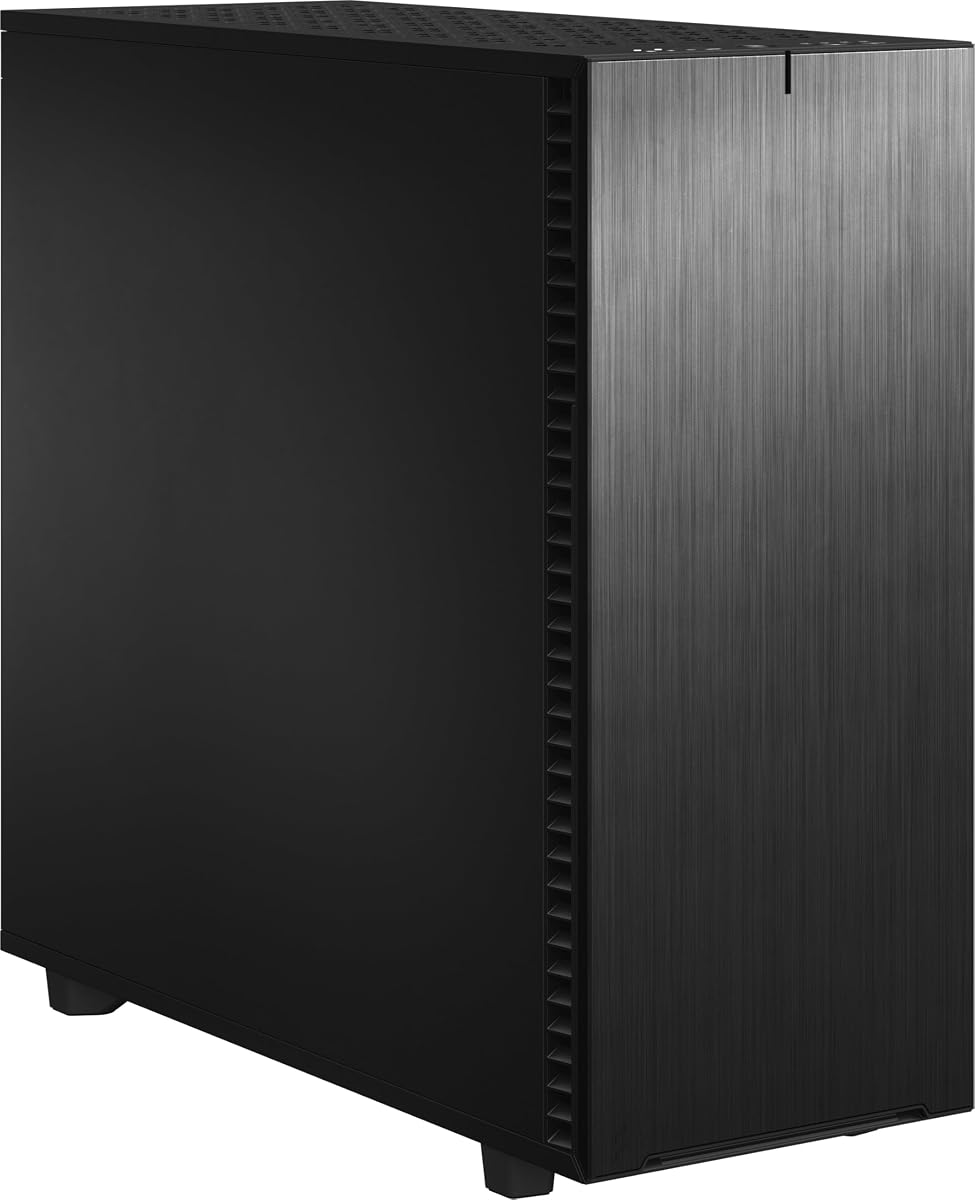
The Fractal Design Define 7 XL is a full tower for builders whose hardware needs extend well beyond a typical gaming configuration. Its 4.6 rating reflects a mature, highly expandable design, and the defining feature is storage capacity: the default layout supports up to 18 hard drives and five SSDs. Few modern full towers make that much sense for a media server, workstation, or archival system.
We may earn a commission when you buy through this link, at no additional cost to you.
The interior accommodates E-ATX and SSI-EEB motherboards and can be converted to an open layout for elaborate custom water loops. Large reservoirs and radiators up to 480mm are supported, giving the case substantial thermal potential. Multi-brackets can transform otherwise unused fan positions into HDD, SSD, or pump mounts, which improves the usefulness of otherwise awkward spaces.
Its exterior takes a more restrained approach than a glass-heavy gaming chassis. A brushed aluminum front surround and steel enclosure are paired with a refined front door, reversible dual-handed hinges, and magnetic latching. This design emphasizes a clean appearance and quieter operation rather than a fully exposed visual spectacle.
The Define 7 XL makes the most sense for a workstation, home server, or enthusiast system that genuinely benefits from extensive storage and custom cooling. Builders wanting a smaller or lighter case should look elsewhere. For large-scale internal flexibility in a refined full-tower format, it remains one of the most capable selections in the roundup.
The default support for 18 hard drives and five SSDs is a major differentiator. It reduces the need for external storage or a separate server chassis when a project requires large local capacity.
Brushed aluminum, a closed front door, and reversible magnetic latching create a refined appearance. Converting the interior to an open layout gives builders room to install large reservoirs and radiators without abandoning the full-tower format.
We may earn a commission when you buy through this link, at no additional cost to you.
The Lian Li V100-ATX is a mid-tower that combines a strong 4.8 rating with an unusually complete list of standard features. It is an attractive recommendation for first-time builders who want four illuminated PWM fans, a 360mm radiator position, broad motherboard support, and easy access without assembling an entirely bespoke cooling or lighting plan.
We may earn a commission when you buy through this link, at no additional cost to you.
Four 120mm ARGB fans are preinstalled, providing immediate airflow and illumination with daisy-chain connectivity. A 26-LED ARGB strip adds coordinated color effects and can synchronize with motherboard software. This makes the V100 visually engaging out of the box, though builders who dislike software-controlled lighting may disable or reconfigure the lighting after installation.
The chassis supports ATX, Micro-ATX, Mini-ITX, and both standard and back-connect versions of ATX or Micro-ATX motherboards. Graphics cards up to 420mm and CPU coolers up to 178mm are accepted, while a top radiator can reach 360mm. Each side panel uses a tool-less mounting mechanism, simplifying routine access without requiring a screwdriver for the panels.
The listed fan specifications include a maximum speed of 1800 RPM, airflow figures between 61.47 and 60.4 CFM, static pressure between 2.54 and 2.17 mm-H2O, noise levels between 26.5 and 30.8 dBA, and hydraulic bearings. The V100-ATX is best for builders who want a complete, polished mid-tower with cooling and lighting already assembled.
The included ARGB PWM fans immediately provide both cooling and visual effects. Daisy-chain connectivity and a coordinated 26-LED strip reduce some of the complexity normally associated with a multifan lighting setup.
Support for back-connect motherboards, 420mm GPUs, 178mm CPU coolers, and 360mm radiators covers widely used enthusiast hardware. Tool-less side panels make it easier to inspect dust, connect components, and perform routine maintenance.
We may earn a commission when you buy through this link, at no additional cost to you.
The LIAN LI O11D EVO RGB is the most balanced overall selection in this guide, earning a 4.7 rating and an Editor's Choice designation. Its signature dual-chamber layout separates the motherboard and power-supply areas from the graphics-card chamber, creating an unusual presentation while improving the distribution of heat and cable space. A removable front support pillar allows an unobstructed view without sacrificing the stated structural integrity.
We may earn a commission when you buy through this link, at no additional cost to you.
Capacity is a major strength. The main compartment supports graphics cards up to 455.7mm and provides seven expansion slots. A 420mm radiator position and adjustable motherboard mounting height give builders room to configure fans and CPU cooling for different performance and aesthetic priorities. The case is therefore more versatile than a purely decorative display chassis.
Two 1.5mm L-shaped RGB strips sit at the top and bottom of the tempered glass panels. Lighting is only one part of the design, though; cable management receives equally detailed attention. Velcro straps and dual-layered clips group both large and small cables, while the power-supply bracket protrudes 15mm to create additional space for connectors and slack.
The O11D EVO RGB is ideal for a builder who wants a recognizable, high-visibility enclosure without sacrificing hardware clearance or serviceability. It demands more deliberate planning than a simple box because the two chambers must be considered, but the payoff is an organized and striking finished system. It is the all-around choice for a modern enthusiast build.
Separating the graphics card from the motherboard and power supply reduces visual crowding and lets key components become focal points. Removing the front support pillar opens the view further, giving the system a cleaner showcase appearance.
Two motherboard mounting heights let builders reconfigure the relationship between the CPU cooler and fans. Combined with 455.7mm graphics-card clearance, seven expansion slots, and a 420mm radiator position, the layout supports demanding hardware and elaborate cooling.
We may earn a commission when you buy through this link, at no additional cost to you.
The JOYJOM Mini ITX Case is the most compact option in the guide, with a stated capacity of just 4.3 liters. It carries a 4.1 rating and targets builders using miniature motherboards, short graphics cards, low-profile coolers, and specialized FLEX power supplies. The included PCIe 3.0 riser enables a more flexible arrangement of the graphics card within the extremely small enclosure.
We may earn a commission when you buy through this link, at no additional cost to you.
Compatibility is precise. The case supports standard 17 by 17cm ITX motherboards, a FLEX-Small 1U power supply measuring 15 by 4 by 8cm, graphics cards up to 17 by 10 by 4cm, and up to two 2.5-inch SSDs with a thickness below 9mm. CPU coolers must be less than 36mm high, making a suitable low-profile cooler a critical part of the build.
The body uses 2.0mm aluminum alloy, providing a rigid enclosure with the material's characteristic heat-dissipation properties. The stated dimensions are 18.4 by 10.4 by 22.3cm, and the package includes one mini-ITX case, one PCIe 3.0 riser, and screws. Important accessories such as the motherboard, cooling hardware, power supply, and storage are not included.
This case is best for a very small portable system, console-style project, or enthusiast comfortable sourcing specialized components. It is unsuitable for conventional ATX hardware, ordinary tower coolers, or full-size power supplies. Within that narrow niche, the included riser and compact aluminum construction provide a useful platform for portable small form factor builds.
At 4.3 liters, the JOYJOM enclosure makes every millimeter matter. Its supported motherboard, FLEX-Small power supply, short graphics card, and sub-36mm cooler are integrated around a very different component standard from full-size ATX systems.
The included 18.5cm PCIe 3.0 riser provides the flexibility to position the graphics card in relation to the motherboard and power supply. Buyers must also plan for the very limited storage, cooling, and cable-management options before beginning assembly.
We may earn a commission when you buy through this link, at no additional cost to you.
The right aluminum case is the one that fits the planned hardware, supports the intended cooling arrangement, and remains practical for the space where it will live. Board size, component dimensions, accessibility, and expansion needs should be evaluated before appearance takes priority.
Begin with the motherboard form factor because it sets the foundation of the entire build. Options in this guide range from Mini-ITX and Micro-ATX to ATX, E-ATX, and SSI-EEB. A case may physically accept an ATX board but have less clearance around tall coolers, wide GPUs, or cable routing, so every stated dimension should be checked against the complete component list.
Choose a chassis with enough clearance and mounting support for your board, not merely a case that mentions the form factor. A full-size ATX board in a compact chassis may also force an SFX power supply, while a Micro-ATX build can benefit from a smaller case without accepting Mini-ITX restrictions.
Modern graphics cards can occupy more space than the motherboard and cooler combined, making length a decisive specification. The featured cases support graphics cards ranging from only 170mm in the JOYJOM enclosure to 455.7mm in the LIAN LI O11D EVO RGB. Account for the card's actual length, power connectors, sag support, and the space needed to route attached cables.
A case with a stated maximum GPU length is useful, but it should not be treated as permission to install any card that technically fits. Check cooler width, power-supply placement, front fans or radiators, and clearance for cables before finalizing a high-end build.
Air and liquid cooling impose different demands on a chassis. Air coolers need physical height and airflow around the heatsink, while liquid coolers need radiator placement, pump clearance, mounting points, and room for tubing. Listed CPU cooler limits range from under 36mm in the ultra-mini case to 178mm in the V100-ATX and 165mm in the C34Pro.
If the case supports a 240mm radiator, also verify the width of that radiator, whether it uses two 120mm fans, and whether a top-mounted installation leaves enough space for the motherboard and memory. A larger radiator is not automatically better if it forces awkward tubing or restricts a top-mounted CPU cooler.
Power-supply compatibility involves more than ATX versus SFX. The standard ATX and SFX formats differ in size, but the mounting position, cable bend radius, side clearance, and available front or rear space matter just as much. The B2Pro accepts ATX units within a stated 140–170mm length range as well as SFX and SFX-L models, while the C34Pro supports ATX PSUs up to 220mm and offers several mounting positions.
Prefer a case that provides enough room behind the power supply for modular cables and the bend required immediately after they leave the unit. SFX or SFX-L can simplify a compact build, while a full ATX supply may offer more connectors and cable variety. Check the exact power-supply dimensions and the case's recommended layout.
Case size affects every stage of ownership, from component installation to moving the finished computer. Compact designs such as the 4.3-liter JOYJOM case impose severe hardware limits, while portable models like the C34 and C34Pro include carry handles. Full towers such as the Cosmos Alpha and Define 7 XL maximize room but require more desk or floor space.
Measure the intended location before ordering, including clearance for cables, airflow, and the room needed to work on side panels. If portability matters, compare not only the case dimensions but also the weight of the complete system and the comfort of carrying it by its handle.
Airflow depends on component placement, intake and exhaust direction, and the obstacles created by panels, filters, and cable bundles. The MasterFrame 500 Mesh uses an open frame and preinstalled 200mm fans, the O11D EVO separates chambers, and the Cosmos Alpha adds a rotating layout. Other cases use mesh panels, multi-zone fan mounts, and removable dust filters to balance access with protection.
Do not judge cooling by fan count alone. Confirm that intake fans face unobstructed openings, exhaust positions have suitable paths, and the power supply or storage does not block incoming air. For a noisy high-performance system, a larger case with more fan options may also make it easier to run cooling at lower speeds.
Storage needs can determine the chassis faster than any aesthetic preference. The Fractal Design Define 7 XL supports 18 hard drives and five SSDs in its default layout, while the open test bench supports four drives and the JOYJOM case accommodates two thin 2.5-inch SSDs. Expansion slots and accessory brackets matter for multi-GPU, capture-card, or controller-based configurations.
Count every drive, including storage used for operating systems, media, backups, and scratch data. Also consider whether the drive layout obstructs airflow or complicates cable routing. A case with abundant storage mounts is not automatically superior for a gaming system that needs only one or two fast SSDs.
Aluminum sheet thickness, frame construction, edge finishing, removable filters, and the design of screws or tool-less panels all influence long-term usability. The B2Pro specifies different aluminum thicknesses for its frame and panels, the C34Pro combines aluminum and steel, and the V100-ATX uses tool-less side panels. Open frames are easy to access but offer little protection, while glass-heavy cases require more careful handling.
Evaluate how often you will need access and what must be disconnected to reach it. A removable motherboard tray, adjustable expansion slots, and organized cable clips improve serviceability. Confirm that the included screws, handles, feet, filters, and supports match the design and are sufficient for the intended configuration.
Before installing components, unpack the chassis over a soft surface, inventory the included screws and accessories, and read the manual before removing panels. Compare every major component with the case's dimensional limits, including the CPU cooler, graphics card, power supply, radiator, and motherboard. Install the power supply and standoffs first, then confirm that the board and cable routes fit without forcing panels into place.
Plan the airflow path before connecting fans and radiators. Place intake fans where they can draw through unobstructed mesh or frame openings, direct exhaust toward open space, and use the supplied dust filters where they do not reduce intended airflow. Route power, data, and front-panel cables away from fans and hot components. Bundle excess length with the provided ties, straps, or clips while leaving enough slack at each connection.
For ongoing care, power down and disconnect the system before opening the case. Clean removable filters on a regular schedule, especially in dusty environments, and use gentle methods that will not damage mesh, foam, or lighting elements. Keep the aluminum exterior dry, inspect fasteners and dust accumulation periodically, and avoid leaving the open-frame test bench in locations where debris can settle directly onto exposed hardware.
Not automatically. Aluminum can dissipate heat effectively and is lighter than steel, but case cooling is determined primarily by airflow, fan placement, filters, component density, and the path air can take. A well-ventilated aluminum case can outperform a restrictive steel enclosure, while a poorly designed aluminum case can still trap heat.
Choose the board size based on your existing hardware and future plans rather than the case label alone. Mini-ITX encourages the smallest builds, Micro-ATX balances expansion and footprint, and ATX or E-ATX provides more expansion slots and I/O. Verify that the selected chassis supports the board dimensions, rear ports, memory clearance, and cooler height.
No. Aluminum is one possible case material, not a requirement for gaming performance. The more important considerations are GPU clearance, cooling capacity, fan options, dust control, build accessibility, and a layout that suits the components. Each aluminum option in this guide supports common gaming hardware, but some impose tighter restrictions than conventional towers.
It depends on the chassis and the specific card dimensions. Full-size ATX options such as the C34 accept graphics cards up to 335mm, while the C34Pro supports 420mm. The JOYJOM mini case is far more restrictive and supports a specified card size of 170 by 100 by 40mm, making component planning essential.
A mid-tower is shorter and commonly supports ATX, Micro-ATX, and Mini-ITX motherboards, while a full tower offers additional height and depth for larger boards, graphics cards, radiators, and more storage. The Cosmos Alpha and Define 7 XL are full towers; the V100-ATX and O11D EVO RGB provide mid-tower formats with substantial hardware support.
They can be, but they trade enclosure protection for visibility and access. The open test bench provides excellent component access and broad cooling flexibility, yet it offers little dust shielding and exposes cables and hardware. A conventional closed case is generally tidier and safer for a system used in a busy or dusty environment.
The case should list a maximum CPU cooler height, and the chosen cooler should fall within that limit. Some tower coolers also overhang the RAM or side panel, so compare the cooler's full width and heat-sink position as well as its height. The B2Pro supports 135mm, the C34 supports 162mm, and the V100-ATX supports 178mm.
Usually, a soft microfiber cloth lightly dampened with water is sufficient for the exterior. Avoid harsh cleaners, abrasive pads, and spraying liquid directly onto the case, fans, filters, or lighting. Remove the system from power before cleaning internal components, and dry every surface before reassembling the chassis.
The LIAN LI O11D EVO RGB stands out as the most complete recommendation, combining a distinctive dual-chamber presentation, generous graphics-card clearance, a 420mm radiator position, adjustable motherboard placement, and thoughtful cable management. The V100-ATX is the practical value pick for buyers who want four ARGB fans and broad mid-tower compatibility, while the Cooler Master Cosmos Alpha leads the premium group with its curved aluminum frame and unusually flexible interior.
Prioritize component fit before aesthetics. Measure the motherboard, graphics card, power supply, CPU cooler, radiator, and drives, then check the case's complete dimensional list. Consider airflow and accessibility as permanent features rather than afterthoughts, and choose a smaller open or compact aluminum design only when you are comfortable accepting the restrictions that come with reduced internal volume.
Finally, check current ratings, availability, included accessories, and prices before buying, since manufacturer configurations and retailer listings can change. A case that fits today's hardware perfectly may also need room for a future upgrade, so favor documented clearance and modular mounting options over a specification that looks impressive but does not match your build.