
Canon MegaTank G3270
4.1Editor score
Wireless print, copy, scan
Up to 7,700 color pages
1.35-inch square LCD
Two years of ink included
A printer with liquid ink uses refillable ink tanks instead of small replaceable cartridges, making it well suited to households and offices that print regularly. The best models combine affordable ink, convenient refilling, clear output, wireless connectivity, and useful scanning features in a practical all-in-one design.
We compared ten refillable-tank printers on the details that affect daily ownership: included ink yield, refill method, print and copy functions, wireless support, display size, scanning capability, and stated page output. The guide covers options from HP, Canon, and Epson without assuming that every user needs the same capacity or productivity level.
Each review identifies the strongest reasons to choose that model, along with practical trade-offs. The top picks show three distinct priorities: economical everyday printing, a well-rounded feature set, and stronger productivity for demanding users. Prices and promotions can change, so confirm the current listing before purchasing.
4.1Editor score

4.2Editor score

4.1Editor score
As an Amazon Associate we earn from qualifying purchases.
This side-by-side comparison highlights the major differences among the ten refillable-tank printers, including their stated ink yields, connectivity, functions, displays, and intended productivity levels. It provides a quick way to narrow the field before reading the detailed reviews.





The HP Smart Tank 5003 is a cartridge-free all-in-one designed for households and home offices that want to reduce interruptions from frequent cartridge changes. Its 3.9 rating reflects a generally practical package, but the important distinction here is the substantial ink supply and refillable-tank design. It supports printing, copying, scanning, borderless output, mobile use, and wireless connectivity.
We may earn a commission when you buy through this link, at no additional cost to you.
Its strongest selling point is the claimed supply of up to three years of HP ink, with up to 6,000 pages in either color or black described for the included setup. The tanks are replenished through HP's mess-free system: users plug compatible ink bottles into the keyed inlets and allow the ink to drain. This simple workflow is well suited to people who want lower ongoing ink costs without navigating complicated cartridge systems.
The trade-offs are reasonable rather than hidden. Its 3.9 rating trails the highest-rated models in this guide, and its stated 6,000-page inclusion is lower than the 7,500-page figure associated with the Epson EcoTank ET-2803. The available product information also does not identify a particularly large display or aggressive speed specification, so buyers seeking a productivity-focused control panel may find another option more suitable.
This model is a strong recommendation for a family, student, or home office that values wireless printing, scanning, and a generous starting ink supply. Choose it when uncomplicated refilling and a complete set of everyday functions matter more than premium productivity features. For heavier workloads, compare the Epson ET-2903 or EcoTank Pro ET-5150, which offer more explicit speed and productivity details.
The stated inclusion of up to three years of ink gives this model an advantage for users who want to avoid an immediate cartridge purchase. That makes it particularly appealing to households that print school projects, recipes, shipping documents, and routine color pages throughout the year.
HP's bottle-based refill system removes the need to insert small cartridges. Because users connect the bottles and let the tanks drain, the process is designed to reduce squeezing and spilling while preserving the familiar benefit of topping up ink when necessary.
We may earn a commission when you buy through this link, at no additional cost to you.
The Canon MegaTank G3270 combines a refillable ink system with wireless print, copy, and scan functions in an approachable home printer. Its 4.1 rating places it among the stronger-reviewed products here, and the specification highlights up to two years of included ink plus a claimed capacity of 6,000 black-and-white or 7,700 color pages per ink set.
We may earn a commission when you buy through this link, at no additional cost to you.
The high stated color yield is particularly notable for a budget-oriented recommendation. Canon positions the MegaTank as a way to reduce ink expense, while the refillable format avoids the need to replace a series of small cartridges. A 1.35-inch square LCD provides basic on-device navigation without requiring a large, specialized control panel.
There are clear limitations. The product is designed for single-sided printing only, which may not suit users who routinely need automatic duplex output. Its small square display is useful for basic setup and status checks, but it is not the interface to choose when detailed job control or advanced productivity functions are priorities.
The G3270 is well matched to students, families, and casual home offices that print a meaningful number of pages but do not need enterprise features. It is especially attractive for users who prioritize color-page capacity and wireless convenience over duplex printing. Buyers with a heavy office workload should give more consideration to the Epson ET-4800 or ET-5150.
The stated 7,700-page color capacity makes this one of the most compelling choices for photo-heavy school projects, colorful worksheets, and personal image printing. A large included ink set can also postpone the first replacement for regular users.
The square LCD offers an accessible way to manage copying and scanning without navigating the printer from a computer. Wireless printing expands placement flexibility around a room or home office.
We may earn a commission when you buy through this link, at no additional cost to you.
The Epson EcoTank ET-2803 is the highest-rated model in this roundup, earning a 4.2 rating. It is a wireless color all-in-one with a high-resolution flatbed scanner, copier, color display, and support for modern mobile workflows. Its combination of up to 7,500 color pages, 4,500 black pages, and two years of included ink makes it a well-rounded option for regular home printing.
We may earn a commission when you buy through this link, at no additional cost to you.
Epson's cartridge-free EcoTank system is the defining practical advantage. Refill bottles feed high-capacity tanks, reducing the need to replace many tiny cartridges. Epson states that one bottle set is equivalent to about 80 individual cartridges. The printer also supports wireless printing, hands-free voice-activated printing, AirPrint, and the Epson Smart Panel app, giving users several convenient ways to send jobs.
The main caveat is ink compatibility. Epson strongly recommends genuine ink for optimal quality and performance and warns that non-genuine ink could cause damage not covered by its limited warranty. The voice feature also depends on the user's device, account, and service setup. These considerations make the ET-2803 more suitable for buyers who intend to follow the manufacturer's ink guidance.
This is an excellent recommendation for a home user who wants generous ink capacity, wireless flexibility, sharp text, colorful photos, and integrated scanning without moving to a business-class model. It balances convenience and capability particularly well, which explains its strong rating. Those needing faster stated output or a larger control display should look toward the ET-2903 or ET-5150.
With stated yields of 7,500 color pages and 4,500 black pages, the ET-2803 gives frequent color users a larger potential workload than many conventional cartridge printers. The included supply is designed to keep everyday printing productive before refills are needed.
Wireless connectivity, AirPrint, the Epson Smart Panel app, and hands-free voice options provide several paths for starting a job. That makes the printer convenient for shared family spaces as well as personal devices.
We may earn a commission when you buy through this link, at no additional cost to you.
The Epson EcoTank ET-2800 is a wireless color all-in-one built around high-capacity ink tanks, a flatbed scanner, and a copier. It holds a 4.0 rating and offers a stated speed of 10 ISO black pages per minute, making it a practical option for users who want more productivity than a basic home model without moving to the Pro line.
We may earn a commission when you buy through this link, at no additional cost to you.
Its EcoTank design supports up to 4,500 black pages and 7,500 color pages, with up to two years of ink included according to Epson. The company also describes one bottle set as equivalent to about 90 individual cartridges. Its Micro Piezo Heat-Free technology is intended to produce sharp documents, detailed color photos, and lively graphics across common paper types.
The principal trade-off is that its feature emphasis is more restrained than that of the ET-2903. The supplied information does not advertise the larger 1.44-inch color display, zero-warmup operation, or extended mobile app support associated with the newer model. It also includes up to two years of ink rather than the ET-2903's stated three years.
The ET-2800 makes sense for households and home offices that value a dependable refillable system, solid color output, and a scanner and copier in one device. It is also a logical choice for buyers comfortable using genuine Epson ink. Those who want a larger interface and more explicit high-volume productivity should examine the ET-2903 instead.
A stated 10 ISO black pages per minute gives the ET-2800 a more task-oriented profile than many basic refillable printers. That can be helpful when printing a packet of reports, forms, or lesson materials in one session.
The combination of sharp text, color graphics, a flatbed scanner, and a copier lets the device handle more than ordinary web pages. It is a flexible household machine for documents, image projects, and records that need to be digitized.
We may earn a commission when you buy through this link, at no additional cost to you.
The Epson EcoTank ET-4800 is a wireless color all-in-one aimed at users who want substantial ink capacity and an integrated scanner. Its 3.8 rating is the lowest among the ten products, so buyers should look beyond that summary and consider the features that matter for a shared office or active home workspace.
We may earn a commission when you buy through this link, at no additional cost to you.
High-capacity tanks and Epson's EcoFit bottles are the model's central benefits. Users replenish ink through larger bottles instead of tiny cartridges, while the Micro Piezo Heat-Free system is designed to produce sharp text and impressive color photos and graphics. A high-resolution flatbed scanner, copier, and color display broaden the device beyond printing alone.
The available listing information is less detailed than for some competitors. It does not provide a specific included page count, an ink-duration figure, a stated print speed, or details about automatic duplex printing. Those omissions do not mean those capabilities are absent, but they make this model harder to compare with the ET-2800, ET-2803, and ET-2903 on paper alone.
The ET-4800 is worth considering for a home office that values easy refilling, a color display, and scanning without committing to a Pro model. It may be especially attractive to Epson users who want the familiar EcoFit bottle system. Buyers seeking clearly published productivity specifications and a large included ink claim will find those details more straightforward in the ET-2903.
High-capacity tanks are particularly useful when the same printer serves a family or small office. The EcoFit bottle format keeps the refill process tied to the familiar Epson tank system while reducing the frequency of cartridge-style replacements.
The built-in color display provides an on-device way to review settings and navigate copying and scanning tasks. It is a useful middle ground between a minimal printer and a more productivity-focused office model.
We may earn a commission when you buy through this link, at no additional cost to you.
The HP Smart Tank Plus 570 is a cartridge-free all-in-one with a substantial stated initial ink supply. Its 3.8 rating is tied for the lowest in this guide, but the specification sheet reveals a potentially attractive workload: up to two years of Original HP Ink and as many as 8,000 color pages or 6,000 black pages included.
We may earn a commission when you buy through this link, at no additional cost to you.
Its core appeal is uncomplicated ownership. HP's refill system accepts ink bottles directly at the tank, allowing ink to drain without squeezing or spilling. The printer provides printing, copying, scanning, borderless output, mobile printing, and wireless connectivity, so it covers the basic functions expected from a modern home office device.
The drawback is limited published detail about speed, display characteristics, and paper handling. That makes direct comparison with the Epson ET-2903 difficult, where a 1.44-inch color display, 100-sheet tray, and stated speeds are clearly identified. The Smart Tank Plus 570 may still be the better fit for someone primarily concerned with maximizing the initial page supply.
Choose the Smart Tank Plus 570 for regular color printing and users who value a mess-free bottle refill over advanced on-device controls. Its high stated color yield could be especially useful for families producing lots of images, craft projects, or school assignments. For users who need explicit speed guidance, the ET-2903 is easier to evaluate.
The stated 8,000-page color capacity is the highest included color yield among the models in this guide. That makes the Smart Tank Plus 570 an interesting option for users who routinely print photos, graphics, or large quantities of colorful documents.
The direct bottle connection lets users refill the cartridge-free tanks without squeezing the containers. HP positions this as a straightforward way to reduce interruptions and keep printing after setup.
We may earn a commission when you buy through this link, at no additional cost to you.
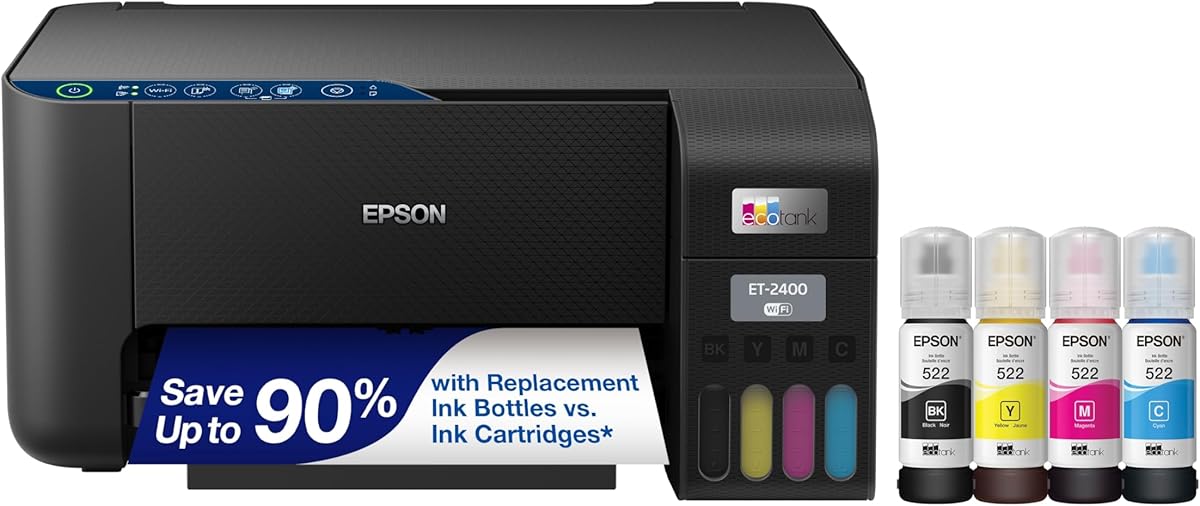
The Epson EcoTank ET-2400 is a wireless color all-in-one with a 4.0 rating, high-capacity refillable tanks, and a combination printer, scanner, and copier. Its stated yield of 4,500 black-and-white pages and 7,200 color pages makes it relevant to regular users who want a generous supply of liquid ink.
We may earn a commission when you buy through this link, at no additional cost to you.
The refill process uses Epson's exclusive EcoFit bottles, which are designed to make replenishment easy and reduce the frequency of cartridge changes. Epson states that up to two years of ink are included, while its Micro Piezo Heat-Free technology is intended to deliver sharp text and detailed photos and graphics on virtually any paper type.
The principal limitation is that the supplied specifications are less explicit about advanced connectivity and control-panel features. There is no stated speed figure, display size, or voice-printing support in the available information. As a result, it is best evaluated on its ink system, output capacity, and all-in-one functionality rather than on office-productivity extras.
The ET-2400 is a solid recommendation for a family room or home office that wants wireless color printing, a scanner, a copier, and a large refillable ink supply. It is a natural fit for Epson users who value the bottle-based system and want to reduce cartridge waste. Consider the ET-2803 when mobile app and voice support are more important.
The stated 7,200 color-page and 4,500 black-page capacity provides a meaningful workload between refills. For regular users, this can make the tank system easier to budget around than a series of small cartridge replacements.
Integrated printing, scanning, and copying eliminate the need for separate desk equipment. The flatbed-style multifunction format is useful for reproducing notes, organizing paperwork, and producing occasional copies.
We may earn a commission when you buy through this link, at no additional cost to you.
This HP Smart Tank 5003 listing offers the same broad product proposition as the first-ranked model: a cartridge-free all-in-one with wireless and mobile printing, borderless output, scanning, and copying. It holds a 3.8 rating and includes an especially substantial stated supply of up to three years of ink.
We may earn a commission when you buy through this link, at no additional cost to you.
Up to 6,000 pages in color or black are described for the initial ink supply. The tank-based system is replenished by connecting HP ink bottles and allowing them to drain, a process HP describes as mess-free and less dependent on squeezing. These attributes make the printer easy to recommend for basic home production and wireless placement.
Its 3.8 rating is among the lowest in the guide, and the stated 6,000-page color yield is lower than the Canon MegaTank G3270, Epson ET-2400, ET-2800, and ET-2803. The listing also gives fewer productivity details than the more expensive Epson office models, so it is not as easy to assess for fast, sustained workloads.
This option is best for buyers who want the Smart Tank 5003's stated three-year ink duration, bottle refilling, and multifunction features at a different listing than the top-ranked entry. It suits a household with regular printing needs and a preference for HP's refill process. Users who prioritize the largest page claims may prefer the HP Smart Tank Plus 570.
The long ink-duration claim helps reduce the chance of needing an immediate replacement after setup. It is an attractive feature for households that print continuously throughout the school year or maintain many personal document projects.
Wireless and mobile printing allow the printer to serve several devices without a fixed computer connection. Borderless printing and the integrated scan-and-copy functions extend its use beyond basic text documents.
We may earn a commission when you buy through this link, at no additional cost to you.
The Epson EcoTank ET-2903 combines a large refillable ink system with unusually clear productivity specifications. Its 4.1 rating, 11-page-per-minute black ISO speed, 100-sheet paper tray, 1.44-inch color display, and built-in flatbed scanner make it the most fully described premium choice in this guide.
We may earn a commission when you buy through this link, at no additional cost to you.
The supplied ink can last up to three years and support a stated output of 3,600 black pages or 6,500 color pages. Epson also highlights 6-page-per-minute color speed, no-warmup operation, and a permanent printhead designed to last for the life of the printer. Mobile workflows are well supported through the Epson Smart Panel app, Apple AirPrint, Mopria Print Service, and Mopria Scan.
Trade-offs include the need for sufficient desk or shelf space and Epson's strong recommendation to use genuine ink. Non-genuine ink may cause damage not covered by the limited warranty. Although the initial color-page figure is lower than that of the ET-2800, ET-2803, and ET-2400, the ET-2903 compensates with clearer speed, tray, display, and printhead details.
This is the premium recommendation for a serious home office or busy family that wants high ink capacity, fast output, a useful control screen, and modern mobile support. It is also a clearer choice when a buyer wants published specifications rather than relying on general brand positioning. The EcoTank Pro ET-5150 is the alternative for even greater office-oriented speed.
The ET-2903 provides the most complete set of workload details in the guide: 11 black and 6 color ISO pages per minute, a 100-sheet tray, no warmup, a color display, and a flatbed scanner. These features make it easier to assess for shared spaces.
Smart Panel, AirPrint, Mopria Print Service, and Mopria Scan cover several common mobile ecosystems. Users can print and scan from compatible devices without relying on a single desktop application.
We may earn a commission when you buy through this link, at no additional cost to you.
The Epson EcoTank Pro ET-5150 is built for higher-volume office environments and stands apart from the entry-level EcoTank models with its stated speed of up to 17 black pages per minute and 9.5 color pages per minute. Its 4.0 rating reflects a generally capable all-in-one for users who print documents more intensively.
We may earn a commission when you buy through this link, at no additional cost to you.
The high-yield bottle system can supply up to 7,500 black pages or 6,000 color pages per replacement set. Epson describes the cost per color ISO page as about two cents, compared with 14 cents for color laser toner in the stated comparison. Its DURABrite ET pigment inks are designed for crisp documents and vibrant color, while a permanent PrecisionCore printhead is intended for sustained use.
The trade-off is positioning. This is explicitly a business printer, and its capabilities are most relevant when print volume is high enough to benefit from faster output. Buyers with occasional printing needs may find the feature set excessive, while Epson users who use non-genuine ink risk damage that is not covered by the limited warranty.
Choose the ET-5150 for a busy home office, small business, or shared workspace where speed and high-yield refills are the priority. It is the strongest choice here for rapid monochrome workloads and frequent color documents. For lighter use, the ET-2903 offers a more compact home-office alternative with a color display and detailed mobile support.
The stated 17 black pages per minute is the highest speed in this comparison. Fast first-page output and no warmup make the model better aligned with offices that need short documents returned quickly.
Replacement bottle sets can provide up to 7,500 black pages or 6,000 color pages. The larger yields reduce refill frequency and make the cartridge-free format particularly practical for sustained office output.
We may earn a commission when you buy through this link, at no additional cost to you.
Choosing a refillable-liquid-ink printer means balancing initial ink capacity, ongoing page output, required functions, connectivity, physical space, and workflow demands. The most economical model is not automatically the most convenient, so compare the specifications against how and how often you actually print.
The amount of liquid ink supplied with the printer has a major effect on the first months of ownership. Some models in this guide advertise up to two or three years of ink, while others provide a page-based claim such as 6,000 color pages or 8,000 color pages. These figures are useful for estimating how long the included bottles may last, but they are not perfectly interchangeable because print habits, page coverage, and test conditions differ. A user who prints occasional full-color photos consumes ink differently from someone producing mostly text documents.
Compare both the time-based and page-based claims when the listing provides them. A longer stated duration is convenient for infrequent maintenance, while a clear page yield can be more helpful when estimating workload. Ultimately, choose the model whose refill intervals fit your printing pattern rather than relying on the largest headline number alone.
Color printers need both black and color ink, but their consumption patterns are different. Most home and office documents use more black than color, while image-heavy users can exhaust color ink more quickly. The reviewed models range from stated totals of 3,600 black pages or 6,500 color pages for the ET-2903 to as much as 8,000 color pages for the HP Smart Tank Plus 570.
Look for a model with strong capacity in the color you use most. If your printing consists mainly of reports and forms, prioritize black-page output and speed. If school projects, photographs, menus, or craft work dominate, place more weight on the color claim and the number of ink colors that can be replenished separately.
A cartridge-free system replaces many small cartridges with refillable tanks and bottled ink. HP describes a mess-free system in which bottles are plugged into the tanks and allowed to drain, while Epson uses its keyed EcoFit bottles. Canon also places refillable ink at the center of the MegaTank concept. These designs can reduce cartridge waste and simplify replenishment, but the exact procedure still requires care.
Read the instructions for the specific model before refilling, keep the correct ink for the printer, and avoid leaving bottles or tanks in a state that could create leaks. If you want the simplest routine, favor a system whose supplied information clearly explains the refill method and bottle identification.
Speed matters most when printing long documents or serving several coworkers. Published figures show 10 black pages per minute for the ET-2800, 11 black and 6 color pages per minute for the ET-2903, and 17 black and 9.5 color pages per minute for the ET-5150. Faster output can shorten waits, but page cost, paper handling, and actual job size also influence the experience.
For light home use, speed may be less important than wireless convenience and ink capacity. For frequent business documents, favor a model with a clearly stated ISO speed and a fast first-page claim. A higher-volume office model is worthwhile only if the routine actually requires it.
Every model in this guide is described as an all-in-one, but the details still matter. A built-in flatbed scanner allows documents, photos, and other flat materials to be digitized, while copier functions can reproduce pages without a separate device. The Epson ET-4800 and ET-5150 are specifically described as business printers, and the ET-2903 includes a high-resolution flatbed scanner and a color display for navigation.
Choose an all-in-one if your home or office occasionally needs copies or scanned records. If you only print, these extra functions may add little value. Conversely, a scanner and copier can make one device more useful for administrative work, school assignments, document organization, and preserving paper records.
Wireless printing is standard across most of the featured models, allowing a printer to be placed away from a desktop computer and shared by compatible devices. Mobile support ranges from straightforward wireless printing to fuller ecosystems. The ET-2803 supports AirPrint, the Epson Smart Panel app, and hands-free voice-activated printing. The ET-2903 additionally lists Mopria Print Service and Mopria Scan.
Think about the devices already in your home or workplace. iPhone and iPad users may prioritize AirPrint, while Android users may value Mopria or a well-supported manufacturer app. Voice printing is useful when hands are occupied, but it adds another layer of setup and depends on compatible services, so it should complement rather than define the decision.
A built-in display can make copying, scanning, and printer setup easier without opening a computer application. The Canon G3270 has a 1.35-inch square LCD, while the Epson ET-4800 has a color display and the ET-2903 features a 1.44-inch color screen. These interfaces are modest compared with a large office touchscreen, but they are more useful than relying only on a small set of physical buttons.
If you regularly copy, adjust document settings, or manage a shared printer, favor a visible color screen for easier navigation. If you mostly send jobs from a phone or computer and rarely touch the panel, display size is likely a lower priority than ink yield, speed, or wireless compatibility.
Paper handling determines how often the tray must be refilled and can influence where the printer can sit. The ET-2903 has an explicitly stated 100-sheet tray, while the available information for the other models does not consistently provide paper capacity. A separate scanner or storage shelf may be needed in offices that keep large paper stocks or frequently work with large formats.
Check the current product listing for paper dimensions and tray specifications before ordering, especially if space is limited. Also consider refill access: the tank should be reachable without moving the entire printer, and the bottles need somewhere safe to be stored. A slightly larger footprint may be worthwhile if it creates easier tank access and steadier operation.
Begin with the unboxing and setup guidance supplied with the printer. Confirm that the correct liquid ink is installed for that model, connect the unit to the wireless network, and complete the alignment or setup sequence before starting a large job. Because these are all-in-one models, test the printer, scanner, and copier functions individually so software and connectivity issues can be addressed early.
For refills, place the printer on a stable surface and follow the manufacturer's bottle and tank instructions. Use compatible ink, keep bottles upright during handling, and avoid forcing a bottle into a port that does not fit. Refill only the relevant color, check that each tank is seated correctly, and wipe away any accidental residue according to the manual. Do not leave the original containers in the tank after they are empty.
Ongoing care should include running the scanner glass clean, removing paper jams gently, and keeping the exterior and control area free of dust. Use suitable media for borderless photos or heavy ink coverage, allow photos to dry before handling, and check for firmware or driver updates through the manufacturer's supported software. If output develops streaks, unusual gaps, or inconsistent colors, run the available cleaning cycle and verify the ink setup before assuming a hardware failure.
A printer with liquid ink is commonly a refillable ink-tank or tank-based printer that uses bottled liquid ink instead of small replaceable cartridges. The reservoirs are built into the printer and refilled when ink runs low. These systems are often attractive to frequent users because they can reduce cartridge changes and the amount of discarded cartridge material.
They can be, especially for people who print enough pages to regularly replace cartridges. The long included ink claims on many models are designed to reduce the need for early refills. Actual operating cost varies with page coverage, color use, ink prices, and maintenance, so current ink costs should be checked alongside the printer.
Every model in this guide is described as an all-in-one and includes core print, copy, and scan functions. The exact interface and productivity features differ, so users who copy often should pay attention to the display, scanner type, and workflow. Epson models in the list specifically include flatbed scanners, and the ET-2903 adds a color display for navigation.
The included supply varies by model. Several Epson models advertise up to two years of ink, while the ET-2903 and HP Smart Tank 5003 listings advertise up to three years. Other claims include 6,000, 7,200, 7,500, or 8,000 color pages depending on the printer. Review the current listing for the exact conditions and page-yield disclaimers.
Epson strongly recommends genuine ink for optimal print quality and performance and warns that non-genuine ink could cause damage not covered by its limited warranty. The HP models also specify Original HP Ink for the stated included yield. Using the manufacturer's recommended ink is the safest way to preserve print consistency and avoid unsupported compatibility risks.
No. A high initial yield is most useful when you print frequently or want the longest interval between refills. Light users may not need the largest claim, while people who produce many full-color pages should consider color capacity more carefully. The best model also needs to fit your space, speed needs, and preferred control workflow.
Yes, the featured printers support wireless printing, and several include dedicated mobile tools. The Epson ET-2803 works with AirPrint and the Epson Smart Panel app, while the ET-2903 also lists Mopria Print Service and Mopria Scan. Setup requirements vary by operating system and network, so confirm compatibility before purchasing.
The Canon G3270 is a balanced budget-oriented choice for wireless printing, scanning, and copying, while the Epson ET-2803 offers a strong rating and broad mobile support. The ET-2903 is a better premium fit when faster output, a 1.44-inch color display, and a 100-sheet tray matter. A busy business should also consider the ET-5150.
The Canon MegaTank G3270 is the best budget-oriented choice for buyers who want wireless print, copy, and scan with a generous stated color yield. The Epson EcoTank ET-2803 is the strongest all-around recommendation, combining the highest rating in the guide with useful mobile features and substantial tank capacity. For premium productivity, the Epson ET-2903 provides clearer speed, tray, display, and scanning details.
Before ordering, prioritize the factors that will affect your experience most: initial ink yield, black versus color use, refill convenience, wireless compatibility, and physical space. Fast users should examine stated output speeds and paper handling, while occasional users may prioritize simplicity over maximum capacity. A printer with liquid ink should fit your routine, not simply carry the largest headline number.
Current prices, promotions, availability, and included-ink terms can change after publication, so verify the live listing before making a final decision. Also review compatibility, warranty conditions, and the manufacturer's ink guidance. Those checks help ensure that the selected refillable printer remains practical for your documents, photographs, scanning needs, and long-term setup.