
Joso Switch 2 Adapter
3.8Editor score
Switch 2 compatible
Four mapping profiles
No software installation
Wired and 2.4G support
Includes OTG converter
Our Nintendo Switch 2 Keyboard guide compares adapters, compact keyboards, and full-size gaming models for compatibility, mapping, and easier typing.
A Nintendo Switch 2 keyboard can make system navigation, text entry, and compatible games feel more familiar, especially if you already prefer a full-size layout or mouse-driven aiming. The important distinction is whether you need a keyboard alone, a keyboard-and-mouse adapter, or a complete gaming set, while also confirming that the hardware supports the newer console.
We compared the listed products by platform compatibility, input methods, remapping options, connection requirements, portability, and suitability for different kinds of play. The list includes dedicated Switch 2 adapters, older console adapters, compact Joy-Con-style keyboards, a portable gaming combo, and a full-size wired keyboard, so compatibility deserves careful attention before buying.
Each review identifies the product's strongest use and its most important limitation. Top selections favor explicit Switch 2 support, dependable input methods, and useful customization, while the other entries offer alternatives for typing, older systems, or mixed-device setups. Marketplace conditions and product details can change, so confirm the current compatibility information before ordering.
3.8Editor score

4.0Editor score
4.0Editor score
The comparison below covers adapters, standalone keyboards, and gaming sets, with special attention to explicit Nintendo Switch 2 compatibility, supported connection methods, remapping features, and the presence of a mouse.


The Joso Keyboard and Mouse Adapter has a 4.1 rating and offers a useful set of controls for players using keyboards and mice on the original Switch, Switch OLED, PlayStation 3 or 4, and Xbox One. Its defining feature is a generous bank of eight profiles, allowing separate configurations for games with different control schemes without rebuilding the setup every time.
We may earn a commission when you buy through this link, at no additional cost to you.
The adapter supports wired USB and 2.4G wireless peripherals, and its profile system can remap controls through the console's official gamepad. Sensitivity can also be adjusted for aiming. No separate driver is required, which makes the product appealing for users who want a direct setup rather than a configuration utility that must be reinstalled after moving between computers or consoles.
There is one decisive limitation for this guide's keyword: the supplied compatibility information explicitly says the adapter is not compatible with Nintendo Switch 2. It also rejects Bluetooth peripherals, and official controllers remain necessary for key mapping and for certain console authentication processes. Those restrictions are reasonable for older systems but rule it out as a Switch 2 recommendation.
This is a good choice for an original Switch or OLED owner who wants eight profiles and mouse sensitivity controls, particularly when using older competitive games. It should not be purchased for a Switch 2 setup, however. Anyone prioritizing the newer console needs an adapter that explicitly lists Switch 2 support instead of relying on generic Switch wording.
Eight independently stored profiles are more useful than a single configuration when you move between shooters, strategy games, and other genres. The ability to retain separate bindings can also reduce repetitive setup work during a gaming session.
Wired USB and 2.4G wireless devices are supported, but Bluetooth is not. Using a wired keyboard and mouse remains the most conservative choice when consistent recognition matters.
We may earn a commission when you buy through this link, at no additional cost to you.
The BLADER Keyboard Mouse Adapter has a 3.5 rating and is designed as a portable bridge between standard keyboard-and-mouse hardware and several console families. Its listed platform coverage includes Nintendo Switch, Xbox One, Xbox Series X and S, and PS4, making it potentially useful for a multi-console setup, although the supplied data does not explicitly identify Switch 2 compatibility.
We may earn a commission when you buy through this link, at no additional cost to you.
Installation is straightforward because the adapter uses plug-and-play operation and requires no additional software. It can simulate keyboard and mouse input as controller signals, while shortcut-key customization and sensitivity adjustment provide room to tailor movement and aiming. That makes it relevant for FPS, TPS, and RTS games where a conventional mouse is more comfortable than a controller stick.
The product has several boundaries that should influence the decision. It needs the corresponding original console controller, does not support mice that depend on driver installation, and the controller's 3.5mm headphone jack stops functioning when the controller connects through the adapter. The instructions also recommend maximizing in-game view sensitivity for the best mouse response.
This is more appropriate for a gamer building a shared controller setup than for someone seeking a verified Switch 2 solution. Its small size and broad older-console support are positives, but the lack of explicit Switch 2 language, limited 3.5 rating, and need for an original controller make it a less certain recommendation. Check the current manual or support material for newer-console confirmation before buying.
The lightweight enclosure is easy to move between compatible consoles, making BLADER useful for a gamer who does not want to maintain a separate input setup for every platform.
The adapter converts standard peripherals into controller signals, so the matching original gamepad is still needed for console recognition. This requirement should be included in the purchase decision rather than treated as a minor accessory.
We may earn a commission when you buy through this link, at no additional cost to you.
The arVin Keyboard and Mouse Adapter carries a 4.0 rating and targets original Switch and OLED models alongside PS3, PS4, Xbox 360, and Xbox One variants. It supports wired and 2.4G wireless keyboards and mice, giving it more connection flexibility than adapters limited to a single cable type.
We may earn a commission when you buy through this link, at no additional cost to you.
Its strongest feature is the ability to store up to eight different keyboard and mouse configurations, with shortcut combinations for switching between them. Mouse sensitivity can also be adjusted for supported Xbox systems. The adapter works without a downloaded application, and the original controller is used to guide the setup of keyboard and mouse functions.
The compatibility exclusions are substantial. The supplied information says the product is not designed for PS5, Xbox Series systems, Switch Lite, PC, Bluetooth peripherals, or third-party controllers. Most importantly for this roundup, it explicitly excludes Switch 2, so the printed language should not be interpreted as covering the newer Nintendo console.
Choose arVin if you use one of its supported older consoles and value saved configurations across several games. It is particularly relevant for PS4 or PS3 users who want remapping and for older Xbox users who want adjustable mouse sensitivity. It is not a practical choice for a shopper whose primary system is Nintendo Switch 2.
The ability to retain eight keyboard and mouse setups is valuable for players who move between different genres or use distinct bindings for aiming, movement, and commands.
The platform list is extensive for older consoles, but exclusions for Switch 2, current Xbox systems, PS5, Bluetooth devices, and third-party controllers make careful model verification essential.
We may earn a commission when you buy through this link, at no additional cost to you.
The T1 Gaming Keyboard and Mouse Combo has a 3.7 rating and offers a self-contained alternative to sourcing a console adapter, keyboard, and mouse separately. Its 39-key wired keyboard has a rainbow backlight, mechanical-feeling keys, anti-ghosting, multimedia functions, and a small footprint that may be easier to manage near a television than a conventional desk keyboard.
We may earn a commission when you buy through this link, at no additional cost to you.
The package includes an RGB gaming mouse and a console converter with driverless key binding and mouse sensitivity adjustment. The supplied compatibility information names Nintendo Switch along with Xbox One variants, Xbox 360, PS4 models, PS3, and Windows. If the connection is correct, the package is intended to work across compatible games rather than being tied to one specific title.
The main concern is that Switch 2 is not explicitly listed. Generic Nintendo Switch support should not be assumed to include the newer console, especially when this bundle also depends on the included converter. Its compact 39-key layout can also be restrictive for extended text entry, although the anti-ghosting and palm-rest design are intended to improve focused gaming.
This combo is most useful for a player who wants one portable package rather than an established desktop keyboard. It may suit a supported older console, PC use, or a shared setup where the included mouse is convenient. For Nintendo Switch 2, verify both the console and converter compatibility before purchasing, and consider a model with explicit next-generation support if your main goal is mouse aiming.
Bundling the keyboard, mouse, and converter removes the need to source three pieces separately. That convenience is the main appeal for a portable or temporary console setup.
The 39-key layout prioritizes gaming commands over full-size typing. It can save space around a display, but users who write lengthy messages or need a numeric keypad should consider a conventional keyboard instead.
We may earn a commission when you buy through this link, at no additional cost to you.
The Brook Sniper 2 has a 4.0 rating and stands out as the most explicitly Switch 2-ready option in this list. It supports PS5, PS4, Xbox Series X and S, Xbox One, Switch, Switch 2, PC, and mobile devices, providing a single control hub for players who move between very different hardware.
We may earn a commission when you buy through this link, at no additional cost to you.
Keyboard and mouse users can refine sensitivity, key mapping, and controller parameters for FPS games, racing, open-world titles, and other genres. Smart macro functions support tap, hold, and loop actions, while built-in memory stores multiple profiles that can be changed without reconnecting to the companion app. The hardware also offers several RGB lighting effects and adjustable brightness.
This depth comes with setup requirements. Sensitivity, remapping, and controller tuning are configured through a companion app, and over-the-air updates are needed to maintain or improve firmware. Xbox systems require an official controller for authentication. Mobile support is limited to controller-mode games and requires a secondary phone for setup control.
Brook Sniper 2 is the strongest choice for a Nintendo Switch 2 owner who wants both a keyboard and mouse, detailed customization, and a device that can continue serving other consoles. It is especially compelling for players who value saved profiles and macro sequences. Buyers should confirm that the app and update process suit their preferred level of configuration before ordering.
Unlike adapters limited to older Switch models or generic console wording, the Sniper 2 expressly identifies Switch 2 among its supported platforms. That clarity makes it a safer foundation for a next-generation Nintendo setup.
Tap, hold, and loop macros can automate repetitive actions or combine inputs in supported titles. Onboard profile memory makes those configurations easier to switch between than rebuilding them through software each time.
We may earn a commission when you buy through this link, at no additional cost to you.
The IOGEAR KeyMander 2 has a 3.6 rating and focuses on configurable keyboard-and-mouse control with a crossover feature for sharing controllers between PS4, Xbox One, and Nintendo Switch. Configuration takes place through the downloadable K2 app, and built-in Bluetooth connectivity is included for setup and control.
We may earn a commission when you buy through this link, at no additional cost to you.
For supported systems, the adapter can replace a controller with a keyboard and mouse. It supports standard Switch and OLED models, Xbox Series X and S, Xbox One, and PS4. The crossover function allows controllers to be moved between several listed console families, with a USB-C charge-and-sync cable required for Xbox Series X or S controllers.
Switch 2 is not named in the supplied compatibility information, so the product should not be treated as a confirmed match for the console at the center of this guide. Switch Lite is explicitly unsupported. PS5 is also not fully supported, with the listed alternatives involving remote play or another software route, which is not equivalent to native adapter support.
KeyMander 2 is most appealing to a gamer who values a dedicated configuration app and frequently moves controllers between older platforms. The crossover function and broad Xbox coverage are meaningful advantages. For Nintendo Switch 2, however, a model that explicitly lists the console is the more dependable choice.
The K2 app provides a central place to adjust input behavior, which can be useful for users who need more than basic plug-and-play operation. Built-in Bluetooth also reduces reliance on a computer during the setup process.
The ability to swap controllers between PS4, Xbox One, and supported Switch models is a distinctive feature. Buyers should verify current platform support because the product's coverage does not include a confirmed Switch 2 entry.
We may earn a commission when you buy through this link, at no additional cost to you.
The Joso Keyboard and Mouse Adapter has a 3.8 rating and is one of only two products here that explicitly identifies Switch 2 compatibility in its supplied product information. It also supports the original Switch, Xbox Series X and S, Xbox One, PS4, and PS3, giving it broader utility than a console-exclusive adapter.
We may earn a commission when you buy through this link, at no additional cost to you.
The adapter supports customizable keyboard and mouse bindings, adjustable sensitivity, and four mapping profiles for different games. Setup is driverless, and most wired USB or 2.4G wireless keyboard-and-mouse combinations are accepted. The package includes the adapter, a USB-C-to-USB-A cable, an OTG converter, and a user manual, while website tutorials provide additional setup guidance.
Bluetooth and driver-dependent devices are not supported, and an official controller is recommended during setup to avoid connection issues. The four-profile count is smaller than the eight offered by some older adapters, but it remains practical for users who play a limited number of games. PS5 is explicitly excluded.
This is a strong pick for a Switch 2 owner who wants mouse aiming without a complicated application-based configuration process. It is particularly attractive for players who want several game-specific profiles and broad cross-platform use without installing extra software. Choose it over a generic older-console adapter when explicit Switch 2 support is your priority.
The Switch 2 label is especially useful in a crowded accessory market. It lets buyers distinguish this model from adapters that mention only the original Switch or Switch OLED and do not support the newer console.
Four profiles, sensitivity adjustment, and remappable controls provide enough flexibility for several game types. The absence of required software keeps the process approachable for users who simply want to connect and play.
We may earn a commission when you buy through this link, at no additional cost to you.
The UGREEN USB Switch Selector has a 4.4 rating, the highest customer rating in this roundup, but it serves a different purpose from a Nintendo Switch 2 keyboard adapter. It lets one set of up to four USB peripherals be shared between two computers, including a keyboard, mouse, printer, scanner, card reader, or flash drive.
We may earn a commission when you buy through this link, at no additional cost to you.
A single button changes the active computer, while an LED indicates which system is selected. The device uses USB 2.0 and is driver-free, with broad listed support for Windows, Mac OS X, Linux, and Chrome OS. Two USB-A-to-A cables are included, and an optional micro USB power input can help prevent disconnections when several power-hungry devices are used together.
This product is emphatically not a KVM switch and cannot carry monitor video. It also does not convert a keyboard and mouse into controller input for a Nintendo console. A computer with only USB-C needs an appropriate adapter rather than a direct USB-C-to-A cable connection, according to the supplied guidance.
UGREEN is a useful choice for someone sharing a keyboard and mouse between two computers, but it does not meet the core need of a Switch 2 keyboard setup. It may complement a console station if the Switch 2 is accessed through a compatible computer or separate adapter, though that arrangement is more involved. For direct console use, choose a product explicitly designed as a controller-input adapter.
One-button switching and the LED indicator make the box convenient when the same keyboard and mouse serve a desktop and laptop. The shared-device count is useful for printers and card readers as well as gaming peripherals.
The product does not translate computer peripherals into controller signals, and it cannot transmit display output. That distinction is essential when comparing it with the dedicated console adapters in this guide.
We may earn a commission when you buy through this link, at no additional cost to you.
The Cyber Gadget Cyber/USB Keyboard has a 3.6 rating and is designed specifically around Nintendo Switch and Switch OLED play. Its 55-key Japanese layout connects by wire to the USB port in the Switch dock's left or right Joy-Con guide area, allowing it to be used while the standard controllers remain attached.
We may earn a commission when you buy through this link, at no additional cost to you.
The keyboard is recommended for online games and is also compatible with Cyber Gadget's double-style controller for Switch. Its compact, lightweight construction makes it easy to carry, and it requires no separate power supply for the Joy-Con. This gives it a focused purpose as a small typing accessory rather than a general gaming keyboard.
The principal issue is that Switch 2 is not listed in the supplied information. The product's dock-specific connection method should therefore be checked carefully before purchase, particularly if the newer console's dock arrangement or port behavior differs. The Japanese layout also requires familiarity with its characters, and there is no mouse or broader control customization.
This keyboard is best for an original Switch or OLED owner who wants a lightweight way to enter chat messages, names, or other text without occupying the television with a full-size keyboard. It is less suitable for competitive mouse aiming, extensive writing, or a confirmed Switch 2 setup. A full-size model or an explicitly next-generation adapter is a better fit for those needs.
The Joy-Con docking design keeps the keyboard physically close to the console display and allows normal controllers to remain in use. It is a practical answer for short text-entry tasks in online games.
A 55-key Japanese layout saves space and reduces weight, but it is less versatile than a full-size keyboard. Confirm your preferred character set and the newer console's connection arrangement before purchasing.
We may earn a commission when you buy through this link, at no additional cost to you.
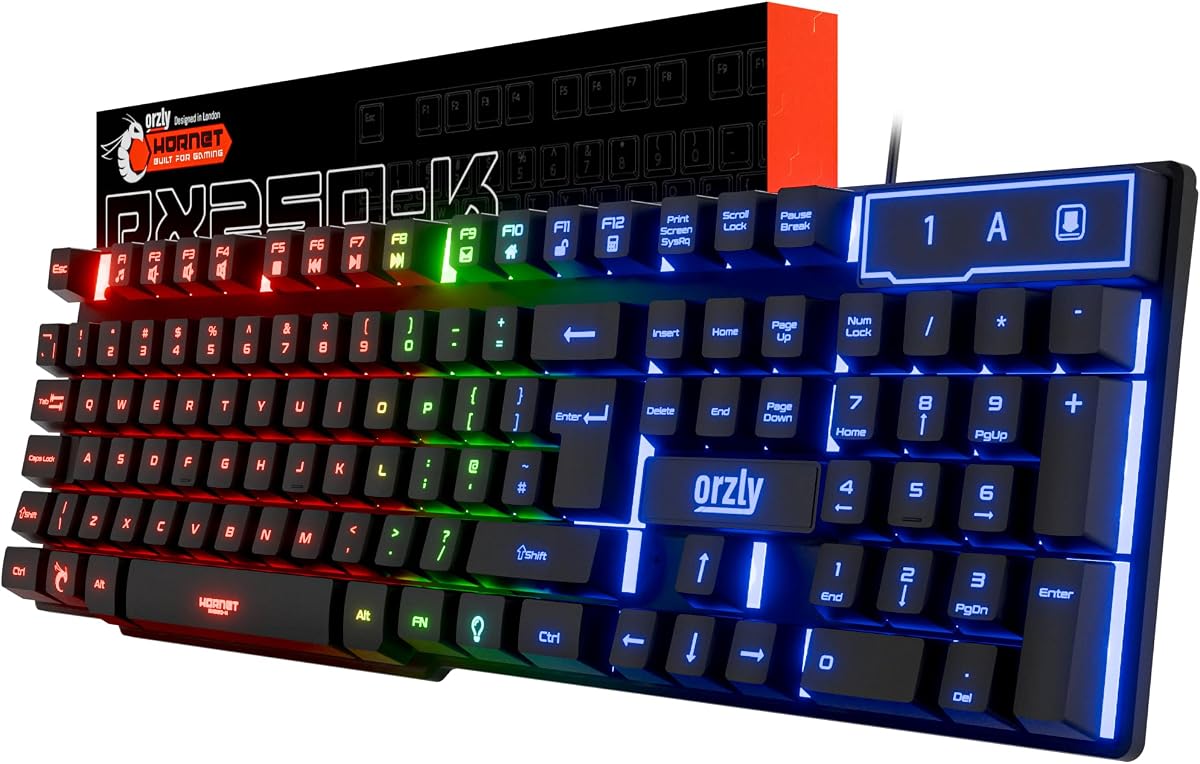
The Orzly RX-250 Keyboard has a 4.1 rating and is a full-size, 104-key wired membrane keyboard designed for both gaming and everyday productivity. It offers 19-key rollover, anti-ghosting, multimedia functions, and a conventional layout that is much easier for extended typing than a compact console accessory.
We may earn a commission when you buy through this link, at no additional cost to you.
Its listed compatibility includes PS5, PS4, Xbox Series X and S, Xbox One, Steam Deck, ROG Ally, laptops, Windows 7 or later, Mac, and Nintendo Switch. The keyboard is driver-free and connects through USB. Three lighting modes, four brightness levels, and breathing effects provide adjustable rainbow backlighting for a gaming setup.
Nintendo Switch 2 is not expressly named, and a keyboard connection alone does not add mouse support. The full-size design also needs more room than a travel keyboard or a 39-key gaming set. Membrane switches, foldable anti-slip feet, drainage ports, and a stated lifespan of up to eight million presses per key make it more of a general-purpose peripheral than a specialized Switch 2 accessory.
The RX-250 is a strong choice for a player who wants one dependable keyboard for a console, laptop, desktop, and handheld setup. It is especially useful for long messages, browsing, and productivity between gaming sessions. If the primary goal is mouse aiming on Switch 2, pair it with a separately confirmed adapter or choose a complete dedicated control hub.
The 104-key arrangement includes the keys expected from a standard keyboard, making it suitable for typing, work, and navigation as well as game commands. That makes it far more versatile than a compact console-only layout.
Broad compatibility and plug-and-play operation make the keyboard easy to move between a console, laptop, or desktop. Verify the exact Nintendo Switch 2 connection method, because the supplied product information names Nintendo Switch generally rather than the newer model.
We may earn a commission when you buy through this link, at no additional cost to you.
The right Nintendo Switch 2 keyboard depends on whether you want text entry, mouse-based game controls, or a flexible setup for several devices. Compatibility, connection method, customization, and physical size should be evaluated together before choosing.
Generic references to Nintendo Switch compatibility do not always include Nintendo Switch 2. A product designed for the original Switch, Switch OLED, or a specific dock arrangement may require a different connection method or may not be recognized by the newer system. The safest choice is a model whose supplied information explicitly names Switch 2, such as the Brook Sniper 2 or Joso Switch 2 Adapter in this list.
Also check whether the product provides a direct console connection or expects the Switch to be accessed through a computer or another adapter. Basic USB recognition is only one part of the setup. Console authentication, controller requirements, dock behavior, and game support can all affect whether keyboard-and-mouse input appears in a title.
A standard keyboard is best for system navigation, chat, usernames, and text-heavy activities. It may also work in games that present an on-screen keyboard. A keyboard-and-mouse adapter is a different category: it translates conventional peripherals into controller-like input, allowing mouse movement and keyboard commands to appear to a game as controller actions.
The compact Cyber Gadget model is designed for console text entry, the Orzly is a general-purpose typing keyboard, and the T1 bundle includes both peripherals and a converter. By contrast, the dedicated adapters focus on translating input for gameplay. Decide whether your priority is comfortable typing, competitive mouse control, or one product that attempts to cover both.
Wired USB offers the most direct and broadly understood route for keyboards and mice. Several adapters also accept 2.4G wireless receivers, which provide cable-free movement while retaining a dedicated radio connection. Bluetooth support is less common in the listed adapters, and one product explicitly rejects Bluetooth peripherals. Driver-dependent devices can also be excluded even when their basic connection type appears compatible.
Look for the included cables and converters. The Joso Switch 2 Adapter includes a USB-C-to-USB-A cable and an OTG converter, while other adapters may depend on a dock or an official controller for setup. Check the connector type and whether the console must be docked before choosing a portable arrangement.
A keyboard-and-mouse adapter becomes much more useful when it can adapt controls to the expectations of different games. Remapping lets you assign movement, aiming, commands, and other functions to familiar keys. Stored profiles are even more helpful because they let you retain several setups and switch between them without repeating the entire configuration.
The Brook Sniper 2 supports detailed sensitivity, mapping, and controller tuning through a companion app, plus tap, hold, and loop macros. The Joso Switch 2 Adapter offers four profiles without required software, while some older products store eight. More profiles are not automatically better, but a richer configuration interface may benefit players who switch among several genres.
Many console adapters need an official controller to complete setup, provide authentication, or accompany keyboard-and-mouse input. The BLADER, arVin, and Joso products all describe controller requirements in different terms. On Xbox, authentication can be particularly important, while some Switch configurations behave differently when a wireless Pro Controller is already paired.
Consider whether you want the controller to remain connected to the console or the adapter during play. Some arrangements allow both controller and translated keyboard-and-mouse input simultaneously. Confirm the supported controller models as well: one product excludes third-party controllers, while another requires the corresponding original controller.
Keyboard size determines how comfortably you can type and where the device fits. A 39-key gaming keyboard may suit a small table or short gaming sessions, while a 55-key Joy-Con-style layout is intended for compact console typing. A 104-key board is the most familiar and productive, but it occupies more desk space. Adapters themselves are generally small and easy to carry between systems.
Also consider mouse movement. A compact adapter is useful, but a mouse needs enough open surface for effective aiming. A portable keyboard near a television and a full-size keyboard on a desk serve very different routines. Choose based on your normal gaming position rather than the product category alone.
Driver-free products are simple, but they may offer fewer adjustment options. App-based devices can provide richer remapping, macro, sensitivity, and controller tuning, along with profile management. The Brook Sniper 2 also supports over-the-air updates, while the IOGEAR KeyMander 2 uses its K2 app. These approaches are better for users who want ongoing control and are less attractive if portability and minimal setup are the priority.
Review what software actually adds and whether updates could change the setup process. Some adapters maintain local profiles in built-in memory, allowing quick switching without reopening the app. That balance between stored hardware settings and companion software can determine how convenient the device remains over time.
A keyboard adapter may not make mouse aiming available in every game. Support depends on the adapter translating input in a way the title recognizes, and individual publishers can restrict peripherals. The listed products are marketed for genres such as FPS, TPS, and RTS, but their descriptions are broad rather than tied to individual games. The T1 converter is also designed for compatible games generally rather than a specific title.
If you play a particular game that supports keyboard or mouse input, verify that the game offers a suitable control scheme and that the adapter's translated signals behave as expected. For standard console text entry, a conventional USB keyboard may be all you need. For competitive aiming, look for sensitivity adjustment and remapping rather than assuming every translated mouse movement will feel identical to a PC mouse.
Begin by confirming that the adapter or keyboard explicitly supports your console and examining the connection requirements in its manual. For a dedicated adapter, connect the appropriate USB cable or OTG converter, attach the keyboard and mouse, and connect the required official controller. If the product uses an app, install the designated companion software and complete the initial configuration before moving to a game.
Test the connection in a low-stakes environment first. Open a system menu or a game that accepts keyboard input, then verify individual keys, mouse movement, and the direction of the mouse buttons. Create a mapping profile for each game or control style, adjust sensitivity gradually, and save the configuration only after confirming that movement and aiming respond as expected. Disconnect unused peripherals when troubleshooting to identify the source of an issue.
For care, keep the adapter and keyboard away from moisture, excessive heat, and heavy impact. Route cables without creating sharp bends, and do not force a connector into a port. Clean keycaps and the mouse surface with a soft, lightly dampened cloth, while avoiding liquid inside the controls. If you use removable storage for profiles or configuration files, preserve a backup of your mappings and update the device's firmware when instructed by the manufacturer.
No. Some products designed for the original Switch, Switch OLED, or a specific dock arrangement do not support Nintendo Switch 2. Look for explicit Switch 2 compatibility and confirm the required connection method. Even a USB keyboard that works for ordinary text entry may not support translated mouse input unless the console and game recognize it.
A keyboard provides text and standard computer-style commands, while a keyboard-and-mouse adapter translates those inputs into controller signals. A conventional keyboard is best for chat, usernames, and system navigation. An adapter is intended for games that accept translated movement, aiming, and button commands.
The listed products have different rules, but many require the matching official controller for setup, authentication, or reliable recognition. The BLADER requires the corresponding original controller, while the Joso products recommend an official controller. Check the manual for the specific model and game before assuming the adapter can operate entirely on its own.
Bluetooth support is limited and should not be assumed. The Joso Multi-Platform Adapter explicitly does not support Bluetooth, and the Joso Switch 2 Adapter lists Bluetooth and driver-dependent devices as unsupported. A wired USB keyboard and mouse is the most conservative choice, while some models accept 2.4G wireless receivers.
No. The adapter must translate input in a way the game recognizes, and the game itself must support keyboard or mouse control. A successful hardware connection does not guarantee that every title offers a mouse-aiming option. Check the game's settings and control instructions before making a purchase solely for one specific game.
The useful number depends on how many games or control styles you regularly use. Four profiles, such as those offered by the Joso Switch 2 Adapter, are enough for several distinct setups. Eight-profile devices provide more room, while the Brook Sniper 2 adds app-based tuning and macros. A profile is valuable only if it is convenient to switch and saves reliably.
A full-size keyboard is generally better for prolonged typing because it uses a familiar layout. The Orzly RX-250 is a 104-key wired model with broad device support, although Switch 2 is not explicitly named in its supplied compatibility list. Compact options save space but are better for short text entry than extended writing.
Reconnect every cable and try the recommended wired or 2.4G connection method. Disconnect extra peripherals, confirm that the required official controller is connected, and check the mapping or profile currently selected by the adapter. If the product uses an app, verify its configuration and update status. Also review the manual for platform-specific authentication or dock requirements.
The Brook Sniper 2 is the strongest all-around recommendation because it explicitly supports Nintendo Switch 2 while adding mouse control, detailed remapping, smart macros, onboard profiles, lighting, and over-the-air updates. The Joso Switch 2 Adapter is a simpler alternative for buyers who want explicit next-generation support, four profiles, and driver-free operation without a full app-based setup.
Your priorities should guide the final decision. Choose a dedicated adapter for competitive mouse aiming and translated controls, a compact console keyboard for brief text entry, and a full-size board for typing, work, and use across several devices. Always verify the exact console model, controller requirement, cable arrangement, and game support before considering an older Switch-labeled product suitable for Switch 2.
Finally, check the seller's current listing, support documentation, and included accessories when ordering. Marketplace details, compatibility claims, bundle contents, and promotional conditions can change, while revised firmware may expand or alter configuration options. Confirming those details ensures that the selected keyboard or adapter fits your Nintendo Switch 2 setup as planned.