
ASUS TUF Gaming GT502
4.6Editor score
Independent cooling zones
Tool-free side panels
Vertical GPU mount included
Front USB-C connectivity
Our Dual System PC Case guide compares dual-chamber and dual-system cases across airflow, radiator support, cable routing, expansion, and build flexibility.
A dual system PC case separates a primary gaming or workstation build from a secondary system, or divides power supplies and drives into a dedicated chamber. The strongest designs improve airflow, cable organization, and expandability while keeping the overall footprint under control.
We compared ten cases based on their documented layouts, cooling capacities, radiator support, fan configurations, GPU support, cable-management features, motherboard compatibility, and included accessories. The list covers both true dual-system enclosures and dual-chamber designs that serve similar organization and cooling goals.
Each review explains where the case stands out, what trade-offs buyers should consider, and which kinds of builds it suits best. Product details and availability can change, so confirm the current listing and compatibility details before ordering.
4.6Editor score

4.7Editor score
This side-by-side comparison highlights each enclosure's system layout, cooling capacity, radiator support, cable-management approach, and practical advantages for builders.


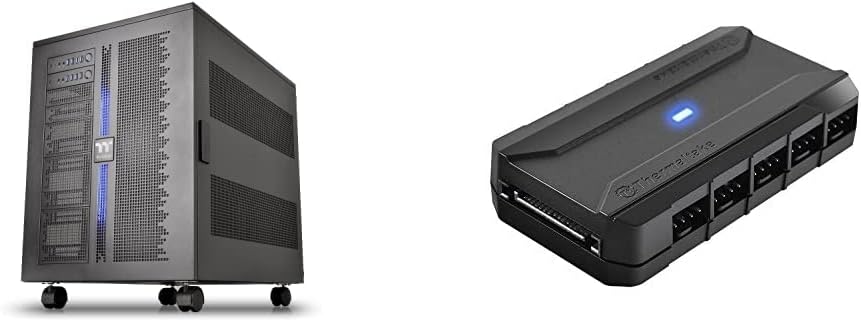
The Thermaltake Core W200 is the most literal interpretation of a dual system PC case in this guide. Rather than using a secondary chamber merely for storage or cable routing, its chassis can host two separate systems in a back-to-back arrangement, including two motherboards, two power supplies, and two graphics cards. Its listing does not provide a numerical rating, so its evaluation here is based on the documented design rather than a customer score.
We may earn a commission when you buy through this link, at no additional cost to you.
The fully modular and dismantleable construction is central to the Core W200's appeal. Builders can rearrange the internal structure rather than work around a fixed motherboard tray. Cooling capacity is particularly notable: the case supports two 600mm radiators for ambitious custom liquid-cooling configurations. The bundled Commander FP can power up to ten PWM fans from the power supply, while reusable ties and hook-and-loop tabs help keep the considerable wiring organized.
The obvious trade-off is physical scale and complexity. A design capable of carrying two complete PCs is larger and more specialized than a conventional dual-chamber mid-tower, and the back-to-back arrangement requires careful planning around airflow and cable paths. It is not an intuitive first build for someone assembling only one system. Even so, these constraints reflect a product intended to consolidate advanced computing, rendering, testing, or streaming workloads into one enclosure.
Choose the Core W200 when two fully independent systems are central to the build and you want exceptional freedom for radiators, fans, and hardware arrangements. It is the clear premium selection for advanced multi-system builders, while the smaller dual-chamber designs on this list are more approachable for conventional gaming and workstation configurations.
The ability to install two motherboards, power supplies, and graphics cards distinguishes this chassis from cases that merely isolate cables or drives. That makes it suitable for parallel computing, development, server-like experimentation, and elaborate streaming setups.
Support for two 600mm radiators gives the Core W200 exceptional cooling headroom. The Commander FP bundle also provides a centralized way to power numerous PWM fans, which is useful when a two-system build requires substantial airflow.
We may earn a commission when you buy through this link, at no additional cost to you.
The NZXT H9 Flow RGB+ combines a dual-chamber structure with polished aesthetics and extensive cooling options, making it the most balanced recommendation in the guide. Its 4.7 rating reflects strong customer reception, while the documented layout places the power supply and drives apart from the main components. Angled front-right fans are positioned to move air directly through the primary chamber.
We may earn a commission when you buy through this link, at no additional cost to you.
Cooling capacity is one of the H9 Flow's strongest attributes. It can accommodate up to nine 140mm fans across the top, front-right, and bottom, plus a 120mm fan at the rear. Large radiators up to 420mm fit at the top and front-right, which gives builders meaningful freedom for high-performance air or liquid-cooled systems. The included lighting package consists of two F420 RGB Core single-frame fans, one rear F120 RGB Core fan, and an NZXT Control Hub.
One point to consider is that the included NZXT RGB Core fans use three-pin DC control, as indicated by the CV designation in the product information. Builders who prefer a fully addressable setup should verify controller compatibility and plan additional lighting hardware. The case also demands attention to GPU clearance and radiator placement during planning, despite its generous stated support for large graphics cards.
This is an excellent choice for a high-end single system that benefits from a cleaner cable layout, separated cooling zones, and a restrained visual design. It also accommodates rear-connecting motherboards such as ASUS BTF and MSI Project Zero. For buyers who value a straightforward daily driver with premium organization rather than a literal two-PC chassis, the H9 Flow is especially convincing.
Keeping the power supply and drives in a secondary chamber reduces visual clutter and allows a dedicated path for airflow around the main components. The result is a cleaner interior without requiring two complete operating systems.
Ten fan positions and support for two 420mm radiators provide room for either a straightforward air-cooled build or a more elaborate liquid loop. The included fans and control hub create a convenient starting point for a coordinated setup.
We may earn a commission when you buy through this link, at no additional cost to you.
The ASUS TUF Gaming GT502 is a practical ATX mid-tower that uses two internal chambers to separate cooling paths for the CPU and GPU. Its 4.6 rating indicates favorable customer reception, and the design focuses on useful organization, tool-free access, and flexible graphics-card positioning rather than hosting two full computer systems.
We may earn a commission when you buy through this link, at no additional cost to you.
One of its most builder-friendly features is the choice between mounting the graphics card vertically with the included mount or installing it horizontally with the bundled support bracket. That lets the owner change the presentation of the system as the build evolves. The side panels also release by pressing a button concealed at the rear, reducing the need for tools during routine access. Tinted tempered glass at the front and side preserves visibility of the main chamber.
As a dual-chamber case, the GT502 does not provide the literal two-motherboard arrangement offered by the Core W200 and Capo X. Its separation is instead used to create independent CPU and GPU cooling zones. This is an important distinction for shoppers who see the phrase dual system in listings and expect two independent operating systems. The GT502 offers excellent organization for one primary build, but it does not provide individual I/O panels for two systems.
The GT502 is a strong recommendation for gamers who want a conventional mid-tower with modern dual-chamber benefits, flexible GPU presentation, and easy maintenance access. It is also a sensible foundation for creators who want dedicated thermal zones around major components. Verify GPU dimensions, cooler height, and radiator placement against the complete compatibility list before finalizing the build.
Independent cooling zones can help direct airflow according to the heat profile of each component. The approach provides organization benefits without requiring the specialized footprint of a case designed for two complete PCs.
The included vertical mount makes it easy to highlight a graphics card as a showcase piece, while horizontal installation and the support bracket favor conventional layouts. Builders can choose the presentation that best suits the desk and cooling plan.
We may earn a commission when you buy through this link, at no additional cost to you.
The Cooler Master HAF II 500 is designed around airflow rather than literal multi-computer operation, and its 4.8 rating is the highest numerical score in this group. The Mighty40 cooling system pairs two 220 x 40mm front intake fans with a 180 x 40mm rear exhaust fan. Large ventilation openings and a low-resistance airflow path help move substantial air through the chassis.
We may earn a commission when you buy through this link, at no additional cost to you.
Split-level cable management is another practical strength because it opens routing space while preserving room for the oversized rear cooling hardware. The MasterRail system supports several fan and radiator sizes at the top and front, allowing the cooling configuration to evolve. The dual-mode GPU holder can stabilize a single card or support two cards up to 3.6 slots, or 72mm, thick each.
The large 220mm and 180mm fans are the case's defining constraint. Builders need to check that their chosen CPU cooler, radiator thickness, and internal hardware will coexist with these oversized fans and the available mounting rails. Storage is also arranged around the PSU length, so drive placement may require a more deliberate layout than in a simpler mid-tower.
This enclosure is ideal for an enthusiast who favors powerful air cooling and wants broad radiator options without relying on a compact, minimalist design. It is less appropriate for a compact workstation or for anyone who expects two complete motherboard systems in one chassis. For a high-airflow single build with potential dual-GPU expansion, it is one of the strongest choices here.
The pair of 220mm front fans and 180mm rear exhaust fan can move more air through the case than a conventional arrangement of smaller fans. That makes the design especially appealing to builders using high-profile air coolers and prioritizing component temperatures.
The adjustable GPU holder can serve a single card or two cards up to the stated 72mm thickness. That flexibility gives builders a route toward expanded graphics capacity while retaining structural support.
We may earn a commission when you buy through this link, at no additional cost to you.
The Antec Flux Pro is a full-tower E-ATX enclosure built for extensive component and cooling capacity. Its 4.7 rating reflects positive customer feedback, and the specification list emphasizes a multi-directional vent design, generous fan support, and removable cooling brackets across the top, front, and power-supply shroud.
We may earn a commission when you buy through this link, at no additional cost to you.
Six PWM fans are included: three Tranquil 140 PWM fans at the front, two P12R PWM reverse fans on the power-supply shroud, and one Tranquil 140 PWM fan at the rear. Total capacity reaches 12 fans, with reverse-blade shroud fans helping move air through the lower chamber. The case can also run a 420mm radiator alongside a 360mm radiator simultaneously, making it suitable for elaborate custom cooling plans.
Its size is the primary limitation for many workspaces. The full-tower format offers room for large components but demands more desk space than mid-tower alternatives. The combination of metal, glass, and wood also creates a distinctive appearance that may complement or conflict with a particular desk setup. The innovative 90-degree PSU mounting option and CPU/GPU temperature display add functional interest.
Choose the Flux Pro for a spacious workstation, a high-end system with numerous fans and radiators, or a builder who wants expansion beyond ordinary ATX dimensions. It is less attractive for a compact installation or a literal dual-computer build. Within the full-tower category, however, its included cooling hardware and multi-radiator support make it especially complete.
Six preinstalled PWM fans provide a useful cooling foundation, while twelve supported positions leave room for additional airflow. Reverse fans on the power-supply shroud add visual interest and help direct air through the lower section.
Removable cooling brackets and the 90-degree PSU mount allow builders to reorganize the interior. A CPU/GPU temperature display also adds convenient at-a-glance monitoring without requiring separate software for basic status checks.
We may earn a commission when you buy through this link, at no additional cost to you.
The ASUS ROG Strix Helios II focuses on premium presentation and high-end component clearance. Its 4.3 rating is the lowest numerical rating among the ten products, but the case remains compelling for builders who prioritize its aluminum front panel, diamond-grille design, dual tempered-glass side panels, and E-ATX component capacity.
We may earn a commission when you buy through this link, at no additional cost to you.
Four preinstalled 140 x 28mm performance fans provide substantial airflow out of the box. The enclosure supports graphics cards up to 450mm long and radiators up to 420mm, while a graphics-card slot clamp and detachable rear PSU bracket help with installation and stability. The multifunction cover combines a PSU shroud, cable cover, and graphics-card holders to produce a clean finished appearance.
Its advanced front I/O panel includes two USB 20Gbps Type-C ports, four USB-A 3.0 ports, an ARGB-lighting control button, and a fan-speed PWM control button. This is a particularly useful feature set for builders who want convenient access to high-speed connections and integrated controls. The dual glass panels, however, mean that every internal cable and component contributes to the visual presentation.
The Helios II is best suited to an enthusiast creating a prominent showcase build with an E-ATX motherboard and a long, high-end graphics card. It is not a true dual-system enclosure, and its dimensions and visual intensity may not suit compact or understated setups. Buyers should compare the available space with their desk and decide how much of the interior they want visible.
Dual tempered-glass panels expose the main chamber from multiple angles, while the aluminum front panel and structured filter provide a distinctive finish. The result is intended for builds where the case itself is part of the visual presentation.
Support for graphics cards up to 450mm and radiators up to 420mm gives builders room for large modern hardware. The included slot clamp adds support for heavier cards and helps maintain a tidy installation.
We may earn a commission when you buy through this link, at no additional cost to you.
The HAVN HS 420 is a dual-chamber mid-tower built around unusually high cooling density. Its 4.6 rating indicates solid customer reception, while the Hybrid Structure is designed to bring cooler air from the bottom intake toward a centrally positioned graphics card. Custom panel ventilation supports the airflow concept across the chassis.
We may earn a commission when you buy through this link, at no additional cost to you.
The case can hold eleven 140mm fans and supports 420mm radiators at the top, right, and bottom. That is extensive flexibility for a mid-tower, allowing builders to combine large radiators and additional fans without immediately exhausting mounting options. A bundled PWM fan hub simplifies power distribution, while the SimpliCable system uses grooved top-to-bottom guides to keep wiring visible but orderly.
Such extensive capacity requires deliberate planning. Fitting three 420mm radiators or a dense collection of 140mm fans can conflict with storage, motherboard placement, and GPU clearance, depending on the chosen arrangement. The 3-way adjustable GPU support bracket handles various card shapes and sizes, but cable routing still needs to be planned around the populated interior.
Choose the HS 420 when airflow and future cooling expansion are the main priorities. It offers an impressive amount of flexibility in a recognizable mid-tower format and includes the hub needed for a large fan load. It is less suitable for a minimalist build, but for a visually open system with extensive cooling, it stands out from conventional dual-chamber alternatives.
Eleven 140mm fan positions and three 420mm radiator locations give the HS 420 exceptional flexibility. This allows dense cooling while retaining a less expansive footprint than many full-tower designs.
The SimpliCable routing system and bundled fan hub address two realities of a heavily populated case: keeping power leads under control and providing enough connections for numerous fans. Both features support a cleaner finished build.
We may earn a commission when you buy through this link, at no additional cost to you.
The Thermaltake Capo X is a true dual-system case with a 5.0 rating, offering two independent mATX systems within one chassis. Unlike dual-chamber designs that separate power supplies and storage, the Capo X is explicitly engineered for parallel operation, with each system receiving its own input/output panel and the ability to function independently.
We may earn a commission when you buy through this link, at no additional cost to you.
The individual I/O panels include power, reset, HD Audio, two USB 3.0 Type-A ports, and a USB 3.2 Gen2 Type-C port. One panel is positioned at the top and the other at the bottom front foot, allowing each PC to be operated like a conventional system. Two detachable clamp braces support the graphics cards from above and below, providing stability for both installations.
Cooling remains a major strength. The chassis supports up to thirteen 120mm fans, 420mm and 360mm radiators, and air coolers up to 180mm in height. Cutouts accommodate hidden-connector motherboards from ASUS BTF, MSI Project Zero, and GIGABYTE Project Stealth. These details help preserve desk space and reduce visible cables when paired with compatible boards.
The Capo X is ideal for users who genuinely need two working computers but want to avoid a large server-style chassis. Its mATX requirement is the main compromise, so it cannot accommodate full-size ATX motherboards. The value of the product comes from consolidating two complete systems, and the Capo X delivers that promise more directly than any other compact entry in this guide.
Each mATX system has its own power, reset, audio, and USB connections. That arrangement allows both installations to be powered and controlled independently rather than sharing a single set of case controls.
Two complete PCs in one chassis can consolidate development, testing, gaming, or media workloads while reducing the number of separate cases on the desk. The approach requires compatible mATX components and careful allocation of cooling and cabling.
We may earn a commission when you buy through this link, at no additional cost to you.
The NZXT H6 RGB+ brings a compact dual-chamber ATX layout to builders who value a clean appearance and straightforward cable organization. Its 4.4 rating is modest compared with the other cases, but the documented feature set supports a focused, minimalist build with a separate chamber for the power supply and cables.
We may earn a commission when you buy through this link, at no additional cost to you.
The single-piece curved tempered-glass panel is bent at a tight radius to reduce distortion and maintain an uninterrupted view. Ultra-fine mesh appears across the top, front-right, and right panels, while a removable nylon filter at the bottom helps limit dust without restricting intake. The chamber separation allows angled front-right fans to target the primary components more directly.
The case supports ten standardized 120mm fan positions across the top, front-right, bottom, and rear. It ships without fans, which gives buyers complete control over cooling and lighting but also makes component selection an extra step. An integrated adjustable GPU anti-sag bracket helps support heavy modern cards and maintain a clean installation.
The H6 RGB+ is well suited to builders creating a compact, visually restrained system with a coordinated NZXT ecosystem. It may not satisfy someone seeking a literal dual-PC arrangement, and the absence of included fans increases the need for careful compatibility planning. For a polished single system with separate cable management, however, it remains a refined option.
A dedicated cable and power-supply chamber keeps the visible interior focused on the main components. The curved glass and fine mesh preserve an uncluttered appearance without abandoning airflow.
Because the H6 RGB+ ships without fans, builders can choose exactly the airflow and lighting hardware they want. Ten standardized 120mm positions provide flexibility, while the anti-sag bracket supports heavier graphics cards.
We may earn a commission when you buy through this link, at no additional cost to you.
The Thermaltake View 380 TG ARGB is the most approachable dual-chamber entry in the guide, combining a 4.7 rating with four included ARGB Lite fans and a pillarless glass design. The front and side tempered-glass panels provide broad visibility, while the chamber layout separates internal zones for a cleaner presentation.
We may earn a commission when you buy through this link, at no additional cost to you.
Compatibility with hidden-connector motherboards is a particularly useful feature for builders seeking a cable-free appearance. The front I/O includes a USB 3.2 Gen2 Type-C port, two USB 3.0 ports, and HD Audio. Maximum radiator support is listed at 360mm, and graphics cards can be up to 415mm long, giving users useful guidance when planning a standard ATX configuration.
Four preinstalled 120mm hydraulic-bearing ARGB Lite fans provide a coordinated starting point without requiring separate lighting purchases. The liquid-bearing design is also suited to quieter operation when the fans are controlled appropriately. Compared with the HAF II 500, Flux Pro, HS 420, and H9 Flow, however, its documented cooling capacity is more modest.
Choose the View 380 TG if you want a polished dual-chamber ATX case with glass panels and coordinated fans already included. It suits mainstream gaming and workstation builds where clean presentation and straightforward installation matter more than extreme radiator capacity. Check the full motherboard, GPU, and cooler dimensions before purchase to confirm that the internal layout accommodates your selected hardware.
Four matching ARGB Lite fans provide the foundation of a coordinated lighting setup. This reduces the number of separate purchases needed for a visually consistent finished system.
Support for hidden-connector motherboards can eliminate many visible power and data cables behind the motherboard tray. That is especially useful when the front and side glass panels make every internal route more noticeable.
We may earn a commission when you buy through this link, at no additional cost to you.
The right dual system case depends on whether you need two operating systems, a cleaner single build, or unusually high cooling capacity. Compatibility, internal layout, and component dimensions should take priority over appearance.
A true dual-system enclosure can run two independent PCs, usually with separate motherboards, processors, graphics cards, power supplies, and I/O controls. The Core W200 and Capo X fall into this category. A dual-chamber case instead isolates the power supply, drives, or cooling paths within one primary system. Cases such as the H9 Flow, GT502, H6 RGB+, and View 380 TG are better when the goal is cleaner organization and improved airflow rather than a second operating system.
Choose a true dual-system design only when you need parallel operation. Otherwise, a dual-chamber layout is usually simpler, lighter, and easier to cool.
Motherboard size determines whether two systems can fit and how much room remains for graphics cards, storage, and cooling. The Core W200 supports two complete systems in a back-to-back arrangement, while the Capo X specifically uses two mATX boards. Most dual-chamber models accept ATX and use their separate chamber for power supplies, drives, or cable routing. Always check the maximum CPU-cooler height, GPU length, and motherboard width against the manufacturer's compatibility list.
Match the form factor to your hardware before refining the aesthetic. A case that looks ideal but cannot accommodate your board can require costly case changes.
Good airflow depends on more than the number of fans. Pay attention to intake and exhaust directions, vent placement, chamber separation, and whether large fans can operate without blocking filters or radiators. The HAF II 500 uses two oversized 220mm front fans, the HS 420 supports eleven 140mm positions, and the H9 Flow supports a mixture of nine 140mm and one 120mm position. These approaches produce different pressure and noise characteristics.
Choose fan positions that create a coherent intake-to-exhaust route. More fans do not automatically mean better cooling if they fight one another or recirculate the same air.
Radiator support should match the cooling loop you intend to build. The Core W200 accommodates two 600mm radiators, the HS 420 supports three 420mm units, and the H9 Flow supports 420mm radiators at the top and front-right. Smaller options include the Flux Pro's simultaneous 420mm and 360mm arrangement and the View 380 TG's 360mm maximum. Check radiator width, fan thickness, tube clearance, and the distance from the graphics card.
Plan the complete liquid-cooling assembly before ordering. A nominal radiator size is useful only if the case can also accommodate the fans, pump, reservoir, fittings, and tubing.
Modern graphics cards are large, heavy, and often connected with bulky power cables. The Helios II supports cards up to 450mm, the View 380 TG up to 415mm, and the GT502 allows either vertical or horizontal mounting. The Capo X includes braces for both systems, while the H6 RGB+ has an integrated anti-sag bracket. Look for length clearance from the front fans, adequate side-panel space, and a holder that supports the actual card weight.
Treat the GPU support bracket as part of the cooling plan, not just an anti-sag accessory. Its position can affect intake airflow, cable bending, and radiator clearance.
A dual-chamber layout works best when the secondary chamber provides enough space for power leads, drive cables, and routing bends. Tie-down points, Velcro straps, removable covers, and grooved channels all help maintain a clean interior. The H9 Flow and GT502 support rear-connecting motherboards, while the Capo X and View 380 TG also list compatibility with hidden-connector boards. Hidden connectors can reduce clutter, but they constrain motherboard selection.
Verify both case cutouts and motherboard support before committing. A hidden-connector board still needs a compatible processor, graphics card, and operating system configuration.
The secondary chamber may appear to provide abundant storage space, but drive cages, cable paths, and radiator positions can reduce usable capacity. The HAF II 500 includes a flexible storage cage for 3.5-inch and 2.5-inch drives in orientations based on PSU length. Other cases emphasize removable cooling brackets and adjustable components instead. Count drive bays, check 2.5-inch mounting locations, and ensure any boot drive remains reachable after the fans and cables are installed.
Prioritize the storage arrangement that matches your actual drives. A case with many advertised mounting points may still be awkward if they are hidden or inaccessible.
Dual-system and high-airflow cases range from compact mATX designs to expansive full towers. The Flux Pro and HS 420 offer exceptional cooling capacity but require more space than conventional mid-towers. Glass-heavy models such as the Helios II and View 380 TG turn the build into a display, while the H6 RGB+ offers a more restrained appearance. Tool-free panels, removable brackets, and accessible filters make long-term maintenance easier.
Measure the available space before choosing. Compare the chassis dimensions, desk clearance, and weight with your hardware, then select a design you will be comfortable opening and cleaning.
Begin by assembling the motherboard, power supply, storage, and graphics card as far as practical before moving them into the chassis. For a true dual-system case, complete and test each system separately when possible. Confirm that both sets of cables, I/O ports, fans, and GPU supports remain accessible after the remaining components are installed.
Route power, data, and front-panel cables through the designated channels immediately after placing the motherboard tray or power-supply shroud. Keep cables clear of fan blades, radiators, and rotating GPU components. Tighten fasteners evenly, attach graphics-card support brackets, and verify that every connector has sufficient bend radius. An organized build is easier to inspect, clean, and upgrade.
Keep filters and vents free from dust, especially in a dense dual-chamber or dual-system arrangement. Power down and disconnect the system before removing panels or fans, then use a soft brush or suitable low-pressure cleaning method. Review fan curves, radiator pump operation, temperatures, and both systems' stability after installation, and repeat these checks whenever hardware or cooling positions change.
No. A dual-system case can host two separate and independently operable computers, including two motherboards and power supplies. A dual-chamber case normally contains one motherboard and uses a separate compartment for the power supply, drives, or cooling hardware. The Core W200 and Capo X are true dual-system designs, while the NZXT, ASUS TUF, and Thermaltake View models use dual-chamber layouts.
It depends on the model. The Thermaltake Capo X is designed for two independent mATX systems, which helps control its footprint. The Core W200 supports a much more elaborate back-to-back arrangement but requires compatible full-size components and substantial internal space. Check the manufacturer's exact motherboard, graphics-card, power-supply, and cooler requirements before buying either case.
It can, provided the airflow path is well designed. Separating the power supply and drives from the main chamber reduces interference with component airflow and can make the primary chamber cleaner. Cases such as the NZXT H9 Flow, ASUS TUF GT502, and HAVN HS 420 also describe specific CPU or GPU cooling zones. The improvement depends on fan direction, radiator placement, filters, and the rest of the build.
Most listed cases support liquid-cooling radiators, but the maximum size and number vary considerably. The Core W200 supports two 600mm radiators, the HS 420 supports three 420mm radiators, and the H9 Flow supports 420mm units in two locations. Smaller designs and the View 380 TG have more limited capacity. Confirm radiator width, pump location, tubing clearance, and fan-radiator thickness before ordering components.
A true dual-system build normally uses separate power supplies for its independent systems, although the exact configuration depends on the chassis. The Core W200 supports two separate systems with their own power supplies, and the Capo X provides individual I/O for two installations. Always verify supported PSU dimensions, wattage requirements, and the number of available connectors for each motherboard and graphics card.
Glass panels do not inherently create cooling problems, but they can affect sound transmission and require more care to keep free of fingerprints. The more important factors are vent placement, fan configuration, radiator clearance, and component density. Cases such as the NZXT H9 Flow and ASUS ROG Helios II combine glass with substantial cooling support, while others use mesh and filtered openings around major airflow zones.
Start with the number of systems, motherboard form factor, and maximum component dimensions. Next compare GPU length and weight, CPU-cooler height, radiator capacity, PSU dimensions, drive positions, and front I/O requirements. Hidden-connector motherboard support can simplify the appearance, but it also narrows component choices. A final check of the full manufacturer compatibility list can prevent costly incompatibilities.
The ASUS TUF Gaming GT502 is approachable for builders seeking one primary PC with improved organization. Its tool-free side panels, flexible GPU mount, and divided cooling zones simplify installation and layout. The Thermaltake View 380 TG is another accessible option with four fans and hidden-connector support. A true dual-system design such as the Capo X or Core W200 is better reserved for builders who specifically need two independent PCs.
The NZXT H9 Flow RGB+ is the strongest all-around choice because it combines a refined dual-chamber layout, strong fan and radiator options, included RGB hardware, and compatibility with rear-connecting motherboards. The ASUS TUF GT502 delivers the best value approach for a single gaming or workstation system, while the Thermaltake Core W200 represents the premium option for builders who genuinely require two complete PCs and advanced liquid-cooling capacity.
Prioritize the kind of separation you actually need. Choose a true dual-system enclosure for independent operation, or a dual-chamber model for cleaner organization and more focused airflow. Then confirm motherboard size, GPU dimensions, cooler height, radiator placement, drive requirements, and PSU clearance before committing. A visually appealing case is only a good choice when it can accommodate the hardware safely and support the intended cooling plan.
Product specifications, included accessories, ratings, and availability can change over time, so review the current listing before buying. Comparing the latest compatibility chart and component dimensions will help ensure that the selected dual system PC case works with your planned hardware and remains convenient to maintain.