
HDMI Media Player, Black Mini 1080p Full-HD Ultra HDMI Digital Media Player
4.1Editor score
Compact 1080p HDMI player
Reads hard drives up to 8TB
HDMI and composite AV outputs
Supports looping and file copying
External Hard Drive Media Player guide comparing ten options for 4K playback, storage support, signage features, connectivity, and everyday use compatibility.
An external hard drive media player turns stored videos, photos, and music into an easy display on a television, projector, or commercial screen. The best model combines dependable playback, broad storage compatibility, useful outputs, and controls that make unattended operation straightforward without requiring a streaming subscription.
This guide compares ten media players and portable-storage options based on resolution, supported formats, hard drive capacity, automatic playback, loop and resume behavior, connectivity, and signage suitability. It covers compact HDMI players, trigger-controlled displays, and two-in-one models with an integrated 2.5-inch SATA drive enclosure.
Each review explains the product's strongest use case, relevant technical features, and practical limitations. The recommendations range from straightforward home playback to specialized digital signage. Product ratings and specifications reflect the supplied listings, while prices and availability can change, so check current listings before purchasing.
4.1Editor score

4.1Editor score
4.3Editor score
The comparison below highlights each product's output level, storage capabilities, automation features, and most suitable application, making it easier to distinguish basic home players from signage-focused and enclosure-based models.


The Micca 4K Ultra-HD media player has a 4.1 rating and stands out as the most versatile model in this guide. It is designed for people who want local media to appear on several types of displays without relying on apps, subscriptions, or a network connection. Its strong combination of 4K decoding, generous storage limits, and signage controls gives it broad appeal.
We may earn a commission when you buy through this link, at no additional cost to you.
Playback reaches up to 4096×2304 at 30fps over HDMI, with support for H.265/HEVC and H.264/AVC among other codecs. It reads USB hard drives up to 8TB and microSD cards up to 1TB in FAT, FAT32, exFAT, and NTFS. Automatic playback, endless repeat, looping, and resume from the last stopping point make it particularly effective for menu boards, lobby videos, and museum displays.
The main limitation is that it does not include a built-in hard drive enclosure, so users must connect storage externally. It also supports configurable 90, 180, and 270-degree rotation, but installation still requires suitable orientation and a stable power supply. Compatibility with older televisions is improved by the composite AV output, while modern displays benefit from digital HDMI audio and video.
This is the best overall choice for households, small businesses, and installers who need one adaptable player for both movies and unattended signage. Buyers should prepare compatible media files, confirm the codec and resolution of each video, and select a screen that supports the intended output. It offers the broadest useful mix of storage, playback, and display-management features in the group.
USB hard drives and microSD cards provide multiple ways to supply content. Support for filesystems including exFAT and NTFS makes it easier to use storage prepared on common computers, while the 8TB hard-drive limit offers ample room for large video libraries.
Automatic starting, continuous looping, and resume behavior reduce daily intervention. Configurable rotation adds practical support for portrait menu boards and vertically mounted displays.
We may earn a commission when you buy through this link, at no additional cost to you.
The Black Mini 1080p media player carries a 4.1 rating and is a practical budget-oriented choice for standard-definition and Full-HD content. Its palm-sized aluminum housing is easy to carry, while its storage support and familiar playback controls make it useful for travel, office presentations, and older home displays.
We may earn a commission when you buy through this link, at no additional cost to you.
The player outputs 1080p at 60Hz through HDMI and includes composite AV for analog televisions or external audio. It reads USB 2.0 and 3.0 flash drives, SD cards, and hard drives up to 8TB when the hard drive uses an MBR partition. FAT or FAT32 media can also be used to copy, delete, and organize files directly through the player.
Its clearest limitation is resolution. Some smartphone or highly compressed 4K recordings may not play reliably, and the listing specifically recommends a separate 4K player for those files. The product also does not provide an internal drive enclosure, although its support for external USB storage more than covers the basic media-player role.
Choose this model when Full HD playback, compactness, and broad file handling matter more than 4K. It is particularly appropriate for travelers, classrooms, offices, and secondary televisions that do not require the latest video standard. For users who only need dependable 1080p playback and easy file management, it represents strong everyday value.
A broad set of video, audio, and image formats reduces the need for transcoding. Loop, repeat, random playback, zoom, rotation, and selected-time playback offer useful controls without demanding a complex setup.
Automatic recognition of HDMI and AV simplifies connection changes, and the included analog cable allows the unit to serve both modern and older displays.
We may earn a commission when you buy through this link, at no additional cost to you.
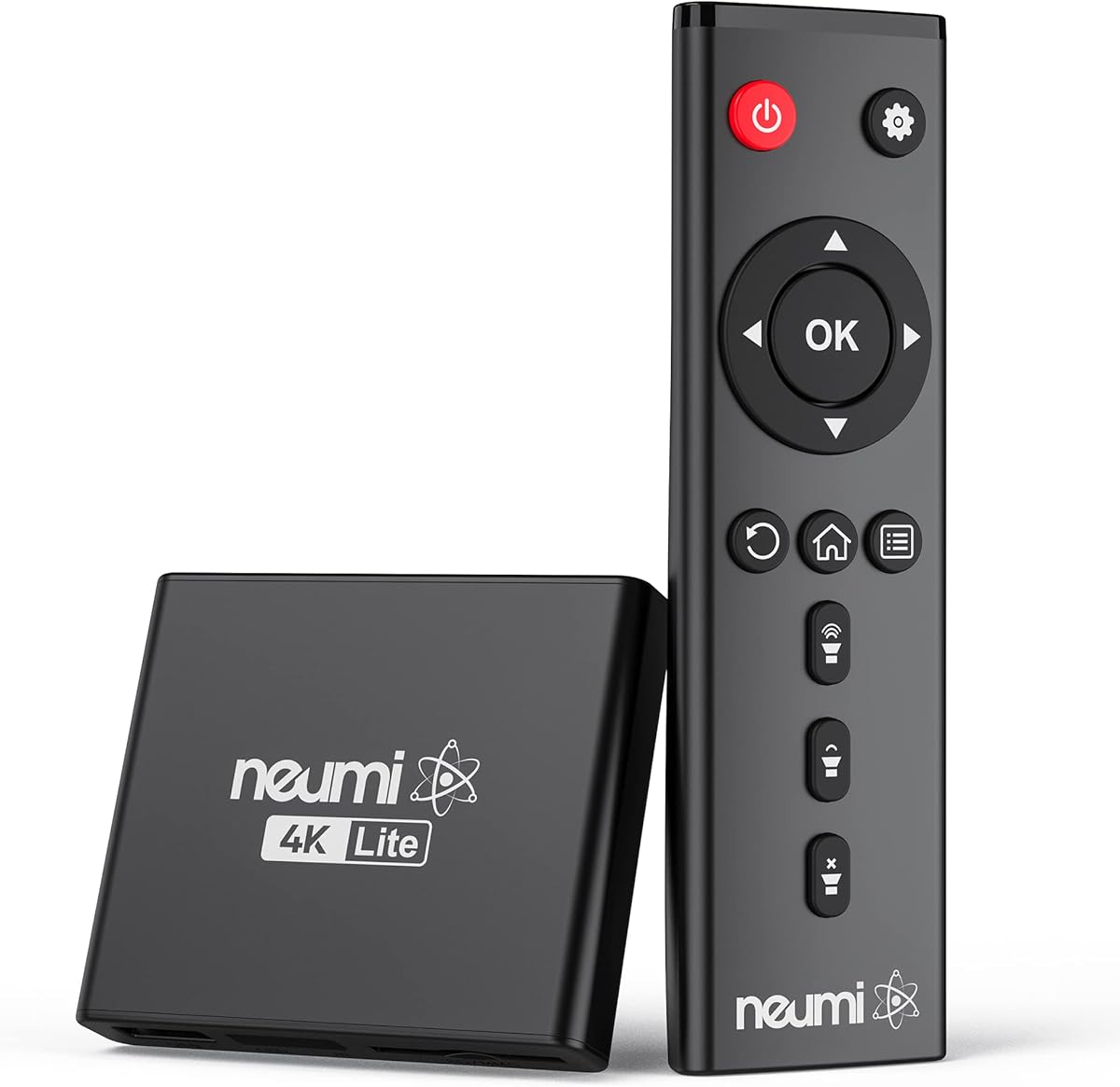
The NEUMI Atom 4K Lite has a 4.3 rating, the highest among the dedicated media players in this comparison. It combines high-resolution playback with an unusual trigger input that expands its usefulness for interactive signage, galleries, and installations. Although it is priced as a premium option, its feature set targets more specialized needs than ordinary home use.
We may earn a commission when you buy through this link, at no additional cost to you.
Its HDMI output supports 2160p at 60Hz, while supported video files include H.265/HEVC and H.264/AVC content up to 4096×2304 at 30fps and 200mbps. It reads USB hard drives up to 8TB and SD cards up to 1TB, supporting FAT32, exFAT, and NTFS. Automatic playback, repeat, continuous looping, and resume behavior suit displays that operate independently.
The distinguishing feature is the trigger sensor input. With an optional push-button or motion sensor, one video can loop until another is triggered, enabling interactive presentations or special effects. Those sensors are sold separately, and the trigger input does not make every installation complex. The device also lacks a built-in drive enclosure, requiring external media.
This is the best premium pick for installers who need 4K quality and trigger-driven behavior. It is also a strong choice for a compact home media player when 60Hz 4K output is important. Choose it over simpler models if interactive control is a genuine requirement; otherwise, a standard signage player may be more economical.
The optional trigger input lets a chosen loop continue until another file is requested. That makes the player useful for guided displays, gallery stations, and audience-triggered experiences.
Despite its small size, the player supports 2160p at 60Hz output, surround-sound feeds to compatible receivers, and files up to 200mbps in the listed formats.
We may earn a commission when you buy through this link, at no additional cost to you.
The ACEMAX 4K HDD Player has a 3.5 rating and combines a digital media player with a 2.5-inch SATA HDD or SSD enclosure. That two-in-one design is appealing when a single unit must both store content and feed it to a television, projector, or unattended display.
We may earn a commission when you buy through this link, at no additional cost to you.
It supports HDMI output up to 4K at 60Hz and H.265 10bit/HEVC decoding. Content can come from an installed SATA drive, USB drive, or microSD card, while an aluminum housing is intended to dissipate heat during extended operation. Automatic startup, continuous repeat, and resume from the previous position make it practical for retail, exhibition, office, and menu-board displays.
A compatible 2.5-inch drive is not included, and some drives may require reformatting. The listing lists several acceptable file systems for different operating systems, but storage capacity can also affect recognition on certain game consoles. Its 3.5 rating is lower than the other dedicated players, so buyers should pay particular attention to the media formats they intend to use.
This model makes sense for users who value an integrated enclosure and 4K60 output more than a polished remote interface or a broad codec list. It is worth considering when the display will remain in one location and benefit from permanent internal storage. For basic playback, a simpler USB player may offer greater ease of use.
A compatible 2.5-inch SATA HDD or SSD can be installed directly inside the metal case. USB and microSD remain available when removable media or separate file sources are more convenient.
Auto play, loop, and resume functions minimize interaction after installation. Offline operation also keeps the display independent from network availability or streaming accounts.
We may earn a commission when you buy through this link, at no additional cost to you.
The 4K30 Media Player has a 4.0 rating and offers a broad combination of video, audio, storage, and presentation features. Its aluminum enclosure and included remote make it a familiar option for home theaters, offices, and displays that may rotate between landscape and portrait orientations.
We may earn a commission when you buy through this link, at no additional cost to you.
It plays 4K files at 30Hz, including MKV, MP4, MOV, TS, VOB, and other listed containers. Storage options include TF cards, USB flash drives up to 128GB, and USB hard drives up to 8TB. The two USB ports cannot read both storage devices simultaneously, but a mouse or keyboard can be connected for operation, and the player also supports PPT documents.
Audio connectivity is a major strength. HDMI can deliver up to 7.1 surround sound, while optical and composite AV outputs can route MP3 or WAV playback to external speakers. Embedded and external subtitle formats including SRT, SMI, SUB, and SSA are supported, and horizontal or vertical display modes support unusual mounting arrangements.
Its main limitation is the 30Hz maximum for 4K, which is less fluid than 60Hz models. Some high-bitrate 4K content may also exceed file-size limits associated with the listed FAT32 and NTFS configurations. It remains a strong option when broad formats, flexible audio routing, and subtitle support are more important than the highest refresh rate.
Support for horizontal and vertical screens makes this model useful for tall digital panels and portrait installations where conventional television playback would not fit.
HDMI, optical audio, and AV outputs provide several routes to a television or sound system. Subtitle support improves the experience for films and multilingual content.
We may earn a commission when you buy through this link, at no additional cost to you.
The 4K30 HDMI Media Player has a 4.2 rating, making it the highest-rated dedicated player in the group. Its appeal comes from broad file compatibility and a wide selection of outputs. It can serve as a straightforward home media player or operate in advertising and multimedia environments.
We may earn a commission when you buy through this link, at no additional cost to you.
Video output reaches 4K at 30Hz through HDMI, and the listed formats cover common MP4, MKV, AVI, MOV, TS, ISO, FLV, WMV, and MPEG-based files. USB hard drives up to 8TB and USB drives or SD cards up to 128GB are supported. The listing also describes direct playback of files copied from compatible Blu-ray discs when they are placed in the first-level directory.
The player includes HDMI, fiber-optic, VGA, and composite AV connections. HDMI supports up to 7.1 surround sound, while optical and AV outputs can send MP3 or WAV files to external speakers. It also handles subtitle files and presents a long list of photo and audio formats, although actual compatibility still depends on each file's encoding.
Its most important compromise is the 30Hz ceiling for 4K. Buyers seeking smoother 60Hz output should examine the models specified for that standard. Even so, this product is a strong all-purpose choice for users who value many file types, flexible outputs, and the highest rating among the dedicated media players.
The long compatibility list covers several generations of common containers and codecs. That variety is useful when a library contains files from different cameras, phones, and editing software.
HDMI handles modern digital displays, VGA supports compatible monitors and projectors, and analog AV serves older equipment. Optical output provides another route for external audio.
We may earn a commission when you buy through this link, at no additional cost to you.
The WD 2TB Elements Portable External Hard Drive has a 4.7 rating and is the highest-rated product in the guide. Unlike the dedicated media players, it is a storage device rather than a player. Its role is to supply media files to a compatible external hard drive media player or computer.
We may earn a commission when you buy through this link, at no additional cost to you.
Its small, lightweight enclosure houses 2TB of capacity, while the USB 3.2 Gen 1 interface supports transfer speeds up to 5Gbps. The listing describes broad consumer use for photos, videos, music, and documents. Plug-and-play operation and stated Windows and Mac compatibility make it convenient to move a media library between systems.
There is no HDMI output, remote control, decoding capability, or loop function built into the drive. Users must connect it to a separate media player that supports an external hard drive of this type. The file system and connection requirements of the selected player should be checked before use, particularly for devices that require MBR partitions.
This is a good storage choice for readers who already own a compatible player or want to assemble a portable media system. It may also be useful as the storage half of one of the two-in-one HDD enclosure players. It should not be chosen as the sole purchase when the requirement is a device that can directly output video to a television.
Two terabytes provides substantial room for high-resolution video collections, photographs, and music. The compact enclosure makes the drive easier to transport than a desktop storage solution.
The drive's stated Windows and Mac support and plug-and-play design simplify preparation and transfer. It can serve as a media source for a computer or compatible standalone player.
We may earn a commission when you buy through this link, at no additional cost to you.
The 4K60 HDD Enclosure Player has a perfect 5.0 rating and is the most highly rated item in the guide. It combines a 4K media player with a 2.5-inch SATA hard drive enclosure, creating a compact system for both storing and displaying media.
We may earn a commission when you buy through this link, at no additional cost to you.
It can play files directly from an internal SATA hard drive, USB flash drives, Type-C storage, or SD cards. The included Type-C cable can also transfer data from the installed drive to a laptop. It supports FAT32, exFAT, NTFS, and Mac-formatted drives, along with mainstream MP4, MKV, MP3, PPT, and AVI files.
Playback reaches 4K at 60Hz, and H.265/HEVC decoding handles data rates up to 200Mbps. For commercial or home displays, auto loop, resume, repeat, and shuffle modes support videos, images, and audio. Continuous slideshows and random music playback broaden its use beyond conventional film viewing.
The hard drive is not included, so complete setup requires a compatible 2.5-inch SATA device. It also appears to be a newer listing, making its perfect rating less reflective of a long history of customer feedback than the ratings on established models. Even so, its combination of 4K60 output, enclosure functionality, and removable storage support makes it a compelling integrated choice.
Installing a 2.5-inch SATA drive creates a self-contained media source, while USB, Type-C, and SD inputs preserve flexibility for files that change frequently.
The player supports 4K at 60Hz and H.265 files up to 200Mbps, offering a stronger motion specification than the 30Hz models in the comparison.
We may earn a commission when you buy through this link, at no additional cost to you.
The Ultra HD 4K60 HDD Player has a 3.8 rating and combines two useful functions in one housing. It can serve as a digital media player for a television, monitor, or projector while also acting as an enclosure for a 2.5-inch SATA hard drive.
We may earn a commission when you buy through this link, at no additional cost to you.
Users can install an internal hard drive or connect USB, Type-C, or SD storage. The included Type-C cable enables data transfer or modification through a laptop. FAT32, exFAT, NTFS, and Mac-formatted drives are supported, and the player offers H.265/HEVC decoding up to 200Mbps with 4K output at 60Hz.
Automatic playback, resume, repeat, and shuffle modes suit both home theaters and digital signage. Photos and videos can play in sequence, while music supports random playback. The 3.8 rating indicates a less emphatic customer reception than the leading models, and the product's remote requires two AA batteries that are not included.
This player is worth considering for installers who want 4K60 output and an integrated enclosure without paying for a separate storage box. The hard drive must be purchased separately, so the final system cost depends on its capacity. For basic users, the same two-in-one benefit can be achieved only if internal storage is a priority.
Internal SATA storage, Type-C media, conventional USB drives, and SD cards can all serve as sources. That flexibility helps when a display uses permanent content alongside frequently changed files.
Auto play and resume make the player suitable for screens that should restart content after power is restored. Repeat and shuffle options accommodate different content types.
We may earn a commission when you buy through this link, at no additional cost to you.
The JLZNLC 4K Ultra HD media player has a 3.0 rating and combines local playback with an internal hard drive enclosure. Its feature set targets digital signage, menu boards, educational displays, and older televisions that need a simple source of local media.
We may earn a commission when you buy through this link, at no additional cost to you.
It plays 4K video up to 4096×2304 at 30fps and 200mbps through HDMI, with composite AV available for older CRTs or external audio systems. Supported files include MP4, MKV, AVI, MOV, MPG, VOB, M2TS, and TS using common H.265/HEVC, H.264/AVC, MPEG, and VC1 codecs.
Storage can come from a built-in 2.5-inch hard drive enclosure, USB hard drives up to 8TB, or microSD cards up to 1TB. FAT, FAT32, exFAT, and NTFS are supported. Automatic playback, continuous looping, resume behavior, and 90, 180, or 270-degree rotation support unattended and portrait installations.
Its 3.0 rating is the lowest in the group and warrants a more cautious recommendation. The 30Hz 4K ceiling also places it below 60Hz alternatives for smooth motion. It remains a functional option when its enclosure, rotation controls, and older-display compatibility matter most, but customers should verify their exact codec and file requirements first.
Configurable rotation is particularly useful for tall menu panels and vertically mounted screens where standard landscape output would waste display space.
The internal enclosure and external drive support provide several storage options, while composite AV keeps the player usable with older televisions and audio systems.
We may earn a commission when you buy through this link, at no additional cost to you.
The right choice depends primarily on display resolution, media formats, storage arrangement, and whether the unit needs to run continuously as digital signage.
A 4K-capable player does not necessarily deliver smooth 4K motion. Several models support 4096×2304 video but limit HDMI output to 30Hz, while others specify 4K at 60Hz. The receiving television, projector, or monitor must also support the selected resolution and refresh rate. For fast-moving sports, detailed animation, or premium home-theater viewing, 4K60 is the stronger target. For static signage and ordinary films on a 30Hz display, a 30Hz model can still provide a sharp image.
External hard drive support usually means the player can read media from a connected USB drive rather than providing storage inside its housing. Pay attention to maximum capacity, partition style, and filesystem requirements. Several listings support drives up to 8TB, while one model specifically calls for an MBR partition. FAT32, exFAT, and NTFS are common, but a player may accept only a subset. For integrated models, confirm that the enclosure accepts a 2.5-inch SATA HDD or SSD and note whether the drive is included.
A long format list does not guarantee that every file will play. Compatibility depends on the container, video codec, audio codec, bitrate, resolution, and storage format. H.265/HEVC is especially common for 4K, while H.264/AVC remains important for older and smaller files. Confirm that the media player supports the codec used by your files and pay attention to maximum bitrate and file-size limits. Testing representative videos before deploying a long unattended playlist is the safest approach.
HDMI is the preferred connection for modern televisions because it carries digital video and multichannel audio. Composite AV provides backward compatibility with older displays and can also send analog audio to a stereo system. Optical audio is useful for some home theaters, while VGA serves compatible monitors and projectors. If the player will feed an amplifier, check whether the required surround format and maximum channel count are supported. Matching the output to the display also reduces the need for additional adapters.
Automatic playback, endless looping, repeat, shuffle, and resume are central features for unattended displays. Auto play starts content after power is restored, while resume continues from the previous stopping point. A trigger input is useful when one video should play continuously and another should begin after a button press or motion event. Portrait rotation can support vertical menu boards. These features matter more for commercial signage than for ordinary home viewing.
A basic player accepts removable media but does not include a drive. A two-in-one model adds an internal 2.5-inch SATA enclosure, allowing the unit to store files directly while also playing them. Integrated designs can simplify cable management and make a display more self-contained, although users must install and format their own drive. Removable storage is more convenient for changing content or sharing files. A portable external drive can also serve as a media source for any compatible player.
An included remote makes menu navigation easier, especially when the player is hidden behind a television or mounted inside a cabinet. Some products also work with wireless air-mouse remotes, while other models accept a USB mouse or keyboard. Check whether the control method requires a clear line of sight. For business displays, automatic operation can reduce the need for continual remote use, but initial setup and occasional playlist changes still require accessible controls.
Compact players are convenient in entertainment centers and behind wall-mounted televisions, but continuous operation can generate heat. Aluminum or metal housings may help dissipate it more effectively than lightweight plastic cases. Adequate ventilation remains important, particularly for 4K decoding and an installed hard drive. A rugged case is less critical for a stationary home display than for portable use, where protection during carrying and access to suitable inputs matter more.
Begin by preparing the storage device in a file system supported by the player, then copy a short test video, a photo, and a music file before transferring the complete library. Connect the player to the intended display, select HDMI or AV as appropriate, and power on the screen before the player so the source is detected. Use the included remote to browse the storage and confirm playback settings.
For digital signage, create a dedicated folder containing only the intended playlist, enable automatic playback, and test loop and resume behavior. Use portrait rotation only when the physical screen is designed for that orientation, and confirm that all text remains inside the visible area. External hard drives should be connected directly to the player rather than through an unpowered hub unless the hub has its own reliable power supply.
Care for the system by allowing ventilation around the enclosure, using a stable power source, and handling the player and drive without abrupt disconnection. Safely eject removable media before unplugging it when the operating system permits. Periodically check that important videos still play and keep backup copies of valuable content, especially when the drive is used continuously for unattended display.
No. A player must support the file's container, video codec, audio codec, resolution, and bitrate. H.265/HEVC and H.264/AVC are common, but even a file with a familiar extension may exceed a model's size or bitrate limit. Testing a representative file before loading an entire playlist is advisable.
Most dedicated players in this guide operate entirely from local files and do not require Wi-Fi, streaming services, or subscriptions. Their offline operation is particularly useful for digital signage and displays in locations with unreliable internet access. A computer may still be needed to organize or copy media onto a drive.
Both can provide a 4096×2160-class image, but 60Hz can display twice as many frames per second as 30Hz. That difference is most noticeable in fast action, sports, and detailed animation. The television or projector must also support 60Hz at the selected 4K resolution, and file decoding must be fast enough to sustain that output.
Only with a model that includes a compatible 2.5-inch SATA HDD or SSD enclosure. The drive is generally not included, and it must use a supported file system and capacity. Players without an integrated enclosure require an external USB hard drive instead.
It may, provided the player has a compatible composite AV output and the television accepts the corresponding cable. HDMI is preferable for modern televisions because it carries digital video and multichannel audio. An external speaker can also be connected through AV when only the picture is sent over HDMI.
Capacity depends on the bitrate and duration of your files, and several players support hard drives up to 8TB. A high-quality library can consume substantial space, so calculate storage needs from the actual files rather than their projected duration alone. Also verify that the player's partition and filesystem requirements are met.
Store the presentation in a dedicated folder, enable automatic playback and looping, and test the sequence after every power interruption.
Confirm resume behavior, screen orientation, subtitle visibility, and audio routing before installing the player permanently.
Keep a backup copy of all signage files on separate storage.
A single player normally has one active output, so multiple independent screens usually require additional players.
Some installations use splitters or distribution equipment, but those add complexity and may not support 4K60 or embedded audio.
For simple household use, a compact dedicated player for each screen is often more reliable.
The Micca 4K Ultra-HD player is the strongest all-around recommendation because it combines 4K playback, large storage support, looping, resume behavior, rotation, and both modern and legacy outputs. The Black Mini 1080p player is a sensible budget option for standard Full-HD use, while the NEUMI Atom 4K Lite stands out for its premium 4K60 capability and optional sensor trigger.
Prioritize the features your setup genuinely requires. Home users should focus on codec support, storage limits, and display compatibility; signage buyers should place greater weight on auto play, looping, resume, orientation, cooling, and remote accessibility. Models with integrated SATA enclosures reduce cable clutter, while removable storage remains more convenient when content changes regularly.
Finally, check current prices, availability, included accessories, and the latest listing details before ordering. Media-player specifications can vary between versions, and storage requirements differ by file format. Confirming compatibility with your television, audio equipment, and actual media files will provide the most reliable result.