
GLOTRENDS M.2 NVMe to PCIe 4.0 X4 Adapter with Heatsink for NVMe SSD
4.6Editor score
Supports PCIe 4.0 and 3.0
Includes two mounting brackets
Works with all NVMe sizes
Our Pcie NVME Adapter guide compares ten options for single-drive, dual-drive, and high-capacity setups, highlighting compatibility, cooling, and features.
A PCIe NVMe adapter lets you install an M.2 solid-state drive in a desktop that has an unused expansion slot but lacks a convenient native M.2 connector. The right card should support your drive’s key, protocol, physical length, and intended PCIe generation while also fitting the chassis and allowing proper cooling.
This guide compares ten single-drive, dual-drive, and multi-drive adapters based on their documented specifications. We examine NVMe and AHCI compatibility, supported M.2 sizes, PCIe slot requirements, heatsink provisions, mounting hardware, operating-system support, and special features such as bifurcation or tool-free installation.
Each review identifies where a product fits best and explains any limitations, particularly the distinction between M.2 NVMe and M.2 SATA drives. The list ranges from straightforward passive adapters to specialized cards for high-capacity systems, and availability, configuration details, and prices can change over time.
4.6Editor score
4.7Editor score

4.6Editor score
The table below compares the ten adapters by drive support, slot design, cooling, and installation requirements, making it easier to identify the option that matches your motherboard and storage plan.




The GLOTRENDS M.2 NVMe to PCIe 4.0 X4 Adapter is a well-rounded way to add storage through a desktop’s expansion slot. Its 4.6 rating reflects a strong combination of broad compatibility, cooling hardware, and useful installation accessories. The adapter supports PCIe 4.0 and 3.0 M.2 NVMe drives in 2230, 2242, 2260, and 2280 formats.
We may earn a commission when you buy through this link, at no additional cost to you.
A particularly valuable feature is the lack of a stated capacity limit, allowing compatible 2TB and 4TB NVMe drives according to the product information. The card can operate in x4, x8, and x16 slots, although the motherboard, processor, and SSD must collectively support PCIe 4.0 for the full generation’s performance. Its included heatsink is documented to reduce drive temperatures by approximately 5–20°C.
The package also includes both a regular 12-centimeter bracket and an 8-centimeter low-profile bracket, making it easier to accommodate different chassis layouts. Compatibility is listed for Windows 11, 10, and 8, Linux, and Mac OS. The principal limitations are that M.2 SATA drives are unsupported, PCIe x1 slots are not suitable, and some older motherboards may use the SSD as storage without allowing it to boot the operating system.
This is an excellent choice for a builder who wants a straightforward single-drive upgrade without paying for an active controller or complicated multi-drive setup. Check the physical clearance around the slot, confirm your drive is M-key NVMe, and make sure the motherboard BIOS supports PCIe NVMe booting if the drive will serve as a system disk.
The x4-to-x16 physical design gives builders several placement options, while the two bracket lengths help with cases that restrict the expansion area. The adapter is best suited to systems with a physically usable x4, x8, or x16 slot.
The included heatsink helps an NVMe drive dissipate heat during sustained transfers. Proper contact between the drive and heatsink is still important, and adequate airflow around the card remains beneficial.
We may earn a commission when you buy through this link, at no additional cost to you.
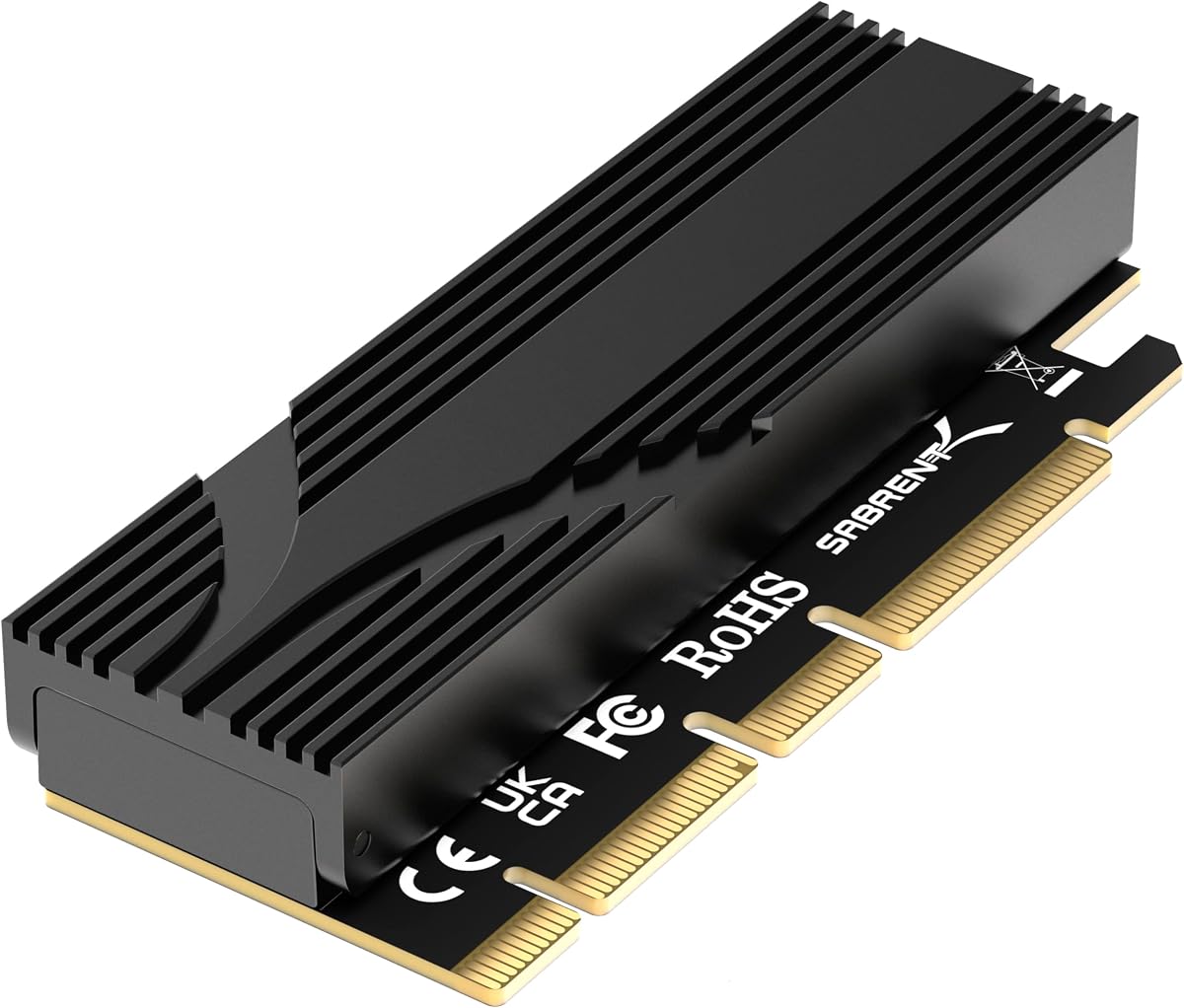
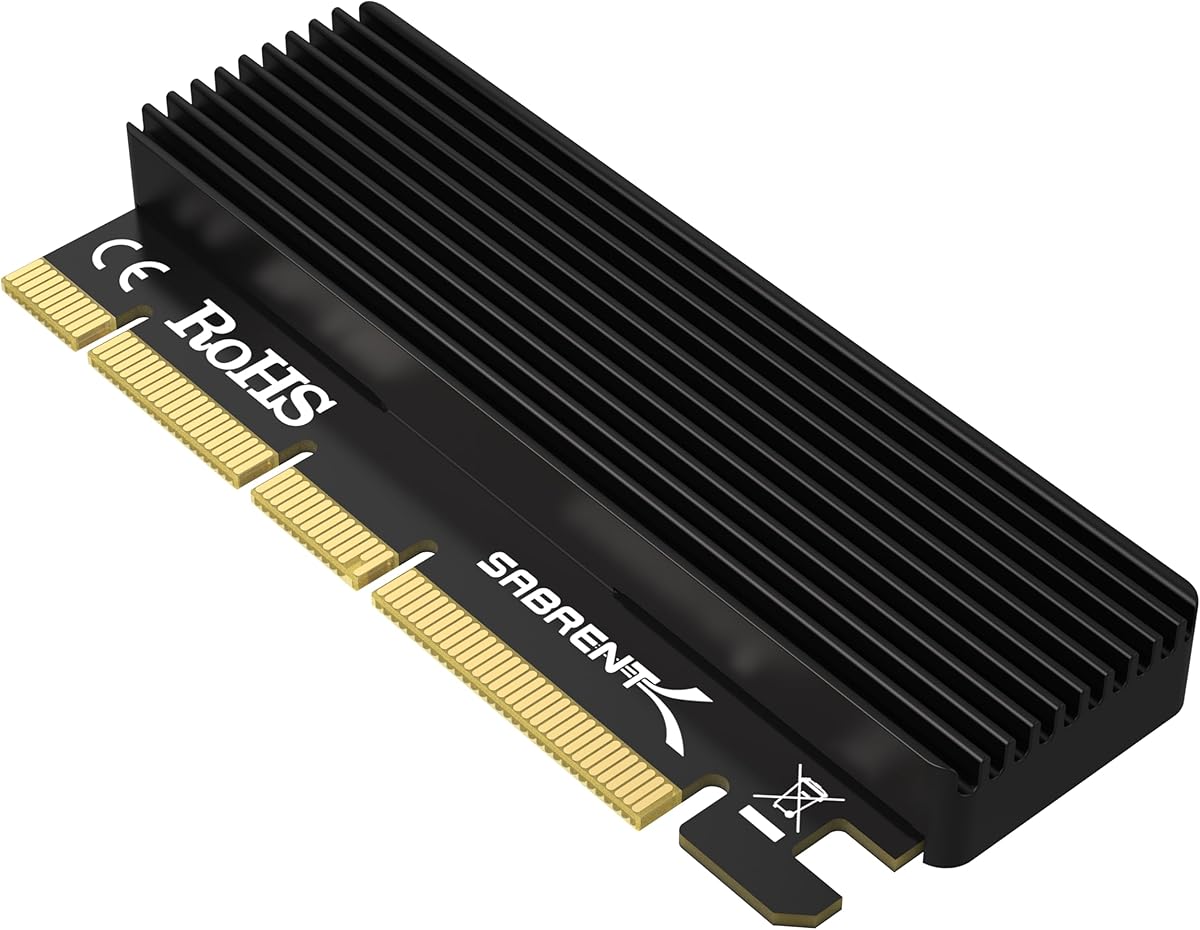
The SABRENT M.2 NVMe SSD to PCIe X16/X8/X4 Adapter Card is a capable general-purpose option for adding an NVMe drive to a desktop. It holds a 4.5 rating and distinguishes itself with straightforward installation, included thermal hardware, and support for all four common M.2 lengths: 2230, 2242, 2260, and 2280.
We may earn a commission when you buy through this link, at no additional cost to you.
The passive design connects the drive directly to the motherboard’s PCIe lanes rather than relying on an onboard controller. That makes the adapter versatile across Windows, Linux, and other supported systems, but it also places responsibility on the host platform. Your motherboard must recognize NVMe over PCIe, and older systems may require the appropriate Windows hotfix or manufacturer-provided driver.
The aluminum heatsink and thermal pads support heat dissipation during sustained workloads. Instructions call for placing one pad between the SSD and heatsink, with spare pads available for different drive thicknesses. A full-length physical x16 edge allows the card to fit x16, x8, and x4 slots, though it cannot physically use an x1 connector.
This SABRENT adapter suits users who value a simple installation process and effective passive cooling. It is less appropriate for a system with only x1 expansion slots or for users expecting guaranteed NVMe boot support on an old motherboard. The SSD itself is not included, and a new drive will need the usual initialization and formatting process.
Because there is no onboard controller, the card inherits NVMe support from the motherboard. This keeps the installation direct and broad, provided the BIOS and operating system recognize the selected drive.
The tool-free arrangement simplifies installing and removing a drive. It is particularly useful for systems that may receive temporary storage upgrades or whose owner expects to transfer SSDs between machines.
We may earn a commission when you buy through this link, at no additional cost to you.
The SABRENT M.2 NVMe SSD to PCIe x16 Adapter Card, Gen5, Heatsink is the strongest all-around choice in this comparison. It has a 4.7 rating, the highest among the listed products, and combines modern PCIe 5.0 capability with a full-length physical connector, tool-free SSD mounting, and a built-in aluminum heatsink.
We may earn a commission when you buy through this link, at no additional cost to you.
The card operates over an x4 link and can support up to PCIe 5.0 when installed in a compatible Gen5 host slot. In a Gen4 or Gen3 slot, it operates at the available generation, so the adapter cannot create additional bandwidth that the motherboard does not provide. Its single-drive architecture means that motherboard bifurcation support is unnecessary, which simplifies compatibility compared with a four-drive card.
M.2 M-key NVMe drives in 2230, 2242, 2260, and 2280 sizes are supported, and the information also lists older B+M-key PCIe AHCI or NVMe drives. SATA-only M.2 drives are not compatible. The tool-free design makes the drive easy to install or remove, while the integrated aluminum heatsink and thermal padding provide passive cooling without adding fan noise.
This adapter is the most complete choice for a new or upgraded high-performance desktop, particularly when a Gen5 slot is available. Builders should verify slot generation, physical clearance, and cooling space. A graphics card, large CPU cooler, or case fan may prevent the full-length card from fitting even when the connector itself is unobstructed.
The Gen5-capable connection prepares a compatible system for current high-bandwidth NVMe drives. It remains backward compatible with slower host generations, but the resulting speed always follows the motherboard slot and connected drive.
A single M.2 position eliminates the BIOS bifurcation and software-raid considerations associated with four-drive adapters. It is an easier way to add substantial NVMe storage to most modern desktop platforms.
We may earn a commission when you buy through this link, at no additional cost to you.
The M.2 NVME to PCIe 4.0 x4 Adapter with Aluminum Heatsink Solution is a direct solution for adding a single NVMe drive to a desktop with a suitable PCIe slot. Its 4.6 rating indicates strong user satisfaction, while the documented support for 2280, 2260, 2242, and 2230mm drives makes it useful with a wide assortment of M.2 SSDs.
We may earn a commission when you buy through this link, at no additional cost to you.
The adapter works in physical PCIe x4, x8, or x16 slots and is built around the M-key NVMe format. Its aluminum heatsink is described as providing a cooling effect of approximately 5–20°C. The product information also lists recognized examples from Samsung, Plextor, and Kingston, illustrating the range of drives that can be used with this type of adapter.
Because the card exposes the system’s PCIe lanes directly, motherboard support remains important. The system must have a compatible slot and a BIOS or operating system capable of reading NVMe storage over PCIe. The drive should be an M.2 PCIe NVMe product rather than an M.2 SATA SSD, as the latter uses a different interface and is not interchangeable with this adapter.
This option is attractive for a basic storage expansion where the user wants one modern drive, a broad range of supported lengths, and a heatsink without the complexity of a multi-drive controller. Confirm the physical space around the slot and ensure the SSD is secured and properly attached to the thermal solution before operating the system.
The adapter focuses on one M.2 position and direct PCIe connectivity. That simplicity makes it practical for extending storage in compatible desktops without introducing RAID or bifurcation requirements.
The aluminum heatsink can help the attached drive maintain higher performance during sustained workloads. Users should ensure solid contact and avoid blocking airflow around the expansion card.
We may earn a commission when you buy through this link, at no additional cost to you.
The M.2 NVMe to PCIe X4 Adapter with Heatsink stands out for its unusually complete accessory package. It carries a 4.6 rating and is designed for PCIe Gen4 and Gen3 NVMe SSDs. Compatible M.2 lengths include 2280, 2260, 2242, and 2230mm, and AHCI SSDs are also listed as supported.
We may earn a commission when you buy through this link, at no additional cost to you.
Its physical x4 interface fits corresponding x4, x8, and x16 motherboard slots. The card is backward compatible with earlier PCIe generations, although actual transfer performance is determined by the slowest participating component. The documentation cites full-speed operation for PCIe 3.0 and 4.0 x4 configurations rather than promising performance beyond what the host can provide.
The supplied accessories are extensive. Buyers receive the adapter, spare SSD bolts, a screwdriver, low-profile and regular-profile brackets, thin and thick heat-conducting pads, an aluminum heatsink, heatsink fixing springs, PCB fixing screws, and bracket fixing screws. Two thermal pads allow the installer to account for different SSD thicknesses when positioning the drive beneath the heatsink.
This is a well-equipped choice for a builder assembling or upgrading a desktop, particularly one who wants a low-profile option and the necessary mounting hardware in one package. Operating-system support includes current Windows releases, Windows Server 2012 R2, Linux, Fedora, SUSE, Ubuntu, and Red Hat. Windows 7 and Windows Server 2008 R2 require an additional NVMe driver, and motherboard BIOS support is still necessary.
The included screws, tools, brackets, and thermal materials reduce the chance of a missing-part installation problem. It is a particularly complete package for a first-time PCIe storage upgrade.
Including both thin and thick pads helps maintain contact between the SSD and heatsink. Users should choose the appropriate pad and confirm that the heat sink is secured before testing the drive.
We may earn a commission when you buy through this link, at no additional cost to you.
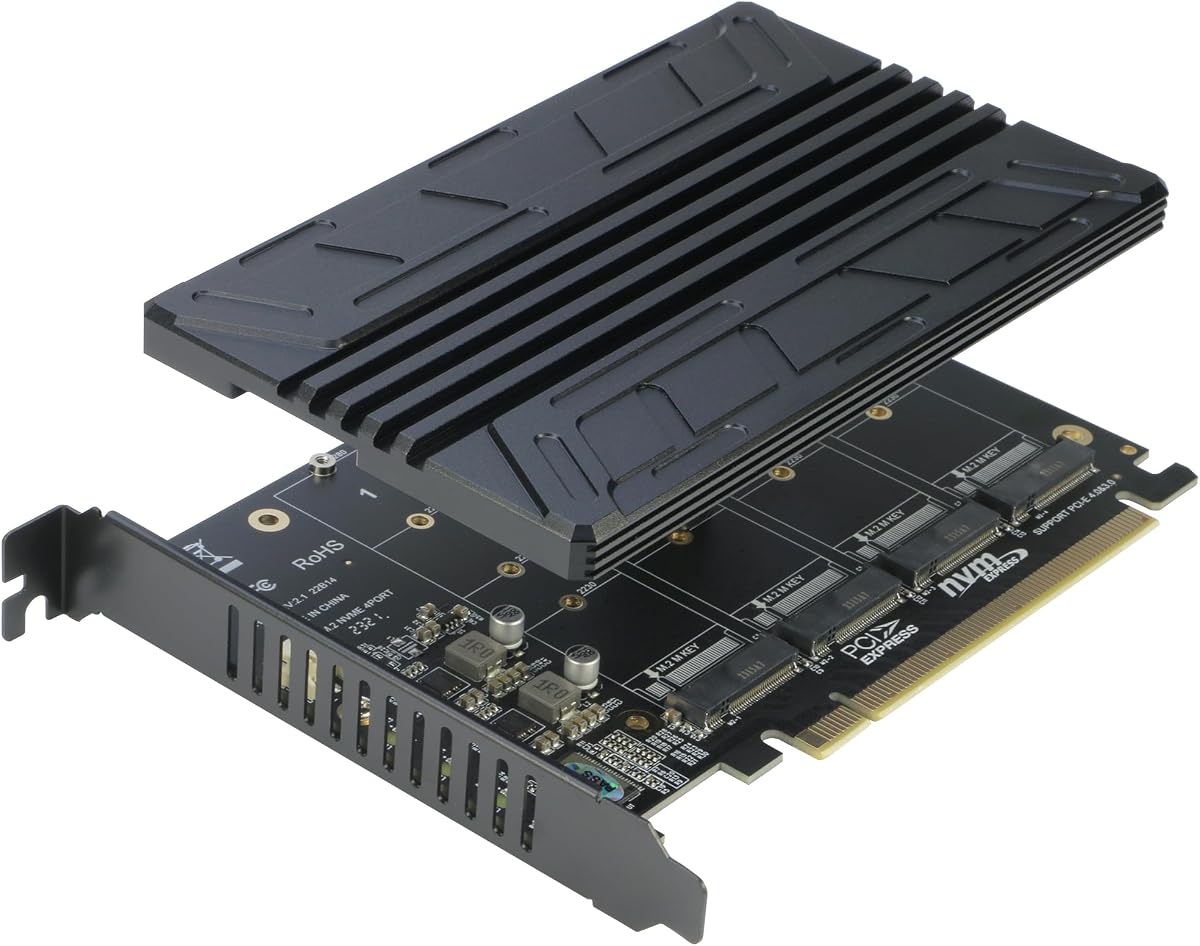
The RIITOP Quad PCIe NVMe Adapter is built for users who want to connect as many as four NVMe SSDs through one physical x16 slot. It has a 4.4 rating and supports PCIe 4.0 or 3.0 x16 slots, provided the motherboard supports PCIe x16 bifurcation and can configure the connection as x4 by x4 by x4 by x4.
We may earn a commission when you buy through this link, at no additional cost to you.
This requirement is the card’s most important consideration. Compatible platforms are described as including many server motherboards and X299 or X399 boards, but the exact system must be checked in its documentation. The processor also needs enough PCIe channels. Without bifurcation, only one of the installed M.2 drives may be recognized, which makes verifying the BIOS and board manual essential before purchase.
All four standard M.2 lengths are supported, from compact 2230 modules to 2280 drives. The card uses a shared 0.32-inch heatsink and individual LED indicators for drive activity. It does not support SATA-based B+M-key SSDs, and it does not provide hardware RAID. Windows 10 software RAID or third-party RAID software can be used, with the product information recommending that the four SSDs be the same model.
This adapter makes the most sense for content creators, developers, homelab operators, and server builders who need high aggregate storage capacity. It is a specialized solution rather than a general-purpose upgrade. Physical clearance, card length, chassis support, case airflow, and the amount of CPU-connected PCIe bandwidth all deserve careful evaluation before installation.
Four drive positions allow a compatible system to aggregate substantial NVMe storage. That scale is useful for large project libraries, virtual-machine data, and media collections where a single drive would be limiting.
The motherboard must split one physical x16 slot into four x4 links. Without that capability, the attractive four-drive layout may not appear to the system, so platform research is essential.
We may earn a commission when you buy through this link, at no additional cost to you.
The PCIe NVMe Adapter Card with Heat Sink is intended to bring NVMe storage to a broad range of desktop motherboards. It has a 4.4 rating, a full-length x16 physical edge, and support for use in x4, x8, or x16 slots. The adapter accepts 2230, 2242, 2260, and 2280 M.2 NVMe SSDs.
We may earn a commission when you buy through this link, at no additional cost to you.
Its main appeal is accessibility. The design uses a direct PCIe connection, has a plug-and-play installation approach, and does not require an additional driver according to the product information. The motherboard must still provide a usable PCIe slot and recognize the drive, particularly if the SSD is intended to boot Windows or another operating system.
Cooling is handled with an included heat sink and mounting hardware. The card’s gold-plated connectors are intended to support stable signal transmission, while a quality PCB forms the card’s base. Users still need to ensure that the heat sink makes proper contact with the drive and that the card receives enough case airflow during heavy workloads.
This adapter is a practical option for an older desktop with a free expansion slot and no native M.2 position. It offers a straightforward path to faster NVMe storage without changing the drive itself. Check the chassis dimensions, slot spacing, and graphics-card clearance before ordering, as the full-length connector can be inconvenient in tightly packed cases.
A desktop that lacks an accessible M.2 connector can often use an unused PCIe slot for NVMe expansion. Native platform support still determines whether the drive appears and whether it can boot the system.
The PCB and gold-plated connector provide a straightforward path between the motherboard slot and the M.2 drive. A correctly seated card and secure drive mounting are essential for reliable operation.
We may earn a commission when you buy through this link, at no additional cost to you.
The StarTech M.2 PCIe SSD Adapter, model PEX4M2E1, is the premium-branded choice in this roundup. It holds a 4.6 rating and supports both NVMe and AHCI M.2 SSDs through a PCIe 3.0 x4 connection. Unlike several competing cards, its drive compatibility is not limited exclusively to NVMe, making it a flexible option for systems with an older AHCI M.2 drive.
We may earn a commission when you buy through this link, at no additional cost to you.
It works in PCIe 3.0 motherboards and remains backward compatible with PCIe 2.0 and 1.0. Supported drive lengths are listed as 2242, 2260, 2280, and 22110. The physical card can also be used in x8 and x16 slots, while native operating-system support is presented as a simple installation path.
Physical flexibility is another strength. The adapter includes both a full-profile bracket and a half-height low-profile bracket, allowing it to fit small-form-factor computers as well as standard towers. StarTech also backs the product with a two-year warranty and provides free 24/5 North American support in multiple languages, which adds reassurance for professional integrators and system builders.
The main limitation is that the adapter is designed around PCIe 3.0 rather than newer generations. That is not a problem for a Gen3-capable NVMe drive, but it will not unlock Gen4 or Gen5 bandwidth. It is best for legacy upgrades, professional workstation use, or builders who value AHCI compatibility, included brackets, and established support over cutting-edge host speed.
Supporting both protocols gives the adapter broader value than an NVMe-only card. It can be useful when upgrading a system that already contains an M.2 AHCI drive or when a used M.2 drive is more readily available.
The included bracket set supports different chassis profiles, while the stated warranty and support coverage suit managed deployments. The adapter remains a PCIe 3.0 solution and should not be mistaken for a newer-generation upgrade.
We may earn a commission when you buy through this link, at no additional cost to you.
The ELUTENG Dual M.2 NVMe to PCIe Adapter is designed for systems that need two NVMe drives rather than one. It has a 4.2 rating and accepts 2280, 2260, 2242, and 2230 M.2 NVMe SSDs. The card runs two drives simultaneously and draws power from the PCIe slot, so no external power adapter is required.
We may earn a commission when you buy through this link, at no additional cost to you.
Its compatibility with x1, x4, x8, and x16 physical slots is unusually broad, though using two drives consumes more PCIe lane resources than a single-drive adapter. M.2 SATA SSDs are not supported, despite the reference to B+M-key compatibility in the product title. The included drive positions are intended for PCIe NVMe devices.
Cooling is handled with copper strips, a multi-hole design, and two included heatsinks. Solid-state capacitors are used for voltage regulation, and the listed system compatibility includes Windows 11, 10, 8, 7, Linux, and Mac OS. A new drive must still be initialized and formatted before the host can use it.
This adapter offers a practical middle ground between a simple single-drive card and a complex four-drive bifurcation model. It is most appropriate for a user who wants mirrored data, separate work and scratch volumes, or simply more NVMe capacity without installing a multi-drive enterprise controller. Review the stated 5Gbps data-transfer figure carefully when comparing it with modern high-speed NVMe configurations.
The dual layout provides a straightforward way to add storage while keeping power within the PCIe slot. That simplifies cable management, although motherboard lane availability remains important.
Copper strips and individual heatsinks help manage heat from two SSDs. Airflow and correct heatsink contact remain important, especially when both drives operate under sustained heavy workloads.
We may earn a commission when you buy through this link, at no additional cost to you.
The ELUTENG M.2 NVMe PCIe Adapter with Aluminum Heatsink Low Profile Bracket is a useful option for compact desktops and straightforward storage upgrades. It carries a 4.4 rating, accepts M-key NVMe SSDs, and can be installed in physical x1, x4, x8, or x16 slots. Its low-profile bracket is designed to make installation easier in space-constrained systems.
We may earn a commission when you buy through this link, at no additional cost to you.
The adapter supports PCIe 1.0 through 4.0, although the listed maximum read/write speed of 16Gb/s is a theoretical figure. Real performance depends on the motherboard slot, processor platform, SSD, and operating environment. A Gen4 drive in an older slot will still be limited by that slot, while a Gen4-capable system can make better use of the adapter’s wider lane support.
Its aluminum heatsink is intended to reduce drive temperature and help stabilize performance. Solid-state capacitors provide voltage regulation, and the product is described as plug-and-play without an additional driver on modern systems. For booting from the SSD, the motherboard BIOS must support PCIe booting. Windows 7 and earlier operating systems require an appropriate NVMe driver.
This ELUTENG card is a sensible pick for a single-drive upgrade in a compact or mixed-slot desktop. It provides broad physical compatibility, passive cooling, and a low-profile option without the complexities of multiple drives. M.2 SATA drives remain incompatible, so users should confirm that the drive label specifies PCIe NVMe rather than SATA before ordering.
The included low-profile bracket helps the adapter fit systems where a full-height bracket would conflict with the chassis or another component. Case dimensions and the position of the selected slot should still be checked.
The aluminum heatsink provides a practical way to control SSD temperature without adding a powered fan. Proper mounting and unobstructed airflow help it perform consistently under sustained transfers.
We may earn a commission when you buy through this link, at no additional cost to you.
The best PCIe NVMe adapter is not simply the one with the newest generation label; it is the card that supports your drive, motherboard, chassis, cooling needs, and intended storage layout.
In short, choose an adapter explicitly compatible with M.2 PCIe NVMe and the exact key used by your drive.
In short, prioritize the slowest part of the connection and check the motherboard manual for its slot-generation and lane-routing details.
In short, confirm the slot, card length, bracket height, and nearby components before ordering, rather than relying on connector shape alone.
In short, match the adapter to the drive’s physical size and mounting hole, then verify protocol compatibility separately.
In short, prioritize an included or easily fitted heatsink, proper thermal-pad contact, and enough airflow around the adapter.
In short, check NVMe recognition, PCIe booting, and any required bifurcation setting before purchasing or installing the card.
In short, use a single-drive design for simplicity, a dual-drive design for modest expansion, and a quad-drive card only when the platform explicitly supports its architecture.
In short, check that the required screws, tools, brackets, and thermal materials are included so the adapter can be installed without improvising.
Before installation, power down the computer completely, disconnect the power cable, and use appropriate anti-static precautions. Open the case, identify the intended PCIe slot, and confirm that its physical length, lane width, and surrounding clearance match the adapter. If the system uses a graphics card or other large expansion device, plan the order of removal carefully rather than forcing the card past connected cables.
Install the M.2 SSD by aligning its connector and mounting position with the adapter. Tighten the retaining screw or engage the tool-free lock, then apply the appropriate thermal pad and secure the heatsink. Make sure the adapter’s bracket matches the case requirement. Reinstall any removed cards, connect power and data cables, and verify that the motherboard detects the adapter before reinstalling the operating system or closing the case.
After boot, use the operating system’s storage manager to initialize a new drive, assign a drive letter if desired, and format it for the intended use. Apply any firmware update provided by the SSD manufacturer, keep the heatsink firmly attached, and maintain unobstructed airflow around the card. If the drive is not detected, reseat it, confirm NVMe support in the BIOS, review bifurcation settings for multi-drive models, and install the appropriate driver for an older operating system.
Yes, but the motherboard must support both NVMe storage and booting from a PCIe device. Many modern systems meet those requirements, while some older boards can read the drive as secondary storage but cannot boot from it. Update the BIOS before installation and check the motherboard manual for PCIe boot settings. If the drive is recognized but not offered as a boot device, that usually indicates a platform limitation rather than a physical adapter problem.
Generally, no. M.2 SATA and M.2 NVMe use different protocols even though many of the drives share the same physical shape. Nearly all adapters in this guide are explicitly limited to M.2 PCIe NVMe drives, with some also supporting PCIe AHCI. Check the label on the drive and the adapter’s compatibility statement, and do not rely on the fact that a SATA module appears to fit the connector.
Only when the rest of the platform supports the faster connection. The motherboard slot, processor platform, adapter, SSD, and software path all influence performance. A Gen5 adapter installed in a Gen3 slot will operate at Gen3, and a Gen5 SSD cannot exceed the capability of the host interface. Even with a compatible Gen5 platform, the actual result also depends on the drive itself and the workload being performed.
Often yes, because a longer physical x16 connector can usually fit into a shorter x16-based slot, such as x8 or x4, provided the case has enough clearance. The link will normally operate at the slot’s available lane width. A physical x1 slot is different and generally too short for these full-size cards. Confirm both the connector type and the space around the slot before installation.
Bifurcation lets a motherboard divide one physical x16 slot into several smaller PCIe links, commonly four x4 connections. It is required for the RIITOP quad-drive adapter to expose all four M.2 positions to the system. Without the appropriate BIOS setting and motherboard support, only one drive may be recognized. Single-drive adapters generally avoid this issue, while a two-drive card should be checked for lane-routing requirements.
The adapters in this guide are designed to draw power from the motherboard’s PCIe slot, so an external SATA or Molex power connection is not normally needed. A large NVMe drive under heavy sustained load can still consume meaningful power, so the system’s power supply and PCIe power delivery should be adequate. Follow the drive and adapter manufacturers’ guidance and use the operating system’s health monitoring tools to check for abnormal reports.
A drive appearing in the BIOS confirms basic hardware detection, but the operating system may still need it initialized, assigned a drive letter, and formatted. Open Disk Management or the storage utility for your operating system and look for an unallocated volume. If the drive does not appear there, check the adapter seating, BIOS NVMe support, and any required driver, especially on Windows 7 or an older system.
A heatsink is highly recommended, especially for sustained transfers, compact cases, or high-power SSDs. Adapter cards can position the drive in a warmer or less ventilated area than a native motherboard M.2 socket. The included heat solution should touch the proper area of the drive, and case airflow should not be blocked. Monitor drive temperature and performance because thermal throttling can reduce transfer speed during extended workloads.
The SABRENT PCIe Gen5 adapter is the best overall choice because it combines a 4.7 rating, Gen5-capable x4 connectivity, tool-free mounting, and a built-in heatsink without requiring motherboard bifurcation. The GLOTRENDS PCIe 4.0 X4 adapter is the strongest budget-oriented option, offering broad drive-size support, two brackets, and a documented absence of a capacity limit.
For other needs, the StarTech PEX4M2E1 stands out as the premium-branded option with NVMe and AHCI support, legacy PCIe compatibility, and a low-profile bracket. The RIITOP quad card is ideal for a platform expressly designed around x16 bifurcation, while the ELUTENG dual card provides a simpler two-drive expansion. Always prioritize drive protocol, physical fit, motherboard compatibility, and cooling over generation labels alone.
The final check should include the SSD’s protocol and size, the motherboard’s slot generation and lane layout, the adapter’s physical dimensions, and the BIOS features needed for recognition or booting. Product availability, firmware, bundle contents, and prices can change, so review the current listing and manufacturer documentation immediately before purchasing.


